How To Root Andromax G2 AD681H on Android – Andromax is not a new name in the Indonesian smartphone market, although its current name is not as famous as it used to be, many Andromax smartphones are still using it today. One of them is Andromax G2 (AD681H).
How to Root Andromax G2 AD681H on Android
How to Root Andromax G2 AD681H on Android
Andromax G2 is just like any other Android phone that can get root access to maximize performance and also have full rights to access the operating system from this smartphone.
For some people, Root is important because it can improve the performance of the smartphone used. After all, there are indeed some applications or programs that cannot be run without root access.
Before you root, you should first understand and know what root is so that after doing it you won’t regret it.
Broadly speaking, the root is that we have full access or control of the smartphone operating system that we use.
Because some people argue that root will damage the smartphone system that we are using.
However, many people who understand Android argue that root access can maximize the performance of an Android smartphone to be more efficient and sophisticated. For example, it can save battery and change the appearance as we want.
Then, how do you get root access to the Andromax G2 AD681H?
You don’t need to worry, because in this post the admin will share the tutorial with you.
You should just follow it so that nothing is missed about how to root the Andromax G2 AD681H below.
Root Andromax G2 AD681H without a PC
To be able to root Andromax G2 without a PC smoothly, you need to display the ‘Apply update from SD card feature in stock recovery as follows
If you have downloaded the two files above, immediately place them in the external SD Card (not in the folder, just put them outside)
Then turn off the Andromax G2 smartphone that you are using
After the cellphone is dead, now turn it back on by pressing the Power + Volume Up button simultaneously and holding it for a while until the new smartfren logo appears, release the button
If you have entered recovery mode and the “Apply update from sdcard” feature appears as shown below
How to Root Andromax G2 AD681H without a PC
The next step is to select “Apply update from sdcard” and then select the 1Philz-CWM-Andromax-G2.zip file on the SD Card
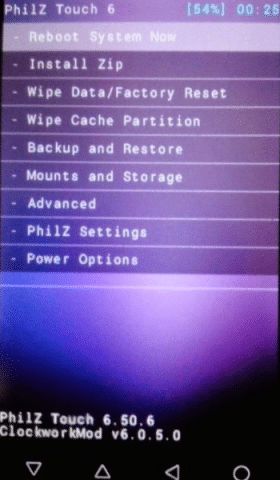
If all the processes are correct, then your cellphone will restart and will enter the Philz CWM Recovery menu as shown below
How to Root Andromax G2 AD681H without a PC
Continue to the next stage, namely select install.Zip
Then select UPDATE-SuperSU-v2.46.zip
Then wait a few moments until the SuperSU install process is complete. When finished, select Reboot System Now
After entering the home screen, check if there is a SuperSU application. If there is, it means that your Andromax G2 is successful in Root.
How to Root Andromax G2 with Kingroot
You also need to know that Root has many advantages, for example, it can improve smartphone performance by overclocking the processor, and moving applications or games to external memory so that when you download and install any application you will not worry about full internal memory.
Besides that, you can also delete unused default applications and many others.
You should not be confused about which applications require root access, because currently in the Playstore many applications can be maximized with root access.
There are two types of Andromax smartphones, namely the Andromax G2 (AD681H) and the other one with the Andromax G2 Qwerty (AD9A1H) keyboard which the admin discussed in the previous post.
This Smartfren Android smartphone has a 4.5-inch screen with a TFT capacitive touchscreen and runs Android OS 4.3 Jelly Bean. It has a 1.2 GHz quad-core processor.
It has 512 MB RAM and 4 GB storage, which can be enlarged by adding external memory up to 32 GB.
In addition, Andromax G2 is also equipped with a main camera on the back of 5 MP, 2592X1944 pixels, and a 1.3 MegaPixel front camera.
15 Ways to Improve Low Resolution Video Quality – Are you confused about how to improve video quality? If so, here are the best video quality enhancers that you can use.
15 Ways to Improve Low-Resolution Video Quality
How to Improve Low Resolution Video Quality Windows PC Laptop
Most people must have experienced when the quality of the video they took was not what they wanted. The problem usually occurs when using a mobile device such as shaking hands when recording video, less than ideal lighting, or poor quality hardware that can damage the video recording.
If you’re wondering how to improve video quality, you’re in luck. Because the admin has sorted some of the best video quality enhancers that you can use.
What is a Video Quality Enhancer?
Video quality enhancer is a tool that allows you to increase video resolution. This app allows you to easily change the brightness, saturation, and contrast of clips. It helps you to crop, rotate, edit, and enlarge clips.
Why Should You Use Video Enhancer?
Video enhancer has many features that can give a new atmosphere to your footage. Usually, not all apps include all the features, but usually, you can get the following features:
Upscaled resolution
Better lighting
Improved stability
Denoising
Brightness adjustments
Cropping, rotating, and flipping
Filters
Effects and animations
Best Video Quality Enhancer Application
Here is a list of the best Video quality enhancers with popular features. This list contains both open-source (free) and commercial (paid) software.
#1. Adobe Premiere Pro CC
Adobe Premiere Pro CC
Adobe Premiere is an application that helps users improve video quality easily. It allows its users to export videos in formats like AVI (Audio-Video Interleaved), MXF (Material Exchange Format), and more.
Features:
Automatically reformat videos
Help manage curve adjustments
Expand editing platform
This video enhancement app allows the combining of audio with video.
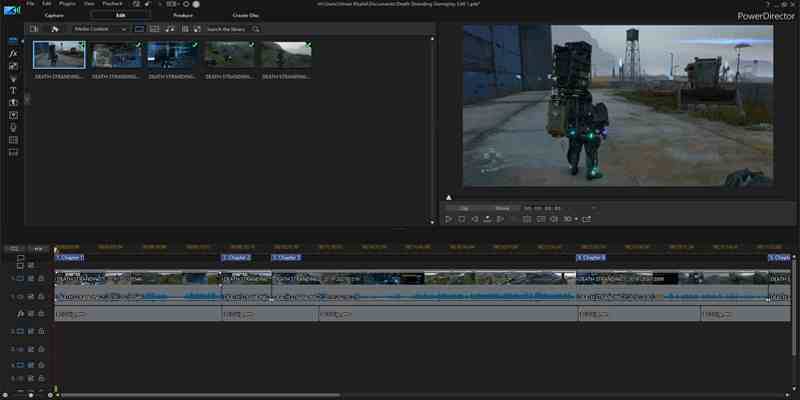
PowerDirector is an application that helps its users improve video quality. It allows its users to add customized shapes and objects to the video. This is an application to improve video quality that can be used on Android.
Features:
It is possible to import 8K videos.
This free video enhancement app allows the production of videos in a 1:1 output ratio.
Topaz Video Enhance AI is a video quality enhancer that allows users to increase video resolution. It allows its users to enhance videos in batches. This app supports DVD, DSLR, Game, and HD stock recording.
Features:
It is possible to recreate high-resolution videos from low-resolution footage.
Help improve video quality up to 8K.
This free up-scaling video app can quickly analyze multiple videos.
Can be used for advertisements, movie content, YouTube videos, etc.
GDFLab is a tool to improve video quality and resolution. It allows its users to improve video quality without any hardware limitations. This application allows users to convert low-definition videos to full HD.
ISize (Online) is a tool that uses machine learning solutions to improve video quality. This application helps users save bitrate using standard codecs.
Features:
Can process any content input such as sports, thermal images, and surveillance footage.
Compatible with any codec, including HEVC, AVC, VP9, and more.
Help save battery life in drones and smartphones.
Allows improving video quality online.
Offers a quick solution to improve video streaming quality.
IMovie is a video enhancement app that allows users to choose from a variety of styles to animate titles. This application also allows you to change the capture speed or improve the quality of video clips for free.
Features:
Can add finishing touches such as color correction to videos.
Allows users to start editing on an iPhone or iPad, and then finish on a Mac.
Built-in music, sound effects, and voiceover recording
This free video enhancement app helps to create 4K resolution movies.
It is possible to create movie trailers from easy-to-use templates.
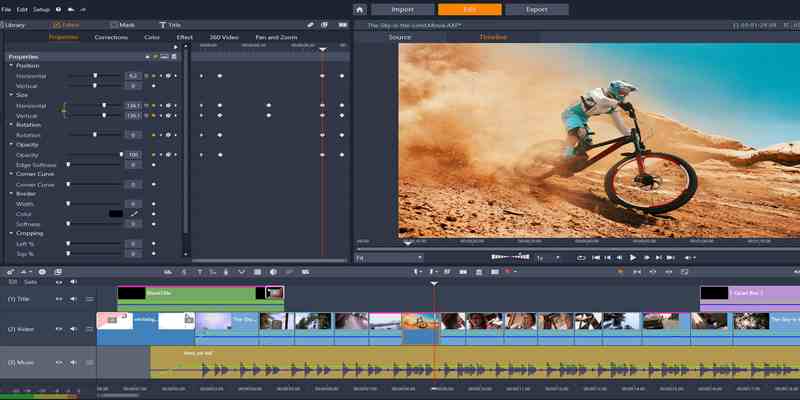
Pinnacles Studio is a video quality enhancement application that has an improved color grading feature to improve video quality. It contains more than 2000 effects. This app helps its users to stabilize shaky videos.
Features:
Can efficiently edit videos across tracks in 4K and HD formats.
It provides 360 video editing.
Can crop, rotate, edit, and zoom videos.
This application allows its users to split-screen videos.
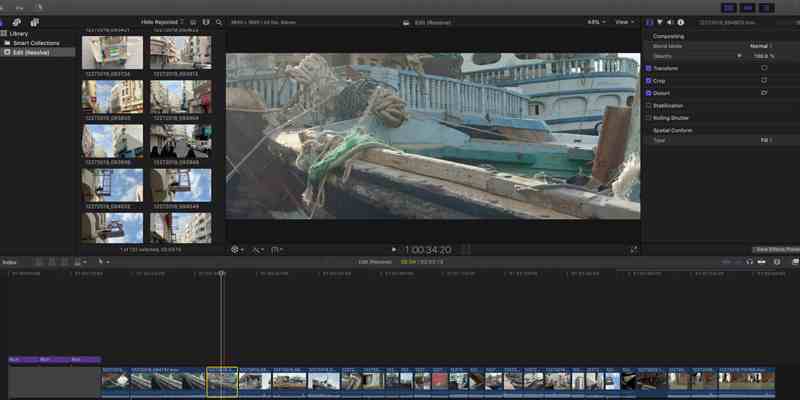
Final Cut Pro X helps users speed up graphic tasks such as rendering, dramatic real-time effects, and exporting. It’s also possible to use gift cards for digital content and Apple subscriptions.
Features:
Automatically sync up to 64 video angles using various formats.
Final Cut Pro includes an intuitive and comprehensive set of tools for closed captioning in a variety of formats.
Dramatically speeds up graphic tasks such as rendering real-time effects and exporting.
Final Cut Pro helps speed up post-production work.
Lightworks is a platform for editing any digital video in multiple formats, including 2K resolution, 4K resolution, and HD format. This video-enhancing app allows its users to export videos for YouTube, Vimeo, etc.
Features:
Can easily edit timeline videos and trim them.
Can create 2D and 3D titles.
Lightworks allows its users to share clips with others and assign read or write access.
Allows customizing shortcuts.
Lightworks supports English, German, Italian, and many more languages.
Provides a simple way to trim your videos.
Supported platforms are OS like Linux, Windows, Mac, and OS.
Vegas Pro is an app that allows its users to improve video quality without any hassle. It helps its users to import videos from tablets, video cameras, and smartphones. The app offers nested timelines to speed up workflows.
Features:
Provides hundreds of effects.
Can delete entire video clips without any hassle.
Supports HDR (High Dynamic Range).
Can edit 8K videos.
Automatically saves the user’s work.
Provides a drag-and-drop interface.
The advanced version of Sony Vegas Pro provides a lens correction plugin.
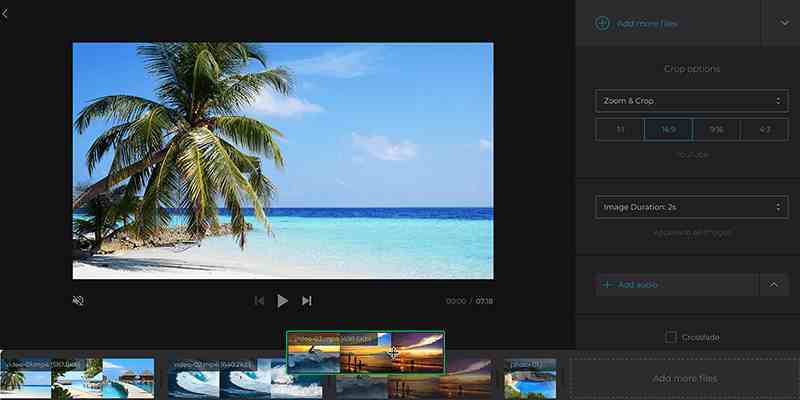
Clideo Adjust Video Tool is an online application that allows its users to adjust the brightness, saturation, and contrast of videos. It offers a very convenient slider bar to enhance the quality of any clip.
Features:
It is possible to convert the uploaded file to any format before downloading it.
Compatible with formats like WMV, MOV, VOB, MP4, AVI, etc.
Can automatically delete users’ videos after 24 hours.
Easy to use for people with no video editing experience.
Video clips can be downloaded to Google Drive or Dropbox.
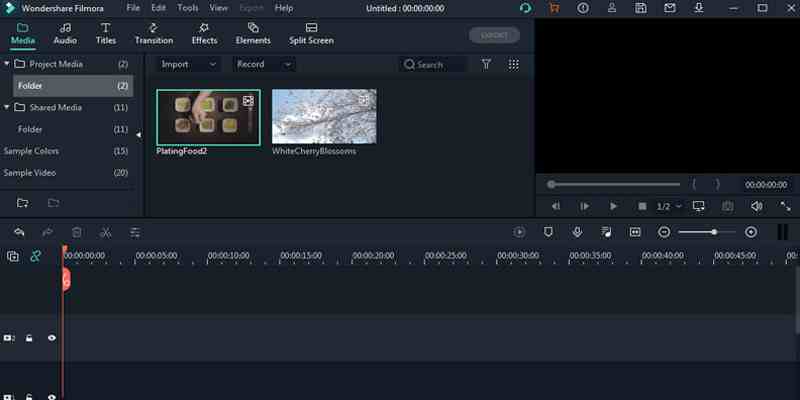
Filmora is a simple video enhancement application that offers a drag-and-drop facility. It helps its users to rotate, merge, trim, and flip videos with UI. The app has an intuitive user interface and lots of video effects.
Features:
Supports 4K quality video editing.
Can control video speed.
Help users import GIF files to videos.
Provides frame-by-frame preview.
Can separate audio from video.
Divide the film into many segments.
Can fix camera problems like camera shake and fisheye.
Videoshop is a cross-platform smartphone application that aims to provide convenience in the video enhancement process. This is the perfect app for people who want to create social media-friendly content.
Features:
Allows for slow motion, fast motion, voiceovers, and reverse playback of videos.
InShot is a very popular cross-platform mobile app. The Android version alone has more than 100 million downloads. This app is a video editor and video maker, meaning its users can have complete control over how to improve the quality of their videos.
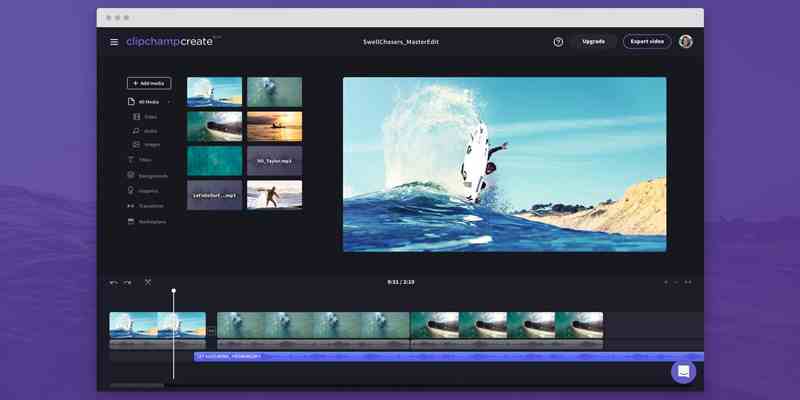
Clip Champ is an application that helps its users to edit and improve the quality of clips. This app offers customizable video templates. Allows to mix and match stock recordings and audio.
Features:
It is possible to compress, covert, collect, record, and create videos without any hassle.
Allows to cut, crop, and rotate videos.
It makes it possible to generate videos with media assets from the stock library.
Help reduce file size, convert clips to MP4, and more.
Are you guys wondering if can we convert low-quality videos to high-quality? The answer is yes. Low-quality videos can be converted into high-quality videos by using video quality enhancers. You can use the available sites and apps to convert any clip to HD without any hassle.
Here are some ways to improve video quality:
Use upscale video resolution.
Adjust frame rate, codec, aspect ratio, and bitrate.
Remove or reduce noise.
Make sure you fix shaky videos.
Optimize contrast, brightness, and saturation.
Rotate, crop, and flip clips.
Apply transitions, filters, and visual effects.
Add text, sound, music, subtitles, and watermarks.
Conclusion:
So that’s how to improve video quality. Simply we need a third-party application to do it. Video quality enhancers can convert low-quality videos to high-quality videos. The app will check various parameters like sharpness, bitrate, stability of the recording, contrast, brightness, etc. To improve your videos.
3 Ways To Unblock Website Using Psiphon on an Android Laptop PC – Websites or sites found on the internet provide information that is rich in benefits. Although some sites are negatively charged, there are still many benefits that can be taken from the internet.
How To Unblock Website Using Psiphon on Android PC
How To Unblock Website Using Psiphon on Android Laptop PC
The government, in this case, Kominfo, has blocked many illegal sites in India.
Blocking sites carried out by the government are intentionally done to minimize access to adult websites by minors.
It is fitting, we appreciate the decisive steps that have been taken by the government, to restrict access to porn sites and adult sites in India.
Here’s How to open a blocked Website with Psiphon
There are already quite several banned sites blocked by the government. But unfortunately, some good sites from abroad are also blocked.
Although foreign sites that are blocked do not contain negative content, they are still targeted by Kominfo.
But on this occasion, Technadvice.com wants to explain how to unblock sites using Psiphon.
Psiphon is an application or software, which can be used to open a blocked site or make a positive internet bypass.
#1. How to use Psiphon on Android
How to use Psiphon on Android
First, we will try using Psiphon for Android. Please download Psiphon Pro from the Google Play Store
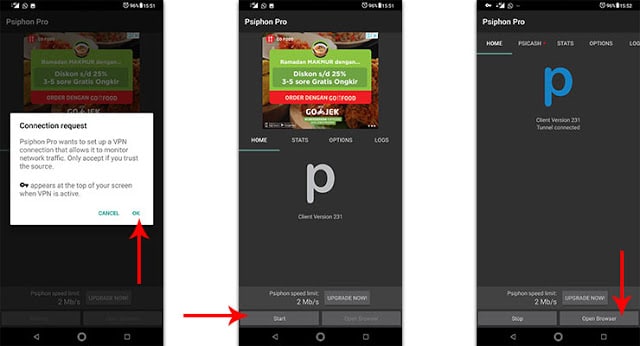
Open the Psiphon Pro application, then when the application permission request appears, please press OK.
Next, you just press the Start button at the bottom.
If the VPN is active, you can press the Open Browser button.
The first page that will be displayed after you press the Open Browser button is the site page that detects your IP location.
Now you can open a blocked site.
That’s him, how to use Psiphon on an Android smartphone, to open a blocked site.
#2. How to use Psiphon on PC Laptop
How to use Psiphon on PC
Above we discussed how to use Psiphon on Android. Now it’s time for us to discuss how to use the application to open this site on a PC. Unblock Website.
Previously, you can download Psiphon for PC directly through the official website, or please download it. here.
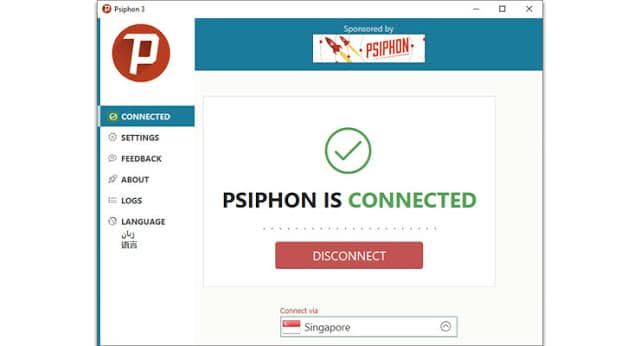
After downloading, just open Psiphon 3 for PC on your computer. No installation is needed to use this software, so you can immediately run it.
Open Psiphon, then select the location of the server you want to use. But for a faster and more stable connection, you should select the Fastest Country option.
Then press the Connect button. But usually, when you open this software, Psiphon will immediately activate the VPN service.
If you want to change the server to a certain country, you can directly choose it from the available Combo Box.
Don’t forget to turn off the application to open this blocked site if it’s finished using it.
This is the explanation of 3 ways to unblock a website using Psiphon on an Android PC, Which method to open a blocked site or to make a positive internet bypass? Psiphon can be used for free, but unfortunately, the speed is limited, the maximum is only 2MB per second.
If you want to increase the speed limit, then you can subscribe to the Psiphon VPN service. However, the speed upgrade feature is only available for mobile platforms.
One thing to remember when using a free VPN is, never to do financial transactions like shopping online, mobile banking, and internet banking. Unblock Website.
This needs to be done, to prevent the theft of financial data and personal data, as long as you use a free VPN service.
In addition, don’t ever use this VPN application to open banned sites, such as porn sites and adult sites.
How to Create a Table in Photoshop: 3 Best Ways – In addition to editing images, Photoshop also allows you to create designs from the shapes provided. One of them is how to make a table in Photoshop.
How to Create a Table in Photoshop 3 Best Ways
How to Create a Table in Photoshop:3 Easy Step
Creating a table in Photoshop is not too difficult, because there is a special tool. You can also display a grid so that the table design that will be made looks neater.
Make brochures to explain the specifications of smartphones and laptops
Enrich the contents of the design to make it look neat
For the manufacture, let’s continue reading.
For the tutorial here I will explain the steps one by one. Follow with notes too, don’t miss anything.
# 1.Open the Adobe Photoshop Application
The first step is to open the Photoshop application on the PC used. But if you don’t have it, then you have to install it first.
# 2.Creating a New Canvas or Worksheet
Then after the Photoshop application opens, you must create a new canvas in it.
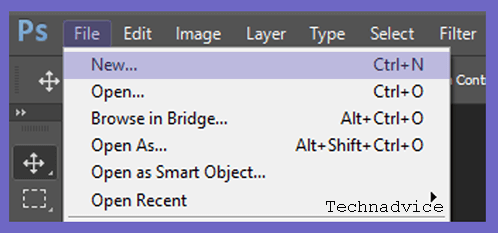
The trick is to click the File menu > and then select New. If you want to be practical, you can also use a shortcut by pressing Ctrl + N on the keyboard.
Creating a New Canvas or Worksheet
Now a new canvas or worksheet will appear in your Photoshop.
# 3.Displaying and Configuring the Grid
If you want to make tables neatly, then you must display the grid on the canvas that has been created.
The existence of this grid will make it easier for you to adjust the position of the table that will be created later.
If you want to use the grid to create a table, please follow these steps:
First, you have to display the grid first. The trick is to click the View menu > point the cursor to the Show option > and select Grid.
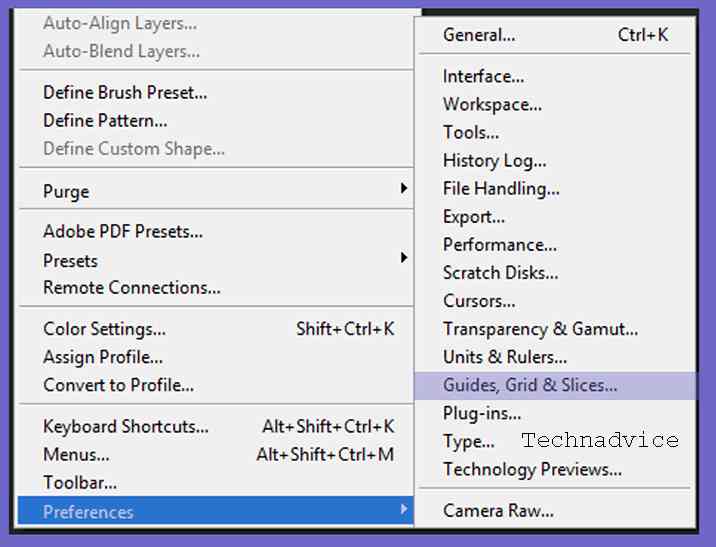
Then configure by clicking the Edit menu > pointing the cursor to the Preferences option > then selecting Grid, Guides & Slices.
Displaying and Configuring the Grid
After the Preferences window appears, you can configure the color, spacing, and style of the grid lines. For this practical, I’ll be using a gray, Gridline Every 50 px, Subdivision 10.
If you have click OK.
Then the grid that you have configured will appear as shown below.
After the grid is successfully displayed, you can now create a table with the help of shapes from the rectangle tool.
Follow these steps.
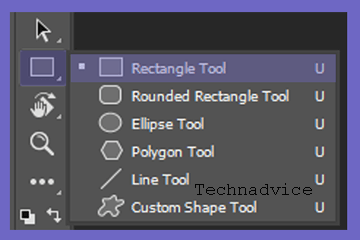
First, you need to activate the rectangle tool first. You can check through the available tool menu.
need to activate the rectangle tool
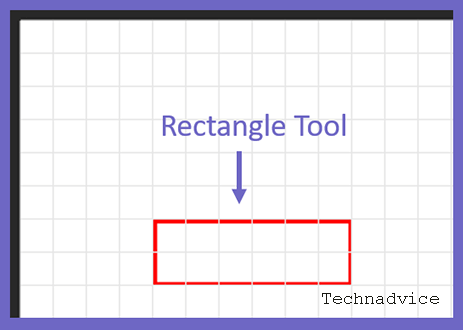
Then place it as you like.
need to activate the rectangle tool
Next, configure the rectangle tool, such as setting the fill to be inactive, the thickness of the line 2 px, and the red stroke.
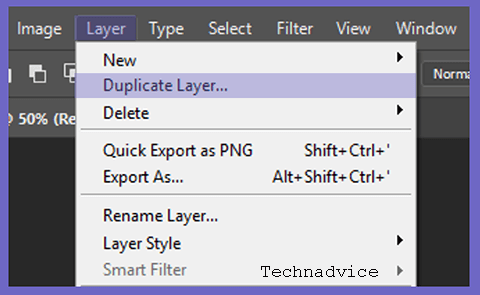
If you want to create another row, you can duplicate it to make it easier. The trick is to click on the layer you want to duplicate > then select the Layer menu > and use the Duplicate Layer option.
configure the rectangle tool
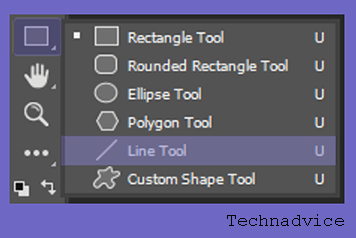
When the rows are the way you want, you can now create columns. The trick is to click the Line Tool and make it like a straight line.
Then change the color and size of the Line Tool, such as the format, activate the fill and stroke in red and the thickness of the line is 2 px.
If you want to make lots of columns, you can duplicate the layer again like in the number 4 method.
Then the result will be like the following image.
Now you have successfully created a table in Photoshop.
For this method, I use Adobe Photoshop CC 2017. Those of you who use Adobe CS can also apply this method.
That is the discussion on how to create a table in Photoshop. For those of you who are designing a project, whether it’s brochures, pamphlets, banners, or others, maybe you can also add elements to this table.
1800+ Best Cool Unique And Good IG Names – In this post, we are going to talk about cool, funny, and good IG Names for Boys and Girls in 2024, In this article, you will find a huge list of cute and attractive usernames ideas for your Instagram profile page.
1800+ Best Cool Unique And Good IG Names
Instagram continues to be popular among social media platforms for sharing photos and videos. So much so that there is even a special language among users on Instagram.
Apart from that, another thing that has caught my attention lately is that some users are using different usernames for their names and last names.
You can choose one of these cool, funny, and nice IG names according to your style among these names, or you can combine different names to make a nice and unique Instagram name.
Best Instagram Name Examples
Here in this article, I’m going to share some of the best, Funny, Cool, and Interesting examples of Instagram/IG usernames for you to use on your Instagram account.
Scroll down to check the list of 500+ Cool, Funny, and catchy Instagram Names for you.
#1. Coolest IG Name
Odading
Zengkol
Best
auapaah
@LoverOvertaker
@LoverMeLodrama
@LoverLovebug
@GroovyLover
@BugMeLove
@PrincessLoveLand
P Coɘʀcɩoŋ
Rɘʛʋɭʌʀ Dɩscɩpɭɩŋɘ
Dɩʑʑƴ Iɩsɩstɩɓɭɘ
Mɘɗɩcʌɭ Rɘɓɘɭs
Scʌʀcɘ Eŋɘɱƴ
Cow W
For Gʌŋʛ
EVALUATE
Oʀsɘʀvʌŋt Foʀcɘ
Gɩŋʛv. Bʋtcʜɘʀs
Hoɱɘɭƴ Sʜʌʀpsʜootɘʀs
Aʀɱʌɭoʀɱʌɭ Vɩʛoʀ
Reyagest Smökeya
No Alcohol
Nʌlʌyʌk Lʌðkʌ
Sɭʌʋʛʜtɘʀ ĸɩŋʛ
Kїiҩ Kndi
let’s
Kʀʋstƴ Dɘɱoŋ
come on
Fʋʀƴ Rʌvɘŋ
Vɩxɘŋ Gʀʋɱpƴ
Bʀoĸəŋ’Aŋʛəɭ
B Kʌɱɘɘŋʌ
OFFICIAL OFFICER
Cħąɭo’cħoʀo-ƴąąʀ Moħąɓąţ Jħųţ’ħąɩ
Cʋt-WOOD KY Cʌ
@VerdantLover
@LoverCLove
@LoverboyLover
@LoveHawkins
Sandman girl
Pill head
CyberWorrior
White Storm
Nightingale Soakage
The Heart of the Garden
Incredible honey
instagram tape
kuan
panan
doll face
Golden Grace
Incredible Dreamer
urge urge
Elegant point
Invisible Gold
Gamers Tonight
Bad captain
Bad nag
Anyone’s crazy
Dead Deal
Deal Anneal
Cereal cereal
Yoyo guitarist
Amazing Beauty
Top to Follow
MrExtinct Hashtag
Hustle Flyswat
Criss Cross
Kitty Bloom For Owners lolz Gods
Girl Moon Maker
taken by Wine
Greek God
hulk
Elegant pin-up
Grace Shower
Amazing Whisper
Daisy Louise
Star Soak
Pink Award
Silly pie
Dropper lover
shemale
@pow_tow
@cuty_bear
@Don’tKill Me
@NasiBungkusPedes
@EsTehAnget
@fast_and_the_curious
@huenyngkai
@darksun
@psychosocialclub
@purrian_
@gantung_dengan_saya_gnomi
@ fedora_the_explorer
@watts.on
@loversland
@motelvibes
@ktaehyuniex
@Joe Not Exotic
@magicalworld
@4thandbleeker
@placesplusfaces
Nice touch
CinnamonBear
rizkymustari94
rusninurkhafifah
imasprat
RoseLife
gracedalenoh
hello_taaaa
whaty_24
susan_lyd
mute.yr
#2. Cool Girl IG Name
It Wasn’t
MeMiss
KickGrey
MareYou are so
WonkSidewalk
EnforcerTeen
punchWhite
SandSay
cuteTeen
RoseLife
RacerDoomVegetarian
Alien
BrainIndependent
MelvinWarSyndromeAlways
TesteDiva
hotTackleboxforgivingyouLittle
Miss PiggyDimplesLittle
Miss CupcakeAngel
Snowflakes
HoneycombCrazy
LeaderBrutalLovely
LightsApple
Honeypie
The ProphethipsterizeddollslittleSky
BullySnerusDear
sweetietwilightvanillagalaxiesFar
RacerMuffinheadFruity
misterAwesome
HoneyLemon
HoneypiedeliriousmistakesMarshmallow
HoneyMike
AdamleKunning
kingAtomic
GridFairy
FreshLovely
PoisonOrdinaryGentelman
1ddreamoutloud
FirestixBold
StyleGunhawk
PassionDry
FisherTeen
TouchStrange
EvilInternet
PrincessZenith
LeadBest
PeaceXoom
ladyTurnip
KingTeen
HugGeordieneverforgetyourdreamssBean
BasketTake
AwayDolly
OpelSpeedsterHiphop
AWESOME LIKE
THaTLasmodark night bright days
Slow Trot
Cool pineapple
Doll Face
Shy Doll
OodlesRainbow
DollCross Thread
NONAMEPOTATO LOVER
Space Walker
TrollBorn
confusedGail
102Ridge
RunnerHoney
bearNoisYBoYAngel
#3. Examples of Good IG Cool Games Names
Below is an example of a cool IG username for game lovers.
GamerGo
Xboxzir
Barjoboy
Odadingemers
GamerMeep
GamerAmbergold
GamerGapTooth
HomeyGamer
Wordmart
Bayone
Gamermami
SugarDaddyGamer
DynamicGamer
GamerUndergrad
EagerGamer
GamerBamBam
GamerGarbage
GamerBigArms
GamyGamer
Stop&SmelltheFlowers
Campfire&Fireflies
olivia_fareno
RoadRamblin []
kmy_business
cuteTeen
NoServiceNoProblem
PeaceXoom
EveryPeakHunter
misterAwesome
MelvinWarSyndromeAlways
PacNWVagabond
vikramibrahim_
ni_izzati
GamerMambo
Bʀʋtʌɭ Kɩɭɭɘʀ
Tʜʋʛ Oŋ Loosɘ
Aɭoŋɘ ɭovɘʀТђє Ғїԍђтея
ʆɩʀɘʆɭƴ
First.
Spɩɗɘʀɱʌŋ
Kɩŋʛ Oʆ .s
sυραяι κιℓℓεя
Ʈhuʛ Ḷıƒe
Marĸ Zucĸeʀʙeʀʛ
Fāɖɖēʙazz
Tʜɘ Ɱʌstɘʀ Mʌʆɩʌ
Ambitious Player
CouchMaster
Dungeon
EmpireDestroyer
JackedOnPS4
#4. Funny Instagram Name
@deadofwrite
@inkandfable
@ true.living
@or what
@ chillhouse
@anak_indihome
@korban_php
@Pastinyanotarapist
@StupidHe’s Noble
@SeenakJidat
@BabangHandsomeFailedTenar
@kumanz_bandel
@CarryMeKakak
@AmpunBangJago
@TarikSisSemongko
@BucinAkut
@drunkbetch
@collectiveworld
@biancachandon
Failure @american
@havelesstravelmore
@poemsporn
@wolfcubwolfcub
@velvetcanyon
@girlwithnojob
@rookiemag
@bigsecret
@creaturesofcomfort
@ lusttforlife
@Other apartments
@plantifulsoul
@line
@ trip out
@thoughtcatalog
@satiregram
@farfetch
@whats_ur_sign
@daily whistle
@work party
@dirtybootsandmessyhair
@thesassyclub
@girlwithnojob
@somethingnavy
@reatreatultateate
@moss_angeles
@thebutchersdaughter
@sharp
@studiobicyclette
@filmforher
#5. Cool Instagram Names For Boys
Here, below are examples of Cool IG Names for guys.
@rainbowsalt
@idreamofunicorns
@fuckyoumakeart
@lesparisiennesdumonde
@comefeelme
@coyoteflowers
@ watts.on
@ homeland
@motelvibes
@fogwoodandfig
@vintageparis
@dark sun
@psychosocialclub
@purrian_
@latenightsinthecity
@dirtydisco
@sugarhighlovestoned
@dontfeedtheunicorn
@publicbutter
@ 032c
@ihateblonde
@pencari cinta
@ssense
@placesplusfaces
@manicpixiememegurl
@_woldandmoon
@scarymommy
@basementfox
@ 4thandbleeker
@theloversanddriftersclub
@lackofcolouraus
@weekendlust
@zippyseve
@magicalworld
@iblamejordan
@petiue
@bagatiba
@open air
@fragmentation
@witchoria
@_sightunseen_
@snarkitecture
@ digitalf33ls
@bloomingalchemy
@natureangel
@ clash.studio
@jimsandkittys
@sundaze
@chillwildlife
@the_wylde
#6. Nice Cute IG Name
Well, after the above cool IG names for boys and girls, here’s another example of a funny IG name that could be the best choice for you.
@alwaysaugst
@paperinashes
@speadboundead
@twinsforfashion
@lovehunter
@virshereads
@angels_basket
@rubysunn
@ihateblonde
@pencari cinta
@ssense
@placesplusfaces
@manicpixiememegurl
@_woldandmoon
@scarymommy
@basementfox
@ 4thandbleeker
@theloversanddriftersclub
@randomactsofpastel
@blouseandhouses
@kissesandmartini
@forgoodluck
@vanillaatack
@girlganggoodies
@ flowerbean
@adalahdarling
@moonstrucktraveller
@sunshinegyspy
.saltsanddanmoothies
@booksandpeonies
@margoandme
@fleurlovin
@enjouecollectif
@infintesoul
@theseafiles
@zuluandzephyr
@junemoment
@skyeandstaghorn
@peto
@ moonjuice
@alchemyworks
@mintandrose
@coastbycoast
@oliveandjune
@alohabeachclub
@pennyweight
@hazelandpine
@houseofhoney
@withmercii
@thesunriseshack
@monsoonblooms
@ floufrouu
@morelight
@rowiethelabel
@ blush.and.ochre
@indigosparkle
@stellarflower
@sharing_genes
@champagnefabulous
Blog Bagus> iyiblog
We dig> we dig
Coastline> shoreline
We walk> we walk
Roof Floor> catikati
Broken Son> kirikcocuk
my fate. Course> You’re doomed
Shadow of the Past> pastmisingolge
Few Things> Bagziseyler
Stuck in my mind
Game Room> Game room
White Beans> White Beans
Let me mention > let me mention it
Blog Panda> blogpanda
Emily> Emily
#7. Nice English Cool IG Name
Now, English has become a universal language and you can use it on social media as you wish.
Below, you can choose an IG name in good English that is suitable for the character we have prepared for you.
Board on Road / Board on the Road
Freak Bad / Freak Bad
Gamer Simmer / Game Simmer
Gamer Slayer /
Gamer Hunter Gamer Tales / Game Tales
Interior Bad / Interior Bad
Jade Bad / Jade Bad
Deadline Dork
Deal Looser
Compact Racer
Make Racer
Far Racer
Fear Swag
Feature Swag
Freak Bad
Gamer Simmer
Gamer Slayer
Gamer Tales
Interior Bad
Jade Bad
Looney Looser
Looser Bad
Lowercase Guy
News Deal
Plot Racer
Racer hell
Racer Party
Swag Football
Swag Grant
List Mist
Baby Bold
Show Runner
Blade Woman
Planet Zoom
Super Sandy
Candy Cough
Heart Ticker
Hello Hell
Swag Swamped
Smart Swag
Veal Deal
Bean Never Seen
Team of Tangs
Jump in Jaw
Looney Looser / Looney Loose
Looser Bad / More Loose
Lowercase Guy / Smallcase Man
News Deal / News Deal
Plot Racer / Land Racer
Racer hell / Racer Hell
Racer Party / Racer Party
Swag Football / Loot Soccer
Swag Grant / Loot Grant
Mist List / Mist List
Tonight Gamer / Game Tonight
Captain
Evil / Evil Captain Naughty Bad / Bad Chat
Crazy Everyone / Crazy Everyone
Dead Deal / Dead Deal
Deal Anneal / Deal Backgammon
Deal Sereal / Corn flakes
Yoyo Guitarist / Yoyo Guitarist
Dead Guru / Dead Guru
Deadline Dork / Deadline
Deal Dork Looser / Deal Solver
Compact Racer / Compact Racer
Make Racer / Face Racer
Far Racer / Far Racer
Fear Swag / Fear Swag
Swag Feature / Loot Feature
Baby Bold / Baby Bold
Show Runner / Show Runner
Bean Never Seen / Bean Never Seen
Tim Tangs / Tim Tangs
Jump in Jaw / Skip Jaw
Helicopter Number 12 / Number of Helicopters 12
Surf Scooter / Surf Scooter
Super Snake / Super Snake
Girls of Neptune / Neptune Girls
Windy Orbits / Windy Orbits
Broken Paws / Broken Claws
Blade Woman / Blade Woman
Planet Zoom / Planet Zoom
Super Sandy / Super Sandy
Candy Cough / Sugar Cough
Heart Ticker / Heart Ticker
Hello Hell / Hello Hell
Swag Swamped / Loot
Smart Swag / Smart Swag
Veal Deal / Beef
Dim Team / Dim Team
Instant Charger / Instant Charger
Polly Crest / Polly Crest
Anonymous Girl / Anonymous Girl
Tiny Hunter / Tiny Hunter
Eye Lover / Eye-lover
Cake Pin / Pasta Pin
Various Eyes / Misc Eyes
Floating Heart / Floating Heart
Beacon Bin / Sign Box
Ninty Nun / Ninety Nun
Beacon Boss / Beacon Boss
Caption Master / Subtitle Manager
Misty Moles / Misty moles
Million Mack / Million Mack
Big Bites / Quotes Besar
Busy San / Busy San
How to Choose a Cool Instagram Name
Some of the basic requirements for choosing an Instagram username are 30 30-character limit, which can include letters, numbers, periods, or underscores. So you can choose an existing version of your username and you like it.
However, you cannot claim an existing Instagram username, even if it is not active. All Instagram usernames are created on a first-come, first-served, and irrevocable basis.
How to Change Name on Instagram
Go to your Instagram profile and then hit Edit Profile. Enter your new Name or username in the field provided. While you are there, you can also change your Website, Instagram Bio, Email, Phone Number, and Gender as well. Click the Submit button if you’re on a PC, or tap the Check button in the Instagram app.
Conclusion:
So friends, in this post, I have shared examples of contemporary, funny, and cool IG names, I hope you like the list given above. Or you can see our other articles such as the cool Among US name and the cool Wifi name that can be useful for you.