7 Ways To Logout Gmail Account on Android and Computers – Gmail account logging is very important to keep your Gmail account safe, let alone logout While this is not a big deal if you log in to your own computer, this issue can be a problem if you let your Gmail account open on an office computer, in a cyber cafe or computer with Public access.
How To Logout Gmail Account on Android and Computer Laptop
Fortunately, you can sign out of Gmail remotely on any computer you sign into, even if you do not have physical access to it. You can also log out of your Gmail account on your Android, tablet, and computer using the regular logout option.
You do not need to actually log out of Gmail if you just want to replace which users are currently signed in. Here’s how to log out of your Gmail account on Android and computers.
Follow the specific steps below for how to log out Gmail account on Android and Computers:
#1. From Desktop Sites
Click your Google profile picture at the top right of Gmail.
Select Sign out.
#2. From the Mobile Site
Tap the menu at the top left of the screen (three lines stacked horizontally).
Tap your email address.
Select Sign out of all accounts.
#3. From the Gmail Mobile App
Tap the menu button.
Tap your email address at the top of the menu.
Select Manage accounts.
Tap EDIT and then DELETE to exit.
Alternatively, if you do not want to log out but stop receiving emails from that account, go back to Step 3 and change the account to an inactive position.
How To Logout Gmail Accounts From Remote
To log out of your Gmail account from all sessions that may open on Android and other devices:
From the computer, scroll to the very bottom of the page below all your messages.
Directly below “Recent account activity”, click the Details button.
Click the Exit all other web session buttons.
Take a look at these facts about logging your Gmail account from the last account activity page:
You will not be logged out of the current session that you used to access this option.
This does nothing for your Gmail keywords, so if other users have access to your account because they know their password or saved it in their browser, and that’s why you’ve logged out, the only way to make sure they do not do so. Sign in to your account You are replacing your Gmail password again
Email clients connected via IMAP are not logged out. For example, if you’re signed in through the Gmail mobile app, too, you’ll still be logged in. Keep reading below if you need to get out of a program like that
Revoke Access to Your Google Account
There’s no easy way to get out of Gmail using a primary account on Android. There is no option through the link above that allows you to sign a program using your Gmail account.
However, you can prevent your device from accessing your entire Google account, including your Gmail, which is useful if you lose your device or forget to sign out of a device you’re no longer accessing.
Follow these steps in order or jump ahead by going to the newly used device page from your Google account, then skip to Step 7.
From your computer, sign in to your Gmail account.
Click your Google profile picture near the top right corner of the page.
Click My Account.
Find the login & security section.
Click the link called Device activity & notifications.
Click REVIEW DEVICES in the recently used Device area.
Select the device you want to block to access your Gmail account.
Next, to the Account access point, select the red REMOVE button.
Click Delete again in the pop-up window to confirm.
Click close
If you want to remove your Google account from your Android device, follow these steps on the device itself:
Go to Settings
Select an account
Tap Google in the My Accounts section.
Select an account to sign out of
Tap the Remove Account button.
Select Remove account again to confirm that you want to delete your Google account from your device.
So, friends, this is the explanation of how to logout Gmail account on Android and Computers, I hope this article may be useful, also, share this article, With your friends, and leave your comment field below.
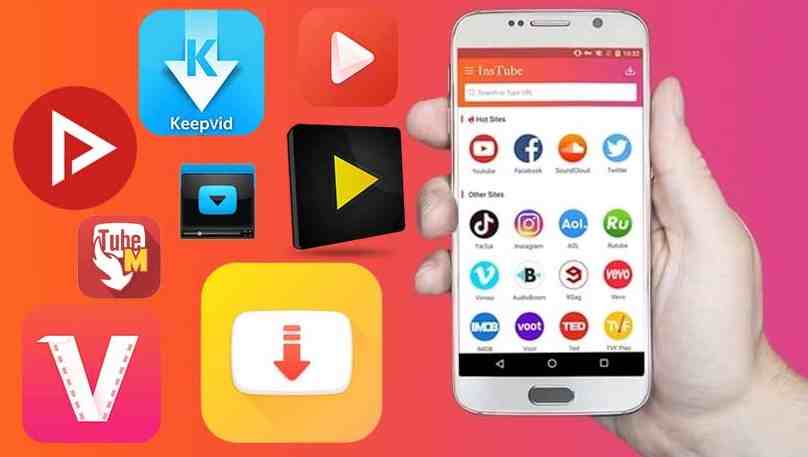
Top 20 Best Free Youtube Video Download Applications for Android – Want to download videos on the Youtube platform but are confused about what to do? Or do you want to have fast and automatic access to save videos from YouTube? then you are right place.
20 Best Free Youtube Video Download Application
Here are The Top 20 Best Free Youtube Video Download Applications for Android Laptop PC
As a large video-sharing platform, YouTube offers millions of content for all its users to choose, view, and download.
Unfortunately, this platform does not automatically attach an automatic download feature to devices, both PC and Android.
So quite a lot of YouTube users experience technical problems when they want to download videos.
But don’t worry, there are a number of ways to download videos from YouTube easily and quickly. One of them is by using the YouTube video download application.
With this 3rd party application, you can immediately save your favorite videos on your cellphone or PC easily, cheaply, and practically.
After that, you can be satisfied watching videos that have been downloaded repeatedly without running out of quota. In fact, you can even watch offline.
Free Youtube Video Download Application for Android Windows 10 PC
What are the fastest YouTube video download applications that you can use? With pleasure, the Technowizah team will summarize the references. Here’s the list.
Airy is a paid application, but this application also offers a free version. It’s just that, the free version can only be used to download 2 videos.
Airy excels because it provides practical features in downloading YouTube videos with just one click. In full, here are some of the advantages and disadvantages of Airy.
Advantages
Download videos with just one click.
Can access videos both offline and offline.
You can download videos in various formats, from FLV, and MP4 to 3GP.
Compatible with HD and Ultra HD quality videos.
Can maintain video quality without destroying it.
Deficiency
The only drawback of this application is that the use of the free version is quite limited. Users can only test for 2 videos.
After that, to download more videos you have to pay.
So, how do you download videos in this application? Users just need to copy and paste the link into the address field. Then select the resolution and location of the video, and the video will be automatically saved on your device.
#2. Any Video Converter
Any Video Converter
Unlike Airy, this application is a platform for converting videos. Even so, you can also use it to download videos from YouTube.
Any Video Converter is one of the YouTube video download applications for PC which is also quite famous in the virtual universe. Apart from YouTube, this application can also be used on 100 other sites.
Advantages
It has a built-in editor that can be used to edit videos, trim videos, adjust colors, etc.
Offers an unlimited free version.
Deficiency
It is not possible to download a large number of videos at once.
Downloading videos is done one by one unless switching to a premium service.
#3. Arktube Youtube Downloader
This application formed by XDA Developer can be used to download video files either via laptop or cellphone.
How to download videos in the best Youtube video download application is very easy and practical. Not only that, but the Arktube Youtube Downloader is also superior with complete features.
Advantages
Complete features.
Can download audio and or video.
There is a share feature.
Able to download 480-pixel resolution videos.
Deficiency
Unfortunately, Arktube Downloader is not on the Google Play Store. So you can only get this application through 3rd party applications.
In addition, this application is considered less secure because there are many fake apk circulating and vulnerable to viruses.
To be more secure, you can download the official application by copying the following link.
Download link: https://bit.ly/3jLb7u2
#4. Ayatube Video Downloader
This application made by Ayamob Inc. offers a more fun and exciting video downloading experience.
However, users can freely choose the format and resolution they want. Apart from that, YouTube also offers download services on other social media platforms.
Advantages
Can choose the resolution and format for either video or audio.
Can download videos from Vimeo, Instagram, Facebook, YouTube, Twitter, and other social media.
The interface is simple and easy to use.
Navigation to download is more practical and easy.
Light application (4.5 MB) and very compatible with Android.
Deficiency
The weakness of this application is that it can only be used on Android above 4.1. So, for Android below the spec is not compatible with this apk.
Download link: https://bit.ly/3bAgOrR
#5. ClipGrab
ClipGrab
Furthermore, there is ClipGrab which is the safest and recommended free video downloader application. It’s just that you need to be careful, ClipGrab has adware like Opera.
So, you should avoid using the browser if you want to use ClipGrab.
Advantages
Has the ability to download a broad and comprehensive.
The download process is easy and simple, just copy the link from YouTube to the application.
There is a built-in browser available so you can search for videos with just keywords.
Proxy settings are available. To configure it is enough to input IP and port.
Able to extract audio from video files and save them as MP3 files.
Deficiency
The only downside to ClipGrab is the adware. So it is less flexible to use all browsers.
#6. Dentex Youtube Downloader
The next Android YouTube video download application is Dentex Youtube Downloader. Dentex is one of the best choices to download videos easily and for free.
What’s so interesting about this application? The main attraction of Dentex lies in the user interface which is simple and easy to understand.
Here are some of the advantages of Dentex that make you obliged to have this application.
Advantages
Able to download large videos, more than 2 GB.
Simple display with user-friendly interface design.
Users are free to choose and determine the quality, resolution, and video format they want.
There is a choice of FLV, MP4, and 3GP formats and resolutions from 144p to 1080p or full HD.
Deficiency
What is quite unfortunate is that this application is not available on the Play Store. So, you have to find a site that provides a download link for the Dentex application.
Take it easy, you can access this platform via the following link.
#7. Free Youtube Download
As the name implies, Free YouTube download is a free YouTube video downloader application. Even so, this application can also be used on other social media sites and platforms besides YouTube.
What’s interesting about Free Youtube Download is the auto-download feature to download videos automatically. Not only that, but this application also has other pluses as below.
Advantages
Automatic download feature (auto download).
Can download videos in large quantities at once.
There is a video converter feature built into the app.
Can be used to convert videos into other formats, including MKV, MP4, AVI, WMV, etc.
Can be accessed via Windows and Mac.
Deficiency
For the time being this application is only compatible on PC both on Windows and Mac and not Android.
Download videos through this application is quite easy, the method is as follows:
Download the application, you can use the link we provide below.
Download link: https://bit.ly/32ZKxGM
Open the application.
Copy and paste the video link / URL from YouTube to the application page.
Then click the blue download button.
The video will be automatically downloaded to your device.
#8. Freemake Video Downloader
For Windows users, this YouTube video download application is quite recommended for use. Freemake Video Downloader has dozens of cool features that are useful.
One of its main features is to download videos from internet platforms, including YouTube. This application is very user-friendly with the one-click feature.
As a Windows-only video downloader application, Freemake Video Downloader has several advantages and disadvantages. Namely as follows.
Advantages
A feature to limit the speed when downloading videos.
Can transfer videos to the Cloud platform after saving files on Dropbox or Google Drive.
Can access videos on various platforms other than Windows, for example on iOs, Mac, or Android.
Dropbox / Google Drive default storage feature that can protect files from being lost on the device.
The user is friendly with a one-click feature on the toggle that is already available in the application.
Deficiency
The free version is limited, it can only be used to download at a speed of 4 Mbps.
A watermark appears at the beginning and end of the video.
To overcome the shortcomings of this application you can download the premium version. Because in the premium version, you won’t find watermarks again. And you can download with unlimited speed.
#9. Gihosoft TubeGet
Gihosoft TubeGet
Next, we recommend a sophisticated and practical portable video downloader application, namely Gihosoft TubeGet.
The main attraction of this application is that it is complete, simple, and friendly. Gihosoft offers almost all video download services.
In addition, this application is also very easy to understand and use. Here are some of the advanced features this application has.
Advantages
Able to download videos from YouTube or from other streaming sites.
Offers HD and UHD video download services with resolutions of 720p, 1080p, 2K, 4K, and up to 8K.
Integrated with a number of other handy features on Windows and Mac.
1x click download mode.
Able to download the entire playlist at once.
Can save videos on Windows XP / 7/8/10 or Vista.
Has a system that adapts to the changing YouTube algorithm.
By having a system for reading the YouTube algorithm, Gihisoft is arguably very updated. This application automatically continues to fix bugs and offers the latest advanced features.
Deficiency
However, Gihosoft TubeGet can only be accessed by Windows and Mac users only. This application also has 2 versions, namely premium, and free versions. The free version is only limited to downloading 5 videos per day.
#10. Instube Youtube
If you like using social media platforms, YouTube Instube Youtube can be the right choice for sharing videos.
In addition to a beautiful and easy-to-use design, Instube offers other social media download features besides YouTube.
With this application, you can get videos from various platforms such as Instagram, Vimeo, Twitter, Facebook, etc.
Advantages
The download feature is fast and easy with just one click.
Can save videos from various social media sources.
Can be used on smartphone devices.
Download videos with full HD up to 4K quality. There are also 360p and 1080p resolutions.
There is a feature to convert videos and MP3 downloaders on YouTube for offline listening.
There are various choices of formats from images, and audio to videos, such as mp3, jpg, and mp4.
Can lock folders with the private video lock feature.
Download speed is 10x faster than other applications.
There is a feature to detect the link copy system.
Deficiency
The only drawback of this application is that it has ads or pop ads in it. This may make some users uncomfortable.
#11. Jihosoft Video Downloader
Not inferior to other advanced YouTube apk downloads, Jihosoft comes with download features up to 8K resolution.
In fact, this application provides features to save videos from more platforms. For example, Naver TV, TED, Reddit, Daily Motion, etc.
This makes Jihosoft one of the best video downloader platforms on the internet.
Advantages
Can save videos with various resolutions (720p, 1080p, 2k, 4k, 8k, etc.
Can be used to download all channels and playlists on YouTube without restrictions.
There is a feature to download original audio, subtitles, or cc, and cover videos.
Able to convert video to audio or mp3 format for free.
There are various video conversion formats available, ranging from AVI, MP4, and MKV to MOV, and several other formats.
There are features to cut videos and provide filters, watermarks, subtitles, audio, etc.
Deficiency
What is quite unfortunate is that this application can only be accessed via a computer or laptop device.
#12. KeepVid
Keepvid was originally just a video download site on YouTube. However, Keepvid already has a YouTube video download application that can be accessed easily and practically.
Even though it’s not very well known, this application is very light and offers a fast download service, you know. Here are some other reasons why you should try it.
Advantages
There is a choice of various video resolutions, such as full HD, 320p / 480p / 720p, and 1080p.
Able to download videos from platforms other than YouTube, for example, Vimeo, Dailymotion, Instagram, etc.
Can convert video formats to MP3 without additional devices or other third-party applications.
The display is cool and easy to understand.
Can be used on smartphones.
Deficiency
Some still complain about the appearance of advertisements in the application.
#13. Mass Tube
Some people want to be practical by downloading multiple files at once. If you are too, then Mass Tube is the most appropriate choice.
This YouTube downloader application offers a feature to process more files at one time. In fact, you can also use more platforms when downloading. Interesting right?
Here are some of Mass Tube’s excellent features that you shouldn’t miss.
Advantages
Free service with unlimited features.
The download process is fast and easy.
There is a large selection of video formats (FLV, MP4, MP3, 3GP, MPEG, OGG, MPG, SWF, etc.).
It has a user-friendly and intuitive interface.
Deficiency
This application with a beautiful design can only be used for a while on a computer or PC device.
#14. Mtube
Although not often heard, this YouTube downloader apk performance is quite good. Mtube has advanced features with an elegant user interface.
Advantages
Choice of format can be in 2 forms, namely video, and audio.
Able to convert from video to audio.
There is a feature to play pop-up videos easily.
Deficiency
Just like other applications, MTube also still has pop ads. This of course can reduce user comfort when downloading videos.
#15. Peggo
Peggo is an Android video downloader application that has the best quality. However, it seems that this application can also be accessed on devices other than Android.
Apart from having cool excellent features, Peggo is quite easy to find. Because this apk is available on the Play Store and can be easily downloaded here for free.
Advantages
Compatible with various devices (HP / PC).
Able to download videos on social media platforms (FB, IG, Youtube, etc.).
Has a very stable download speed.
There is a trimmer feature to select the part of the video you want to download.
Deficiency
Reportedly, this application only provides a storage format in MP3 only.
#16. Snaptube
Snaptube is a free video download alternative application for Android. The application available on the Play Store also offers easy access to computer devices.
Easy again, Snaptube can be used directly on Youtube. So you don’t have to bother copying and pasting the link when you want to download a video.
Advantages
HD video download service and high-quality audio.
Safe for devices.
Can be used on more than 100 sites, such as TikTok, anime, Vimeo, Soundcloud, Dailymotion, etc.
Has a cool user interface with full features.
Video quality ranges from 144p to 1080p.
There is a feature to save videos automatically to the device’s memory.
In addition to some of the advantages above, Snaptube is also getting superior with feature options for resolution. Well, if you are interested, you can immediately download the free application at the Play Store.
#17. Ummy Video Downloader
PC users may be familiar with the name of this site. Yups, Ummy Video Downloader is indeed one of the favorite YouTube PC video download applications for computer devices.
By saving from YouTube mp3 on Ummy Video Downloader, you can get videos with various formats, quality, and resolutions. You can also download mp3 files from this platform.
Advantages
The way to download is easy and instant (by copying the link to the site).
No need to download the application, just access the site.
Free download service.
Able to download on other platforms.
Deficiency
Because it is only a site, maybe some people have problems when they want to download it.
But don’t worry, there are instructions and buttons that guide users to get the video they want for free.
#18. VidMate
With this one application, you can get lots of interesting things with just one access.
Apart from being able to download videos, Vidmate also offers services for streaming videos for free.
Advantages
It has many features with various functions.
Able to download videos, stream movies, and TV shows, download music videos, etc.
There are many file formats to choose from.
Can convert video to MP3.
You can download videos from various platforms, for example, Facebook, SoundCloud, Instagram, etc.
Deficiency
You may find some pop-up ads appearing while running the download process. But this seems normal if you use a free service.
#19. Videoder
Unlike some of the names above, Videoder is a video download application specifically for Android.
Even so, there’s nothing wrong with you trying it on a Smartphone because the features that this ak has are quite up-to-date.
Advantages
Can download on more than 50 of the most popular video sites.
Video quality reaches 4k.
Can download more videos at once.
Download speed is up to 10x.
Complete features for editing videos, tagging, detecting links, changing theme colors, etc.
There is a feature for quick downloads.
There is a night mode in the application.
Can be used for free.
Deficiency
Unfortunately, you have to wait a little longer if you want to use it on a computer device. Because for the time being Videoder can only be accessed via Android.
#20. Winx Youtube Downloader
The PC video download application that we recommend next is Winx. Why Winx?
Besides being quite easy to understand, Winx also offers several services that are not inferior to the Android downloader application.
Advantages
Can be used to download videos on 500 well-known websites, such as YouTube, Vimeo, Dailymotion, Facebook, etc.
Service is available to select the desired video quality and format.
Download videos with the qualities provided by the uploader.
Features are available to convert video into an audio format or other formats.
Deficiency
On the Winx platform, you can only get quality videos as provided by the uploader. So, the video quality is determined by the video owner himself.
This is the explanation of some collections of the Top 20 best free YouTube video download Applications for Android, Above are some recommendations for YouTube video download applications that you can try. Besides being cheap and practical, these applications can also be obtained easily.
It’s just that, it’s a good idea to be vigilant and careful when accessing websites or using applications on your device.
If you don’t want to bother downloading the apk or accessing the site, you can also use the YouTube video download method without an application.
Free COC Accounts [2025] Clash Of Clans Gmail and Passwords – If you are bored with the game Clash Of Clans because you have an account with a small level, here we will provide a free COC account with unused and active TH 11/12/13/14 guaranteed no cheats and still functioning.
Free COC Accounts Clash Of Clans Passwords
Free COC Accounts Clash Of Clans Email and Passwords
COC is one of the most popular games to date, created by the famous developer Supercell, this game is also currently able to compete with Free Fire and Mobile Legends games.
When you first play Clash of Clans you will have a village to develop, over time the game will continue to expand the city until it becomes imposing. However, increasing the city or TH to the maximum level takes quite a long time.
Therefore, the Technowizah team will provide the best solution by using several free COC accounts that are still active with various options for Facebook and Google Play logins. Check out the following reviews, guys!
What Is a Clash Of Clans? Full Review
Clash Of Clans Review
Clash Of Clans is a strategy game in the RPG genre developed by Supercell, in this game, there are various types of buildings with different functions such as gold miners, gold storage, and elixir miners.
In addition, you can also upgrade buildings to increase base HP, gold storage, elixir storage, and others. You can buy and upgrade the various buildings above using gold coins, elixir, or dark elixir.
To be able to create and improve various types of buildings you need time and resources in the form of gold or elixir. Therefore, you must collect as many resources as possible.
You can build gold miners and elixir miners or it can be done by attacking other players’ villages to get a lot of various resources.
Later in addition to upgrading buildings with these resources, you can also use them to make hero troops or troops be used as a defense for your village.
Because this game takes a long time and resources are large enough for your city or TH to be large, many players feel bored.
Therefore, we provide a solution for you, namely by using some of the free COC accounts below that are not used.
Free COC Accounts Clash Of Clans Email and Passwords [Updated]
In the following, we will share with you several COC accounts for free that have not been used and are still active.
Because the account given is open or public, not all of the above lists can be used, because someone else may have taken it and changed the account password.
But we also recommend that you try one by one from the list above because who knows you might be lucky to get a free COC account for free.
How to Use a Free COC Accounts Clash of Clans
After getting a COC account that we provide for free, you must refer to the explanation below on how to login with a free Clash of Clans account on an Android smartphone:
The first step, go to the settings menu of the cellphone you have.
Then select the account option and add an account via the Google Play Store.
Next, enter the email address and password for the free COC accounts that we have shared above.
If so, open the Clash Of Clans game then click the settings menu and select the connect option.
Then select the email address of the account you added earlier and click OK.
Finally, the COC account will be opened and completely yours.
Finished.
Terms and Conditions:
The account above is a COC account that is no longer used by the owner, so you can get it for free in the way we described above.
Because the COC account is public or free anyone can have it, but if you manage to get the account, change the password immediately so that it doesn’t get taken by someone else.
If from the list of accounts above there are those who cannot login or cannot be used, then the account is already owned by someone else.
Attention: For all Clash Of Clans accounts that we have shared above, are not fully usable or functional because each account must have taken it.
Conclusion:
This is the collection of the latest free COC accounts, You can use them, hurry up and choose one of the accounts above before someone else has it.
How To Download Canon MX497 Driver | Free Download – Canon MX497 is one type of multifunction printer that has 4 excellent features including Print, Copy, Scan, and FAX features. In addition to having attractive features that are attractive, this printer also has super-fast printing performance, saves ink, and of course easy to use.
How To Download Canon MX497 Driver I Free Download
How To Download Canon MX497 Driver
Another uniqueness offered by this Canon MX497 printer is that it already supports a network connection without a USB cable, so there will be a Wireless (WIFI) feature that functions to make it easier for users when they want to connect the printer with a PC or Laptop device.
So, for those of you who have just purchased a Canon MX497 Printer in a new or used condition, be sure to check all the purchase packages, such as manuals, USB data cables, CD-Driver print cables, and official warranty cards, but if there is one of the lost purchase packages such as CD / DVD Driver tapes are damaged, so you need to manually search for them and download them via the internet.
The function of the Canon MX497 Driver software is very important because if you want to use the printer on a PC device that has never been used, then the first thing that must be done is to install the default driver software so that the printer can be connected and connected to the PC or Laptop device used.
How To Download Canon MX497 Driver
The Canon Printer Driver that I will share below has also been on the latest variant and has an official version because I got it directly from the official website of Canon India.
Windows 7 32-bit and 64-bit versions
Program name
win-mx490-1_1-mcd
Current Version
1.1
Updated
December 26, 2019
OS support
Windows Vista / 7/8 / 8.1 / 10
File Size
49.11MB
Download Software
Windows 10 32-bit and 64-bit versions
Program name
win-mx490-1_1-mcd
Current Version
1.1
Updated
December 26, 2019
OS support
Windows Vista / 7/8 / 8.1 / 10
File Size
17.46MB
Download Software
How to Download and Install Canon Printer Drivers
To download the MX497 driver is very easy, you just need to select and click the button above, but make sure to choose according to the PC device used, be it Windows 7 or 10 32-bit and 64-bit versions.
But you need to know that the driver software that I shared above already has the full version and the offline installer feature, so the installation process will not require an internet connection to download additional data.
Download the driver software via the link above.
Then run the installer and follow the instructions,
Wait until the installation process is complete.
If you have already restarted your PC or Laptop device.
So, friends, This is the explanation of how To Download the Canon PIXMA MX497 Printer Driver for Windows 7 & 10 32-bit and 64-bit versions, I hope this article is helpful for you.
5 Ways to Open Device Manager in Windows 10 and 11 – Windows Device Manager is a program that functions to manage and manage the hardware installed on the computer system, both internal and external hardware.
How to open Device Manager in Windows 10 and Windows 11
The main function of the Device Manager is to manage and manage the hardware on the computer system. Device Manager allows users to install, update, shut down, or remove drivers.
Device Manager can also be used to detect driver and device errors. If your device is having problems due to corrupted drivers, you can quickly reinstall or update those drivers via Device Manager.
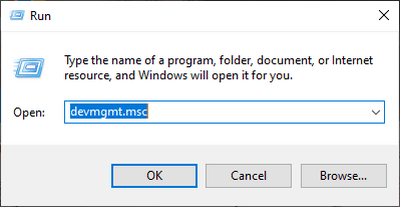
Press the Windows key +R
Type the command: devmgmt.msc
Click the OK button or press Enter
The Device Manager program will open
#2. Through the Quick Access Menu
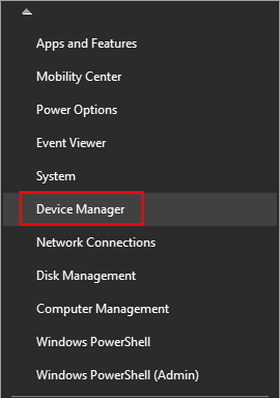
The second way to quickly open Device Manager is to use the Quick Access Menu. This is the menu that appears when we right-click the Start button.
The method is very easy, first, please right-click on the Start button (Windows button), or you can also press the Windows key + X on the keyboard > then select the Device Manager program on the menu that appears.
#3. Using the Start Menu
The third way to open the Device Manager program is to use the Start menu. This you can use as an alternative to quickly open Device Manager.
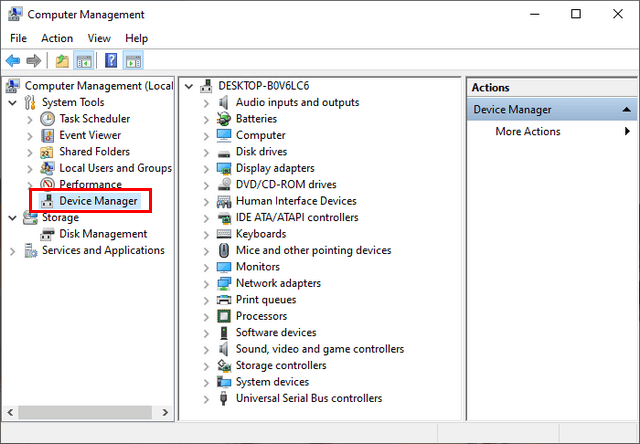
You do this by clicking on the Start button > pull down until you find the Windows Administrative Tools folder then click once > select it and click on the Computer Management program > click on the Device Manager program.
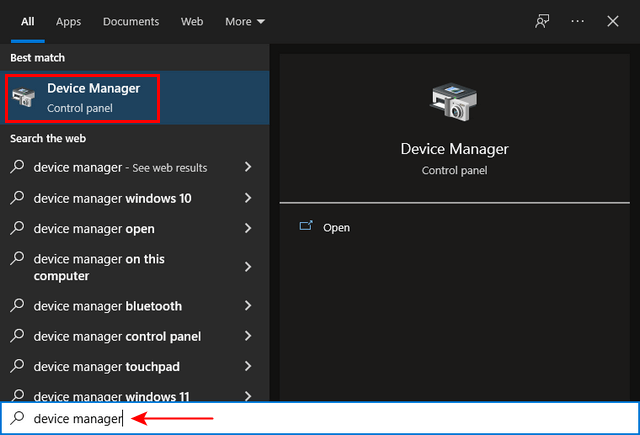
#4. Using the Search Bar
The next way to open Device Manager is to use the search feature in Windows 10 and 11. This search feature is very useful for opening various programs and files on your computer quickly without having to navigate manually.
The Search Bar in question is the search field on the Task Bar which is located next to the Start / Windows button.
You do this by clicking on the Search Bar column and then typing Device Manager, the Device Manager program will appear in the recommendations that appear, click once to open it.
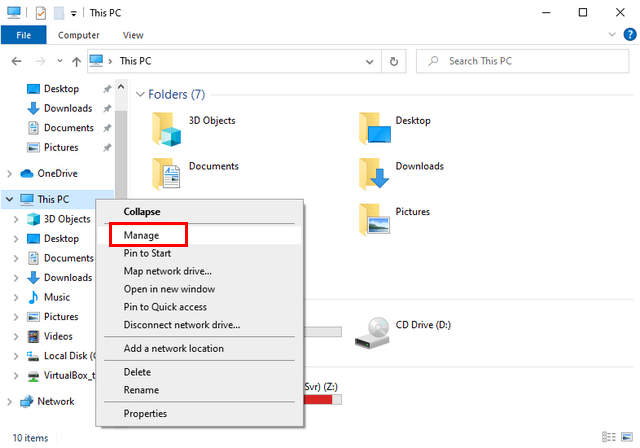
#5. Via File Explorer
Opening the Device Manager program can also be done from File Explorer, namely from the context menu (right-click menu) on the This PC icon.
The method is quite easy, first, open File Explorer > in the directory panel on the left, find and right-click the This PC icon > select the Manage menu > click on the Device Manager program.
Device Manager is an important part of a computer because its function is to manage all the existing hardware on computer devices.
Hardware referred to here includes internal devices such as processors, motherboards, hard disks, CD/DVD drives, and video, and audio adapters, as well as external devices such as mice, keyboards, printers, and others.
Device Manager is widely used by Windows users or users to find out whether the hardware is functioning properly or not. This is done by checking the driver status and the color of the device icon once detected.
By knowing how to open Device Manager in Windows 10 and Windows 11 you will be able to manage hardware and drivers on your computer more freely. Hopefully, the information we provide can be useful.
 How To Logout Gmail Account on Android and Computer Laptop


![Free COC Accounts [2025] Clash Of Clans Gmail and Passwords](https://technadvice.com/wp-content/uploads/2021/08/Free-COC-Accounts-Clash-Of-Clans-Passwords.jpg "Free COC Accounts [2025] Clash Of Clans Gmail and Passwords 3")