What Is The Full Form of DP and What It Means – We all often hear from some friends that I have changed my DP today, how is my new DP? close friend! What’s the best DP? But do you know that the DP Full Form works on Facebook, Instagram, and WhatsApp?
What Is The Full Form of DP and What It Means
What Is The Full Form of DP and What It Means
It is worth mentioning that many users know about DP’s full form, but many users do not know about this.
So if you do not know what is DP? And why the profile picture on Facebook or any social media network is called a DP? So you have the right place and we will get information in the article.
By the way, according to the different topics
of the DP, there are many names like,
The term DP for Computer Science students is meant for data processing and a similar DP for Mathematics students means the Dirichlet process.
But all these Short Form DPs are limited to some people and everyone doesn’t need to know it too.
But the DP word used on social media is common to all types of people, whether it is a student or a businessman, and the full form is the same for everyone.
If someone is asked to you, what is DP’s Full Form? So many people will have the answer to the desktop picture, while this is the wrong form of full DP.
Photos used on social media and messaging profiles are called Display Picture
That is DP’s Full Form is “Display Picture”
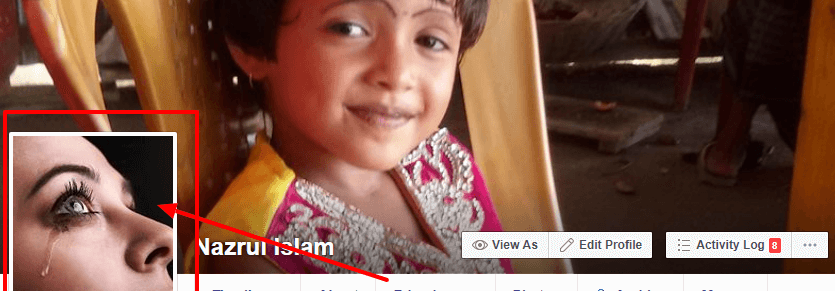
Whatever photo we used earlier on an account like Facebook, WhatsApp, or Instagram is called Profile Picture this word was first used for Facebook and then replaced by DP and now it has become the most popular word DP for social media
What is the benefit of DP?
Display Picture is one of the 3 most important factors used for any Social Media or Messaging account. Also known as NIP.
N – Name
I – ID (Email, username, Phone number)
P – Profile Picture OR Display Picture
These three are very important for social media or messaging because if we know about any person about any two factors, we can recognize them immediately. for example…
The name is a common factor, it can be two or more people in our friends and ID is unique. In such a situation, if a person has a name and an ID, we will immediately understand who he is.
If we know someone’s ID but do not know the name, then we can not recognize it. But if we have his photo with his ID, then we can recognize him immediately.
The biggest advantage of a display picture or a DP is that if we get an unknown number message and the person’s profile is accompanied by it, then if we are a person of our identity, we immediately know the person’s name.
Type Of DP:
The DP is now called a profile picture that is used everywhere but it is for some platforms and it has got recognition due to this. for example…
Facebook profile is used on Facebook profile Facebook DP, if we have posted a Cover Photo or any Post on Facebook, as a Picture, then it will not be called a DP.
Similarly, the Instagram profile is used on the Instagram profile, and Instagram DP and if we share it on a photo Instagram account, then it will not be called a DP.
So, Friends, That is the full form of DP? This means, many people don’t know about DP Full Form, so we should know that DP’s Full Form is a “Display Picture” and use it for all Social Media profiles.
Why Facebook Lite Can Not Open? Here Is The Solution – There are two versions of the Facebook application for Android, namely the official and the lite version. In the liter version, there are problems, for example, FB lite cannot be opened.
How to Fix Facebook Lite Not Working on Android
The first time you want to open the Facebook homepage, only the stacks continue to load. Only a white dot icon appears flickering. This problem arises due to several factors.
One of them is the network you are currently using. When your Facebook Lite can not be open or has a problem, you can find the best solution in the following review.
Maybe some users feel that they have never done their Facebook Lite. Meanwhile, the problem continued to befall him.
Because you are a beginner in accessing your Facebook account via Facebook Lite. Maybe yes, not yet fluent in how to deal with Facebook, it can’t be opened.
Reasons Why Facebook Lite Can Not Opening
A new problem arises where you cannot access the FB lite home page. Several supporting factors signal that you must stop playing Facebook first.
Well, the reasons why FB lite cannot be opened are as follows. The first is a network problem, the second is a problem with the application, and the third is a problem with the device you are using.
A notification appears sorry there is a problem please try again. It often happens when the network you are using is experiencing interference.
So that you get a way to fix it, you can see the explanation that I will give you through the review below.
#1. How to Fix Why Facebook Lite Can Not Open on Smartphones
Potato cellphone users, in particular, must use the lite version of the application. The FB lite social media application is no exception. Almost all Android cellphone users use the lite version to open Facebook.
Sure enough, because it’s small in size and does not take up excessive storage space. They prefer to use the lite version of Facebook rather than the official.
But there is a problem where you have to involve all aspects. Starting from the network, and the software even to your smartphone device. Below is how to fix Facebook can’t be opened.
# 1. Check Network
This network problem is common in several other social media applications. Not only on Facebook, applications like Instagram, WhatsApp, and Line still have the same problem.
You can check the internet network using a network speed check tool. For example, you can download an application called speed net, or use the fast.com site.
If your internet speed is slow, then it is certain that the network in the area does not support opening the FB lite application.
# 2. Change APN
If you have checked the network the network you are using is still fairly slow. You can take advantage of the features found on Android itself.
Namely changing the APN or access point names in Indonesian is the Access Point Name. You can change your APN settings using the INTERNET APN or other APN – APNs.
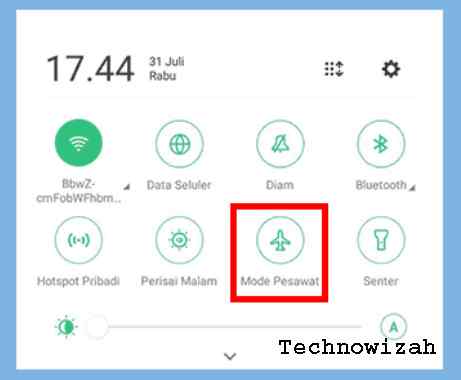
# 3. Turn on Airplane Mode
You can’t solve the network problem by opening Facebook Lite by activating airplane mode. Make no mistake, this feature is actually activated when boarding an airplane.
But you can use it when the signal and network strength are down again. By turning on airplane mode, your network will be temporarily lost.
Then you can turn off the airplane mode. When turned off the signal will automatically appear with a new IP address. Where you can have even stronger network strength.
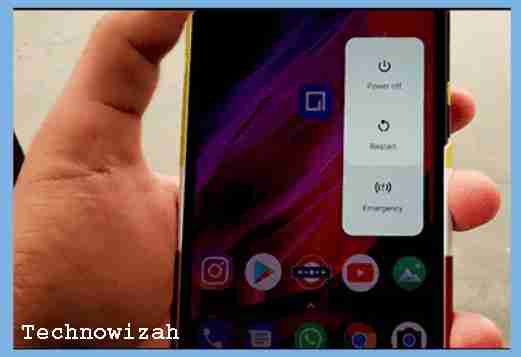
# 4. Restart the Smartphone
If the network you are using is still fairly slow and slow. Then it cannot be used to open the FB lite application. You can reload on the smartphone.
For how, please press the Power button on your smartphone. Press and hold for a few seconds and a screen will appear on the hp option Reboot / Restart and Shut Down. You can choose to reboot/restart to reload the phone.
# 5. Clear Facebook Lite Application Data and Cache
How to solve the FB application error by deleting cache files and deleting data .. Oftentimes you get FB lite errors like that, the problem is in the application itself
You can clean up the garbage that has accumulated in applications by deleting and clearing the application cache. In this way, you can lighten the burden of apps.
The method is quite easy, you can enter the settings menu then application management -> select FB lite -> memory usage -> clear data to clean data and clear cache to clean the application cache.
In addition, you can do combinations such as force stop and clean application data. Stopping and deleting data is a very solution in overcoming unfortunately and the Android system will run normally.
# 6. Uninstall Then Install Back
You can temporarily delete or uninstall the Facebook application. Once it’s erased, you can let it sit for a few hours if you can.
Then you can re-download the Facebook Lite application on Google Playstore. Once downloaded, you can access Facebook by entering your account login data.
In addition, before reinstalling the Facebook application, use a clean master so that Facebook data and cache files are properly deciphered.
# 7. Update the Facebook Lite application
If you have done everything, you still cannot fix the difficulty of entering Facebook. You can update the FB lite application on the application store.
With an update from the app store, you can get bug fixes. Then you can have no trouble accessing Facebook Lite.
How do I update it? Follow these steps:
Open the Play Store.
Swipe right to open the menu on the Play Store.
Then select My Apps & Games.
Search for Facebook and then select the Update button.
Done.
Why Facebook Lite Cannot Be Opened With Cellular Data
As for the problem of lite not being able to enter when using cellular data. This will usually cause, among others, that the network in your area does not have maximum speed access.
How to Overcome FB Lite Cannot Open Using Wifi
When using wifi, for example, a wifi corner or just using wifi from a hotspot. But to open the FB lite application you cannot enter. You can disconnect the wifi network first then reconnect the wifi to the previous wifi.
Why does Facebook Lite continue to load
The cause is a network that is not strong or the internet network is out of order. Network problems are often one of the main causes of social media problems.
You can apply the above method to Android smartphones in vivo, Samsung, oppo, Asus Zenfone, Lenovo, Realme, and so on.
#2 How to Fix Facebook Lite Cannot be Opened on Android
There are several reasons why the Facebook Lite application cannot be opened. The first cause is the occurrence of internet network problems.
Then there is a problem with the application itself and finally, there is a problem with your cellphone. For how to fix this, follow the method below:
#1. Change the APN
Then further improvements can be made by replacing the APN. Although this is rarely noticed, many Facebook Lite users have managed to open the application after changing APNs. Here’s how:
Open your mobile and go to ” Settings “.
Then look for the SIM Card settings menu and tap on that menu.
Then in it look for the settings menu with the words ” Access Point Name (APN) “, or ” Access Point Name “.
After that, make changes to the APN writing to ” Internet ” or another APN according to your provider.
Finally, check again by opening the Facebook Lite application.
#2. Enter Airplane Mode
Indeed, the way to overcome this one seems very simple and easy to do, namely entering Airplane Mode. Even though it’s easy, it turns out that this method is quite effective for improving your internet network.
By changing the cellphone to Airplane Mode, all connections will be disconnected directly from Bluetooth, WiFi, Hotspot, and also the internet network. Its purpose is to update the network to make it smoother.
If you have entered Airplane Mode, return to normal conditions and open the Facebook Lite application.
#3. Clean Application Data
The next way is related to applications, namely deleting application data including cache data. The method is very easy, namely go to ” Settings “, and” Installed Applications ” and search for ” Facebook Lite “.
In it, tap on the words ” Clear Data ” and the button ” Clear Cache “. Even better, press the “ Force Stop ” button and re-open the Facebook Lite app.
#4. Reinstall the Application
Another alternative you can do is uninstall the Facebook Lite application. Not infrequently the cause of an application not being able to open is a system failure in the application. So the way out is to uninstall and install again.
Re-installation with a new application allows system updates to occur in the application.
#5. Update the application
You can actually encounter application problems that suddenly cannot be opened or crashed, not only on Facebook Lite. Usually, by updating or updating the application, this problem can be resolved.
You can try this method if the Facebook Lite application cannot be opened. Here’s how:
Open the Android Play Store app center
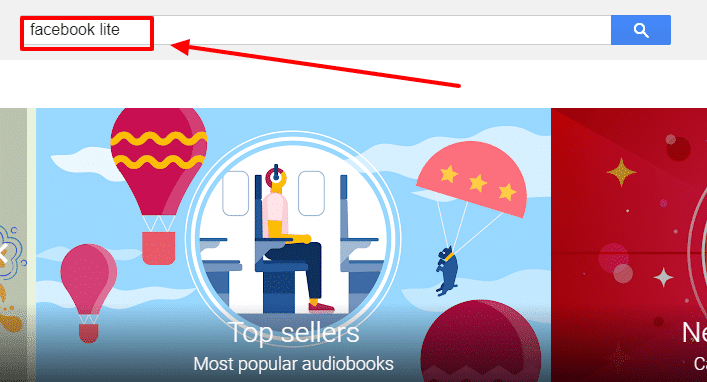
Tap on the search field and type ” Facebook Lite “.
Tap on the top search result.
Look for the words ” Update ” or ” Update ” and wait for the process to complete.
#6. Restart the HP
Restarting the cellphone or rebooting it can also solve the problem that Facebook Lite cannot be opened. Usually, the HP RAM is full or running too many applications simultaneously.
In this way, the HP system will be refreshed and fresher. So that it can run the application without problems.
This was an explanation of why Facebook Lite cannot open. Here Is The Solution, and I have described some of the steps above to fix Facebook Lite that cannot be opened. Thank you and hope it is useful for you this article.
How to Change Facebook Name on Android iPhone PC – Are you currently looking for a way to change your Facebook name that cannot be changed or want to change your own Facebook name? if yes, then follow this article to the end.
How to Change Facebook Name on Android iPhone Laptop Desktop PC
Facebook is a social media giant of interest and its users are increasing day by day. How to change your Facebook name is quite easy and can be done via a cellphone or PC. Maybe users want to change the name with their name so that it can be found and recognized by many people.
Using real names will certainly make it easier for friends or other people who are known to find user accounts. Especially now, social media is considered by interviewers when applying for work. It would be a shame if the name of the user account was Alay.
Please note that the way to be able to change your Facebook profile name can be done by using certain methods according to the device you are currently using. Can use a laptop, android, iOS, or another device that can be used for internet access.
The several methods along with the steps and stages to change/change Facebook’s name can be done by:
How to Change Facebook Name Via PC / Laptop
In the first method, we can change Facebook’s name via PC or Laptop. There are two ways that can be passed namely the new Facebook look and Facebook classic look.
#1. New Facebook
The steps:
Open the browser application first on your laptop, you can use Google Chrome for fast internet access.
If it’s understood, just click the triangle icon downward ∇ on the top right of any Facebook page.
Select and click Settings.
Next, choose the Name.
Delete then enter a new name for your Facebook account. After that, click Review Changes.
Enter your Facebook password to confirm.
In the final step, click Save Changes.
The two methods above are actually the same, there are only differences in the location of the menu. And if understood more thoroughly, the difference can be clearly known.
How to Change Facebook Name on Android
For Android phone users, you can change Facebook names with the Android FB application. Of course, you have to have the FB application installed on your cellphone. Afterward, read the following guidelines.
Unlock the screen on your Android phone to start using it.
To start the process, open the Facebook application.
Login / Login using your FB account if you are not logged in.
Click the Options menu ( ≡ icon ) in the upper right corner.
Select Settings & Privacy » Settings.
In the Account Settings section, tap/tap Personal Information.
To change the name, tap the Name section.
Delete then enter a new name for your Facebook account. After that, click Review Changes.
Enter your Facebook password to confirm.
In the final step, click Save Changes.
How to Change Facebook Name on iPhone
The next method is how to change the name of Facebook via iPhone (iOS). Intended for you iPhone, iPad, and iOS cellphone users. The way is almost the same as an Android phone, more or less see the following steps.
Unlock your iPhone screen to start using it.
For those who do not have a Facebook application, download & install the Facebook application via the App Store or click here.
Open and run the Facebook application.
Login or Login with your Facebook account, and enter your email with your FB password to login.
After logging in, you will be presented with a Facebook homepage display.
Click the Options menu ( ≡ icon ) in the lower right corner.
Select Settings & Privacy » Settings.
In the Account Settings section, tap/tap Personal Information.
To change the name, tap the Name section.
Delete then enter a new name for your Facebook account. After that, click Review Changes.
Enter your Facebook password to confirm.
Finally, click Save Changes.
How to Change Facebook names that can not be replaced
What happens if your Facebook name has been changed repeatedly? Then you are not allowed to change your name again. Take it easy, we have tips for changing Facebook names that cannot be changed. Check out the steps below.
Login to Facebook.
Go to Settings & Privacy » Settings » Name. Change the current name with another name in the name list.
After changing the name, visit the site: https://www.facebook.com/hacked
We make it as if our Facebook account was attempted to be hacked (hacked) by someone else then we return our account. Now during the Fb account recovery process, an option will appear to change our Facebook name.
Click the Secure Account. follow the steps. We will be asked to enter a new password. Why a new password? because for recovery if our Facebook account is attempted to be hacked, it is mandatory to change the password
In Step 3 (Review Changes), there are options to review and correct your name, well here’s why we have to change our name before. So, it’s as if our Facebook name was replaced by someone else. that’s where we are given the choice of the name change.
Click Continue.
Activate your account.
Done.
NOTE: Do not use this facility repeatedly because Facebook will suspect your account as SPAM which causes your account to be BLOCKED by Facebook.
Things to Look For When Making a Name Change
Users cannot just change their Facebook account name. There are things that must be considered before changing the name. Here are some things to consider when changing your Facebook name.
#1. Using a Real Name
Facebook now requires each user to use a real name according to his identity. Maybe the name that can be changed back is only the last name or clan.
#2. It takes 2 months to change the name again
Important for Facebook users to know. Facebook has restrictions to change user names. If the user has replaced the name within 2 months or 60 days, Facebook will forbid changing the name again. So, if the user wants to make a name change again, it is necessary to wait for the next 2 months.
#3. KTP is required
If the user wants to change the name but is rejected by Facebook, the user may be using a pseudonym or fake name. Therefore, to prove the authenticity of the name registered, Facebook will ask users to upload a photo ID card.
Conclusion:
So, friends, here are some of the easiest methods for changing your Facebook name. Hopefully, these tips can help users who do not know the steps to change their Facebook account names.
Download Facebook Lite on Android and PC Windows10 PC –Facebook Lite is the social network that is the only independent application to reach the market.
Download Facebook Lite on Android and Windows 10
How To Download Facebook Lite for Android and PC Windows 7,8,10
Not to mention that you have to reduce the version of the mobile application version to the full version of the mobile application aimed at devices with poorer connections and less memory.
With this user of adaptation that has an irregular Internet connection or for low-end devices, this seems to make sense
You can try Download Facebook lite for Android, which is much smaller in size than the regular Android. This imparts advantages over devices that have a small amount of memory.
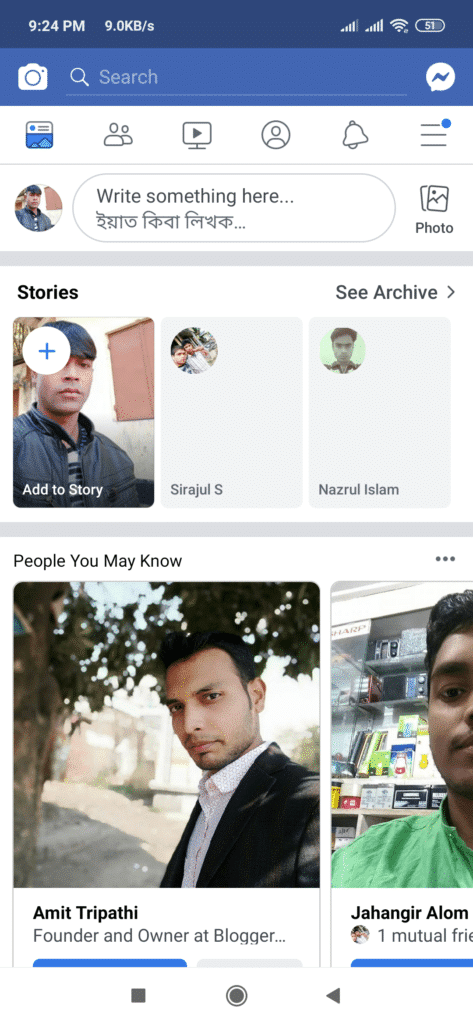
Facebook Lite does not feel light on the features though. You can still maintain the maximum benefit of the application through comments, such as messages from friends;
publish a group of individuals or groups geotagged without having to open Messenger.
The only thing that we miss is the absence of an APP browser. Therefore, all the links, it will take you out of the application.
It looks quite simple and retains the originality of the native Facebook application so, why wait to download Facebook Lite for your mobile phone now?
Facebook Lite features
Facebook Lite comes with too many features that made an instant hit at the launch of the application.
Almost all the features are present as the native application.
It is super easy to navigate and perform small actions.
Without delay while going through the news.
The application is less than one MB of the best size for low-end phones.
Download Facebook Lite for Android | Facebook Lite APK
Download Facebook Lite for Android | Facebook Lite APK
Facebook Lite must be downloaded manually with the help of a third-party source, due to the limited availability of the application in the sore game. However, performing a simple search on Google can help you or you can even search Facebook Lite for Android here.
First of all, you have to use Facebook Lite APK using the link below.
Now, you can continue with the installation process.
Before proceeding to install the package Be sure to set the correct permission to install applications from other
sources.
For this, it is necessary to go to the configuration of the application. Once you see the “unknown sources” option that is probably disabled, it must be enabled.
Once you have checked the box, the next step would be to install the application on your phone.
To install the package simply look for the APK on your phone. And touch on it.
The installation will take some time to decompress the package and install the application.
Once this is done, you will see the Facebook Lite application on your Android device installed successfully.
Download Facebook Lite for PC (Windows 7, 8/10)
Download Facebook Lite for PC (Windows 7, 8/10)
Installing Facebook Lite on the PC allows the user to see what friends are doing as well, to share updates, photos, and videos. You can also be noticed when friends comment on the mail. The latest version of Facebook Lite also allows users to play games and use their favorite applications.
However, the installation of Facebook Lite on the PC is not similar to the installation of the program. exe. Because a user needs to download an Android emulator.
We ask that you download and install BLUESTACKS. Here are the next steps to follow before installing Facebook Lite on the PC.
First, download the bluestacks emulator from the below link.
Now open the APK by double-clicking and selecting BlueStacks to execute it.
It will be installed inside BlueStacks and will notify you after the installation is done.
Use the mouse cursor to navigate within the application.
Download Facebook Lite for PC and start having fun with your friends using minimum data on your PC. You can
browse through all the essential news feeds without unnecessary interruptions. It also has a fast design.
With the characteristic wall, post details, and comments, you like you can do anything more or less similar to the native Facebook application.
FAQs:
We have tried to respond to the most expected queries from users. If you have questions about the Facebook Lite App
that is not included here. Do not hesitate to contact the owner of the website.
Could Facebook Lite Messenger replace standard applications and Messenger?
Yes, absolutely the Lite version has the most features in it. But to get the advanced features you may have to use the native Facebook application.
How to download Facebook Lite apk?
Yes, you can download the Facebook Lite APK with the last link here. You can also add the application to the Google Play store.
We are allowing the download links to make sure that you get all the originals and are not broken. You can use our
guided steps to download the Facebook Lite apk and install it on an Android device.
Why at some point Facebook Lite cannot start?
Facebook Lite apps run on a variety of devices and almost have no problem. Please try to uninstall and reinstall the applications. If the problem persists you can contact us using the contact page.
It is safe to download the Facebook Lite apk through the website.
Yes, it needs to download free Facebook Lite for Android from the given direct links. We have tested all the
links for the malware and all our less are 100% safe to use.
While Facebook Lite retains so many features of the native application of Facebook Android, which is so popular, the Lite version is intended for people who go through minimal use.
DMCA: Technadvice.com complies with 17 U.S.C. * 512 and the Digital Millennium Copyright Act (DMCA). It is our policy to respond to any infringement notices and take appropriate action. If your copyrighted material has been posted on the site and you want this material removed, Contact us.
Although there can be no delay as the official version of the application. The initial reaction has been good and people like to use Facebook Lite on next-generation phones. Still, Facebook has a mile to go before it releases the application with fewer bugs.
Why is My Facebook account locked or disabled – and how to recover an account? If your Facebook Account is disabled or Blocked and you want to recoveryourFacebook account, then you are in the right place. Today I will explain all such issues related to the Facebook Account and their solution.
Why Is My Facebook Account Locked or Disabled
How to Recover Your Blocked or Disabled Facebook Account
If your Facebook account is not disabled, then you should keep the information about it, because if you are aware of the Facebook Account Privacy Policy, then Future will be very helpful for you.
Because many people have Facebook accounts blocked and they do not even know why their account Block has happened, something similar happened to me. That’s why I am telling you all about this, which can help you,
Here I will talk about Facebook’s Top 3 related topics,
Why is a Facebook Account Disabled or Blocked?
How to Recover Facebook Blocked Account?
How to prevent a Facebook account from being blocked?
Why Is My Facebook Account Locked or Disabled
Facebook Account Disable the main reason for or Blocked, which is why Facebook Account Block Gets | for example …
If you do not show your real name on Facebook, your account may be blocked because of this ( For example – @, $ You can not use it for Facebook Name.)
Account Block is blocked even if a lot of group joins on Facebook ( Max-200 Group )
If you share a lot of links on a group or your timeline, then Facebook blocks your account.
Poking too many logos also leads to the account block.
Using the VPN server also causes Facebook Accounts to be disabled.
If you do too many Offensive Content posts on Facebook then a Facebook Security Message will show on your account, after which your Facebook Account will be disabled or Blocked. (For example – Accident, e-War).
If you send a friend request to people you do not know or who are not from your community, then Facebook can block your account in such a way.
If you need information in related detail related to your Facebook account, you can read the Facebook Privacy Policy.
(How to Recover Blocked Facebook Account):
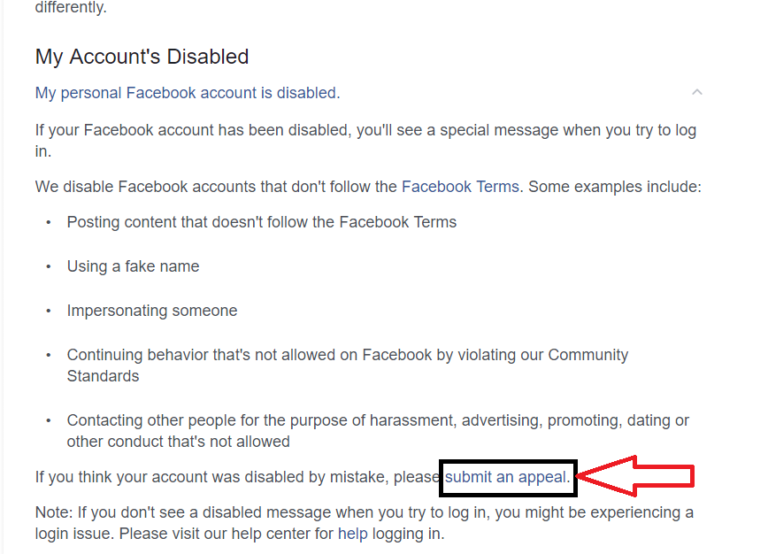
If your Facebook account has been blocked or disabled for some reason, you will have to appeal to Facebook to Unblock the Account.
Note- You can Be Unblocked and recover your Facebook Account only when the Gmail ID or Phone Number is added to your account.
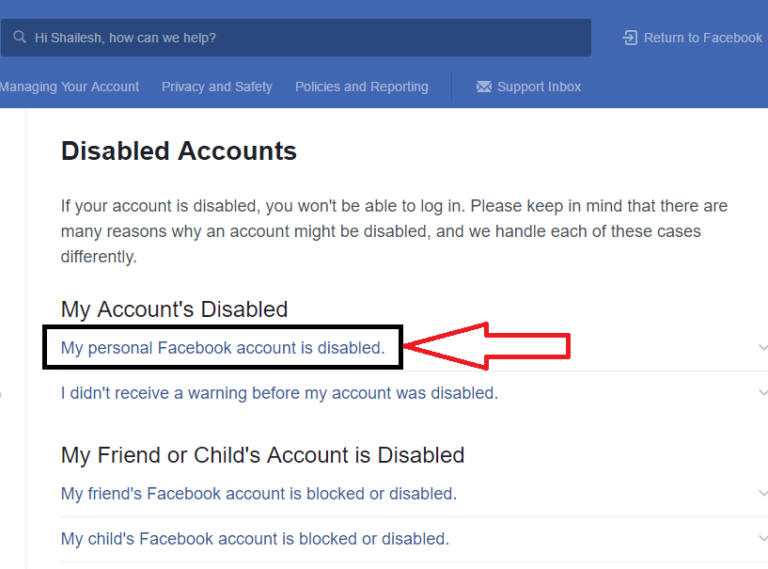
To make an Account Recovery Appeal you will have to go to the Facebook Helpdesk, if you do not know about it, you can click on the link and access the Direct Facebook Helpdesk.
After going to the Facebook Helpdesk, you can click on the “My Personal Facebook Account is Disabled” option,
Facebook account appeal
After going to Personal Account, you can click on “Submit an Appeal ”
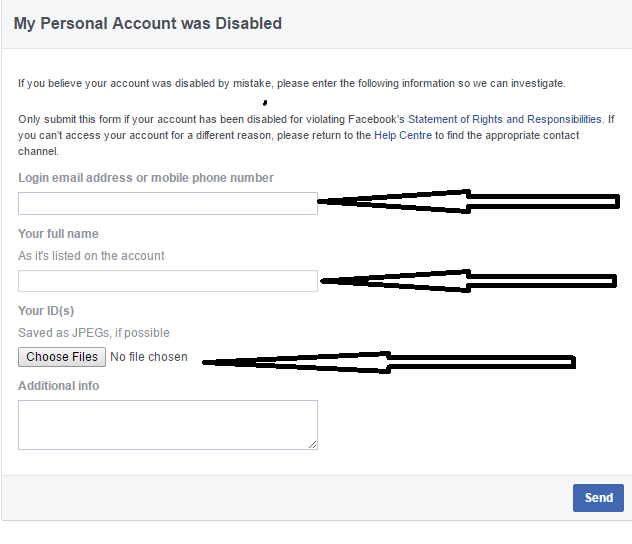
Now here you will get a form, which will be asked about your Email, Phone Number, Name, and ID (Aadhar Card, Voter ID, PAN Card, etc.). After you have completed all the options, upload a PDF file of one identity card.
Note: – When you appeal to Facebook to unblock your Facebook Account, you must upload an ID, of course, if you do not upload the ID, then Facebook will not unblock your account.
How to Avoid Getting a Facebook Account Disable:
If you follow some of the Facebook terms, your Facebook Account will never be blocked or Disabled, and by doing so your account will also be safe.
Do not share any posts, or Messages Share on Facebook Timeline, which is against Facebook policy.
Send a friend request to any people who have no mutual friends.
Never post an accident, personal, or offensive, if you do once, then Facebook ignores it.
If you do this, Facebook understands that you are doing spam.
For more information about Facebook Policies & terms, you click on a ray Policy Facebook Terms.
So, friends, that’s above why is my Facebook account locked or disabled? which will help you to recover your “Blocked Facebook Account“ and also inform you why the Facebook Account is Disabled or Blocked.
 If the network you are using is still fairly slow and slow. Then it cannot be used to open the FB lite application. You can reload on the smartphone.