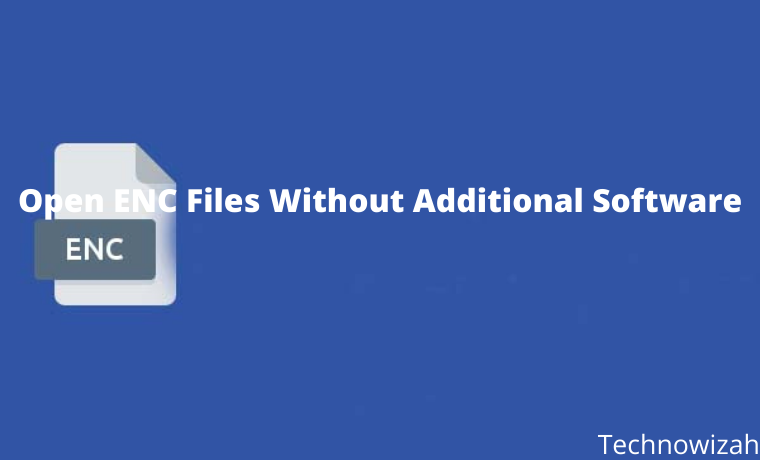
How to Open ENC Files Without Additional Software – Have an ENC file but can’t open it? Check out the explanation of this article to find out how to open it. Computers or smartphones have different file types that are marked with certain formats or extensions.
How To Open ENC Files Without Additional Software
How To Open ENC Files Without Additional Software
For example, there are doc files or documents that can be opened via computers and smartphones, apk for Android applications, compressed files in the form of zip and rar, exe format is a file that can be run directly.
In addition to the formats above, several types of file formats still have protection, so they cannot be opened in the usual way and require additional software to open them.
What is an ENC file?
ENC stands for Encryption which is a format for one type of file.
So, the ENC file type is a file type that is given special protection by the author to avoid viruses and minimize piracy.
Inside the enc file, confidential data cannot be opened by anyone, both online and offline.
For example config files from WhatsApp or other chat applications.
In essence, an ENC file is a type of file that is protected and cannot be opened in the usual way.
ENC files can be opened via laptop and Android by several methods.
Keep in mind that you have to be careful when opening it. Because if it gets corrupted, the data cannot be displayed and read. That’s why we need a special way to keep the enc file intact when opened.
If you don’t know how to open it, it’s best to follow the guide below.
How to Open ENC files on PC/Laptop
Windows 10 users are easier. Because Windows 10 has been equipped with a file extract feature that has existed since the first time you installed Windows.
So that ENC files can be opened directly through File Explorer without the help of additional software.
For the complete method, please follow the following guide:
Open File Explorer is located at the bottom left.
Then open the folder where the enc file is stored. If it is still on the Smartphone, you should first move it to a laptop.
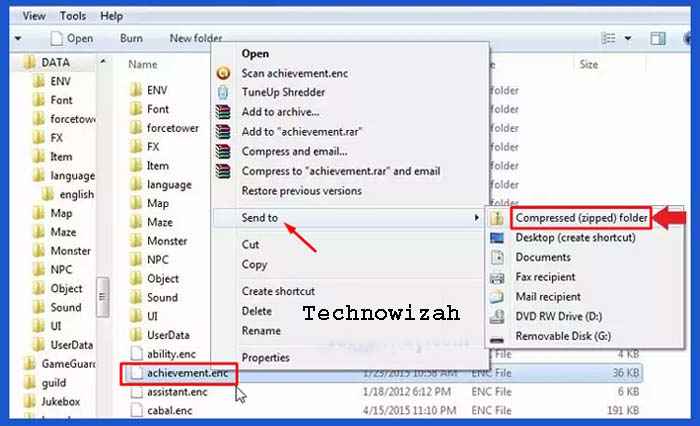
Then hover over the enc file.
Then right-click and select the “Send to” option.
Then click the “Compressed (zipped) folder” option.
Furthermore, the enc format file will change to the “.zip” format.
For example, the file “achievement.enc” will change to “achievement.zip”.
After the format change process is complete, please open the zip file by extracting it.
Right-click on the zip file, then select “Extract files…”.
Then click OK.
Next, there will be a new folder that contains the enc file.
Finished.
Now the enc file can be opened. If the file can’t be extracted, it’s usually corrupt.
How to Open an ENC File on an Android Phone
ENC files can also be opened directly via Android smartphones. But it takes an additional application to open it.
In this article, I recommend 2 applications that you can use to open enc files on Android phones in an easier way.
#1. Using ZArchiever
Please download the ZArchiever application via Playstore.
Open and run the ZArchiever application that has been installed.
After the application is open, please find the location of the ENC file to be opened.
If you have found it, please press once on the ENC file.
Next, several menu options will appear, please select the “Extract here” menu.
After the extract process is complete, the ENC file can be opened.
finished.
#2. Using RAR
Open the Playstore, then search for the RAR application.
If you have found it, just download and install the RAR application.
Open and run the RAR application.
Then open the folder where the ENC file is stored.
Then press on the enc file.
Then select the menu open with RAR.
Then the ENC file will open automatically.
Now you can open and view the contents of the ENC file using only an Android smartphone. So you don’t have to bother to move the ENC file to the laptop again.
How to Open ENC Files Online
You can apply this method on a smartphone or laptop as long as it is connected to an internet connection.
Open Google Chrome or another browser application that you use frequently.
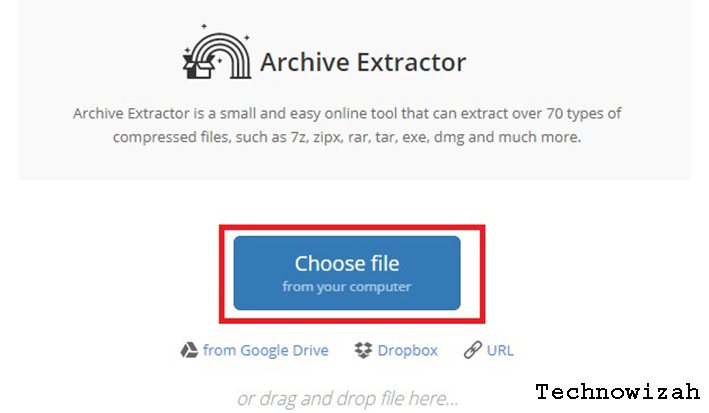
Next, visit the URL https://extract.me/.
Then click the “Select file” button.
Then open the folder where the ENC file is saved. Click on the ENC file, then click the Open button.
Wait a few moments until the ENC file upload process is complete.
If so, please click the blue Save all as ZIP button to download the file.
After the file has been successfully downloaded, please extract the file in the usual way.
Conclusion:
Those are some methods that you can use to open enc files via android, and Windows 10 laptops without the help of additional software.
100+ Free course hero accounts and passwords – Many college and high school students have a lot of homework and classwork to perform on their own, yet passing tests is required.
100+ Free course hero accounts and passwords
On Course, Hero, over 20 million students, and professional instructors exchange their textbooks, course-related materials, and other humanitarian educational resources.
It has the most comprehensive and up-to-date library of classroom-related materials, as well as professional teachers, personalized cards, and classroom suggestions.
There are numerous resources available online that will assist students with their homework, but you must pay.
We will discuss the course’s hero and how to get a free course account on all of the websites. I understand how much a student desires Chegg accounts to get their notes and assignments for free.
What is Course Hero?
Because of the recent pandemic, we have been obliged to stay at home, and many schools and colleges have closed. Students are unable to attend, leaving them with only one option: to study from home.
We live in a technological age when everything is online, so why not study? Andrew Grauer created this company in 2006, and it currently assists millions of students in completing their learning journey.
For each subject, Course Hero provides study materials such as practice questions, study guides, textbook solutions, and step-by-step explanations. There are millions of documents there that provide useful information, answers to your inquiries, and notes.
Furthermore, Course Hero has a Hero Student Scholarship program that provides scholarships of up to $5000 each year to many students until they graduate.
Follow the steps below to establish a free Course Hero account:
First and foremost, go to the Course Hero official website.
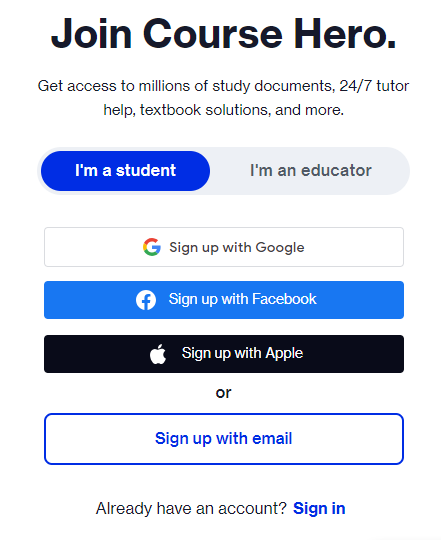
In the top-right corner of your screen, click the Sign Up button.
Choose whether you want to be a student or an educator on Course Hero.
Accounts and passwords for Course Hero Choose Sign in and enter your e-mail address and other relevant information.
Complete your profile by entering the name of your school.
When you finish your profile, you will be taken to the dashboard.
The following are some of the benefits of Course Hero Premium membership:
Study Materials: If you do not want to take classes, you can easily have access to 30 course-specific study resources per month. To remove your uncertainties and answer your queries, simply read these materials, textbook solutions, and guidelines.
Professional Tutors: Having difficulty answering a question? Many qualified teachers on Corse Hero can help you clear your doubts. They can help you through any confusion with an explanation in as little as 15 minutes.
Textbook Solutions: Course Hero Premium Membership plans provide access to millions of textbook solutions papers and step-by-step instructions. You don’t have to worry about anything because these documents have been validated by a large number of expert tutors.
Scholarship: Course Hero strongly advises pupils who excel in school and college. The corporation awards them every year until they graduate.
Friendly Community: In addition to tutors, you may submit your query on the community page. Other students will try to answer all of your questions. You can also assist them with their questions, which will encourage all pupils to help one another.
Usernames and Passwords for Free Course Hero Accounts Updated
Without a doubt, Course Hero is one of the best places for students to acquire crucial information and answers to their questions.
However, you cannot obtain key documents and solutions for free. To access millions of pieces of content, you must first acquire their premium membership. However, many students are unable to budget for study tools.
It provides all of its users with a premium account. If you don’t have one, don’t worry; we’ll share a couple in working condition with everyone. Give them a shot to find out what’s going on. Furthermore, it enables you to ask clarifying questions without having to spend money.
The following are some active Course Hero VIP accounts that will assist you in unblurring the answers: Please do not change the password, or these accounts will be permanently canceled.
Alternative Methods for Obtaining a Course Hero Premium Account
If you have any issues with our free Course Hero accounts, please provide some valid means to gain free access to Course Hero’s material and documents.
#1. Register for a free account
There are some free solutions in the library, and you may also ask them questions. However, there will be certain limitations when utilizing the free account, but you will be able to grasp how Course Hero works.
#2. Submit your study materials for free access
When you create your free Course Hero account, you are asked whether you want to access the content by paying a membership fee or uploading your study documents.
Premium Course Hero Accounts You may earn free credits on Course Hero by uploading your documents. These credits can be used to open documents in the library. When you upload your study resources to Course Hero, you can unblur several papers of your choice.
You will always have access to these documents and can read them whenever you want. Simply upload your documents and wait for them to be confirmed.
After you’ve been confirmed, you’ll have free access to many documents, and you can earn more credits by uploading more documents.
#3. On Course Hero, rate the contents
While method 2 may not be available to you, you may simply unblur documents on Course Hero by ranking other people’s documents.
You must rate the material of other users on the site. Every instructor responds to the questions, and if you like it, rate it positively;
if you don’t like it, score it negatively. To unlock Course Hero for free, you must give five different ratings in total. It will take an hour to gain access.
#4. Utilize the Course Hero Promotion
Numerous deals on Course Hero Free Unblur can be utilized to unblur your papers; you may sign up for a Course Hero Free Premium account to take advantage of these offers.
You can earn enough offers by referring a friend to unblur your document. You can also apply for a Course Hero scholarship. Course Hero scholarships are legitimate! They have given over $200,000 to around 90 kids from various backgrounds.
Course Hero scholarships are only one method by which they assist students in achieving their academic goals.
#5. Make a quiz
You can also gain free credits by creating a quiz. All you need to do is open the documents to which you have access.
To create a quiz, use the “Quiz Yourself” option. Now, to design your quiz, follow the on-screen directions. When you create a quiz, you will gain points that will allow you to unblur and access additional papers on Course Hero.
Conclusion:
So, these are some legitimate methods for obtaining free Course Hero Premium accounts. You can, however, purchase their membership and gain access to millions of contents, interact with live tutors, take various quizzes, and so on.
You can use these accounts to study for examinations and other schoolwork. I hope you acquire a Course Hero account that works.
Download Latest SuperSU ZIP Root Files Apk [Official] – SuperSu CF-Auto-Root is an application that you use to manage the root permissions of your phone after a successful root process. Mostly, for Samsung mobile devices, once you root and install TWRP, you can add SuperSu right away.
Download Latest SuperSU ZIP Root Files Apk [Official]
How to Download Latest SuperSU ZIP Root Files Apk [Official]
There are two unique types of this application available; there are SuperSu.zip and SuperSU.apk files. The apk version like you probably knows what you are going to install directly on the Android device; Android OS supports apk files.
Also, as I said before, you can install this app on Samsung or any other mobile device via TWRP. To install SuperSU via TWRP, all you need is a .zip file. When you get a .zip type/version of this application, then, you will extract its contents on your computer and save them to a specific folder.
Apart from that, after rooting the Hp, you can install any application to it. However, the application must be a .apk. Otherwise, it won’t accept to install on your Android device.
SuperSu application
Meet the # 1 mobile app on any rooted Samsung Galaxy device or any other smartphone. This application serves to allow you to manage root permissions on your smartphone. This means, if your device is not rooted it is highly likely that this app will be irrelevant so just ignore it.
On the other hand, if your device is rooted, then, you need this amazing app. We will show you where to download zipped and apk versions of the root permission app.
Things to note before downloading any SuperSu version
First and foremost, the mobile device which you are trying to install must be Rooted. We have some helpful tutorials on how to root a successful Android device using a PC or even without a PC.
This application is available as a flash file, and is equally a regular application for your smartphone; You have to know which one is the best for you and download it
Pay attention to your device model no.
Download the Latest SUperSU
This application works on all Android devices, however, the device must be rooted in the full functionality of the application.
The following is the .zip file of this application.
Note: You cannot install this version directly on mobile devices. First, you have to download it on your computer, extract the files, then flash them to the desired device. Below are the unique download links to all zipped versions of this app.
Of course, you will have lots of apps on the Google Play store with the name – SuperSU, believe me, more than 80% of those apps are fake. Here, we will provide you with various links to download any version of the SuperSu apk you like.
Below is how to install this application on your smartphone directly. This process/step does not require a computer. It has to be something you already know;
Download the SuperSu.apk version of your choice by following any of the links we provide above
After downloading, select and install the application
If you prevent installing this application if you have not enabled “Unknown sources” on your device. So, when you get the message ” Installation Blocked “, click on settings and enable “Unknown Sources.”
After enabling the unknown sources option, the application can be installed
Launch it and grant access to it {allow all permissions requested by the app}
Disclaimer: All forms of download files on the Technowizah.com site are for educational purposes only.
DMCA:Technowizah.com complies with 17 U.S.C. * 512 and the Digital Millennium Copyright Act (DMCA). It is our policy to respond to any infringement notices and take appropriate action. If your copyrighted material has been posted on the site and you want this material removed, Contact us.
The 7 Best iOS Emulators for Windows and MacPC – smartphones are one of those advanced technologies that make the world run faster than ever. Humans can get millions of information in seconds with just one device the size of the palm of a hand and can be used wherever and whenever they want. This does not escape the sophistication of the technology that is in the smartphone device, especially the operating system.
Best iOS Emulator for Windows and Mac PC
There are two most popular operating systems used on smartphones today, namely Android and iOS. Android was developed specifically and officially by Google and this operating system is usually used by various mobile phone brands such as Samsung, LG, Sony, Xiaomi, Realme, Oppo, Vivo, and others. The iOS operating system is specifically developed by Apple and released on Apple devices only.
Due to its exclusive nature, iOS gets more attention from some freelance or non-official developers. Ordinary users will not be able to tamper with the contents of iOS and require deeper coding and programming reasoning.
However, with the existence of an iOS emulator, hobbyists or freelance developers can find it easier to understand and use iOS as experimental material on their PCs or laptops. Curious about this iOS emulator? Check out the following reviews.
iOS, Premium Smartphone Operating System
iOS originated from an earlier operating system called iPhone OS, a special operating system developed by Apple for their iPhone phones. Currently, iOS is popular because so many iPhone users end up choosing this phone as their daily driver. The reason is only two words, “reliable”.
iPhone users will never be disappointed with the camera quality of this phone. Even the latest iPhones always top the rankings for the quality of camera captures. No wonder so many influencers, artists, and business owners rely on the iPhone to promote many things on social media because the photos produced are very good and detailed.
The catch of this iPhone camera does not escape the help of the operating system which processes RAW captures from the cellphone camera. iOS is famous because the software contained in it can improve the optimization of the performance of hardware and applications on a smartphone.
In the software or application development stage on the iOS operating system, a test is needed. These tests are usually carried out on live iPhone devices and the performance of the application is directly assessed based on the experience of using it.
If there is an error in usage, the developer can fix the part that caused the error. If the results are good, then the application can be released or can be said to be a suitable application.
However, testing like this can also be done on a tool called the iOS Emulator.
Overview of the iOS Emulator
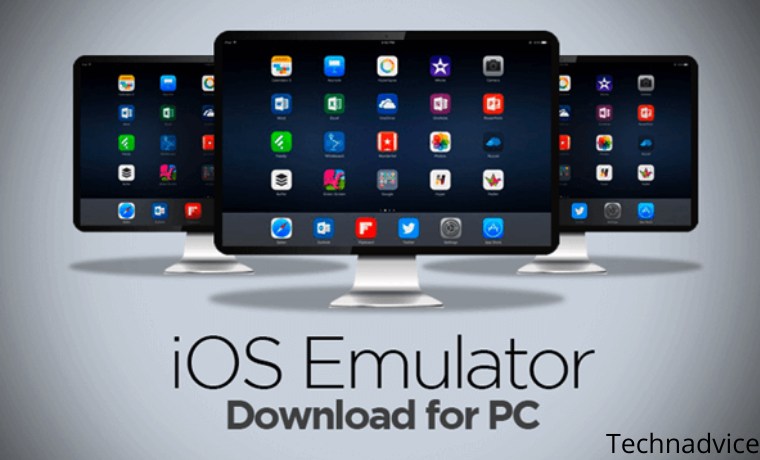
As the name implies, the iOS Emulator provides an iPhone experience on a computer or laptop. Only with a computer or laptop that you have, you can experience using iOS without the need to have an iPhone first.
With this iOS Emulator, ordinary users and even developers can be helped to develop their applications before they are released to the public.
Developers deliberately try their applications on emulators like this before they are released to the public. This is done to test and monitor the performance of the application. Because of this need, there are so many emulators for Android, iOS, and other operating systems have sprung up on the internet.
List of Best and Latest Best iOS Emulators
Like other emulators, the iOS Emulator can also be used on computers or laptops with Windows and Mac operating systems. Therefore, emulators like this are worth trying so you can experience using iOS for yourself or develop your version of the application.
Just learning the code and programs can be done with the help of this iOS Emulator. Interesting right? Without further ado, here are some of the best iOS Emulators that you can use on your PC and laptop:
#1. Emulator for iOS IPadian
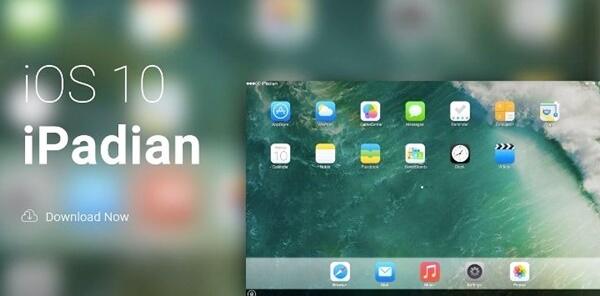
iOS software developers or hobbyists who use Windows are familiar with this application. iPadian provides an experience for users to experience the iOS operating system with a display similar to Apple’s tablet, namely the iPad. With a Windows-based computer, this application can run smoothly and users can use the applications available on it, just like the iPad.
Unfortunately, some applications cannot be used such as iMessage because applications like this can only run on Apple’s original software such as iPad, Mac, and iPhone. To download iPadian, you can directly visit the site at the following link: https://bit.ly/3E3BHII
#2. Emulator iOS Appetize.io
Next up is the web-based iOS Emulator, Appetize.io. Unlike previous emulators, this emulator does not require the user to first install it on a computer or laptop. By directly using a browser like Mozilla Firefox or Google Chrome, you can directly access it and use iOS features for free. To test your developed application, you can upload it to this site and your application will run and be controlled through your browser. Simple isn’t it?
When using Appetize.io, you will get the first 100 minutes for free and it will cost you $0.05 per minute. It’s not expensive for an interesting feature like this, moreover, you only need to use a browser to test your application. To try this Appetize.io emulator, please visit the official website using the https://bit.ly/30qKOFk
#3. Emulator iOS AIR iPhone Emulator
AIR iPhone, as the name implies, this software is a development of Adobe AIR which is devoted to providing users with an iOS experience. Unlike other iOS Emulator software, this software is specifically for developers or developers who want to test their applications or test the features contained in iOS.
Developers can check if their application runs smoothly or if there are problems and errors in it using this iPhone AIR.
To use this iOS Emulator, you need Adobe AIR on your computer and laptop. After that, please download AIR iPhone at the link below: https://bit.ly/3pVpGzL
#4. Smartface iOS Emulator
Smartface is an iOS emulator that can run on the Windows operating system. In fact, not only serves as an emulator, Smartface can also be used as a Debugger or to find Bugs and fix them.
Users can download apps from the App Store and learn about and debug those apps. Developers can directly change the coding of the program in real-time, so there is no need to leave the emulator first. You can even choose the environment from various iOS such as iPhones and iPads.
This emulator can be obtained for free and you can download it on the official Smartface website or by clicking the link below: https://bit.ly/3pWK5EK
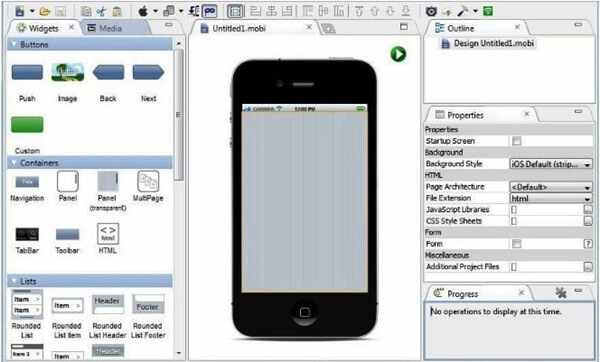
#5. Emulator iOS MobiOne Studio
The next application is an application that is very popular in the developing world of iOS software development, namely MobiOne Studio. This application is popular because many developers are helped in developing iOS applications thanks to its features it.
You can change the UI of this application, run iOS applications, develop iOS applications, choose portrait or landscape mode, and much more. With the help of App Sync technology, you can use MobiOne Studio to test large applications.
#6. Emulator iOS Ripple
Apart from Appetize.io, Ripple is also a web-based iOS emulator that can run on a web browser. By using browser applications such as Mozilla Firefox and Google Chrome, users especially developers can run iOS smoothly.
Many hobbyists and iOS developers take advantage of this emulator because Ripple can be relied on in terms of debugging and testing applications. Although users are required to pay or become premium members first, the developers still use this application because of its good performance. For Ripple, you can use the link at https://bit.ly/31RbPml
#7. Emulator iOS Xcode
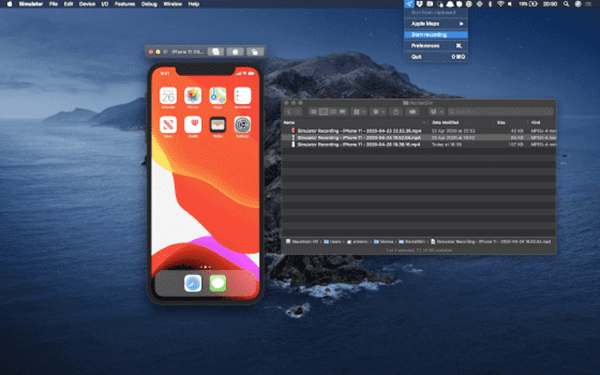
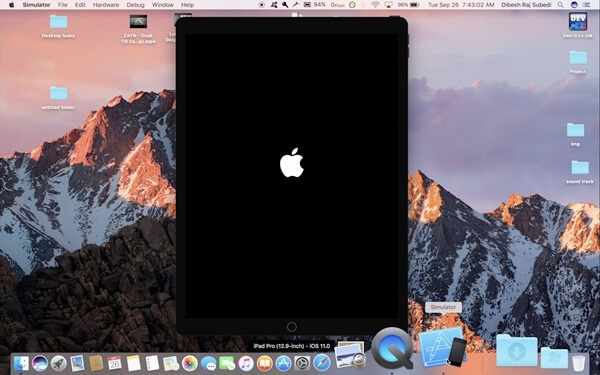
Another iOS Emulator that is widely used by users and developers is called Xcode. Unlike other Emulator software, Xcode can only be used on Mac or Apple computers.
This is because Xcode is an application that was released by Apple itself as software for developing iOS software and applications. Because this application was released by Apple itself, the features contained in it are not arbitrary.
The features in Xcode are specifically designed for developing iOS applications so that developers can get the most out of applications.
Even not only iOS, developers can develop applications for macOS, WatchOS, and also tvOS. If interested, you can get Xcode on the official website by entering your Apple IDE using the link below: https://apple.co/320diXp
After getting an iOS Emulator that is suitable for you, you can immediately download and install it. Then, you can immediately taste an iOS-flavored Windows computer and start developing your applications or just take a look at the features in it.
Why is an iOS Emulator Important?
As ordinary users, we may never think about how an application runs. We may only use it according to the instructions listed or use it as we please.
However, unlike ordinary users, developers must think about every application aspect carefully. Even the slightest errors and bugs can be a problem for the application and must be fixed immediately.
Imagine if there was no iOS Emulator, developers would have to buy iPhones and iPads with various versions before being able to develop their applications.
The costs used will be very high and the free applications that we usually enjoy will turn into paid applications even though the application is trivial. Thanks to the iOS Emulator, we as users also benefit, although not directly.
So, friends, This is the explanation of The 7 best iOS emulators for Windows and Mac, which you can use to develop your own iOS applications. Not only developers, but ordinary users can also experience using the iPhone on their computer without the need to buy an iPhone smartphone.
How to Root Redmi 4A Without PC (100% Working)—If you have a Xiaomi Redmi 4A Android Smartphone and you want to root it safely without a PC, Mac, or laptop, then you are in the right place. This article will guide you through rooting the Redmi 4A without a PC.
How To Root Redmi 4A Without PC (100% Working)
How to Root Redmi 4A Without PC (100% Working)
Xiaomi Redmi 4A is powered by a 1.4GHz quad-core Qualcomm Snapdragon 425 processor and comes with 2GB of RAM.
This phone packs 16GB of internal storage which can be expanded up to 128GB via a microSD card.
As far as the camera is concerned, the Xiaomi Redmi 4A has a 13-megapixel main camera on the front of a 5-megapixel selfie.
Enable Root Access on Redmi 4A without a PC
So many users want to reboot their Android phone to unlock more features several ways allow you to enable root access on your Android device.
In this guide, we will show you how to Root Redmi 4A without using a PC / Computer. So before you start the guide, let’s look at the advantages and disadvantages of the Redmi 4A root.
The advantage after you root Redmi 4A without a PC
You will be able to Update Redmi 4a to Android 7.0 Nougat.
You will be able to do customization
You will be able to add tweaks such as battery tweaks which increase battery life.
You will be able to Install Custom ROMs on your device.
Disadvantages of having rooted your Redmi 4A without a PC
After you root Redmi 4a without a PC your warranty will expire.
Sometimes the cellphone becomes slow if the procedure is not followed correctly.
Pre-requirements before you do root Redmi 4a without a PC
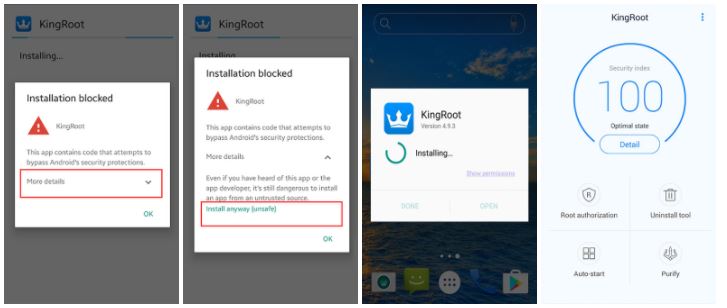
After the KingRoot download is complete, install the Kingroot APK.
If you receive a ” Google installation message blocked “, take the following steps.
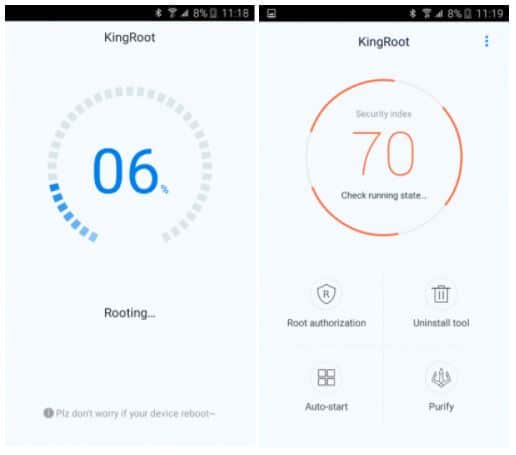
How to Root Redmi 4A with Kingroot
If you have not set it before ” install blocked “, it will set a reminder, such as the steps in the following image, if you have set it before, skip this step.
On the System installation screen, click ” install ” to start the installation, when the installation is complete, click the ” open ” button to start using Kingroot.
install blocked
Click ” try ” to enter the main interface, and click the ” get now ” button to start rooting.
The implementation process is complete and complete, and after that, you will return to the main screen, then Rooting is complete.
#2. How to Root Redmi 4A without a PC with KingoRoot
Download the latest version of KingoRoot APK.
After the KingoRoot download is complete, install the KingoRoot APK.
If Chrome warns you about KingoRoot.apk, click “OK” to continue.
Install KingoRoot.apk on your device. Suppose you don’t check “Unknown Sources” in Settings> Security, then during installation. In that case, you will get “Install blocked”, which states that “For security, your cellphone is set to block the installation of applications obtained from unknown sources”.
Just follow the telephone instructions and install Kingo Root on your device and allow installation from “Unknown Sources”.
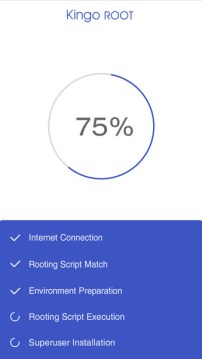
Launch the “Kingo ROOT” application and click One Click Root to start rooting.
Wait a few seconds for the results screen to appear.
How to Root Redmi 4A without a PC with KingoRoot
Finally, open the search and Download the Google Play App Store: Root Checker to Check the Root successfully, like the following image that represents success.
Done!
#3. Root Redmi 4A with SuperSU
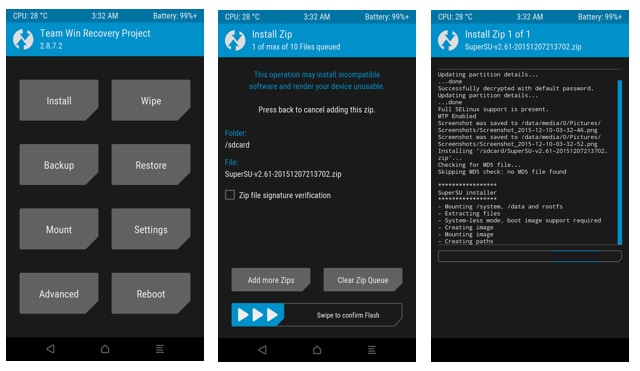
The whole rooting process is easy after opening the Unlock bootloader and flashing TWRP. Now, you only need to flash the Supersu.zip Flashable file and you are ready to go.
1. Boot into TWRP Recovery using the Power on + Volume Up button.
2. Select “Install” from the menu.
3. Select SuperSu.zip, and save your device’s internal storage.
4. Select the ” Swipe to confirm flash ” button. This will flash it.
5. After installing Wipe Cache & Dalvik Cache select the reboot option.
The first boot will take time to load all of your applications. So wait a minute.
Root Redmi 4A with SuperSU
Well, done, and root successfully
How to Unroot Xiaomi Redmi 4A?
It’s easier to root your device. You can easily root your phone by using the SuperSU application that we use to manage root permissions.
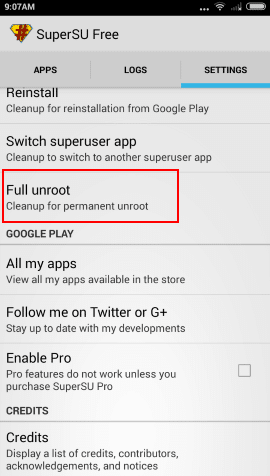
1. Open the SuperSU application from the application menu.
2. Open the Application settings.
3. Scroll down and select the Unroot & Reboot your mobile option. This will root your device in a few seconds.

 Follow the steps below to establish a free Course Hero account:
 The following are some of the benefits of Course Hero Premium membership:
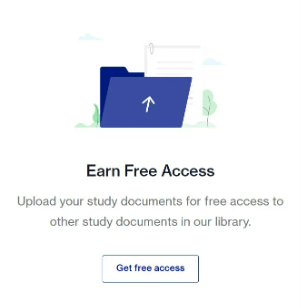 When you create your free Course Hero account, you are asked whether you want to access the content by paying a membership fee or uploading your study documents.
 #4. Utilize the Course Hero Promotion
![Download Latest SuperSU ZIP Root Files Apk [Official] 2025](https://technadvice.com/wp-content/uploads/2021/04/Download-Latest-SuperSU-ZIP-Root-Files-Apk-Official.jpg "Download Latest SuperSU ZIP Root Files Apk [Official] 2025 3")