How to Play PS4 Game on Android All Smartphones—Who doesn’t know PlayStation? Sony created the PlayStation in 1994, and it has become very coveted by gamers.
How To Play PS4 Game on Android All Smartphones
How To Play PS4 Game on Android All Smartphones
At this time, PlayStation has entered the 4th generation. PlayStation 4 (PS4) games have good gameplay and charming graphics.
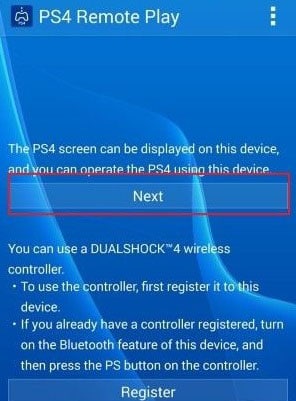
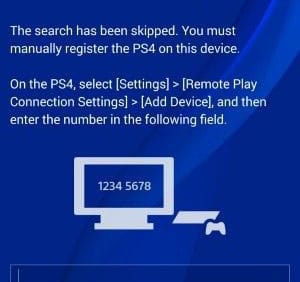
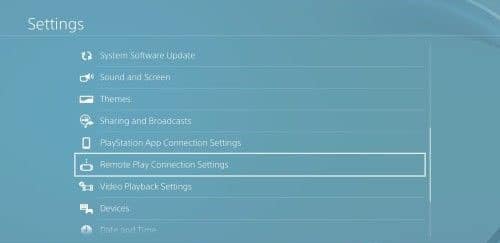
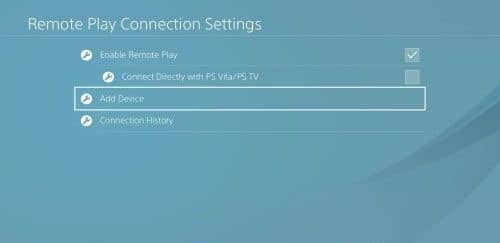
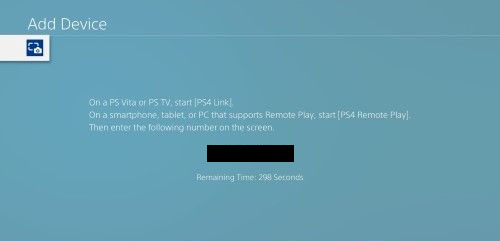
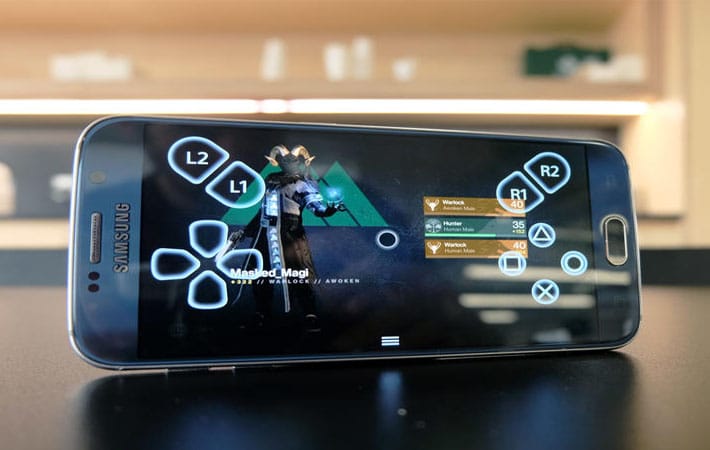
This can be done officially by using the PlayStation Remote Special Application. Unfortunately, this application can only be used on Sony Xperia series smartphones. In this discussion, all Android smartphones can be used for this!
#1. Initial Preparation
Here are the things that need to be prepared:
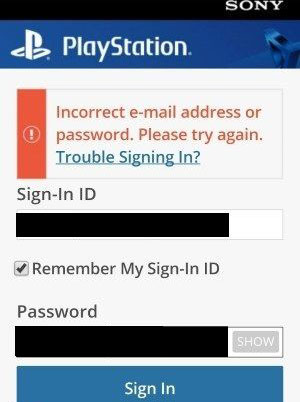
PlayStation 4 connected to a PSN account.
Any brand Android smartphone, as long as the 4.2 operating system and above.
So, friends, this is the explanation of how to Play PS4 Games on Android smartphones, Now you can play PS4 games like the Nintendo Switch that can be carried anywhere.
7 Ways To Play Nintendo Games on PC – For those of you who were born in the ’80s to ’90s, you must have played Nintendo games.
7 Ways To Play Nintendo Games on PCLaptop
How To Play Nintendo Games on PC and Laptop
Yup, Nintendo was one of the most popular consoles of its time. When it can be said Nintendo is one of the few consoles that are commonly encountered other than the Playstation.
Nintendo itself is still being developed and many of the latest games are released following the times.
However, many also know people who want to play old Nintendo games. For example to remember childhood, hehe.
Well, here I want to discuss a little about how to play old Nintendo games on a PC or laptop.
How to Play Nintendo on PC or Laptop With Emulator (NES)
To play NES ( Nintendo Entertainment System ) games on a PC or laptop, you must first install an emulator. Commonly used in general is Nestopia.
This emulator is light and the size is not too big. In addition, Nestopia supports netplay which allows you to play together with other people.
Here’s how to play Nintendo using Nestopia on a PC or laptop:
#1. Run the Nestopia Emulator
First, please download the Nestopia emulator first. If so, extract the file using Winrar or Winzip.
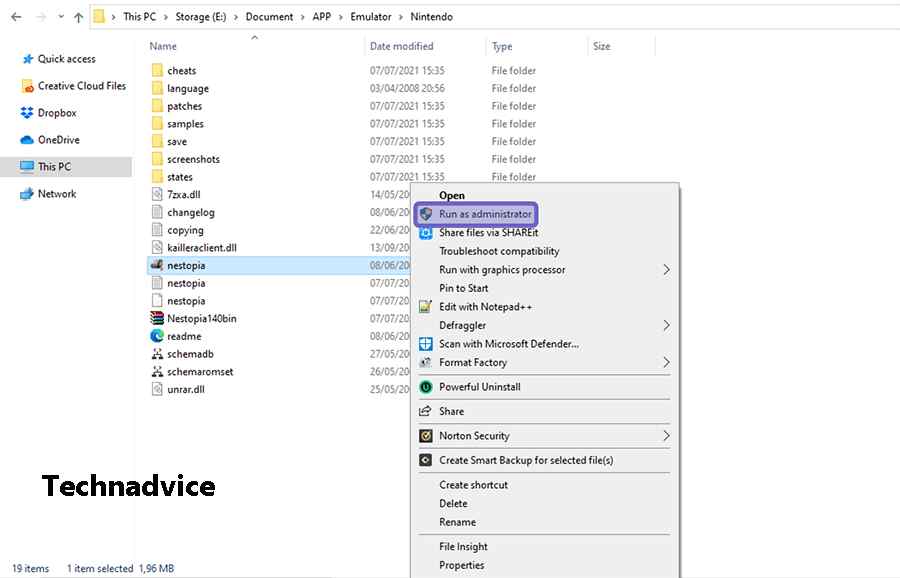
Later, the files from Nestopia will appear. Next, right-click the Nestopia application, then select the Run as Administrator option.
#2. Open the Open Menu
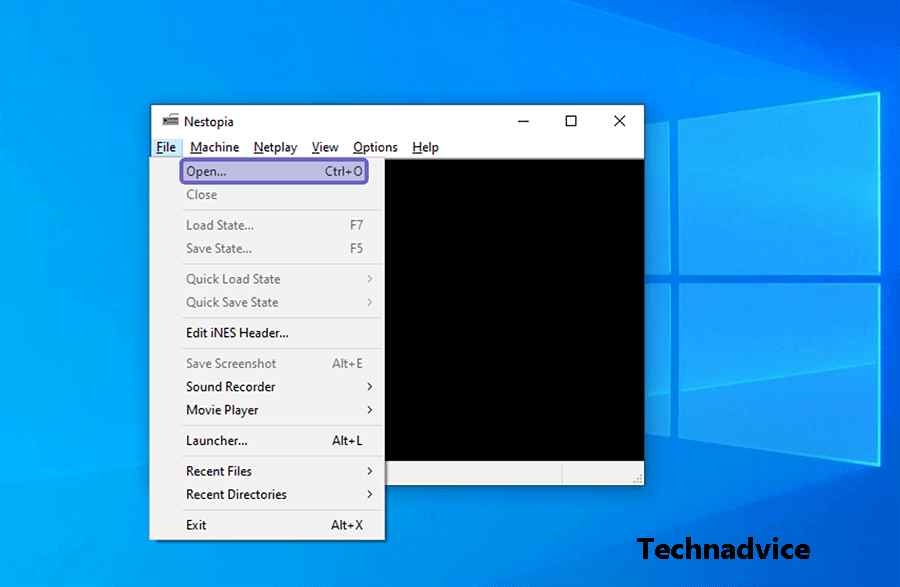
After the Nestopia emulator opens, please click the File tab. Then select the Open menu to open Explorer.
#3. Search Nintendo Games
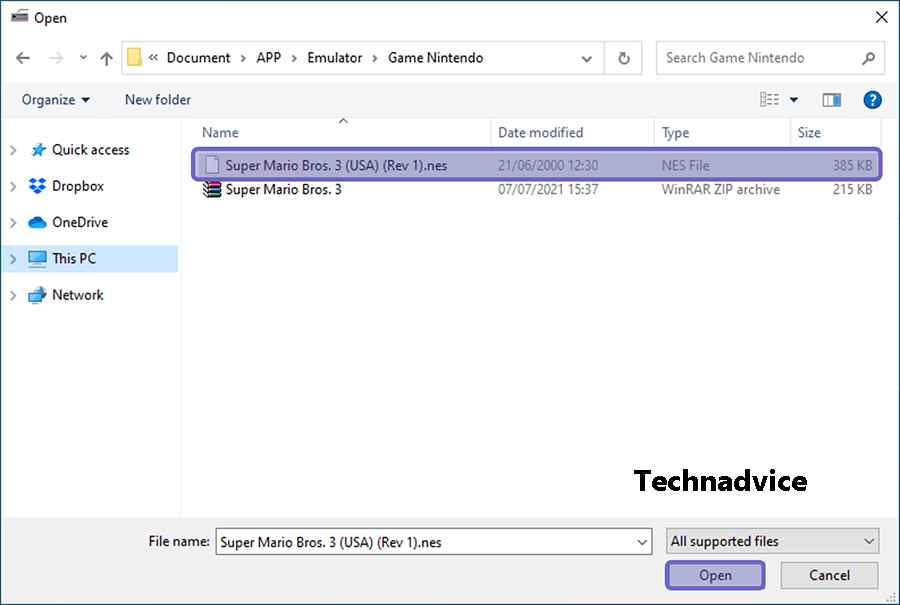
After File Explorer appears, please locate the Nintendo game file you prepared earlier. If you have clicked the Open button.
#4. Play Game
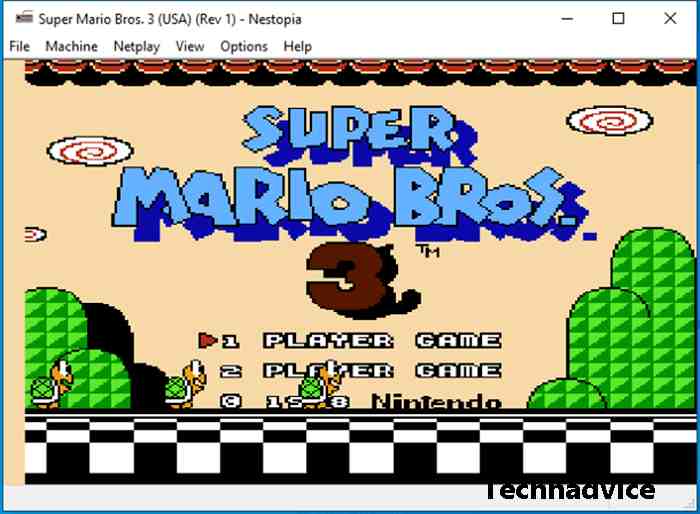
If successful, then the game you selected will appear in the emulator. Now you can play the game.
Other Emulators That Can Be Used To Play Nintendo
Apart from the NES, there are also several other types of Nintendo emulators. Like Nintendo Wii, Switch, and 3DS. The three emulators were developed by different developers. Here’s the full explanation:
#1. Dolphin Emulator (Nintendo Wii)
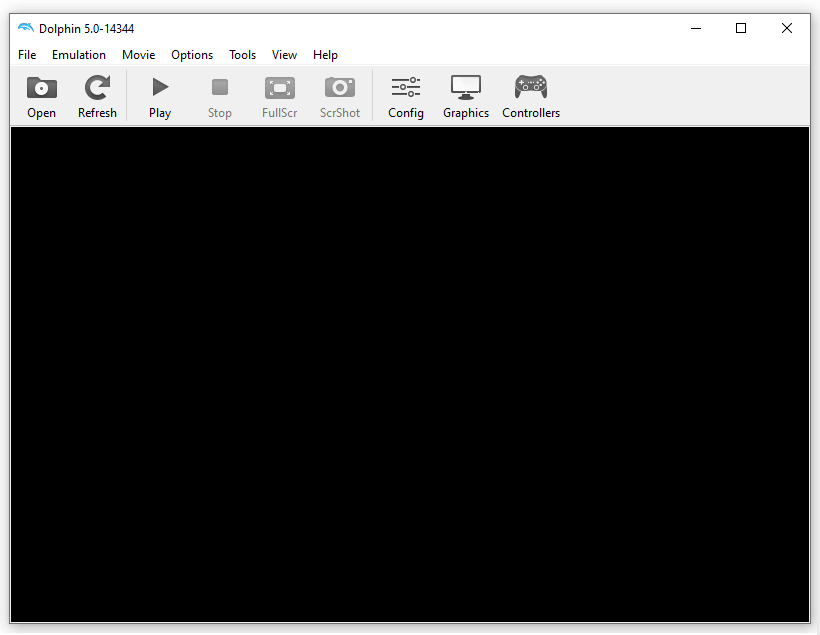
To play Nintendo Wii games, most people usually use the Dolphin Emulator.
This emulator has various audio and graphics settings. So that it can be adjusted to the specifications of a PC or laptop.
In addition, this emulator can not only run Nintendo Wii games, but you can also play NGC (Nintendo GameCube).
Another plus is Dolphin Emulator supports various operating systems. Starting from Windows, Linux, and macOS to Android.
#2. Yuzu Emulator (Switch)
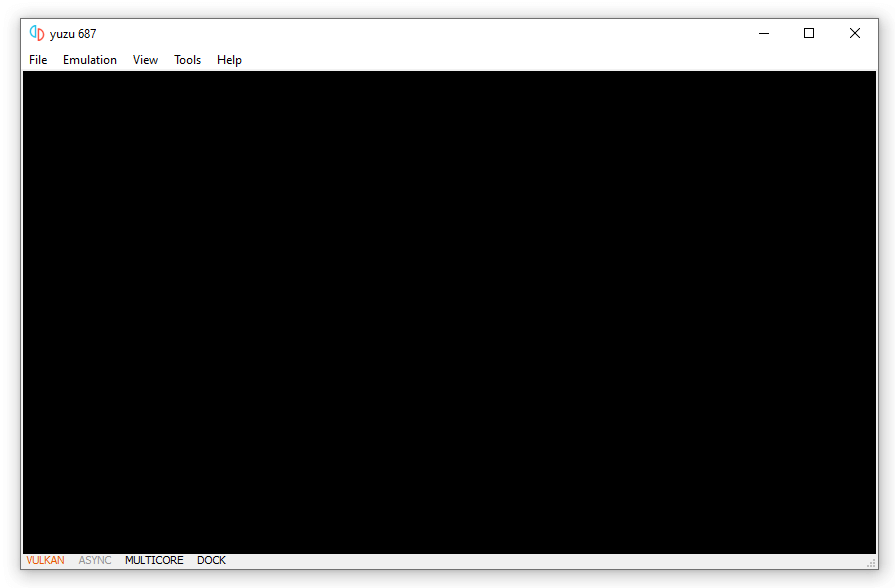
Furthermore, if you are a Nintendo Switch fan, you can install the Yuzu Emulator.
Yuzu Emulator is an emulator designed for Nintendo Switch games. This emulator is also quite light to run and its performance tends to be stable.
Yuzu Emulator supports Windows and Linux operating systems. And to find out complete information, you can check through the official Yuzu Emulator website, at yuzu-emu.org.
#3. Emu Image (3DS)
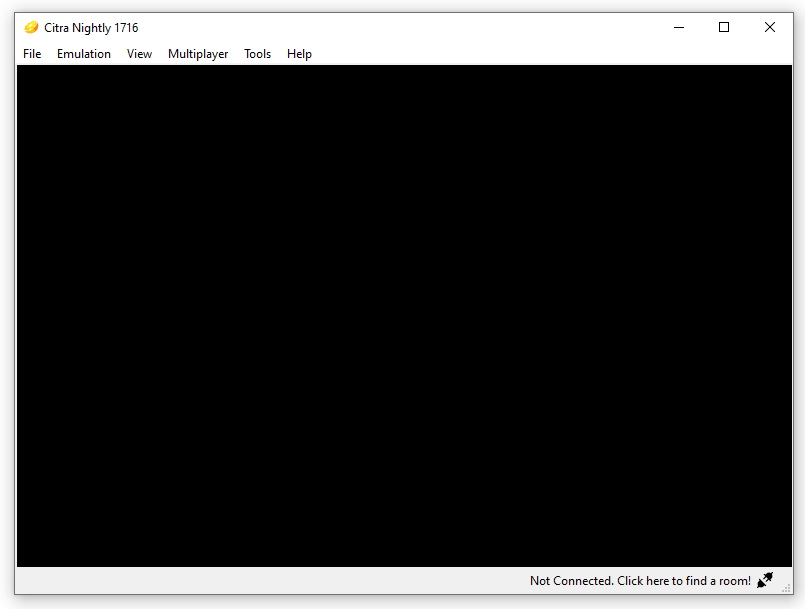
Finally, for Nintendo 3DS, you can use Citra Emulator.
The emulator, which was originally developed in 2013, is now one of the choices for gamers to play Nintendo 3DS games.
There are many features in Citra Emu. One of them is the multiplayer feature that allows you to play with other people.
This emulator supports multiple operating systems. These include Linux, Windows, macOS, and Android.
It should be noted a little, to run the emulator, the PC or laptop used must be a little qualified in terms of specifications. Especially if the emulator used is Nintendo Wii and Nintendo 3DS.
Usually, the memory resources (RAM), processor, and VGA used by the two emulators are quite high. So, the game will lag on a computer or laptop with low specifications.
If you have questions about the Nintendo emulator, don’t hesitate to post them in the comments column.
4 Ways to Recover Mobile Legends Account – The Mobile Legend is a MOBA game that can be played on an Android or iOS smartphone. This game is very popular, especially in Indonesia. To play this game you can register directly using a Moonton account, Facebook, or VK.
How to Recover Mobile Legends Account
Some mobile legend players must often experience problems with their accounts and the most common problem is a lost ml account usually, this happens because the account is hacked. To overcome this, there are several ways or solutions that you can try.
Starting from using related accounts, using temporary accounts, and even contacting customer service.
Here we summarize how to recover the mobile legends account that you must try to get the account back.
#1. Account Not Bind
If you talk about mobile legends accounts, then it is closely related to the binding system. Each player is required to bind to several social media options, including moonton account, Facebook account, and VK account.
So one day you can login only by using the related account. This option can be a way to recover the lost ml account.
First, open the mobile legend
Next, select the available login options, it can be Facebook or Vk
You will automatically be asked to login into the related social media
If successful, you will login to mobile legend, and your ml account is back
So, if you play mobile legend, make sure that your mobile legend account is linked to some of the social media options that have been given. If you can login with all available options, be it Facebook or Vk.
#2. Temporary Accounts
In addition to the social media bind system, mobile legend also has a Temporary Account feature. You can also use this option to restore your mobile legends account.
Of course to use a Temporary Account or temporary account you have to create it first and after creating it you will get a QR code that is used to log back in.
First, open the Mobile legend application on your smartphone
Then select the login option using a Temporary Account or a temporary account
Next, select the QR code photo from the Temporary Account that you have saved
After the QR code upload process is successful, you will be asked to enter a password
#3. Lost due to Advanced Server Move
Mobile legend has 2 different servers, namely the original server and the Advanced Server. Advanced Server has faster updates, such as hero updates, maps, and more.
Some players are curious and want to try Advanced Server, their old account will automatically disappear and become a new account.
Here’s how to restore an account lost due to moving to Advanced Server.
First, open Mobile legend and login with your account
Go to the profile section and select the Account Settings menu
At the bottom right, press Back to the Original Server
Click OK to continue and your account has returned to the original server
#4. Contact Customer Service Mobile legend
If the problem of a lost ml account cannot be resolved in several previous ways, then this last method is quite powerful way, namely by contacting the Mobile legend help center.
First, open Mobile legend
Then press the help menu or customer service usually in the upper left corner
Then select the Account Problem or Account Problem option
Continue to select the Retrieve Accounts menu and select Forget Platform Accounts
Later a form will appear that you must fill out, please fill it in with your correct data, and in the Reason about Lost Accounts section fill in the reason your account is lost, my advice is to use English, you can use Google translate
Finally, press the submit button
Until here you just need to wait for the mobile legend to read the complaint you have made, usually, they will send a reply message to the related account information, such as email.
Conclusion:
That’s how to recover mobile legends account. By doing the above method, now your mobile legend account is back and can be played. May be useful.
25 Best Under 100MB Offline Games For Android – In this article, we will provide recommendations for offline Android games that are interesting to try, and of course, have a light size, with only around 100MB.
Top 25 Best Under 100MB Offline Games For Android
Top 25 Best Under 100MB Offline Games For Android
#1. Spades – Online Alternatives
While the games listed above are some of the best offline for Android, other alternatives can provide just as much entertainment. A couple to mention is Spades.co, an online take on the popular card game Spades. The second is 2048, a grid game where players move keys to combine numbers.
#2. All-Star Fruit Racing VR
All-Star Fruit Racing is a game developed as a VR game. But even so, you can also play without even using VR. In this game, you will control a vehicle and collect every fruit that is scattered along the track.
After reaching the finish line, the vehicle will make a jump based on how fast you finish the track and collect each fruit. The more fruit you collect, the further distance you can jump. For that, there are several different tracks that you can play.
Mode: Offline
Genre: Racing
Size: 92MB
Download All-Star Fruit Racing VR
#3. Broken Dawn: Tempest HD
The Broken Dawn game series always presents games with cool serving quality even though they have small sizes. The Tempest HD series also has a detailed presentation, starting from the environment, and good lighting, to various battle effects that can be packaged stunningly.
In this game itself, you will play a character to complete the various levels available with shooter gameplay. The farther the progress, the stronger the enemy you will have to face. For that, you can upgrade weapons and various other elements to make it easier to defeat the enemy.
Apart from the second series, the first series of Drift Zone is also one of the recommended drift games to play. This game will be suitable if you are looking for a game that is light but has a quality that doesn’t disappoint.
Not only does it present a satisfying graphic presentation, this game is also supported by good game controls. To play, you can play by completing dozens of levels or play as you like in freeride mode.
This game presents a variety of cars that can be unlocked. Later, you can customize the car and adjust it to suit the way you play.
Mode: Offline
Genre: Racing
Size: 62MB
Download Drift Zone
#5. Hellrider 3
The 3rd series of the Hellrider game comes with a very significant change and becomes even more interesting. Both in terms of concept, gameplay mechanism, perspective, and graphic presentation, it is packed very differently from its predecessor series. By carrying out arcade-type gameplay, this game combines it with interesting story elements that you can follow.
You can follow the story by completing each mission that you must complete. For the gameplay mechanism itself, here you will bring a character to drive a motorbike.
Later, you will do various things on the motorbike, such as avoiding collisions, avoiding bombs, to fighting against enemies.
Truck Driver Crazy Road is a simulation-type game where you will simulate the process of driving a truck. The truck will transport various objects, such as wood, tree trunks, and even furniture. The goal is to reach the finish point.
Apart from requiring you to drive a truck on difficult offroad roads, you will also fail if the goods being transported fall. As a simulation game, this game presents a simple control mechanism and is supported by fairly realistic vehicle physics. Later, you can complete up to dozens of levels which are divided into 4 different locations.
Developed using Unreal Engine 4, The Slayer RPG features a hack-and-slash game theme. In this game, you can play in several game modes, such as completing levels or doing battles in dungeons.
There are several types of monsters that you will meet to fight. Conceptually, this game presents a game theme that will remind you of the God of War game. Meanwhile, in terms of gameplay, this game presents quite promising gameplay, but the game controls and the various battles are arguably less smooth.
Mode: Offline
Genre: Role-Playing
Size: 181MB
Download The Slayer RPG
#8. The Cook
Carrying a game concept that is unique and different from most other games, The Cook is a game that is quite entertaining for all ages. In this game, you will have the experience of owning a food truck and selling various types of food or drinks.
For the gameplay itself, you have to present each customer order appropriately and according to demand. After serving food, you will get money which you can later use to buy various other food ingredients. With a colorful presentation and a simple but varied gameplay concept, this game is suitable for filling your leisure time with fun.
Racing Rocket is a racing game with a fun game concept and comes with very good presentation details. Even though it has a size of about 100MB, various elements in this game can be presented beautifully, starting from the car, and the track, to the car physics while playing.
In this game itself, you can play in several different game modes such as mission mode and endless. In mission mode, you can complete the many missions available. Each mission has a unique gameplay mechanism, starting from competing to be the fastest against other characters, reaching a certain target distance, and so on.
For that, this game provides a variety of different cars that you can unlock with the coins collected. In addition, you can also upgrade to improve car performance.
Mode: Offline
Genre: Racing
Size: 89MB
Download Racing Rocket
#10. Don Zombie: A Last Stand Against The Horde
Set in a world that has been hit by a zombie plague, Don Zombie will take you to survive as the last human. By carrying out action shooter type gameplay, here you will fight against hordes of zombies which are divided into various levels.
Uniquely, each level in this game is packaged quite uniquely and makes the game less repetitive. This is inseparable from the many different elements that you can encounter after completing the higher levels.
Apart from fighting against hordes of zombies, this game also features a battle against a strong boss. For that, there are various weapons with a total of more than 20.
Still carrying a background that is not much different from the previous game, ZOMBIE SURVIVAL will invite you to a zombie apocalypse situation. The zombie outbreak nearly wiped out the entire human population. As humans who are still alive, you are also required to survive in this situation.
By carrying out 3D action shooter gameplay, you will get rid of zombies. There are various types of weapons that you will find in this game, from shotguns, and submachine guns, to snipers. To make it easier to defeat zombies, this game allows you to upgrade each weapon.
Apart from weapons, there are various types of zombies with unique appearances and abilities that you will encounter in this game. As a game with a relatively light size, this game also presents satisfying graphics.
Taxi Run – Crazy Driver is a casual racing game with a very simple gameplay mechanism. Here you must deliver passengers from one point to another. Of course, passengers must be delivered safely without accidents.
To play, you can press the phone screen to accelerate, and release to apply the brakes. The simple game concept can be packed with various challenges that will become increasingly difficult.
Along the way, you will also be spoiled with various colorful environments that can be packaged attractively.
Drift Sport is a racing game with additional drifting elements that you can do in several different locations. Both the tracks, the environment, and the cars presented are quite cool for 100MB offline Android games. Apart from that, this game provides several game modes as well as a car that you can unlock.
One of the drawbacks of this game is that the physics is not that good so it leads to game control which will be quite difficult. Even so, Drift Sport is a game that looks very promising.
Mode: Offline
Genre: Racing
Size: 65MB
Download Drift Sport
#14. Skyturns
Combining several different elements into platformer-type gameplay, Skyturns brings a very exciting and challenging game concept. How not, here you are required to control the stickman character who will continue to run.
But it’s not that simple, you have to pay attention to speed, and jump accuracy, and solve the various problems that are presented at each level. Besides presenting a challenging game, the graphics of this game are also packed with colorful dishes that don’t disappoint.
So if you want to spend your free time playing games that require more skill, Skyturns is a recommended game that is worth trying.
Mode: Offline
Genre: Arcade
Size: 77MB
Download Skyturn
#15. DEAD CITY: Zombies
As the title implies, DEAD CITY: Zombie is a game that will take you to a city of the dead. The damage suffered by the city cannot be separated from the zombie disaster that spreads rapidly.
By presenting FPS-type gameplay, you will play by killing hordes of dangerous zombies using weapons. The gameplay mechanics it presents are quite simple.
You only have to point your weapon right at the body part of the zombie, then your weapon will fire automatically.
Even though it is a 100MB offline Android game, what this game called Truck Evolution: Offroad 2 is trying to capture is truly amazing. By carrying the theme of offroad games, this game has several advantages that are quite pronounced.
This game can present a graphic presentation with an environment and various effects that are packed with cool quality. In addition, you can find up to a dozen different weather conditions.
As for playing, there are quite several levels that you can complete by reaching the finish line. Apart from the career mode, there are 3 more game modes that you can play. But even so, this game still has bugs on various types of cell phones and makes it get bad reviews.
Mode: Offline
Genre: Racing
Size: 92MB
Download Truck Evolution: Offroad 2
#17. Butterflies Episode 0: The Demo
Butterflies Episode 0 is a demo version of the Game Butterflies which can be downloaded for free on the Google Play Store. By presenting arcade-type gameplay, here you will do inline skating where you will do it in a city.
In the game, various objects can be a place for you to perform cool tricks. Now, one of the advantages of this game is that it presents a very unique visual presentation and is quite different from most other games.
Mode: Offline
Genre: Arcade
Size: 139MB
Download Butterflies Episode 0
#18. Racing Horizon
Presenting a fairly classic game concept, this game is a game that will take players to control a car on a busy road. Even so, Racing Horizon presents various elements that can make it quite worth trying.
The game controls that are presented and the physics can be packed with a detailed realistic concept. To play, this game provides a variety of cars that can be unlocked for later use on 3 different roads.
As for the game mode itself, there are 4 game modes that you can currently play, including mission, endless, time-up, and escape modes.
Mode: Offline
Genre: Racing
Size: 85MB
Download Racing Horizon
#19. Friday the 13th
Presenting the Friday the 13th horror film icon, this game will take you to play the figure of Jason in puzzle-type gameplay. With the addition of horror elements in the game, here you have to play the figure of Jason with the task of slaughtering the victims. In total, there are more than 100 different levels that can test your analytical skills.
Each stage contains several different targets. The farther the progress, of course, the more puzzles you have to solve will be more complex and difficult. Before being released to mobile devices, this game was already released on PC devices.
As a game with a size that is not too large, this game can present a combination of gameplay and graphic presentation, as well as various animations that can spoil players.
Mode: Offline
Genre: Puzzle
Size: 80MB
Download Friday the 13th
#20. Car Parking Pro
Car Parking Pro is one of the games made by Tiramisu, which has released several drift games with cool quality. Well, besides the drift racing-themed game, you can also try playing with a quite different theme in this game.
In this game, you will simulate the process of parking a car in a variety of different situations. Even though it has a relatively small size, this game can display a detailed 3D graphic presentation.
Not only about graphics, but the gameplay it presents is also packed with controls and physics which are made with realistic concepts. As for your car, there are a variety of different cars that you can also customize.
Slap Kings is one of the 100MB offline Android games that carry a unique game concept. The reason is, that in this game, you will have a battle against other characters. Now what makes it unique, the battles that are presented require you to take a slap action.
You can win the fight if your opponent’s health bar reaches zero. The control mechanism itself is quite simple, you have to tap the indicator in the middle position.
Later, your character must also be upgraded to make it easier to defeat your opponent. Even though the gameplay mechanism is very simple, Slap Kings can present a very entertaining game.
Stickman Destroy is a stickman-themed offline Android game with a physics ragdoll that provides 2 game modes, namely running and destroy. For running mode, your job is to control the stickman character to touch the finish flag.
As for the destroy mode, you are required to defeat the stickman character who is your enemy. The two game modes are divided into different levels. Each level certainly has its obstacles which will get more and more difficult along with the progress you have made.
Overall, this game can present gameplay that is quite entertaining and quite challenging even though it comes with a fairly simple appearance.
Mode: Offline
Genre: Action
Size: 60MB
Download Stickman Destroy
#23. Gyrosphere Evolution
If you are the type of player who likes challenges, then Gyrosphere Evolution is a game that might be interesting for you to conquer. In this game, you will control a ball to reach the finish line.
But it’s not that simple, this game presents various obstacles that you have to pass, such as a narrow or slippery track, making jumps, and collecting keys that are scattered along the way to open the finish line.
In total, there are dozens of tracks with several different nuances that you can complete with varying difficulty levels. Besides that, you can also unlock the other balls provided.
Mode: Offline
Genre: Action
Size: 88MB
Download Gyrosphere Evolution
#24. Fire Sniper Combat
Fire Sniper Combat is a game that carries a cover-based shooter gameplay where you will play as an elite force in hundreds of missions.
Not only does shooting action against enemy soldiers, but this game also presents a game mode that allows you to fight against hordes of zombies who are ready to prey on them.
To support the shooting action, this game presents various types of different weapons that you can also upgrade to provide much greater damage.
With the many missions presented and the relatively light size, of course, this game is interesting to play if you only have a small amount of storage memory left.
Presenting gladiator battles in an arena, Gladiator Glory is a game that will bring you to experience quite an intense fighting action.
For offline mode itself, you can play in story mode and complete many battles. Not only focused on using swords and eliminating enemies, but this game also requires you to think of the right strategy for defeating each enemy.
The reason is, that you will find a situation where you will fight against a much larger number of enemies. To help you in the battle, you can also use a variety of different weapons that you can unlock with the gold you have collected.
The last 100MB offline Android game is Overleague. Overleague is a racing-themed game, where you will not only focus on ordinary races but with the help of various weapons that you can get from the weapon boxes along the track.
For now, Overleague is still in the Early Access stage and can be played offline. Because it is still in the development stage, of course, this game does not yet provide complete features, where you can only play one track.
As for cars, there are several cars with unique characteristics that you can use when racing. Although the features are still incomplete, this game looks promising if it is released in a full version and is worth the wait.
Those are the 26 Best Under 100MB Offline games For Android, which are light but have exciting gameplay. Besides being fun, of course, installing these games will save storage memory on your cellphone, right?
Best Settings For PPSSPP on Android (100% Working) – In this post, I will share the best PPSSPP settings so that when playing PSP games on Android it can run smoothly without the broken sound that usually occurs on low-spec cell phones.
Best Settings For PPSSPP for Android Not Complicated
How to Best Settings For PPSSPP for Android
When talking about the PPSSPP game, I remember when I first played racing games on PS1 which at that time I was playing Championship Motocross. It is a very pleasant thing where we can play with friends and duel in a motorcycle race.
However, many users complain that they experience lag when playing games, broken sound, cracked images, and others like that.
Therefore here we will provide the best ppsspp settings that you can use to play PSP games smoothly and smoothly.
Newest Anti-Lag PPSSPP Settings
Newest Anti-Lag PPSSPP Settings
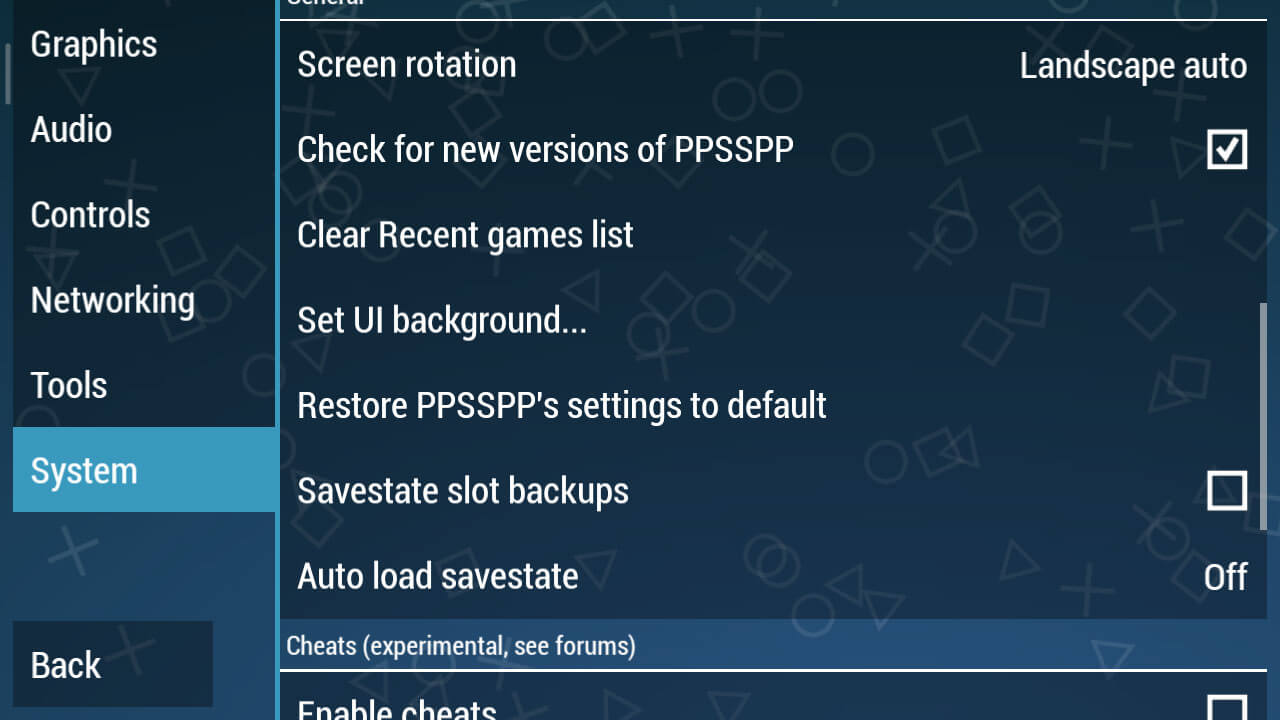
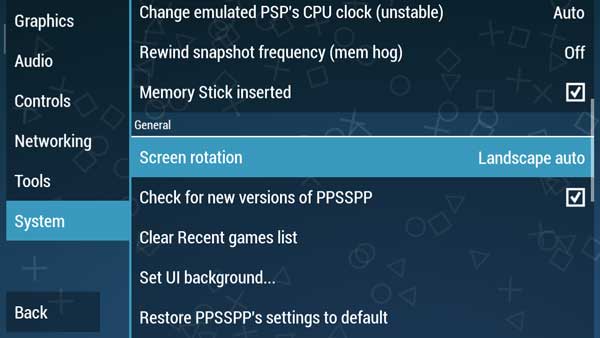
If already installed, now enter PPSSPP then go to the Settings section or Settings. Choose System > General and select Restore PPSSPP’s settings to default so that we can make settings from the start.
Graphic Settings
Continue to the Graphics Settings option, this is the primary key so that a game can run smoothly and not lag. Moreover, problems often arise such as lag, broken, and black screen if you do the wrong graphic settings.
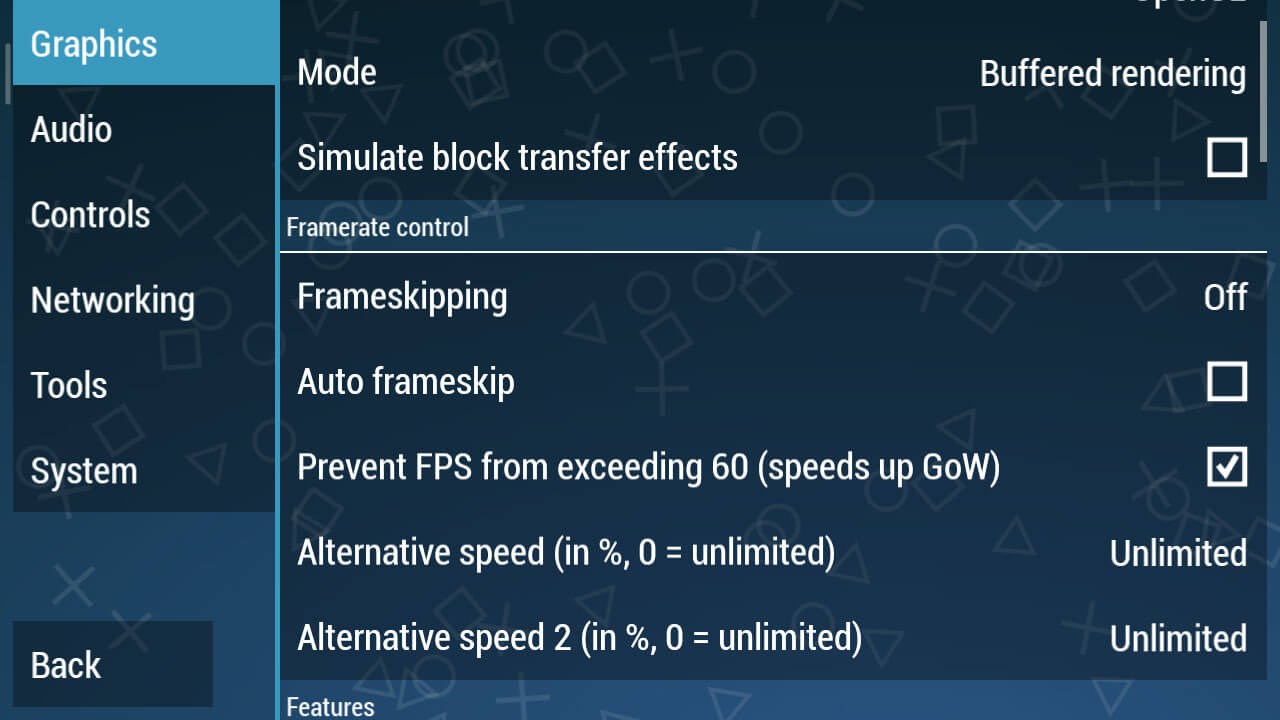
In Backend, select OpenGL
In Mode, select Buffered
Simulate block transfer effects, don’t check
For more details, please see the screenshots above. As for the Buffered rendering, make sure you choose Buffered because it does match some skip-buffered games like the Naruto PPSSPP game, but other games will immediately black screen if you use that mode.
Graphic Settings
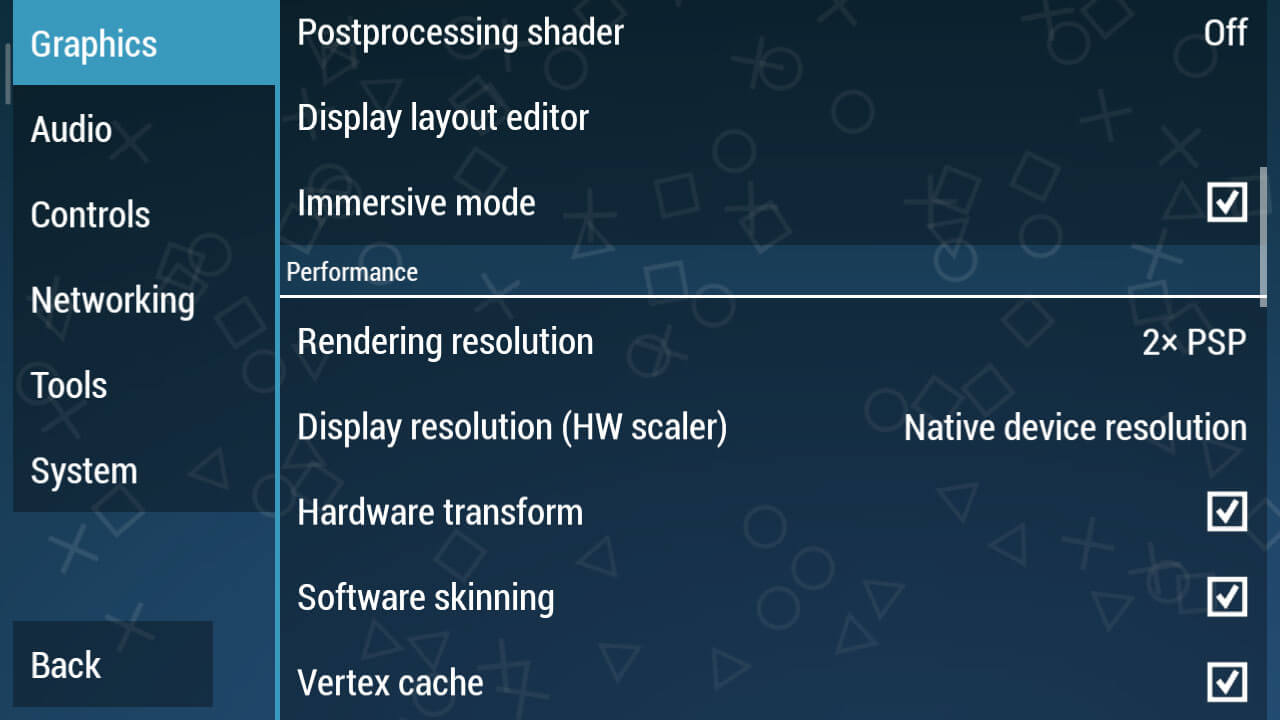
Immersive mode => Check
Hardware transform => Check
Software skinning => Check
Vertex Cache => Check
Graphic Settings
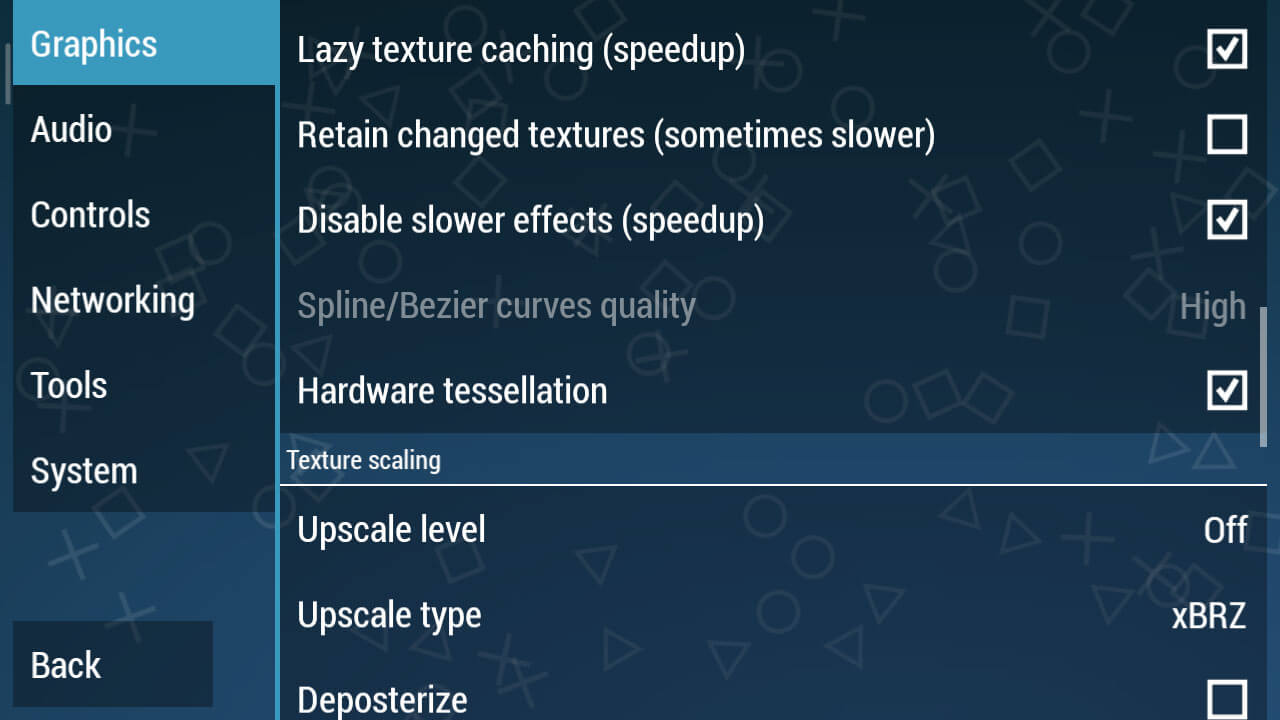
Lazy texture caching (speed up) => Check
Disable slower effects (speed up) => Check
Hardware tessellation => Check
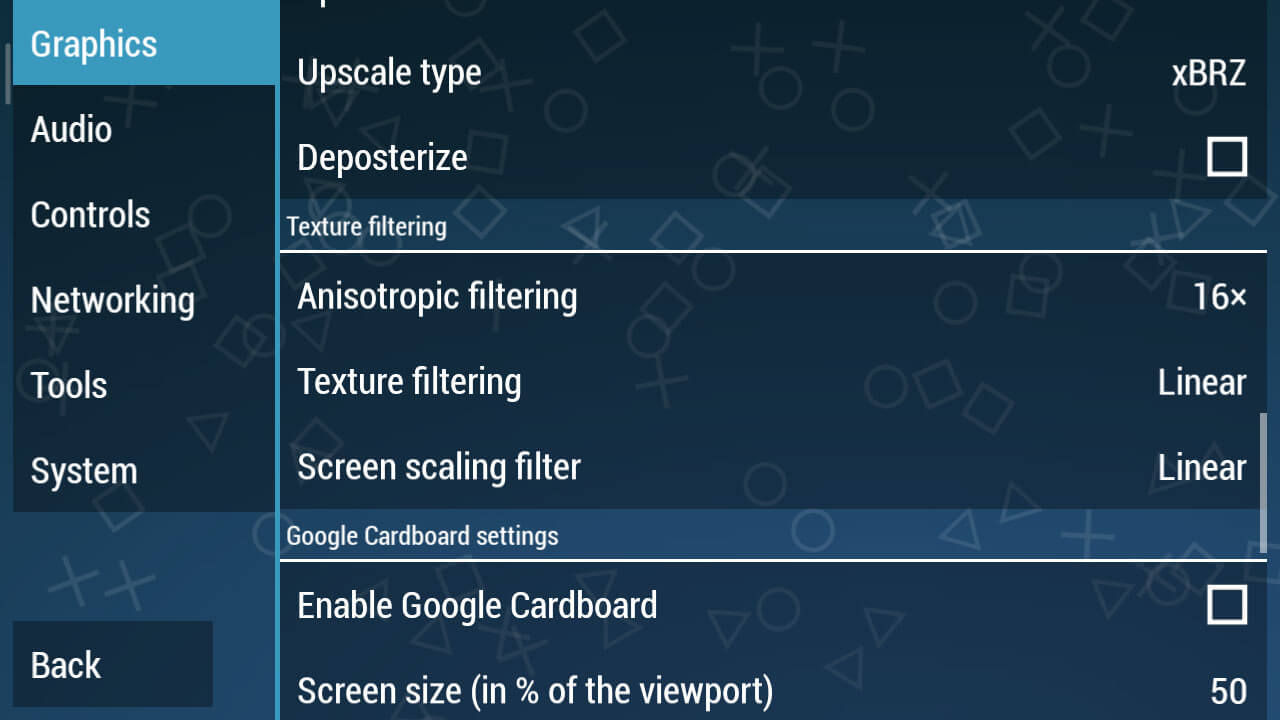
Change Texture Filtering to Linear
Screen Scaling Filter change to Linear
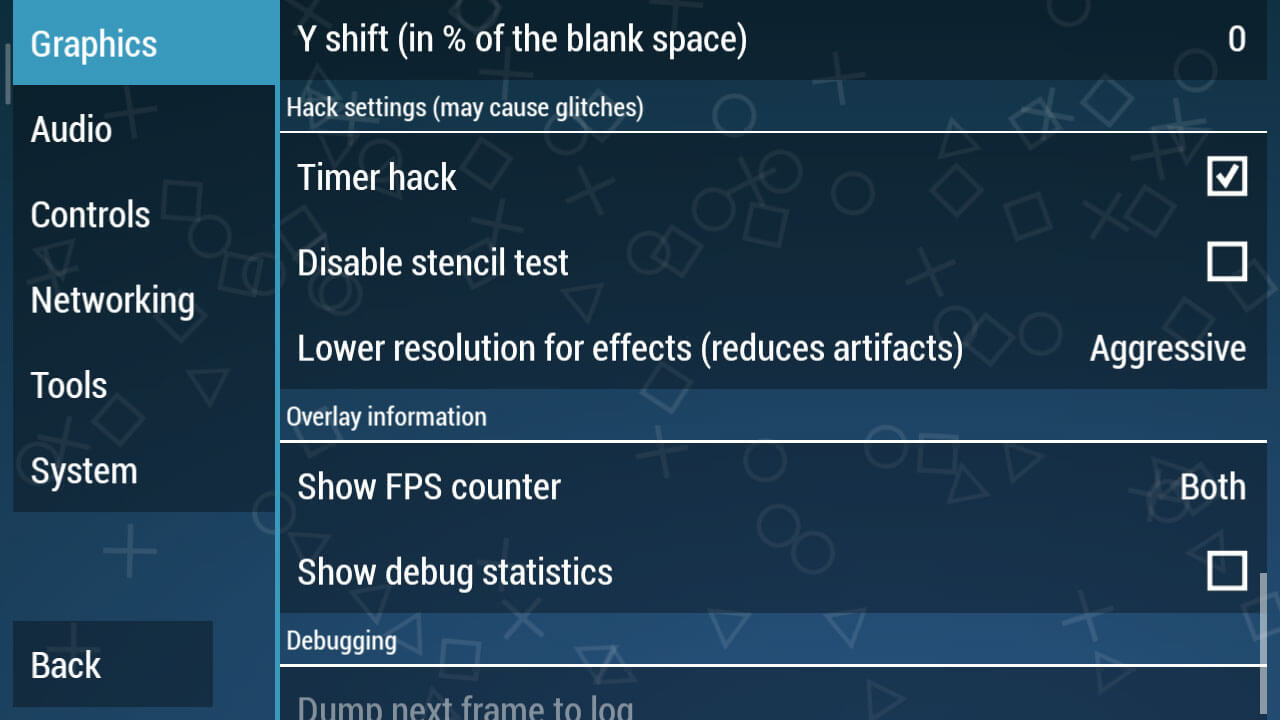
This is the most crucial part, going into the Hack Settings Settings. Check the Hack Timer box, this is a must because this is only in PPSSPP version 1.7.5.
Next, change the Lower resolution for effects (reduces artifacts).
Audio Settings
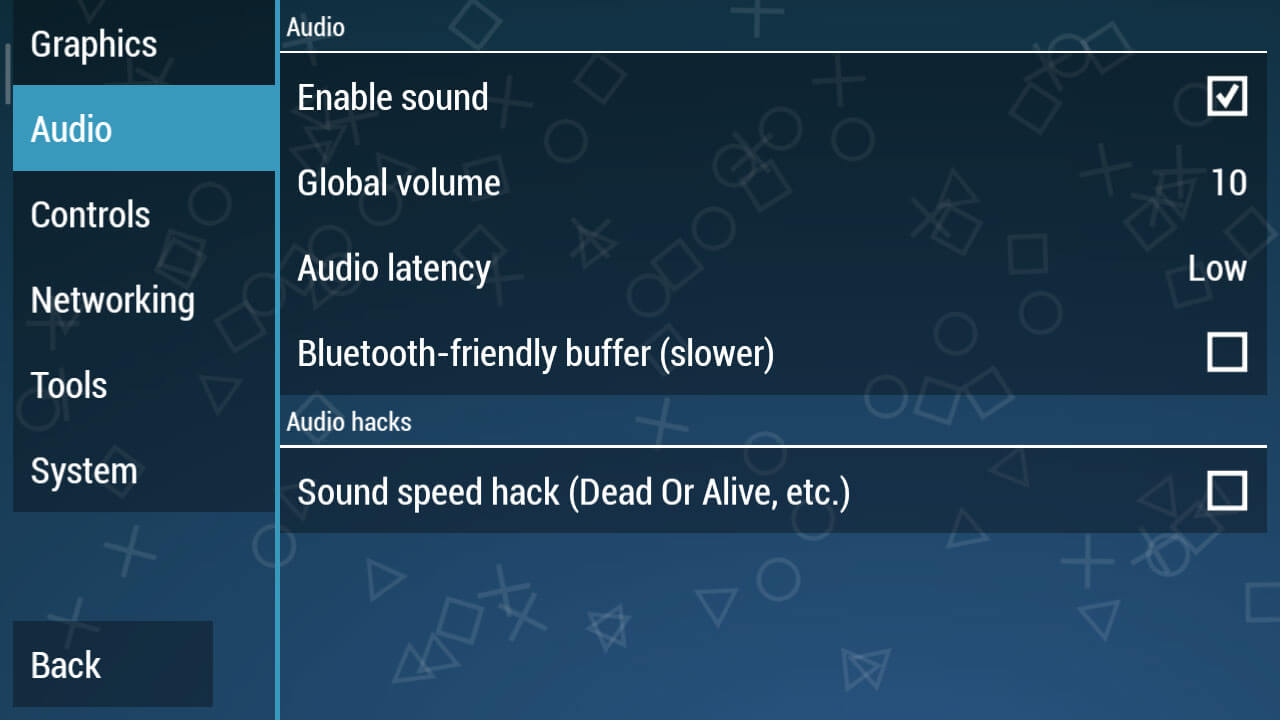
You can just change the Audio Latency to Low. It looks simple, but if this setting has been applied it will clear up the sound of the game being played later.
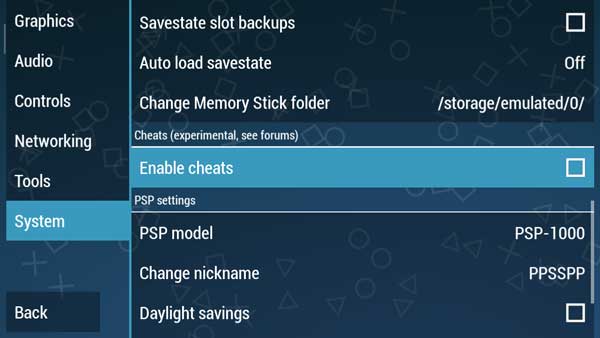
System Settings
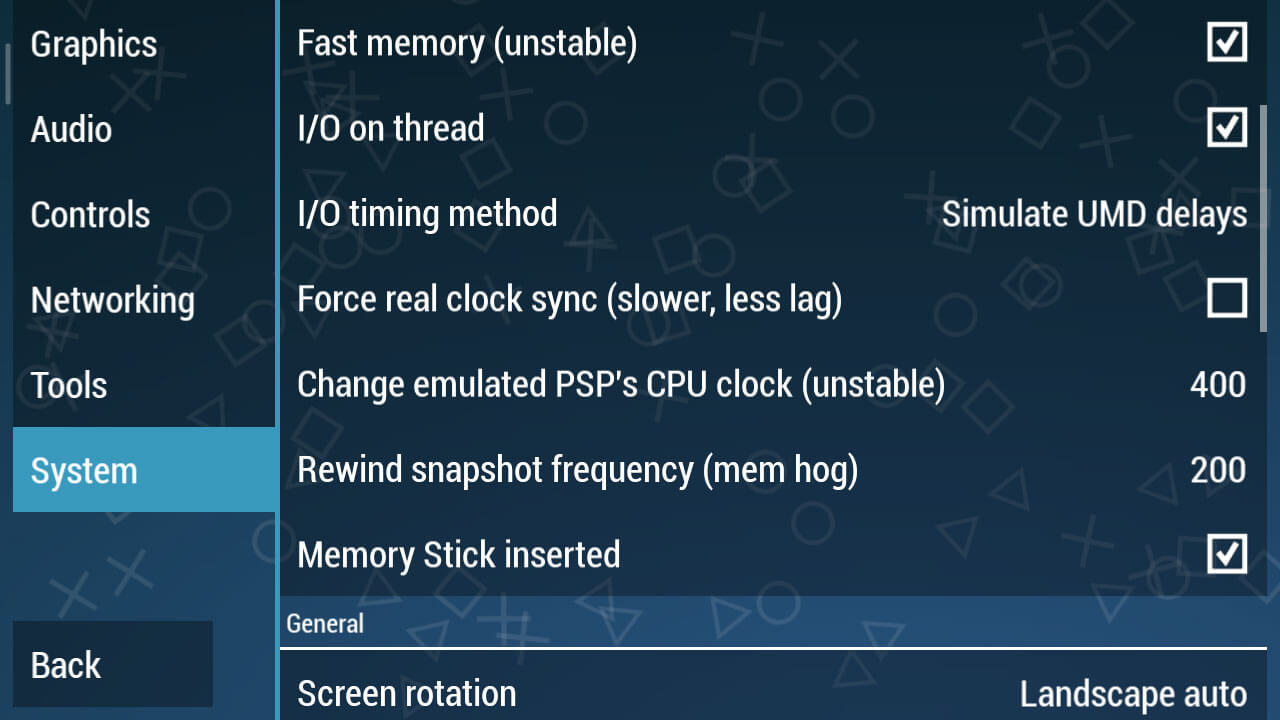
I / O timing method changes to Simulate UMD delays.
In the Change emulated PSP’s CPU clock (unstable) section, change it to 400.
Then in Rewind snapshot frequency (mem hog) change it to 200.
As for you PPSSPP Gold users, for the settings, you can see below:
Best PPSSPP Gold Settings To Play Smooth Games
Here I prefer the Gold version of PPSSPP over the regular version because this is a premium application that we can buy at the Play Store, of course in terms of features it is also more complete than the usual version.
For PPSSPP Gold, you can download it from the Play Store.
# Step 1 – Graph Settings
In the graphic settings, this is the most important part, because this will adjust to the device you are using.
Here we will provide the best possible settings so that all types of mobile phones ranging from low to medium specs can run PSP games smoothly.
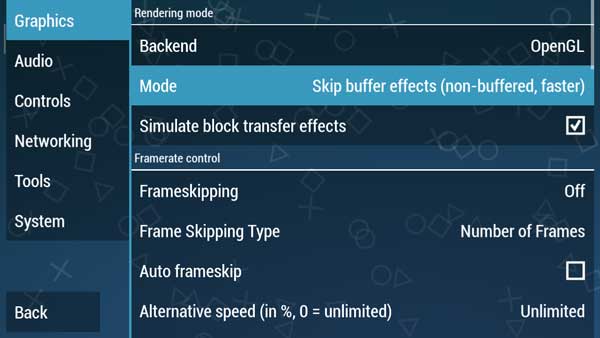
In Rendering Mode, change the Mode to Skip buffer effects (non-buffed, faster)
Step 1 – Graph Settings
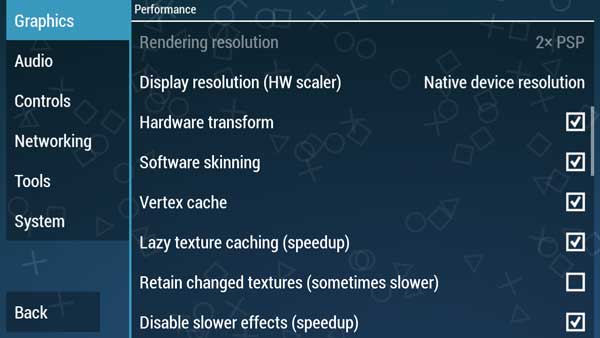
We continue to the Performance section
Check Lazy texture caching (speedup) and also Disable slower effects (speedup)
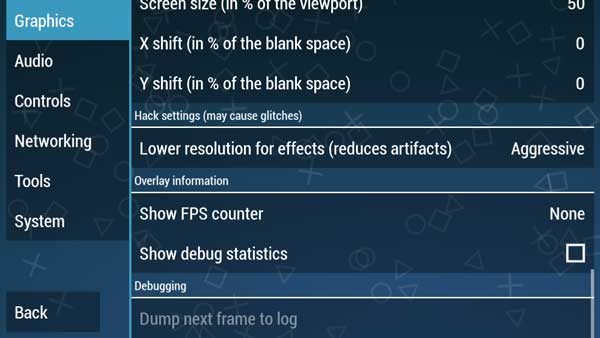
And in the Hack settings (may cause glitches)
Lower resolution for effects (Reduces artifacts) we make Aggressive
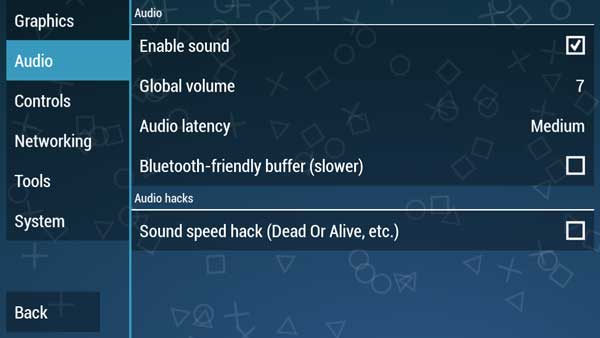
# Step 2 – Audio Settings
In this audio section, we usually complain that we always experience broken sounds and also not smooth.
This is not happening in the Audio settings but occurs in graphics or tools settings that cause game settings to be slow.
For audio settings, we just need the settings below.
Step 2 – Audio Settings
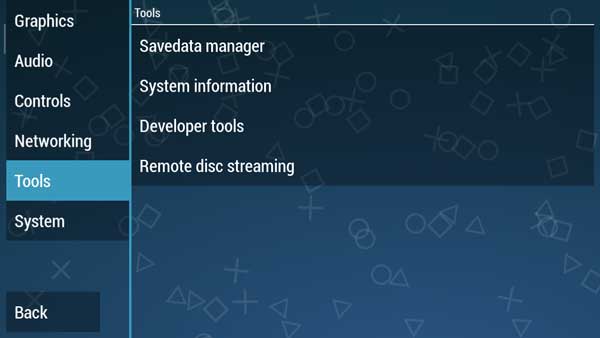
# Step 3 – Setting Tools
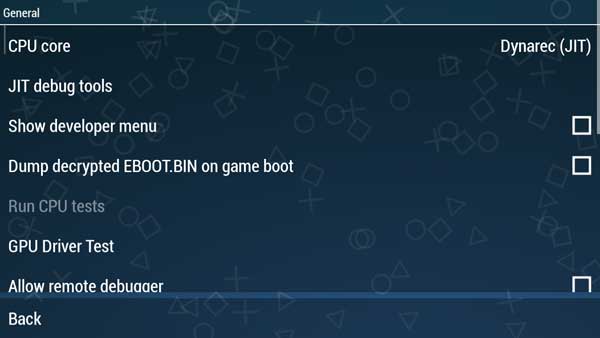
For this part, you just need to make sure whether the CPU core is in Dynarec (JIT) mode or not, how do you please refer to the steps below.
On the Tools menu, select Developer tools, and in the CPU core section make sure it’s Dynarec (JIT).
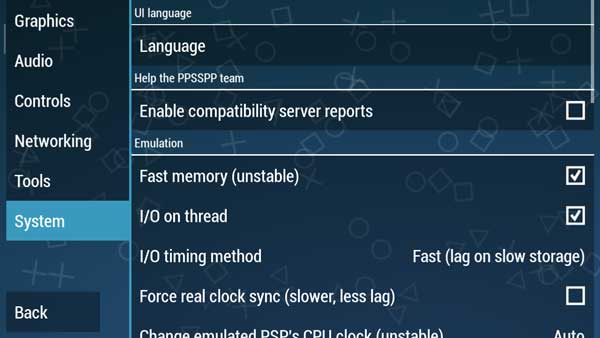
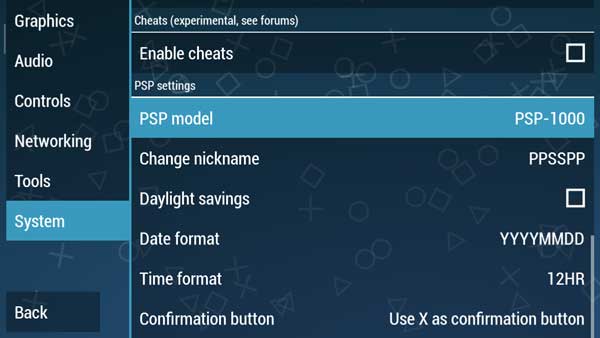
# Step 4 – System Settings
And in the System section we don’t need to make any changes, just look at the pictures below to adjust your PPSSPP Gold settings.
Please adjust the settings in your PPSSPP.
PPSSPP Gold is a more optimal version than the usual PPSSPP version. So actually in this version, we don’t have to change a lot of settings.
However, on certain devices, especially old-school phones with low specs, sometimes it requires optimal settings to stay smooth when playing PSP games.
So, friends, these Above the best settings For PPSSPP for Android, which we recommend to play PSP iso games on Android so that it runs smoothly without lags. But sometimes there are still many who complain about slow games.
 While the games listed above are some of the best offline for Android, other alternatives can provide just as much entertainment. A couple to mention is