Author: Nazrul Islam

  • 10 Apps To Find and Remove Duplicate Files in Windows PC 2025

    10 Apps To Find and Remove Duplicate Files in Windows PC 2025

    10 Apps To Find and Remove Duplicate Files in Windows PC – To find and delete duplicate files on Windows computers we can use the help of an application. Deleting them one by one manually, of course, will be tiring and time-consuming, especially if there are a lot of them, file names, and locations are different.
    10 Apps To Find and Remove Duplicate Files in Windows
    10 Apps To Find and Remove Duplicate Files in Windows

    How To Find and Remove Duplicate Files in Windows PC

    By using an application to delete duplicate files we can do it automatically with just a few clicks. This is the most effective way to delete duplicate files on Windows PCs and laptops as well as many others.

    Read more:

    On this occasion, I will provide some recommendations for the best applications to find and delete duplicate files in Windows 10, 8, and 7. You can use it to clean hard disks on PCs and laptops so they don’t fill up quickly.

    #1. Duplicates Cleaner

    Duplicates Cleaner
    Duplicates Cleaner

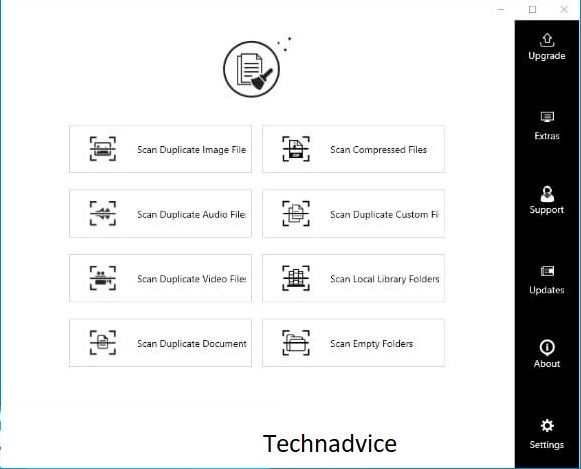
    You can get Duplicates Cleaner from the Microsoft Store. This application is a freeware that can be used for free. Just as the name suggests, this application was developed for only one function, namely to find and delete duplicate files in Windows 10.

    By using this application we can find duplicate files in the form of photos, videos, documents (word, excel, txt, ppt), program files, and other file types both small and large. Because this application is freeware, there is no feature limitation even though we use it for free.

    This application is the first recommendation that you should try on Windows 10, in terms of appearance, this application is very simple and easy to use. The size of the application is also quite small and light when running so that the scan process can be done while working with other applications.

    Download

    Features:

    • Find duplicate files on laptops, external hard disks, flash drives, memory cards, etc.
    • Delete all duplicate files at once with one click
    • Search for duplicate files in various formats such as photos or images (jpg, jpeg, png, gif), documents (excel, word, txt, ppt), videos (mp4, avi, mkv, flv, mov), audio mp3, pdf, and other common formats.

    Advantages:

    • Free
    • The application interface is easy to use
    • Light
    • Fast scan process
    • You can choose the duplicate file format you want to find

    Deficiency:

    • Incomplete features
    • No search parameters and filters
    • Only works on Windows 10

    #2. Auslogics Duplicate File Finder
    Auslogics Duplicate File Finder
    Auslogics Duplicate File Finder

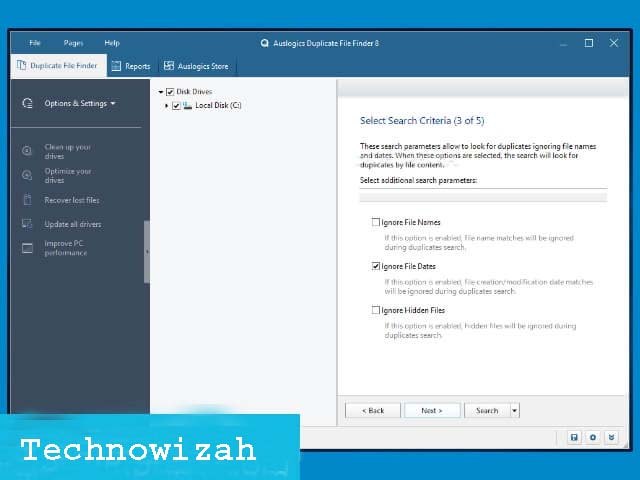
    The best application for finding duplicate files on the next laptop is Auslogics Duplicate File Finder. This application is a freeware that can be used for free without any feature restrictions.

    The advantage of this application is the algorithm that can find duplicate files even though they have different file names. You can find duplicate files in the form of photos, videos, documents, and programs on your computer and delete them with just one click.

    This application has a simple interface that is very familiar with Windows, so using it will feel easy. You can specify what directory and file format you want to search so that the scan process will be faster.

    Download

    Features:

    • Search for duplicate files on laptops, PCs, external hard disks, pen drives, memory cards
    • Sort by file format (photos, videos, documents, etc.)
    • Can determine the location of the scan

    Advantages:

    • Free
    • Smart algorithm to find duplicate files with different names
    • Can specify the scan directory
    • Can sort only certain file formats

    Deficiency:

    • UI looks a little dated

    #3. CCleaner

    CCleaner
    CCleaner

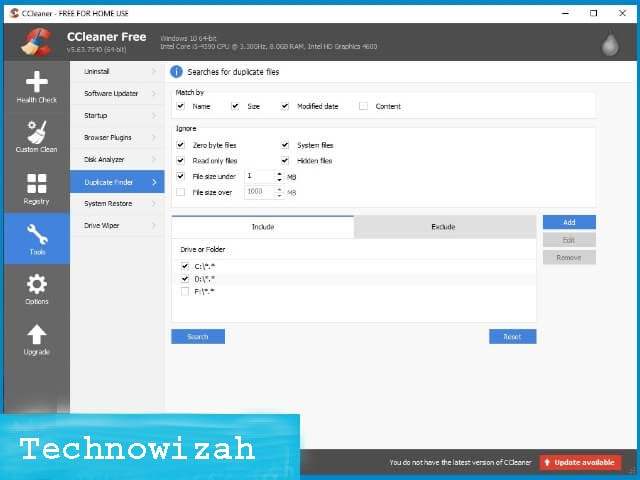
    CCleaner is one of the best PC cleaner applications that can be used to clean junk files on your computer. One of the features of this application is a duplicate file cleaner called Duplicate Finder.

    If you already have this application installed on your previous laptop, then there is no need to install additional applications to clean duplicate files. CCleaner is quite effective for finding duplicate files quickly, you can use a search filter based on the file format, name, size, or modification date.

    Duplicate files that have been found can be easily deleted one by one or many at once with one click. This application can be used for free but also has a pro version if you want to get more complete features.

    Download

    Features:

    • Looking for duplicate files on laptops, external hard disks, flash drives, SD cards
    • Scan by file format, size, modification date, and content
    • Delete all duplicate files at once many

    Advantages:

    • Free
    • User-friendly UI interface
    • Fast scan process

    Deficiency:

    • Extra redundant features, mostly unused
    • The application size is quite large

    #4. dupeGuru
    dupeGuru
    dupeGuru

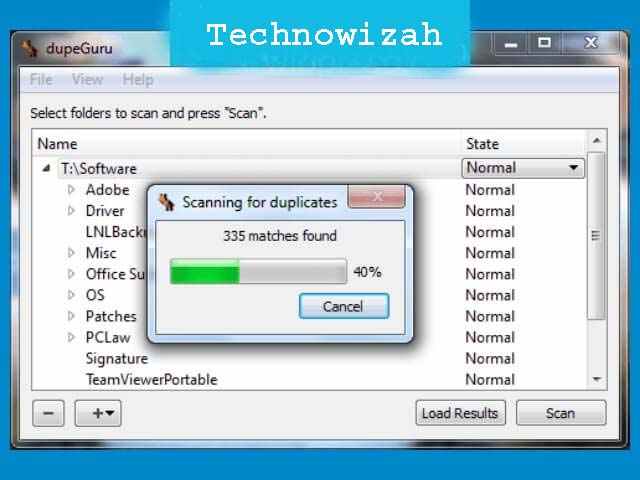
    dupeGuru is an application specially created to detect and clean duplicate files on a computer. This application has three versions, namely the standard version, music, and pictures. The standard version can be used to find duplicate files of all formats, a special music version to detect duplicate files in the form of MP3 and other audio files, and a special picture version to find duplicate photo files and images.

    This application is quite light and easy to use, but very effective for cleaning duplicate files on laptops, external hard disks, flash drives, memory cards, and other storage media. You are free to choose the version that will be used as needed.

    dupeGuru is an open-source application that is free to use by anyone, you can use all versions for free, and there are no device or feature restrictions. This application can be obtained directly from the official website.

    Download

    Features:

    • Search for duplicate files in the form of photos, videos, music, documents and other file types
    • Find duplicate files on computers, external hard disks, flash drives, memory cards, and other storage
    • Special version for photo and music search
    • Smart algorithm for more accurate search

    Advantages:

    • Free, opensource
    • Search filters can be modified as needed
    • Multi-platform support for Windows, macOS, Linux
    • Light
    • Available in three versions

    Deficiency:

    • The UI is less attractive

    #5. SearchMyFiles (Portable)
    SearchMyFiles (Portable)
    SearchMyFiles (Portable)

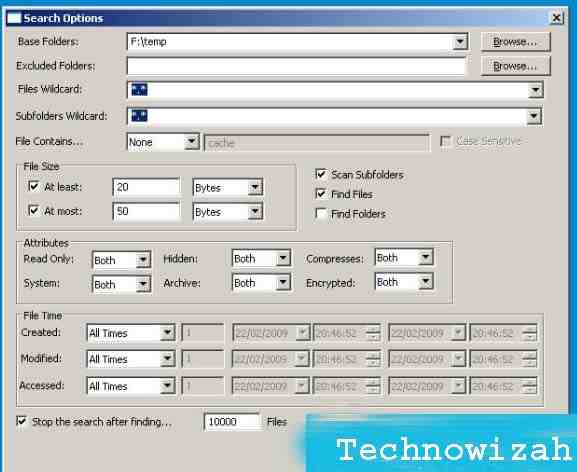
    SearchMyFiles is a file search application that can be used to find duplicate files on your computer. This application is equipped with wildcards, filters, and very comprehensive parameters so that the search results can be very accurate. You can define filters based on file size, modification time, and access, to the attributes of the file.

    For example, with this application, we can find all files with a capacity of less than 100MB that were created not more than the last month. By utilizing filters and parameters like this we can easily find all duplicate files on the computer, external hard disks, flash drives, and other storage media.

    This application comes in portable form so that it can be run immediately without having to install it first, making it suitable for those of you who want to find duplicate files without installing additional applications. SearchMyFiles is a freeware that can be used for free without any restrictions.

    Download

    Features:

    • Search for duplicate files on your computer and other storage media
    • Finds duplicate files of all formats
    • Wildcards, filters, and search parameters
    • Save a list of search results in text / html / CSV / XML format

    Advantages:

    • Free without any restrictions
    • Light
    • Support for Windows 10, 8, 7, Vista
    • Quite a complete tutorial on using the application on the official website
    • The search results are very accurate

    Deficiency:

    • Using the application can seem complicated for those unfamiliar with wildcards, filters, and parameters in the file search process
    • Not suitable for beginners

    #6. CloneSpy
    CloneSpy
    CloneSpy

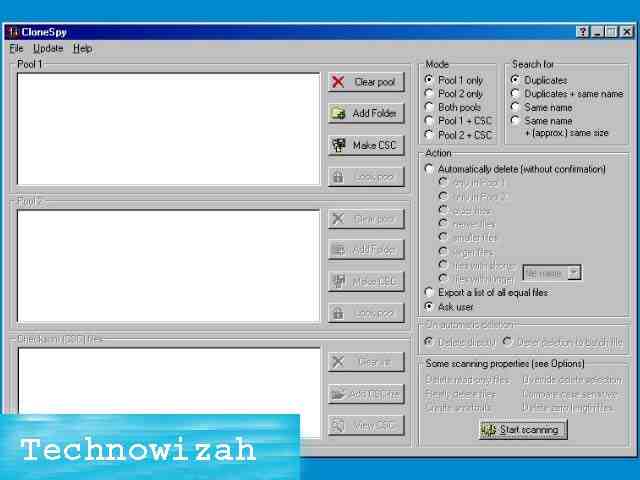
    An application for deleting duplicate files in Windows 10 which is next is CloneSpy. This application allows us to search for duplicate files from several locations simultaneously.

    CloneSpy can be used to detect duplicate files even though they have different names, modification dates, and locations. This application can also detect different files with the same or similar names, files with a certain size, and files with a capacity of 0kb.

    This application is freeware that can be installed for free without any feature restrictions or several devices and can be used on versions of Windows 10, 8, 7, Vista, and XP.

    Download

    Features:

    • Search for duplicate files in different locations at once
    • Search for files with parameter name, size, modification date
    • Delete all duplicate files at once with one click
    • Move duplicate files to another directory
    • Export-import scanned list

    Advantages:

    • Free without restrictions
    • Light
    • Can search files by name, size, location, modification date

    Deficiency:

    • The UI is less attractive

    #7. Duplicate FilesFinder
    Duplicate FilesFinder
    Duplicate FilesFinder

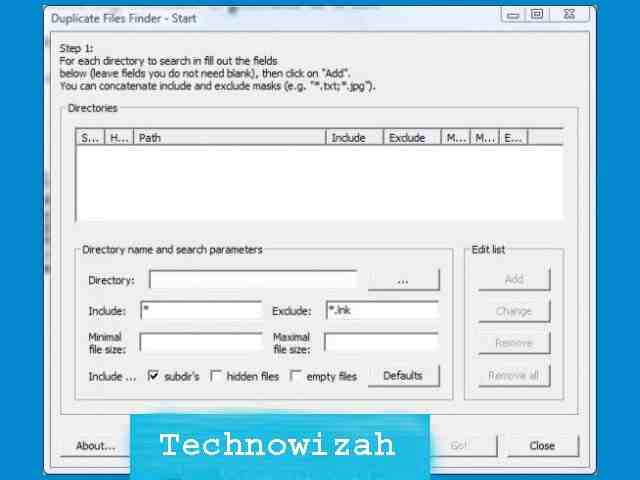
    Duplicate FilesFinder is a very lightweight duplicate file search application with fairly reliable performance. This application can run on all versions of Windows, even older versions such as Windows NT and XP can still use this application.

    Its main feature is to find duplicate files that exist on the computer by filtering wildcards (name and extension) and file size. All scanned files can be deleted or moved to another location as needed.

    This application can also be used for free without any restrictions and can run quite well on Windows 10 even though it is quite old and currently doesn’t get any more updates from the developer.

    Download

    Features:

    • Search for duplicate files in specific folders, all over your computer, external hard disks, flash drives, memory cards
    • Fast search
    • Support hard link and symbolic link
    • Delete all duplicate files at once

    Advantages:

    • Free
    • Light
    • Can run on all versions of Windows

    Deficiency:

    • The UI is less attractive
    • It is no longer updated by the developer

    #8. AllDup
    AllDup
    AllDup

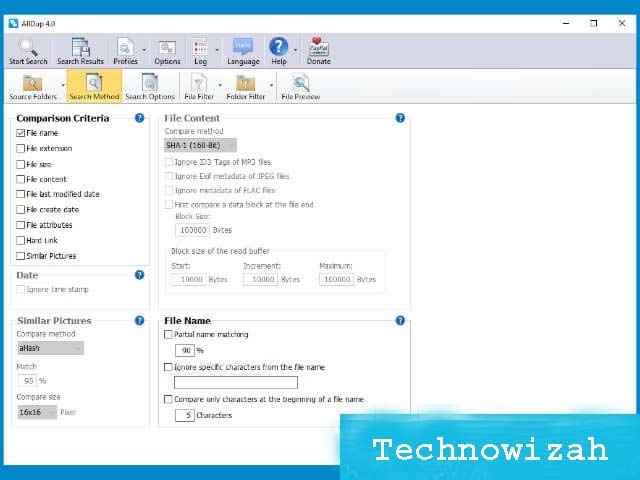
    AllDup is a freeware that can be used for free, the main function of this application is to find duplicate files on PCs, laptops, external hard disks, flash drives, and other storage media automatically.

    This application is equipped with quite complete features, you can use it to search for duplicate files from certain directories with parameters that can be adjusted by the user. You can search for files specifically by name, size, modification date, file extension, and metadata. This application is very useful for finding duplicate photos and music on a laptop, even though the names are different.

    AllDup is also available in portable form, so for those of you who don’t want to install additional applications, you can use this version. This application is also quite light and the scanning process is relatively fast.

    Download

    Features:

    • Find duplicate files on your computer and other storage media
    • Look for duplicate MP3 music files even though they have different names
    • Fast search algorithm
    • Search for duplicate files in archives (zip, rar, 7z, epub, etc)
    • Search using parameters as needed

    Advantages:

    • Free without restrictions
    • The scan process is quite fast
    • Can use specific search parameters
    • Option to delete duplicate files at once

    Deficiency:

    • Using the application may seem difficult for beginners because of too much navigation
    • Can only be used on Windows

    #9. VisiPics
    VisiPics
    VisiPics

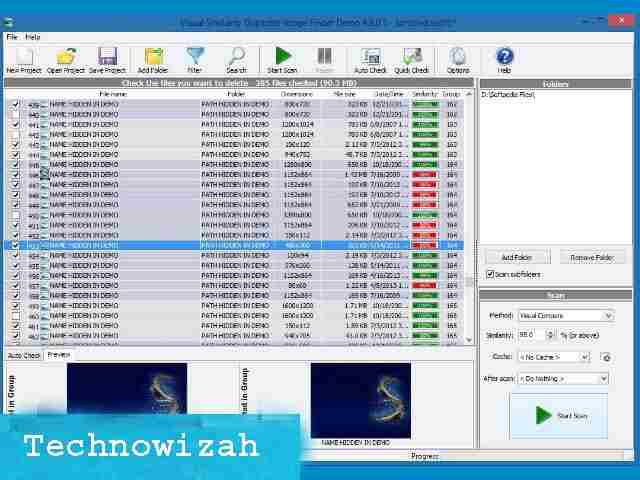
    VisiPics is a special application that functions to find duplicate images and photos on computers, external hard disks, memory cards, flash drives, and other storage media. This application can perform a checksum so that the search process becomes more specific and accurate.

    As you know, photos are the files that most often accumulate on a laptop, sometimes we don’t realize that we have saved several of the same photos, but because the storage location and name have changed, we have trouble finding them.

    With this application, we can search for all duplicate photos on the laptop even though the name has been changed. This will be very useful to save storage space so that it doesn’t fill up quickly. VisiPics is free to use and can run on all versions of Windows.

    Download

    Features:

    • Detect duplicate photo files that are on the computer
    • Visual comparison
    • Fast scan
    • Preview scanned files

    Advantages:

    • Free
    • User-friendly UI interface, easy to use
    • Can find duplicate images and photos with accuracy even though the names are different
    • The comparison and preview features are very useful for determining which files should be deleted

    Deficiency:

    • Can only be used for photo and image file types
    • You have to install other applications if you want to scan files other than photos
    • Incomplete search parameters

    #10. Fast Duplicate File Finder
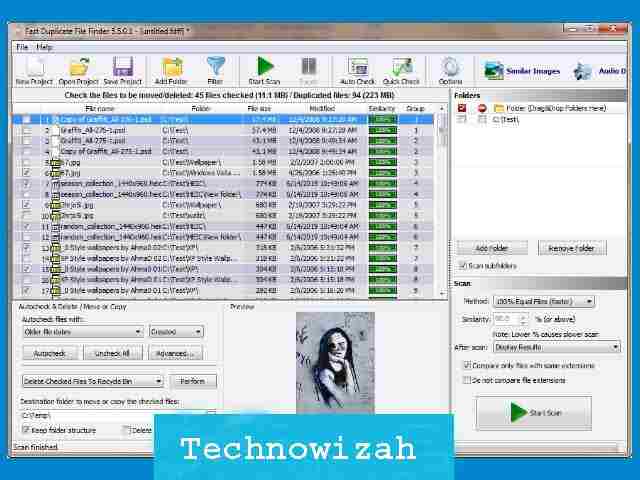
    Fast Duplicate File Finder
    Fast Duplicate File Finder

    Fast Duplicate File Finder is the last application to delete duplicate files in Windows. This application is freeware, so you can use it for free without any limitations on features or the number of devices that install it.

    You can search for duplicate files in a folder, in partitions on laptops, external hard disks, flash drives, memory cards and cameras, and other storage media. This application can be used to find duplicate photo files piled up on a laptop, mp3 music files, videos, and documents such as Word and Excel.

    Fast Duplicate File Finder can detect duplicate files even though they have different names, the auto checker and preview features in this application will make it easier for you to select which files should be deleted.

    This application can be used on all versions of Windows such as Windows 10 / Windows 8.1 / Windows 8 / Windows 7 / Windows Vista / Windows XP / Windows NT / Windows 2000 / Windows 2003 / All Windows Server. You can use the free version or buy a pro license if you want the extra features offered.

    Download

    Features:

    • Find duplicate files on your computer, external hard disk, flash disk, SD card
    • Detects duplicate files with different names
    • Preview and auto-check scanned files
    • Delete or move the scanned files at once
    • File renamer
    • Filters and search parameters for more accurate results
    • Export-import scanned list (only for the pro version)

    Advantages:

    • Available in free and paid versions
    • The lightweight and relatively fast scanning process
    • There are search parameters that are quite complete for more accurate results
    • Can scan multiple locations at once

    Deficiency:

    • Too much navigation so it’s a little confusing
    • Feature restrictions on the free version

  • How to Cheat NFS Most Wanted PC Need For Speed 2025

    How to Cheat NFS Most Wanted PC Need For Speed 2025

    How to Cheat NFS Most Wanted PC Need For Speed – So that you get what you want in this game, you need cheating actions such as cheating in the most wanted PC game so that when you play this game you can play this game more freely because you only need to play it right away without completing any mission or buying it. whatever your friend wants because you can cheat money without running out.

    How to Cheat NFS Most Wanted PC Need For Speed
    How to Cheat NFS Most Wanted PC Need For Speed

    Easy Ways to Download Cheat NFS Most Wanted PC Need For Speed

    What is required in the Most Wanted PC cheat? You only need a little help with software called a cheat engine. This software is rarely used for in-game cheating now.

    Read more:

    On this occasion, I want to share my experience in how to easily cheat NFS Most Wanted.

    By following this Most Wanted PC cheat tutorial, playing Most Wanted will be even more proficient. Please continue reading how to cheat NFS Most Wanted until the end of this review.

    Therefore I am here to provide a little tutorial about the Most Wanted PC cheat, the advantages are as follows

    1. Unlimited Money – run out of unlimited money.
    2. Unlimited speed breaker.
    3. Unlimited nos or unlimited nos.
    4. Maximum bounty
    5. Mission accomplished immediately.
    6. Can get all rival king cars.
    7. Unlock all cars.
    8. Modify as well as add (replace) a car with the maximum type and speed (can exceed the normal speed in a game)
    9. Can get all police cars.
    10. Can change the police car at any level.

    You can find the codes above in my previous post regarding the most wanted cheat collection.

    That way you can directly copy it to Notepad so that next time you can find the code again if you need a PC Most Wanted cheat.

    I am here to share my experience with how to cheat the most wanted using the help of the cheat engine application and this method is guaranteed authenticity because I have proven it every day.

    But you need to know that this Most Wanted PC cheat does not last permanently but can only be used in one game if you are out, the cheat will automatically disappear too, so just go to how to enter the most wanted PC cheat using the cheat engine.

    Download + Cheat Code NFS Most Wanted Black Edition PC

    How to cheat need for speed Most Wanted PC or laptop usually requires to cheat engine software.

    This software serves as a tool for processing cheat data into the most wanted application.

    You need a complete collection of Most Wanted PC cheats to get a cheat code, you can download it below:

    1. Make sure you already have a cheat engine application and already have the 2005 Most Wanted Game.
    2. Make sure again that my friend has copied all the code that I gave in the previous post.
    3. If everyone feels ready, you can immediately open the most wanted game.
    4. Then you have to take the game out, if you use Windows 10, it will be easier because you just need to press the Windows Shortcut (Windows image on the keyboard), and then it will exit itself and enter the desktop menu.
    5. After that, you can immediately open a copy of the document that contains the cheat code to enter the game via the cheat engine.
    6. After opening, friend, first install the engine cheat software.
    7. Then point your cursor to the top left corner icon named Select A Process To Open.
    8. A new window will appear with a display called Process List, here you can choose the game called Speed.exe and then click Open.
    9. Point the cursor to the Memory View menu
    10. Here my friend will find a new window. You can directly select the Tools menu -> Auto Assemble or you can press the shortcut CTRL + A
    11. Later a new window will appear again, here you can copy the cheat code to the auto-assemble column.
    12. Then point the cursor to the Execute menu -> A new window appears -> click Yes -> New song window press OK. Done
    13. If you feel confused, you can see the video below.

    PS2 No Software Cheat Code

    PS2 No Software Cheat Code

    There are several cheat codes that you can apply to the NFS Most Wanted PS2.

    PS2 here does not mean using a PS2 console, but you can also use a laptop (as long as you use a joystick).

    The way to use this cheat is that you have to enter the “Press Start” menu and don’t get into the game first.

    The following is a cheat code that you can use:

    All $ 100,000 Cars R1, L1, up, down, up, down, up, down
    Back Room (transmission, engine, tires, body kits) R1, L1, L2, R2, up, down, down, up.
    Bounty: 5,999,999 L1, R1, up, down, up, down, up, down
    Bounty and Milestones are over down, left, right, down.
    up, down, up, down, left, right, left, right.
    Castrol Syntec Ford GT left, right, left, right, up, down, up, down
    Unlocks the Ford GT Up, down, up, down, left, right, left, right
    Unlocks the Porsche Cayman L1, R1, R1, R1, right, left, right, down.
    Opens Junkman Engine Part Up, up, down, down, left, right, up, down
    All Open Cars R1, O, O, O, R1, R2, L2, L1, up, down, L1, L1, L1.
    All Enemy Cars O, O, up, up, down, up, L1, R1, up, down.
    All Live Games Over left, right, up, up, up, down, down, down, down, left, left, right, right, right, up, down.
    Shop Marker up, up, down, down, left, right, up, down.

    Most Wanted PC Cheat Codes

    Most Wanted PC Cheat Codes

    How to use this cheat code on a PC / laptop is the same as most wanted PS2 consoles.

    Unlock All Cars iammostwanted
    Activating the GTO Car givemethegto
    Unlocks Burger King burgerking
    Get the Catrol Ford GT Castrol
    Get a lot of money letsplay
    Unlocks the BMW M3 GTR (Mobile Razor) Givemegtr
    Unlocks Corvette C6.R givemecorvette
    Unlock All Performance Upgrades / Tunings mwperformance
    Unlock All Cars (Black Edition) mwunlockcars


    Read more:

    Conclusion:

    So friends, these are the above methods for cheating NFS, the most wanted PC game for speed, using a cheat engine. This method is quite easy even though you can see and imitate the most wanted PC cheat video without an image.

  • Download Naruto Ultimate Ninja Impact Small Size 2025

    Download Naruto Ultimate Ninja Impact Small Size 2025

    Download Naruto Ultimate Ninja Impact Small Size – Naruto is a very famous anime series by Masashi Kishimoto that has succeeded in entertaining and gaining a special place in the hearts of its fans.

    Download Naruto Ultimate Ninja Impact Small Size
    Download Naruto Ultimate Ninja Impact Small Size

    How to Download Naruto Ultimate Ninja Impact Small Size

    The stories from the Naruto manga series total 700 chapters and for the anime version, there are approximately 500 episodes.

    Read more:

    As well as presenting various kinds of stories and adventures that are very entertaining and there are positive values ​​and moral messages in them.

    Naruto Shippuden has now made a game version and can be played on various consoles such as Playstation (PS), Nintendo, PSP, and PC / computer.

    And what’s even greater is that games that can only be played on PSP can now be played on an Android smartphone, of course, this becomes more effective.

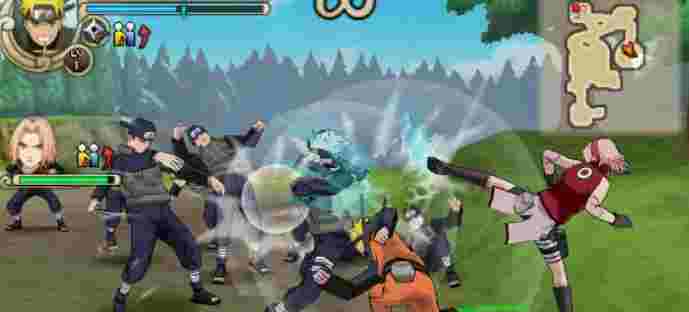
    In this article, the admin will discuss one of the Naruto Shippuden Ultimate Ninja Impact games, the version of the ppsspp game that is looking for a lot.

    Download the Small Size PPSSPP Naruto Ultimate Ninja Impact Game

    Naruto Ninja Impact.CSO [900 MB]

    Save Data Until End

    PPSSPP emulator

    Game Details:

    Note:
    Just choose one of the ISO or CSO files from the download link above. If there is a broken link, you can tell us via the comments column so we can fix it immediately.

    Download Naruto Ninja Impact 70 MB (High compress)

    Download Naruto Ninja Impact 70 MB (High compress)

    For small high compressed ISO files, you can get them via the download link below:

    ISO High Compress file [70 MB]

    An alternative link, if you experience an error, can be downloaded here

    Note:
    For the High Compress, the game is still in Japanese. If you want to use the English one, you can use the CSO file which has a smaller size (536 MB) than the original version.

    How to Install Naruto ISO on Android

    1. Select one of the ISO or CSO files that you will use in the link above
    2. For ISO or CSO files, just move them to your Android storage either on an SDcard / External or Internal memory
    3. For files in the form of RAR, you have to extract them first, then move them to the Android device you are using.
    4. Then extract the saved data file
    5. Move the RULES Folder to Internal storage / PSP / Savedata / move it here.
    6. If so, just open and run the PPSSPP Emulator which is already installed on your Android phone
    7. Then select the Naruto gameplay
    8. Enjoy.

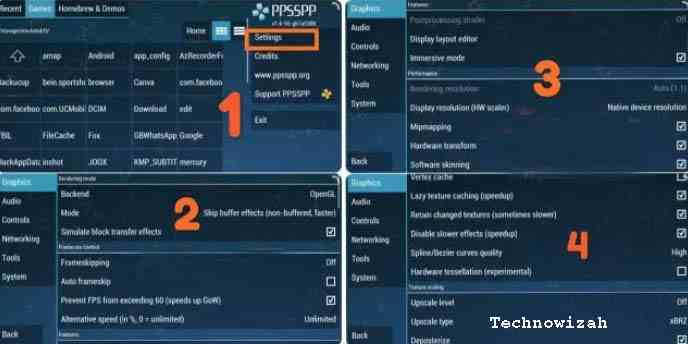
    Settings So as Not to Lag & Crash

    When you first open and play this game, usually on some Android phones there will be a lag and when you start the mission it will come out on its own.

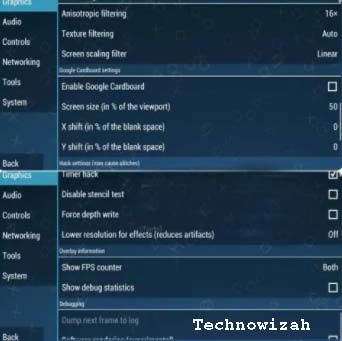
    So that this problem does not occur, you should change the settings on the PPSSPP emulator as shown below.

    Settings So Not to Lag & Crash
    Settings So Not to Lag & Crash

    For more details about how to install you can see the following video. Even though the name of the game is different, the way to install it and how to play it remains the same.

    Naruto Ninja Impact PPSSPP is included in the action genre game, so many gamers like it, especially if they are fans of the Naruto anime.

    This game can be played on a computer and can also be played on an Android smartphone.

    If you want to play this Naruto Battle game, of course, you have to use a PC emulator and an Android emulator when playing on an Android device.

    The Naruto Shippuden Ultimate Ninja Impact game already has a very good graphic display and its characteristics.

    This game is a series of the last Naruto games released by Bandai or NGBI around 2011.

    Although this game was released last for the PSP series, it is guaranteed in terms of quality and gameplay.

    There will be many exciting and interesting things that you will find in the Naruto Ninja Impact game.

    The storyline of this game starts from a rescue mission for the kazekage (Gaara) to a meeting with the five Kage.

    Apart from the small-size Naruto Ninja Impact game series that the admin has explained above, there are still more exciting series that you must try.

    DMCA: Technowizah.com complies with 17 U.S.C. * 512 and the Digital Millennium Copyright Act (DMCA). It is our policy to respond to any infringement notices and take appropriate action. If your copyrighted material has been posted on the site and you want this material removed, Contact us.

    Read more:

    Conclusion:

    This is an explanation of how to download Naruto Ultimate Ninja Impact in small size, about the PPSSPP Naruto Ninja Impact ISO high-compressed game for Android, complete with a Google Drive link to download it.

  • 3 Ways To Resolve Error Code 0x0003 NVIDIA GeForce 2025

    3 Ways To Resolve Error Code 0x0003 NVIDIA GeForce 2025

    3 Ways To Resolve Error Code 0x0003 NVIDIA GeForce – If you are a Nvidia brand VGA Card user on a computer, have you ever experienced an ERROR CODE 0x0003 in the Nvidia Geforce Experience application? How to solve the 0x0003 error is very easy.

    How to Resolve Error Code 0x0003 NVIDIA GeForce
    Image Source: pcmag.com

    How to Fix or Resolve Error Code 0x0003 NVIDIA GeForce

    Most of the problems experienced by Geforce users in the 0x0003 error are the error message Something went wrong. Try rebooting your PC and then launch GeForce Experience when opening the Nvidia Geforce Experience application or software.

    Read more:

    All you need to know, there are several causes for the appearance of error code 0x0003 on Nvidia Geforce. This error code represents several problems, namely 0x0003.

    You must know what causes the 0x0003 error in your Nvidia Geforce so that you can more easily figure out how to solve it. Here are some of them:

    • Nvidia Telemetry cannot be applied to the desktop.
    • An important service from Nvidia cannot run.
    • The Nvidia driver has crashed.
    • Network error/glitch.
    • The Nvidia GeForce GPU driver does not support updates from Windows.

    Of the several causes of the 0x0003 error in NVIDIA GEFORCE above, is there one cause that happened to your computer? If so, here’s how to fix the error code 0x0003 on NVIDIA GEFORCE.

    #1. Run Nvidia Telemetry

    Run Nvidia Telemetry
    Run Nvidia Telemetry

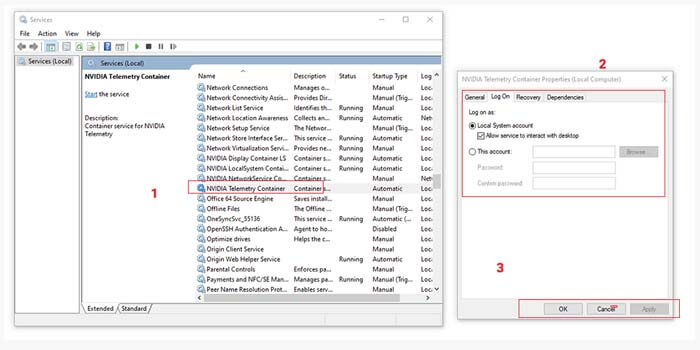
    Nvidia Telemetry is the most common cause of error codes 0x0003 in Nvidia GeForce. You only need to run Nvidia Telemetry so that it can be applied on your desktop.

    How to fix error code 0x0003 in Geforce Experience:

    1. Open the menu Run by pressing Windows + R.
    2. Type services.MSC then press the Enter key.
    3. Find the Nvidia Telemetry Container and right-click it.
    4. Select the Properties option > click the Log On tab.
    5. Put a check on the Allow service to interact with the desktop.
    6. Then click Apply and OK.

    Now Nvidia Telemetry is confirmed to be running on your desktop. But if it still doesn’t work, make sure the other Nvidia components are already running.

    Still in the services.MSC menu, look for Nvidia Display ServiceNvidia Local System Container, and Nvidia Network Service Container. Then right-click for each component and select the option Start.

    #2. Reset the Network Adapter

    Reset the Network Adapter
    Reset the Network Adapter

    You can also fix the 0x0003 error that occurs in the NVIDIA GEFORCE experience simply by resetting the network adapter. You can use this method on Windows 7, Windows 8, and Windows 10 very easily.

    How to solve error code 0x0003 in Geforce Experience:

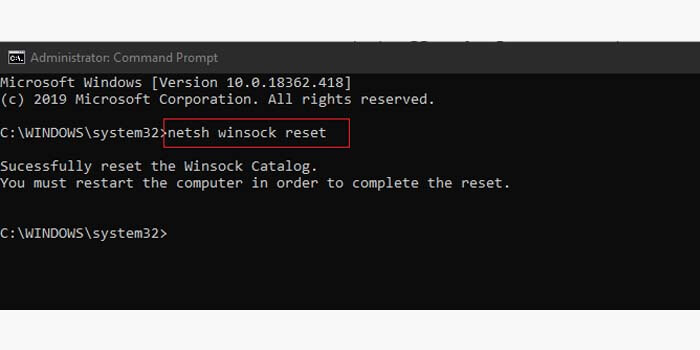
    1. Press the Windows key + R to open the Run menu.
    2. Type CMD then press Ctrl + Shift + Enter.
    3. In CMD type netsh winsock resetand press Enter.
    4. Then a message will appear that you have successfully reset Winsock.
    5. Finally, restart your PC or computer.

    Wait for your PC or computer to turn on again. Then check whether the error code 0x0003 on the Nvidia Geforce Experience has been successfully repaired or still exists.

    #3. Reinstall Geforce Experience

    Reinstall Geforce Experience
    Reinstall Geforce Experience

    The last method to resolve and fix error code 0x0003 in Nvidia Geforce Experience is to reinstall all components or drivers.

    First, you have to remove or uninstall all Nvidia Geforce Experience drivers that are already installed on your PC or computer so that the problem that occurs is completely gone.

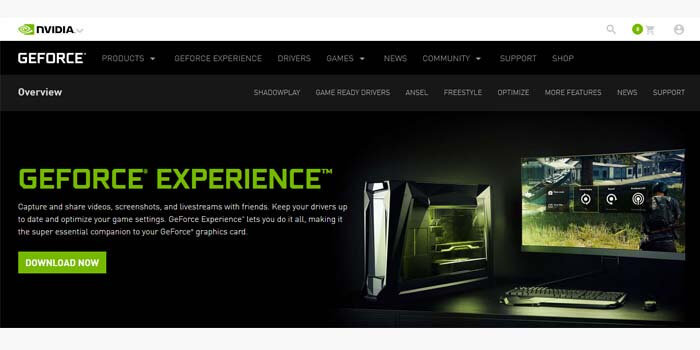
    Then, download the Nvidia Geforce Experience driver in the latest version. You can grab the Geforce Experience driver files through the official Nvidia website.

    Finally, just install the GeForce Experience driver that you have downloaded on your PC or computer as usual. If there are no problems, then you can log into your Nvidia account to find out your VGA performance.

    Read more:

    Conclusion:

    So, friends, here are the instructions above on how to resolve error code 0x0003 NVIDIA GeForce Experience, which you can use to fix your problem.

  • 4 Ways to Uninstall Avast to Clean the Roots in Windows 10 PC 2025

    4 Ways to Uninstall Avast to Clean the Roots in Windows 10 PC 2025

    4 Ways to Uninstall Avast to Clean the Roots in Windows 10 PC—Avast is an antivirus application that has many users. This is because It can be used for free, and most newly purchased laptops usually have the Avast application installed on them.

    How to Uninstall Avast to Clean the Roots in Windows 10

    How to Uninstall Avast to Clean the Roots in Windows 10 PC Laptop

    For those of you who want to delete the Avast application until it is clean, don’t use the usual method by uninstalling it via the Control Panel, because usually the residual files from the application will still be stored on the laptop. To make sure you uninstall Avast thoroughly, all residual files and configurations that are still attached should be removed as well.

    Read more:

    In this tutorial, Winpreso will provide several alternatives for how to remove Avast antivirus on Windows 10 until it is completely clean and no leftover files are still stored on your computer.

    Turn off the Self-Defense feature on Avast before uninstalling

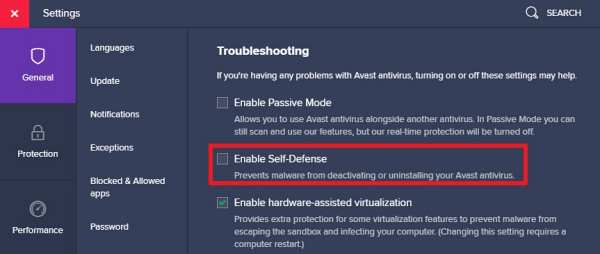
    The first step before uninstalling the Avast antivirus program is to first turn off the Self-Defense feature. If this feature is active, it will prevent the deactivation or deletion of the application, as a result, Avast cannot be uninstalled/deleted.

    So the first step you have to do is turn off this option.

    1. Open the Avast application
    2. Click the Menu button
    3. Select Settings
    4. Click on the General tab
    5. Enter the Troubleshooting section
    6. Uncheck Enable Self-Defense

    Turn off the Self-Defense feature on Avast before uninstalling
    Turn off the Self-Defense feature on Avast before uninstalling

    After turning off this feature, then we can uninstall it.

    #1. Using RevoUninstaller

    Here’s how to clean the Avast application to its roots:

    1. Download and install the RevoUninstaller application

    First, you need to have the RevoUninstaller program. If you don’t have one, download and install the application form here:

    https://www.revouninstaller.com/revo-uninstaller-free-download/

    2. Run the RevoUninstaller application

    Next, run the RevoUninstaller application that has been installed.

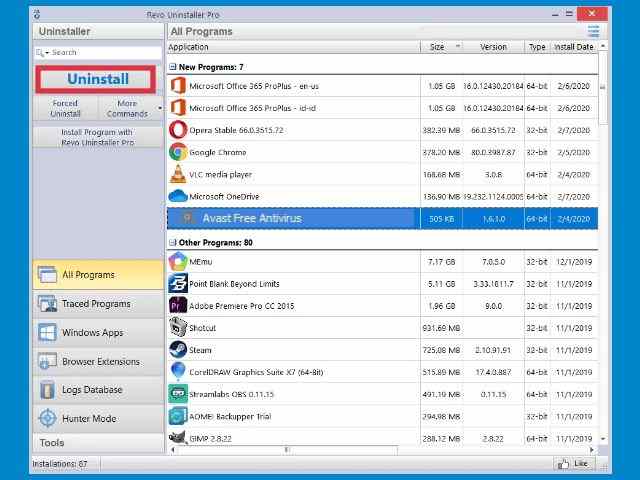
    3. Find the Avast program

    On the main page of the RevoUninstaller application, you will see all the programs on your computer. Find the Avast Free Antivirus application.

    4. Click the Uninstall button

    Then click on the Avast Free Antivirus application> then click on the Uninstall button.

    Using RevoUninstaller
    Using RevoUninstaller

    A pop-up window asking if you want to uninstall will appear> select Yes> follow the process to completion.

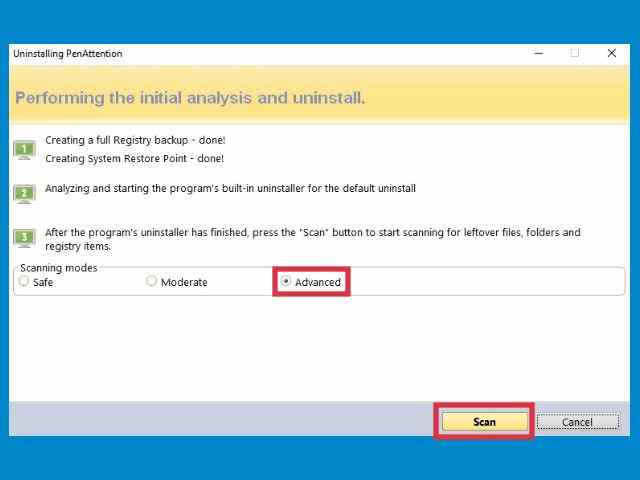
    5. Select the Advanced scanner mode

    After the uninstall is complete, a scanner window will appear> click on the Advanced option > and select Scan.

    Using RevoUninstaller
    Using RevoUninstaller

    Wait until the scan is complete. At this stage, RevoUninstaller will scan all the remaining files from Avast as well as the remaining registry entries.

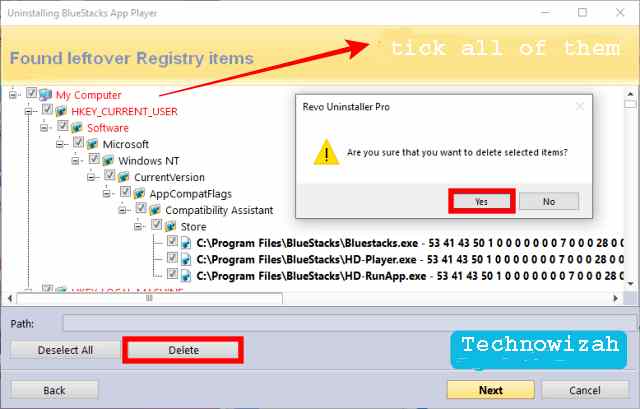
    6. Delete all Registry entries

    When finished you will enter the registry entry cleaning page> check all registry entries > click the Delete button > and click Next.

    Using RevoUninstaller
    Using RevoUninstaller

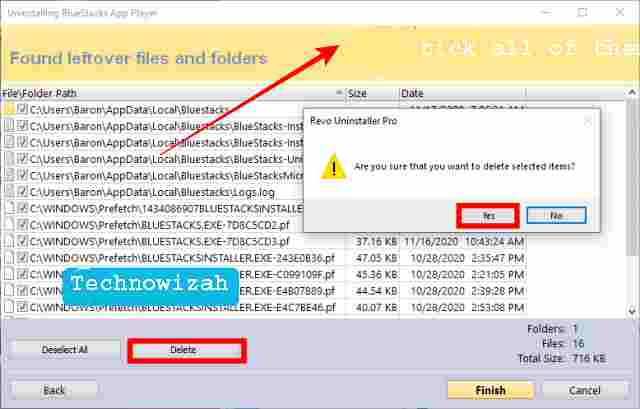
    7. Delete all residual files

    On the leftover files page, check all existing files and folders > click the Delete button > and click Finish.

    Using RevoUninstaller
    Using RevoUninstaller

    Done. At this point, you have successfully wiped Avast clean to the roots. The last step is to restart, after that, your computer is ready to use as usual.

    Revo uninstaller is one of the best software to uninstall applications cleanly that you can use. But this app is a paid app, you have to buy the pro version to get all its features.

    #2. Using the Avast uninstall utility

    The second way to uninstall Avast antivirus is to use an uninstaller called Avast to uninstall utility. You can use this as an alternative if you don’t have the RevoUninstaler application.

    Follow these steps:

    1. Download the Avast uninstall utility

    First download the application form here: https://www.avast.com/en-us/uninstall-utility

    2. Restart the computer into Safe Mode

    The second step is to restart your computer and then enter Safe Mode. The uninstall process must be done in this mode to ensure that all remaining files from Avast are deleted cleanly.

    To enter Safe Mode in Windows 10 follow the steps here:

    3. Run the avastclear.exe application

    Once in Safe Mode. Open the download folder where the Avast uninstall utility application was downloaded and run the program.

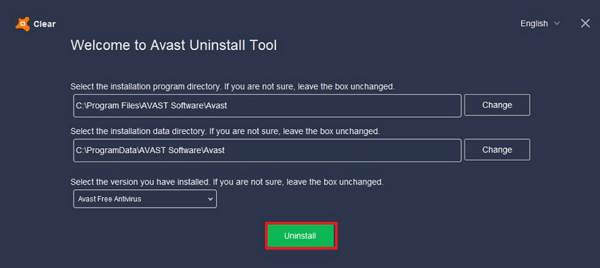
    4. Make sure the Avast location folder is correct

    In the avastclear.exe application, look at the Installation program directory and Installation data directory sections, and make sure they are correct.

    5. Click the Uninstall button

    Finally, click on the Uninstall button. Follow the process to complete.

    Using the Avast uninstall utility
    Using the Avast uninstall utility

    When finished, restart the computer to normal mode.

    #3. Using CCleaner

    The third way to remove the Avast application on a Windows 10 laptop is to use a cleaner application. You can use a free one like CCleaner.

    Follow these steps:

    1. Download and install the CCleaner application

    First, download and install the CCleaner application from here:

    https://www.ccleaner.com/ccleaner/download

    Choose the Free version. After downloading, immediately install the application on your laptop.

    2. Run CCleaner

    Then open the CCleaner program

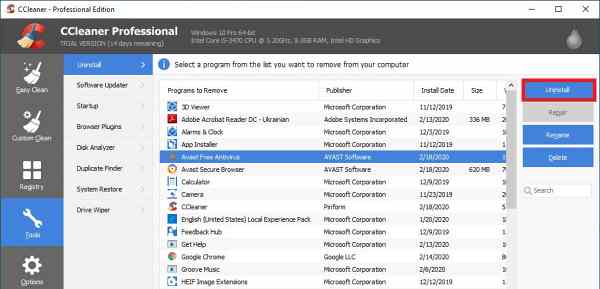
    3. Select the Tools menu> Uninstall

    In CCleaner select the Tools menu > click on the Uninstall menu.

    4. Uninstall Avast antivirus

    On the right panel, you will see a list of applications installed on the laptop. Find and click on the Avast Free Antivirus application then click the Uninstall button.

    Using CCleaner
    Using CCleaner

    5. Restart the computer

    After the uninstall process is complete you will be asked to restart> select Yes or Restart now.

    6. Clean up leftover Avast files with CCleaner

    After the computer turns back on, open the CCleaner application again then run Easy Cleaner and Registry Cleaner to clean up leftover files from Avast.

    #4. Using IObit Uninstaller

    The last way to wipe Avast clean to its roots is to use IObit Uninstaller. This application also can clean applications and uninstall residual files, and there is a free version that you can use.

    Follow these steps:

    1. Download and install the IObit Uninstaller application

    First, download the iObit application to your laptop via the link below:

    https://www.iobit.com/en/index.php

    You can select the Free version, and then install it as usual.

    2. Run IObit Uninstaller

    Then run the IObit Uninstaller application that you have installed on the laptop.

    3. Find the Avast Free Antivirus application

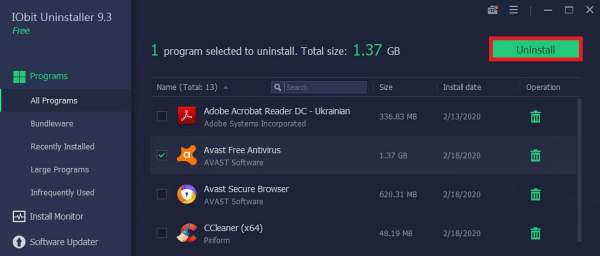
    In the iObit application click on the Program menu > select All Programs > on the right-side panel find and click the Avast Free Antivirus program.

    Using iObit Uninstaller
    Using iObit Uninstaller

    4. Click the Uninstall button

    Click on the Uninstall button then select Yes. Wait for the uninstall process to run and finish.

    5. Clean up leftover Avast files

    After Avast is successfully uninstalled, the iObit application will scan the remaining files, and wait until the process is complete. After that delete all the remaining files from Avast that were detected.

    Close the IObit application then restart your computer.

    Read more:

    Conclusion:

    These are the 4 ways you can uninstall Avast antivirus immaculate to the roots. I hope this article will be helpful for you.