Author: Nazrul Islam

  • Top 10 Best Motocross Games for Android 2025

    Top 10 Best Motocross Games for Android 2025

    Top 10 Best Motocross Games for Android Play Right Now – The Motocross game for Android is a racing game that is quite different from ordinary racing games. However, it takes a special motorbike and also the expertise of the driver. Not only in the real world, but motocross races are also interesting to play in the game world.

    Top 10 Best Motocross Games for Android Play Right NowHow to Download 10 Best Motocross Games for Android

    Now for those of you who are looking for recommendations for the best motocross Android game or dirt bike, you can try the following recommendations for the 10 Best Motocross Games for Android 2024!

    Read more:

    #1. RMX Real Motocross

    RMX Real Motocross is a motocross-themed game with a very interesting 3D presentation to play on Android phones. In this game, you can compete on the various tracks provided.

    In total, this game provides up to 10 different tracks. Uniquely, you can do a variety of cool tricks during the race. You can get various new tricks if you have completed several tracks.

    For presentation, this game has very good potential. But unfortunately, the graphics and game controls that are presented are still not so optimal.

    Mode: Offline

    Genre: Racing

    Size: 284MB

    Download Real Motocross RMX

    #2. RiderSkill

    RiderSkill is a motocross-themed game that offers a simulation game of driving a motocross with a fairly realistic gaming experience. In this game, you will be spoiled by racing at various levels and enjoying the open-world feature without any restrictions.

    By presenting a fairly detailed graphic presentation, you can race in 4 different environments, namely canyons, deserts to mountains.

    In addition, the physics vehicle that is presented is also quite realistic and is supported by good game controls.

    Mode: Offline

    Genre: Racing

    Size: 88MB

    Download RiderSkill

    #3. Monster Energy Supercross

    Monster Energy Supercross is a game that will take you to become a superstar in the motocross championship. By carrying out the arcade drag racing gameplay, you can play in several different game modes, including single-player and multiplayer.

    However, it is quite different from most other drag racing games, the track presented in this game is filled with various elements for jumping.

    For motorbikes, this game features riders and official motorbikes from the Monster Energy Supercross 2017 championship. Later, you can compete in the 250cc and 450cc championships.

    Mode: Online

    Genre: Racing

    Size: 212MB

    Download Monster Energy Supercross

    #4. Gravity Rider Zero

    Unlike some of the previous games, Gravity Rider Zero is a game with a futuristic theme. With a very unique colorful presentation, this game also combines it with interesting gameplay.

    Quite different from the previous Gravity Rider series, this game comes with a simpler vehicle mechanism. The reason is, in this series, you won’t be bothered about upgrading every part of the vehicle or racing against overpowered enemies.

    The various tracks it presents are made in a balanced way and don’t emphasize Pay to Win elements. Even so, you can still customize your vehicle to make it look more attractive.

    For game control, this game still carries a simple but precise control mechanism.

    Mode: Online

    Genre: Racing

    Size: 85MB

    Download Gravity Rider Zero

    #5. Bike Rider Stunts

    Bike Rider Stunts is a motocross-themed game with a unique and attractive presentation style. In this game, you are required to complete various levels. Each level can be completed by bringing the controlled motorbike to the finish line.

    But it’s not that simple, there are various obstacles that you have to go through along the way. The further the level, the more difficult the obstacles you have to pass. Not only does it present a good graphic presentation, but the control and physics of the game are also quite well-packed.

    Mode: Offline

    Genre: Racing

    Size: 86MB

    Download Bike Rider Stunts

    #6. Elite Trials

    Elite Trials is an offroad-themed game that comes with a casual game theme. Therefore, this game is suitable to be played while spending leisure time. In this game itself, you can complete the many levels provided.

    Each level is packed with unique nuances. To complete the levels, you have to avoid various obstacles, collect coins, and perform cool tricks.

    Even though it can be played offline, you must first connect to an internet network when you first open the game.

    Mode: Offline

    Genre: Racing

    Size: 70MB

    Download the Elite Trials

    #7. Bike Racing 2

    Presenting a very challenging motocross-themed game, Bike Racing 2 is a game that can hone your gaming skills. In this game, you have to reach the finish line to complete the mission.

    Every mission in this game is classified as difficult to complete. How not, besides having to avoid various obstacles, you are also required to balance the motor that is used.

    For presentation, this game is capable of presenting a fairly impressive graphic presentation. Unfortunately, the Bike Racing 2 game still doesn’t deliver a 60FPS frame rate, so it still feels less smooth.

    Mode: Offline

    Genre: Racing

    Size: 101MB

    Download Bike Racing 2

    #8. Trial Xtreme 4

    Trial Xtreme 4 is a motocross-themed game that can be played both online and offline. For the offline game mode, you can complete up to hundreds of levels which are divided into several maps.

    Complete a level is not easy. The reason is, that there are various obstacles that you must pass. The farther the level, the more difficult the obstacles you have to complete.

    In addition to presenting a very attractive graphic presentation, the animation and physics of the vehicles in this game are also able to be presented smoothly and are supported by good game controls.

    Mode: Offline

    Genre: Racing

    Size: 332MB

    Download Trial Xtreme 4

    #9. Trials Frontier 

    Discussing motocross-themed games, of course, the Trials Frontier from Ubisoft is still one of the best to date. However, this game not only presents a charming graphic presentation but is also supported by various other elements that are packed well.

    In the game, you will be tested with steep and steep roads, falling rocks or other objects, and even racing against AI characters. Later, there are dozens of missions that you can complete.

    To improve performance and help you complete difficult missions, you can also upgrade your motorbike. Even though it can be played offline, some elements in this game require that you be connected to the internet. Among them, namely when upgrading the motorbike part and downloading additional data.

    Mode: Offline

    Genre: Racing

    Size: 96MB

    Download the Trials Frontier

    #10. Dirt Bike Unchained

    As one of the newest motocross-themed games that come with very promising quality, Dirt Bike Unchained is certainly not to be missed. This game can package various elements in great detail, starting from the motorbike, and environment, to physics, which is quite realistic.

    Even though it carries a simple gameplay mechanism, the gameplay presented by this game can be very addictive. In addition, this game is suitable for playing while relaxing. The reason is, in this game, you only have to press the cellphone screen and find the right momentum to jump, land, and so on.

    To accelerate the speed of the motorbike, you have to find the right momentum. Later, you can collect up to more than 20 different motorbikes. In addition, the existence of various places with eye-pampering views will certainly make you feel at home while playing.

    Mode: Online

    Genre: Racing

    Size: 840MB

    Download Dirt Bike Unchained

    Conclusion:

    These are the recommendations latest for the 10 Best Motocross Games for Android, which will be suitable if you are looking for a unique racing game recommendation. Which one is your favorite?

  • Top 9 Anime Like Katanagatari [Best Recommendations] 2025

    Top 9 Anime Like Katanagatari [Best Recommendations] 2025

    Top 9 Anime Like Katanagatari [Best Recommendations] – Katanagari is one of the best action romance anime worth watching. This anime also has a high rating on the world anime website, one of which is MyAnimeList, which scores 8.47.

    Top 9 Anime Like Katanagatari [Best Recommendation]
    Top 9 Anime Like Katanagatari [Best Recommendation]

    9 Anime Like Katanagatari [Best Recommendation]

    Katanagari is unique compared to the others, namely smooth graphics and unique coloring and background characters. Katanagatari numbered 12 episodes.

    However, the duration shown is around 50 minutes per episode. That is also what becomes the special excitement of the anime.

    Read more:

    Katanagatari tells of Shichika Yasuri living a remote life until the game comes up! This is a tragic love story, with a touch of historical context.

    The shogunate is described in various ways in the anime. It’s hard to imagine that the Edo Period began in the 1600s. Historical stories educate us, amaze us, scare us, and much more.

    Although not every anime with historical elements is factual, this setting can be enjoyed and related.

    Steel collides with steel and will clash with the will. When will people learn that violence is not the only language in the world? Even in the anime, war will flare up, if it’s just for fun.

    If you are like me, and like a good sword fight, then you have come to the right place. Katanagatari might be over, but the battle has just begun, prepare yourself! Samurai, sword, ninja, and romance.

    Here are 9 anime similar to Katanagatari which should not be missed, of course with an exciting and interesting storyline.

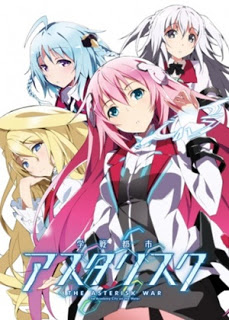
    #1. Gakusen Toshi Asterisk

    Gakusen Toshi Asterisk
    Gakusen Toshi Asterisk

    After the Invertia incident, the world rebuilt its power structure. With the Integrated Enterprise Foundation around, there are new biological types of humans.

    With these super-powered humans roaming, elite schools now compete in battles for entertainment. Seidoukan Academy is one of these schools.

    Some schools play dirty, however, and try to get rid of competitors before they enter the tournament. Luckily, Ayato Amagiri saved Julis-Alexia von Riessfeld from such an attack. After saving Julis, Ayato promises him that he will protect him.

    Just like Shichika, Ayato is an overpowered bodyguard, who openly shares affection with the girl he vowed to protect. Togame and Julis also have no pushovers, and they both fight next to their protectors.

    Togame and Julis shared one thing in particular, though, both of them were daughters. If you want more protectors like Katanagatari, Gakusen Toshi Asterisk is perfect for you.

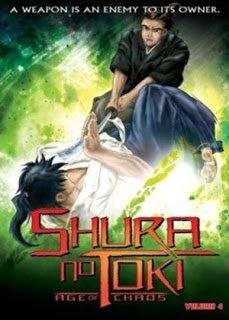
    #2. Mutsu Enmei Ryuu Gaiden: Shura no Toki

    Mutsu Enmei Ryuu Gaiden Shura no Toki
    Mutsu Enmei Ryuu Gaiden: Shura no Toki

    Legend tells of an invincible martial art known as Mutsu Enmei-Ryu, an unarmed style that allows users to defeat several armed opponents using extraordinary speed and power.

    This is the story of three generations of those who have Mutsu names, and their encounters and battles with the strongest fighters in their era.

    One of the best martial arts anime with interesting and exciting stories. These two series feature male leaders who defeated various swordsmen without using swords, which is a rather rare similarity.

    Both of them share the same speed and journey, although Katanagatari has more comedic elements and a more colorful visual style.

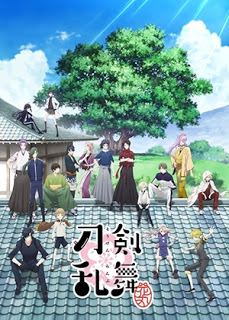
    #3. Touken Ranbu: Hanamaru

    Touken Ranbu Hanamaru
    Touken Ranbu: Hanamaru

    History is an important thing to maintain, humans tend to forget the past.

    Maybe because evil influences mess up history! Luckily we have Saniwa, which transformed the historic Japanese sword into humans who are now struggling to defend the past.

    These swordsmen usually roam around their homes, until there are real threats, and enter various comedy situations. While the story occurred in 2024, swords that protected the past were mostly from feudal Japan. Never be afraid, protected, by funny fighters!

    Shichika is considered the sword in Katanagatari, and there are even more swords alive in Touken Ranbu: Hanamaru. Both of these anime also have the same fighting style.

    Read more: Top 45 Best School Anime Recommendations

    If not much happens, Touken Ranbu: Hanamaru, has a few slices of life genre pieces. Katanagatari also has a few slices of life genre pieces when they don’t fight.

    Even though the slice of life is not part of one of their genres, it is good for creators to take the time to develop the characters as they do.

    Both of these anime also have several surprising and light comedies. If you like Katanagatari, you will like this anime!

    #4. Hakuouki

    Hakuouki
    Hakuouki

    Hakuouki’s story follows a group in the show (and actual history) known as the Shinsengumi.

    After the bastard samurai almost killed Chizuru Yukimura, he was saved by the Shinsengumi. He and his savior have the same goal, to find his father, who studies Western medicine.

    For their safety, they let Chizuru stay with them, as long as he continued to dress like a boy. It became clear later that chemicals were being distributed, and Chizuru’s father was somehow involved.

    There must be many stories in the Edo Period! I suspect history and swordplay are preferred in the Edo Period environment.

    Togame needs a bodyguard and hires Shichika, while Chizuru is guarded by the Shinsengumi. Both female protagonists have strong protectors in Japanese feudalism.

    This must be a runaway theme that guards must have in that era. Although it doesn’t offer much in terms of romance, I think that other similarities might be a good reason to watch it!

    #5. Ookami to Koushinryou

    Ookami to Koushinryou
    Ookami to Koushinryou

    Lawrence is a merchant who travels the world to trade and adventure. He visited the village and suddenly a girl was sleeping under the straw on his cart.

    He has wolf ears and a tail. The Wolf Girl said that she was “God” but her name was Holo.

    Lawrence teases the girl, but after hearing his story, he decides to accompany the north to travel north.

    On the trip, they both had various adventures & often got into trouble but slowly the bonds between them grew stronger

    The two series deal with the relationship between two opposite-sex protagonists who more or less meet by chance and join each other to make an epic journey in a beautiful fantasy setting.

    Their rather vague goals may be different (in Katanagatari this is a kind of treasure hunt, in Spice and Wolf, the desire to explore the world). While Katanagatari involves some politics and battles, while Spice and Wolf deal with trade and bargaining, both depend heavily on character dialogue and interaction along the way, which has many similarities too.

    The two women, for example, are cunning little creatures who not only tease their partners by guessing but also know how to manipulate the people around them,

    If you enjoy the development of mature romantic relationships during their journey through a fantastic world of funny, cunning, and pure dialogue, and a complete character in one of these shows, chances are you will enjoy the others.

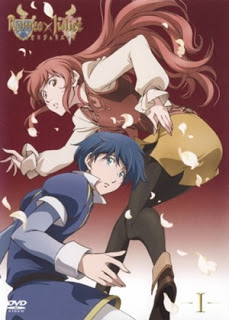
    #6. Romeo X Juliet

    Romeo X Juliet
    Romeo X Juliet

    On the floating continent of Neo Verona, the Montague family controls and kills every member of the Capulet family except Capulet’s daughter, Juliet Fiammata Asto Capulet.

    14 years later, Juliet and the remnants of Capulet’s followers lived hidden from the Montague family’s right hand.

    Juliet has long forgotten the murder of her family or her identity, and is dressed cross as Odin and the hero of city justice, “Red Whirlwind.” The sudden escape in his daily adventure takes him to Romeo Candorebanto Montague, a tyrannical Montague tyrant.

    Destiny was set when these two individuals soon became “lovers who were fascinated by stars” who cruelly played with fate amid war. Loosely based on the drama by William Shakespeare.

    Romeo X Juliet is probably the most different title in the list in terms of setting and historical context.

    When he arrived at the tragic love story, Katanagatari was no stranger. Togame ends to death at the end of Katanagatari. This could happen without saying, but Romeo and Juliet also died eventually.

    As many say, however, that is not the goal, but the journey that makes the story. We must say, this is the most creative adaptation of Shakespeare that we have ever seen. If you like Katanagatari and tragic love stories with heavy swords, see also Romeo X Juliet.

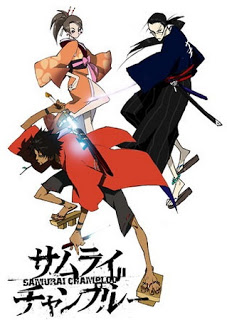
    #7. Samurai Champloo

    Anime Like Katanagatari
    Samurai Champloo

    In this alternative version of the Japanese Edo Period, hip-hop seems very popular! After Mugen agreed to defend Fuu Kasumi, at the restaurant where he worked, everything was out of control.

    Jin wanders near the restaurant, and Mugen thinks he’s a henchman, so they also fight. Jin and Mugen are arrested and will be beheaded for disrupting business affairs.

    Jin and Mugen fight and run away with the help of Fuu. Owing to Fuu, both of them are now guards, looking for samurai that smell of sunflowers.

    The shogunate happened again, and they did not like sunflower samurai at all. Both Samurai Champloo and Katanagatari take place in the Edo Period.

    So we imagine if you like sword fighting and fighting, Samurai Champloo is a mixture of old and new styles that are suitable for you to watch.

    Like Shichika, Mugen has a crush on the woman he protects. They are both willing to let go of anything for their loved ones (although Mugen rarely shows it emotionally).

    If you are looking for good entertainment like Katanagatari, this anime is very exciting to watch!

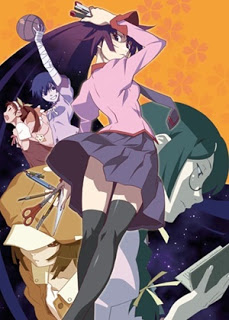
    #8. Bakemonogatari

    Bakemonogatari
    Bakemonogatari

    Both of these anime have lots of stories and are cool at work. But the best part is how the story is told.

    Both of these anime have the same level of comedy and both are amazing anime shows. In addition, the two anime are also written by the same author.

    #9. Basilisk: Kouga Ninpou Chou

    Basilisk: Kouga Ninpou Chou
    Basilisk: Kouga Ninpou Chou

    A battle between Kouga and Iga will determine who the next shogun will be. The leader of each clan must choose 10 fighters to fight for them. After a village is attacked, this is the time for the war to end.

    Gennosuke Kouga is a respectable man and tries to marry Oboro Iga. Unfortunately, their clan is now an enemy. Oboro may not be a warrior, but he can use his eyes to reduce the enemy’s strength.

    Both clans will lay traps, play dirty, and do whatever is needed to win. Can Oboro and Kouga find peace, when is their world at war?

    People may complain about living in a time of division, but keep in mind, there are bad times. Shichika and Gennosuke both lived in feudal Japan.

    The Edo period was very brutal. Both Shichika and Gennosuke fought hard in Japan, and both had the same interest in love.

    Togame stated that he was part of the shogun, and Oboro was forced to fight by the government. There are also similarities in characters who fight.

    Jyubei Jimushi at the Basilisk hides a knife in his stomach. Maniwa Koumori in Katanagatari also hid the sword in his stomach.

    We think hiding knives in the stomach sounds painful, so don’t try this at home huh! If you like Katanagatari you might like Basilisk. Basilisk is a little more bloody.

    Read more:

    Conclusion:

    So, friends, That’s the list of Anime Like Katanagatari. If there are other things related to this article, you can comment below this post.

  • 10 Best Video Editing Apps For Android 100% Free 2025

    10 Best Video Editing Apps For Android 100% Free 2025

    10 Best Video Editing Apps For Android 100% Free – Your Android smartphone may be able to shoot stunning high-quality videos, but it doesn’t have a good video editor. So it can’t help to make your video look as good as possible.

    10 Best Video Editing Apps For Android Free
    10 Best Video Editing Apps For Android Free

    10 Best Video Editing Apps For Android 100% Free

    The Android video editing app will allow you to make cuts to videos, add background music, enter text, apply filters, make transitions between clips, and much more. Make your edited videos look more stunning and professional.

    Read more:

    #1. Most Professional Features: KineMaster

    KineMaster is another full-featured video editing app and has a very good reputation on Google Play. It has a user-friendly interface and an amazing range of editing features for a free app. Like PowerDirector, Kinemaster also comes with a chroma key for background editing and can export videos in 4K resolution.

    Price: Free with in-app purchases ranging from $1.04 to $44.36.

    #2. Powerful and Cloud Available: Adobe Premiere Rush

    Developer: Adobe

    Price: Free +

    Premiere Clip was once Adobe’s reigning video editing app, but Premiere Rush seems to be quickly taking its place. Designed to be used via the cloud with apps for desktop and mobile, everything you do within the app is accessible anywhere. This all-in-one video editor lets you take advantage of a variety of powerful tools so that your videos look the way you want them to.

    Price: A limited free starter plan with a free Adobe Creative Cloud membership and the option to purchase a single app for $10 per month. Adobe Premiere Rush is also included with Premiere Pro.

    #3. Simple Yet Professional Video Editing: Quik

    Developer: GoPro

    Price: Free +

    Quik is a great app for video creators who just want to get their job done as quickly and comfortably as possible without compromising on quality. You can upload any combination of photos and videos, and the app will do the rest by automatically creating professional-looking videos. Then you can customize the video by trimming the clips, rearranging them, adding transitions, applying effects, and much more before you export them to other formats.

    Price: Free

    #4. For Video Editing Pro: PowerDirector

    Another Editor’s Choice on Google Play, PowerDirector is the kind of video editing app you want for your Android. It’s perfect for those of you who want to take editing seriously and are willing to take the time to learn how this app works.

    Once you get used to it, you’ll be able to create some professional-looking videos with all sorts of amazing effects. The app’s chroma key feature even lets you add voiceovers, action effects, and background graphics.

    Price: Free with in-app purchases ranging from $1.19 to $46.99.

    #5. Best Social Video: InShot Video Editor & Video Maker

    Price: Free +

    As Editor’s Choice on Google Play with over 3.5 million downloads, the video editing app InShot lives up to its reputation.

    This powerful video editing app guides you through the easy process of creating and editing videos, offering you a wide selection of editing options including merging videos and merging multiple clips with ease.

    Additional editing features are also available to optimize your videos for specific social platforms like Instagram, YouTube, TikTok, and more.

    Price: Free with the premium version for $2.99.

    #6. VivaVideo

    Similar to the video editing app InShot, VivaVideo is another impressive (and popular) app designed to create short videos and upload them to social networks.

    It offers the best and most extensive range of editing features but is very user-friendly and fun to use. You can still trim clips, merge them, apply filters, apply text, and take advantage of visually appealing stickers and images.

    Price: Free with in-app purchases ranging from $1.29 to $40.99.

    #7. YouCut

    YouCut is one of the few good video editing apps that will allow you to export your videos for free without a watermark.

    From the makers of the popular video editing app InShot, YouCut is also designed to create videos quickly and easily to upload to popular social networks like Instagram, YouTube, TikTok, and more. Use it to merge/merge clips, set speed for fast or slow motion, create photo slideshows, add music and much more.

    Price: Free with in-app purchases ranging from $3.79 to $12.99.

    #8. FilmoraGo

    Developer: WONDERSHARE TECHNOLOGY CO., LIMITED

    Price: Free +

    FilmoraGo is the best and most popular video editing app on Android that thankfully won’t put a watermark on your video exports, but that’s about it.

    The app offers all the basic features like cropping, applying filters, and adding text with various professional editing tools plus a large collection of effects. It’s perfect for creating videos for social networks like Instagram, Facebook, and more.

    Price: Free with in-app purchases of $1.39 to $10.99.

    #9. Magisto

    Similar to Quik, Magisto uses artificial intelligence to analyze videos and choose the best parts to show. If you want quick results and don’t like fiddling with too many options for manually editing videos, then Magisto is a must-try.

    Just choose your editing style, select the videos and photos you want to include and select an optional music track from Magisto’s built-in music library or your device. This application will automatically do its job.

    Price: Free with in-app purchases ranging from $0.99 to $239.99.

    #10. ActionDirector

    Developer: Cyberlink Corp

    Price: Free +

    ActionDirector is the best video editing app on Android specially designed for editing action clips and is another Editor’s Choice on Google Play.

    It’s super easy to use, offering features like slow motion, fast motion, rewind, and rewind to highlight your best action shots. Other features include the basics like customizable color options, filters, transitions, text, and more.

    Price: Free with in-app purchases ranging from $2.49 to $31.99.

    Read more:

    Conclusion:

    This is the list of the 10 best video editing apps on Android that you can try. If this article is useful, please share it on social media so that your friends know this useful information.

  • 15 Ways to Fix Steam Disk Write Error Quick Guide 2025

    15 Ways to Fix Steam Disk Write Error Quick Guide 2025

    15 Ways to Fix Steam Disk Write Error Quick Guide – As we know Steam is the best digital video game distribution service. This software is equipped with many additional features, a user-friendly interface, and much more for a better user experience.

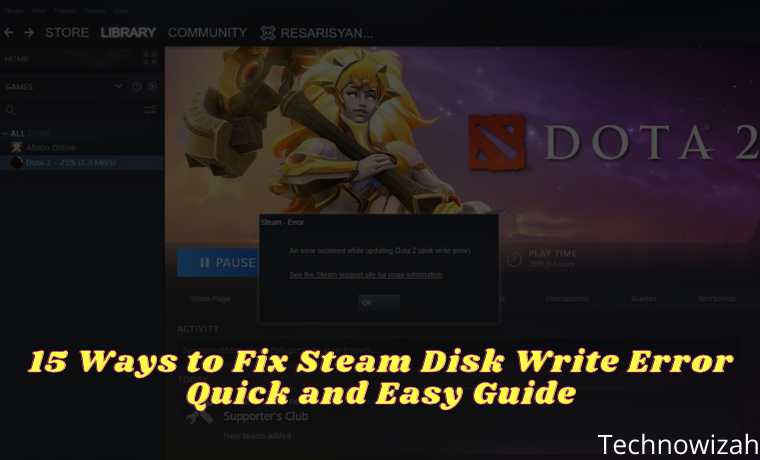
    15 Ways to Fix Steam Disk Write Error Quick and Easy Guide
    15 Ways to Fix Steam Disk Write Error Quick and Easy Guide

    How to Fix Steam Disk Write Error Quick Guide

    However, it seems that there are some bugs or errors that can ruin the gaming experience for many users. Steam disk writes error is one of them.

    Read more:

    According to many reports, affected Steam users experience certain errors while trying to download or install game updates. This error usually appears whenever a user tries to update a game they previously installed or downloaded. But you don’t need to worry, because this time we will discuss how to fix the Steam disk write error.

    How to Fix Steam Disk Write Error

    Well, the chances are high enough that your Steam won’t be able to properly download and save game data to disk storage on your computer. It can show you error messages like:

    • An error occurred while installing game title (disk write error): C:\Program Files (x86)\steam\steamapps\common\game_title
    • An error occurred while updating the game_title
    • An error occurred while installing game_title

    According to some affected Steam users, this error might appear due to a write-protected Steam folder or disk drive, antivirus or firewall blocking Steam from downloading or installing data, corrupt or missing game files, etc. Apart from that, it’s possible that your device drivers are outdated, Steam folder security doesn’t have full permissions, and more.

    #1. Restart Steam

    The first thing you can do to fix the Steam disk write error is to restart the Steam client on your PC. This is an easy thing that can fix all temporary glitches or cache data issues completely. After restarting it, you can try to download or install the problematic game again.

    #2. Reboot the PC

    Well, if restarting the Steam launcher doesn’t solve the problem, try rebooting your computer. Restarting the system can also eliminate all possible glitches or temporary cache data issues easily. Just click on the Start menu > Power icon > Select Restart.

    #3. Check the Internet Connection

    It is also highly recommended that you check your internet connection as a slower or unstable network can also trigger game download or installation problems. If you are using a Wi-Fi network, switch to a wired connection (ethernet) or vice versa.

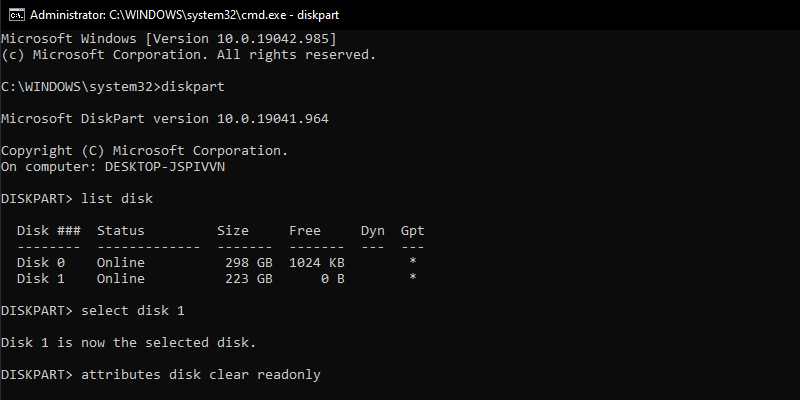
    #4. Remove Disk Drive Write Protection

    Try deleting the disk drive write protection where you installed Steam. To do so:

    Remove Disk Drive Write Protection
    Remove Disk Drive Write Protection
    1. Click on the Start menu   > Type cmd.
    2. Right-click on  Command Prompt from the search results.
    3. Select  Run as administrator > If prompted by UAC, click  Yes to continue.
    4. Once the command prompt window opens, type the following command and press Enter to run it:
      1. diskpart
      2. disk list
      3. select disk #
      4. attributes disk clear readonly
    5. Once done, close the command prompt, and restart your computer to apply the changes.

    #5. Set Steam Folder Security To Full Control

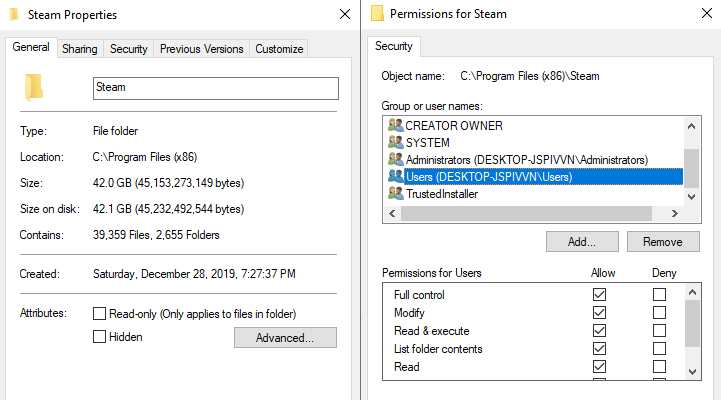
    It’s also possible that your Steam folder doesn’t have full permission to perform tasks easily. To give full control, you can follow the steps below:

    Set Steam Folder Security To Full Control
    Set Steam Folder Security To Full Control
    1. Close Steam and end task from Task Manager.
    2. Press the Windows key  + R  to open the  Run dialog box.
    3. Type  %ProgramFiles(x86)%  and press  Enter to open Program Files.
    4. Right-click on the  Steam folder  > Go to  Properties.
    5. Make sure the Read-only (Only applies to files in folder) checkbox is not enabled. If it is already enabled, then uncheck the checkmark.
    6. Now, click on the Security tab  > Click on  Edit.
    7. From Group or user names, click on your  PC name (user account).
    8. Then tick  Full Control (Allow)  of  Permissions for Users.
    9. Once done, click  Apply and then  OK  to save the changes.

    #6. Turn off Antivirus and Firewall Protection

    Turn off Antivirus and Firewall Protection
    Turn off Antivirus and Firewall Protection

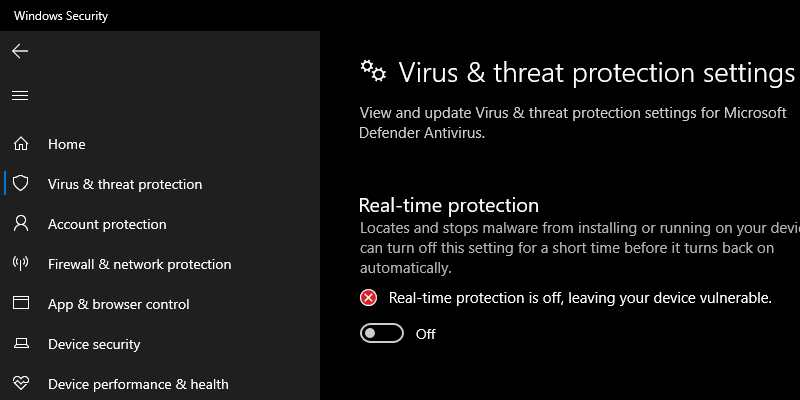
    Chances are high enough that maybe your default Windows Defender Firewall protection or any third-party antivirus program is preventing ongoing connections or game files from running properly. So, make sure to temporarily disable or turn off real-time protection and firewall protection.

    #7. Close the Background Running Task

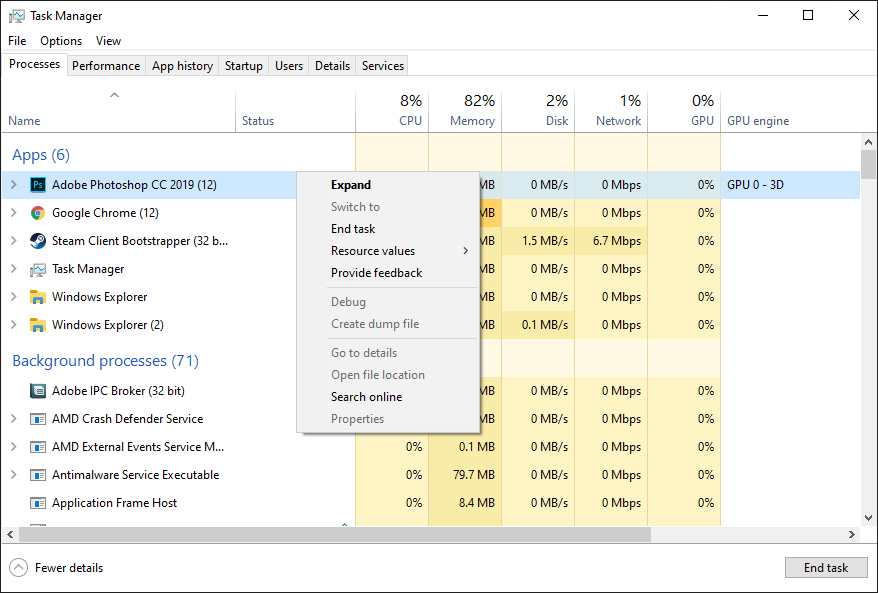
    It goes without saying that some unnecessary background running tasks or programs can easily consume a lot of system resources on your computer which can reduce performance. This directly affects game launching, gameplay, rendering, other running programs, etc. Therefore, make sure you close the program or task completion.

    Close the Background Running Task
    Close the Background Running Task
    1. Press  Ctrl + Shift + Esc to open  Task Manager.
    2. Now, click on the Processes tab   > Click on it to select tasks that don’t need to run in the background and eat up enough system resources.
    3. Click  End Task to close them one by one.
    4. Once done, restart your system.

    #8. Run Steam As an Administrator

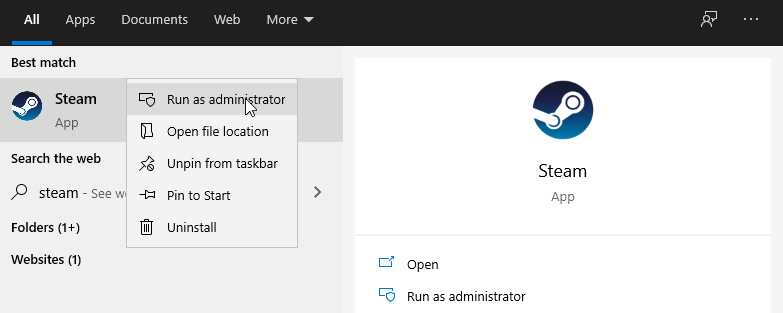
    Make sure to run Steam as administrator as it may not run properly if you don’t have admin access to the Windows user account control system. To do so:

    Run Steam As Administrator
    Run Steam As Administrator
    1. Right-click on the  Steam  (exe) file > Click  Properties.
    2. Go to the Compatibility tab  > Enable the Run this program as an administrator checkbox.
    3. Click  Apply and then  OK  to save the changes.
    4. When finished, restart your computer, and try checking for Steam Disk Write Error again.

    #9. Delete Files 0 KB

    Whenever something goes wrong while Steam is downloading a game or even installing an update, it can create a corrupted file in the installed directory causing a Steam disk write error. To fix this problem:

    1. Close Steam and end task from Task Manager.
    2. Press the Windows key  + R  to open the  Run dialog box.
    3. Type  %ProgramFiles(x86)%  and press  Enter to open Program Files.
    4. Go to Steam folder   > Open Steamapps folder.
    5. Go to  Common folder > Scroll down and delete the  0KB  file (if any).
    6. Once done, restart the computer, and check for Steam Disk Write Error.

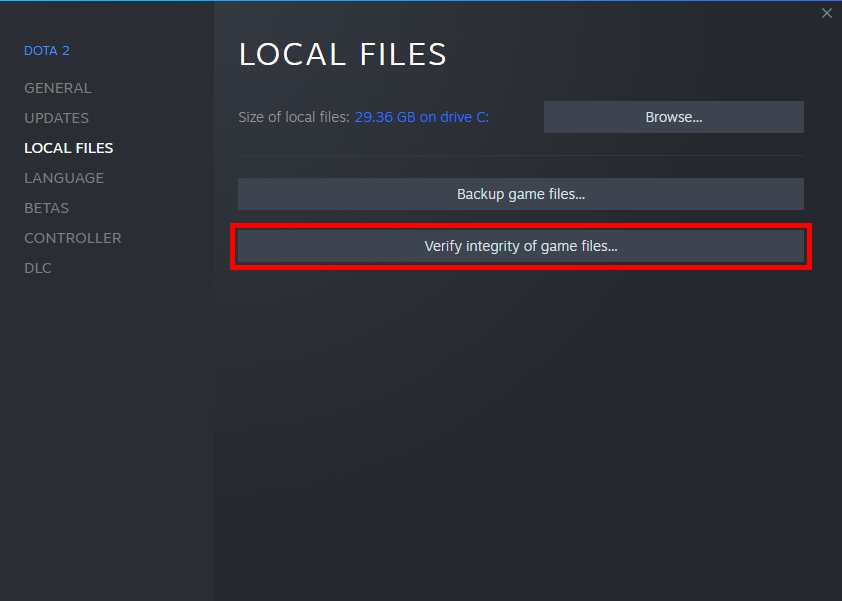
    #10. Verify Game File Integrity

    Well, if your installed game files are missing or corrupted for some reason, you might start receiving lots of problems or crashes, or random errors on your PC. So, simply verifying the game files can reduce the problem drastically. You can do this from the Steam client easily by following the steps below:

    Verify Game File Integrity
    Verify Game File Integrity
    1. Launch  Steam client > Open  Library.
    2. Right-click on the problematic game > Click  Properties.
    3. Click on the Local Files tab.
    4. Select  Verify Integrity of Game Files.
    5. Wait until the process is complete, then restart your game.

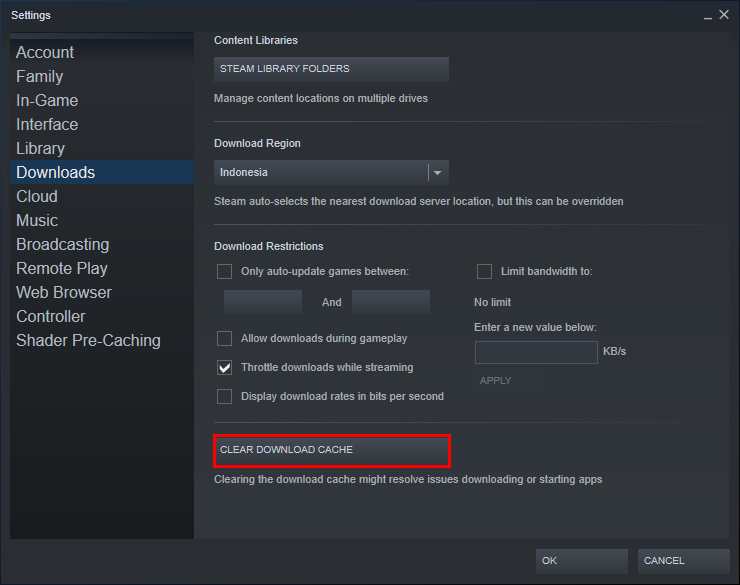
    #11. Clear Steam Download Cache

    In case, the Steam download cache gets corrupted for some unforeseen reason, make sure to delete it. To do this:

    Clear Steam Download Cache
    Clear Steam Download Cache
    1. Open  Steam  > Click on the Steam category from the top left corner.
    2. Go to  Settings > Select  Downloads.
    3. Now, click on  Clear Download Cache.
    4. Once done, restart Steam, and check for the problem again.

    #12. Reinstall Steam To Another Drive

    Sometimes it is also possible that the installed Steam drive partition is causing some problems or not having enough free space. In that case, you will have to uninstall Steam first and then try to reinstall it to a different drive partition to check if it has fixed the Steam disk write error or not.

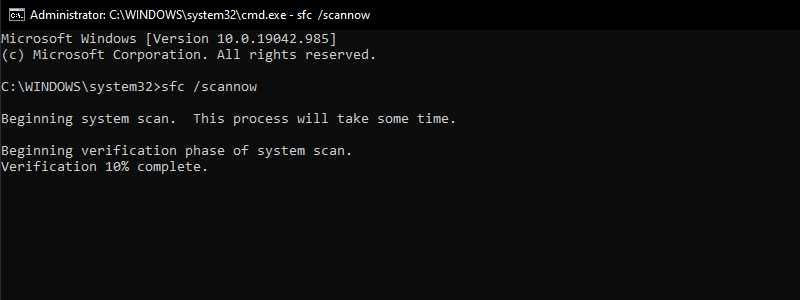
    #13. Run SFC

    System File Checker (SFC) is a utility tool for the Windows operating system that allows users to scan for damaged or missing Windows system files and recover them automatically. This method will solve the startup problem completely.

    Run SFC
    Run SFC
    1. Click on the  Start Menu and type cmd.
    2. Now,  right-click on  Command Prompt from the search results.
    3. Select Run as administrator  > If prompted, click  Yes to grant admin privileges.
    4. Once the command prompt window opens, type the command SFC /scannow and press  Enter  to run it:
    5. Now, wait for the process to complete.
    6. Make sure to restart your computer for the changes to take effect.

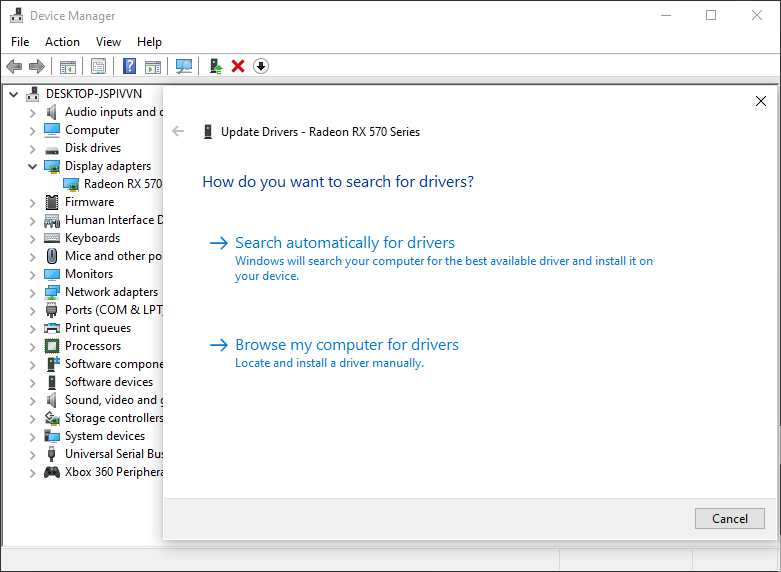
    #14. Update the Device Driver

    Well, it’s worth mentioning that in case, you haven’t updated your device drivers for a while, that means some drivers are already running on old versions which can bring about compatibility issues. Make sure to keep your device drivers up to date. To do this:

    Update Device Driver
    Update Device Driver
    1. Right-click on the Windows logo.
    2. Click on  Device Manager from the list.
    3. Now, double-click on the respective drive category to expand the list.
    4. Then right-click on the name of the graphics card.
    5. Select  Update driver  > Select Search automatically for drivers.
    6. If there is an update available, it will automatically download and install the latest version.
    7. Once done, make sure to reboot your computer to apply the changes.

    #15. Contact Steam Support

    If nothing else works for you, try contacting Steam Support for further assistance. Also, you can find more help on the Steam Community Forum.

    Read more:

    Conclusion:

    So that’s how to fix the Steam disk write error. You may get this error when downloading or updating games on Steam such as Dota 2 games or others. If you have an app that can prevent Steam from saving or updating files, disable it. The game should be installed and updated without any problems.

  • How to Force Close an Application on Windows 10 PC 2025

    How to Force Close an Application on Windows 10 PC 2025

    How to Force Close an Application on Windows 10 PC – It’s frustrating when you have an application that doesn’t respond to use. But turning off the computer manually by pressing the power button can result in damage to your computer. Instead of waiting for the app to respond, here’s how to force close an app on a Windows 10 PC in three ways.

    How to Force Close an Application on Windows 10 PC
    How to Force Close an Application on Windows 10 PC

    How to Force Close an Application on a Windows 10 PC Using a Keyboard Shortcut

    Read more:

    1. Click on the frozen application. You have to select an application so that your computer knows that it is the one to close.
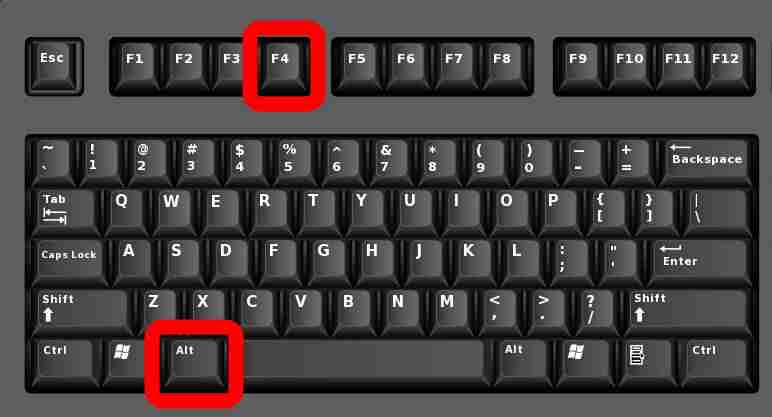
    2. Next, press the Alt + F4 keys simultaneously. The F4 key is on the top of your keyboard, while the Alt key is on the left of most keyboards.

    How to Force Close an Application on a Windows 10 PC Using a Keyboard Shortcut

    If you don’t select a window or application, this shortcut can cause your computer to shut down. If these keyboard shortcuts don’t work on your Windows 10 PC, or your laptop doesn’t have an F (function) key, you can use Task Manager.

    How to Force Close an Application on a Windows 10 PC Using the Windows Task Manager

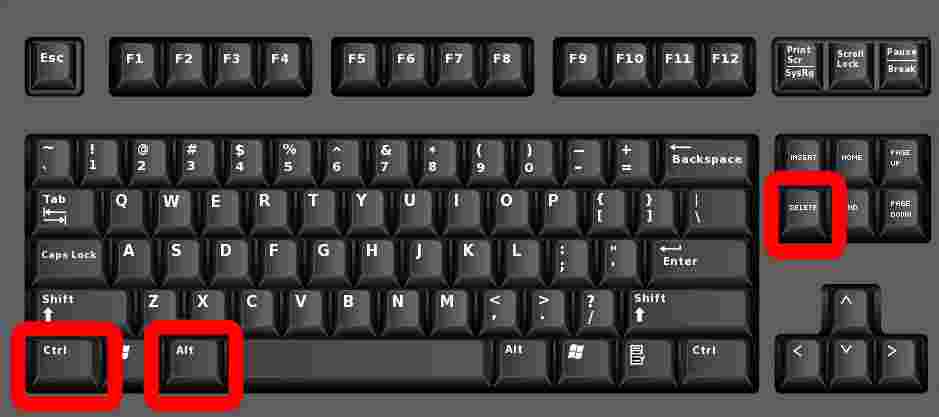
    1. Press the Ctrl + Alt + Delete keys simultaneously. Will display a screen that says, ” Preparing security settings ” before you see a short task list.

    How to Force Close an Application on a Windows 10 PC Using the Windows Task ManagerNote: The “delete” key is not the same as the “backspace” key. If you don’t have the delete key, try pressing Ctrl + Shift + Esc to open the Task Manager window.
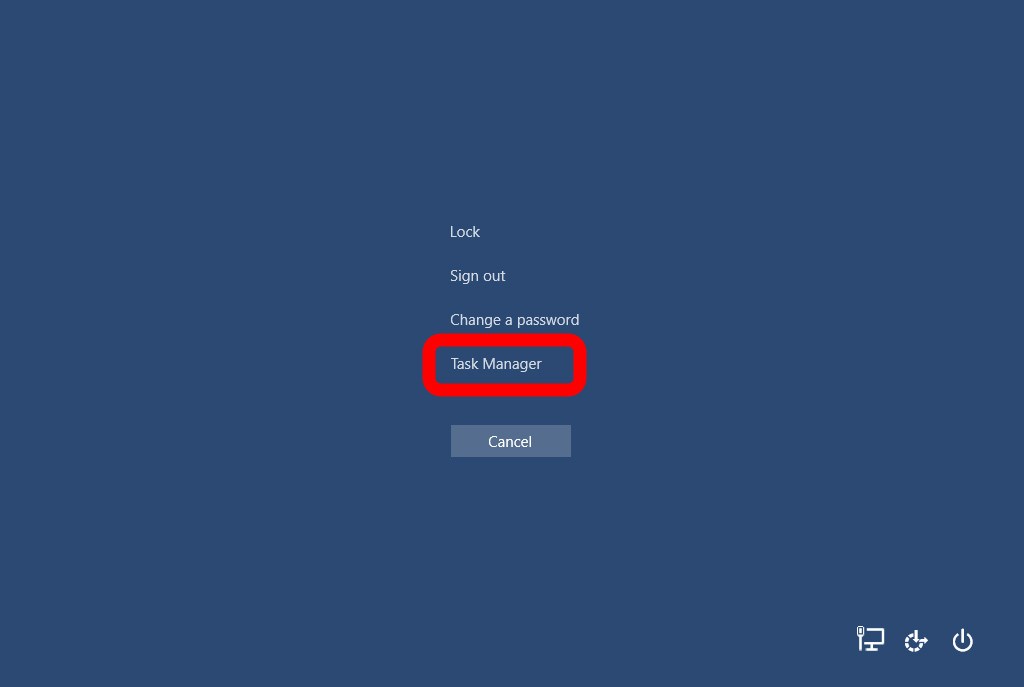
    2. Then select Task Manager. This is the last option on the list.

    How to Force Close an Application on a Windows 10 PC Using the Windows Task Manager

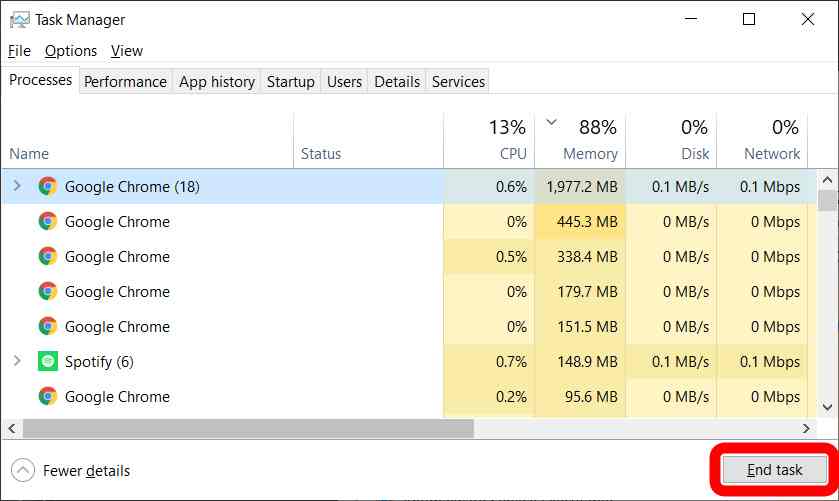
    3. Click the application that you want to force quit.  If you don’t see the app in the list, make sure to hit the More details button in the lower-left corner of the window.

    4. Click the End task to close the program.

    How to Force Close an Application on a Windows 10 PC Using the Windows Task Manager

    How to Force Close an Application on a Windows 10 PC using Command Prompt

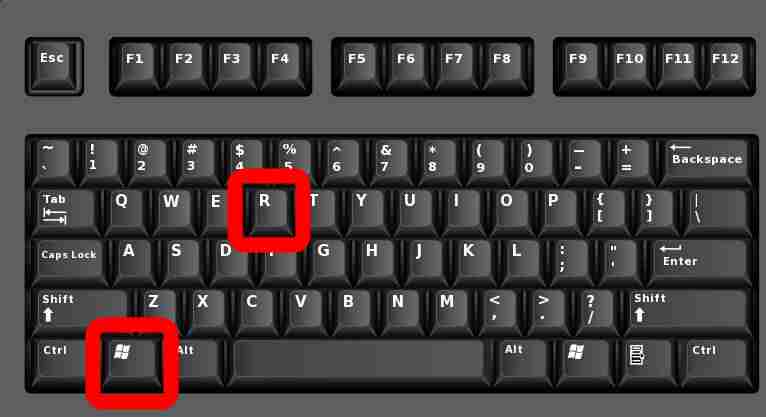
    1. Click the Windows key + R on your keyboard simultaneously. The Windows key is the button with the Windows logo to the left of your spacebar.

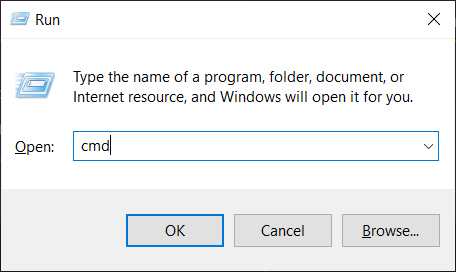
    How to Force Close an Application on a Windows 10 PC using Command Prompt2. Then type “cmd” in the search box and hit enter on your keyboard
    How to Force Close an Application on a Windows 10 PC using Command Prompt

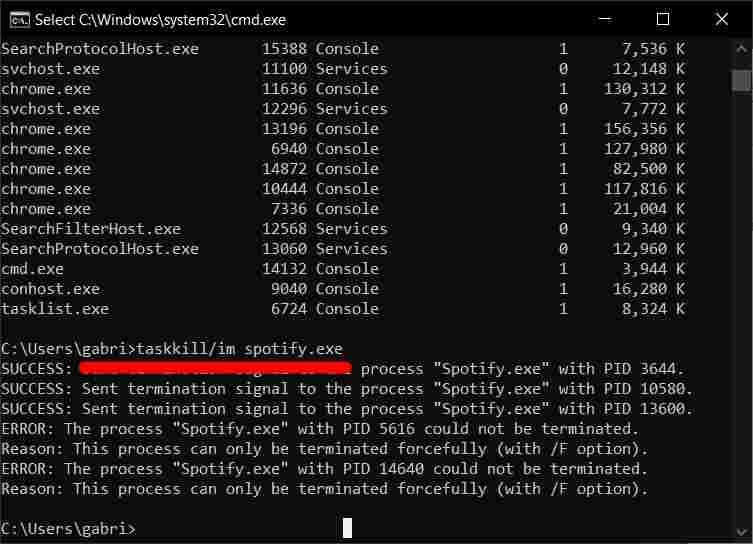
    3. Type “tasklist” into the Command Prompt. It displays all tasks and programs running on the machine, including those with problems.

    4. Finally, type “taskkill / im {name_of_program} .exe” Replace {name_of_program} with the name of the program you want to force quit. Remember to put a space between “taskkill im” and the program name.

    5. Finally, hit enter on your keyboard.

    How to Force Close an Application on a Windows 10 PC using Command Prompt

    For example, if you wanted to force quit Microsoft Word, you would type “taskkill / im word.exe” and press enter. The Command Prompt will send a confirmation message that the task kill was successful.

    Read more:

    Conclusion:

    This is the explanation of how to force close an application on a Windows 10 PC, If you are using this shortcut to force quit apps frequently, it may be time for you to run a check of your PC.