Category: Android

Android – Here you can find Android-related updates, Games, Online Game, Offline Games, Multimedia Games, Tips & Tricks, information, and more.

  • 10 Best Video Editing Apps For Android 100% Free 2025

    10 Best Video Editing Apps For Android 100% Free 2025

    10 Best Video Editing Apps For Android 100% Free – Your Android smartphone may be able to shoot stunning high-quality videos, but it doesn’t have a good video editor. So it can’t help to make your video look as good as possible.
    10 Best Video Editing Apps For Android Free
    10 Best Video Editing Apps For Android Free

    10 Best Video Editing Apps For Android 100% Free

    The Android video editing app will allow you to make cuts to videos, add background music, enter text, apply filters, make transitions between clips, and much more. Make your edited videos look more stunning and professional.

    Read more:

    #1. Most Professional Features: KineMaster

    KineMaster is another full-featured video editing app and has a very good reputation on Google Play. It has a user-friendly interface and an amazing range of editing features for a free app. Like PowerDirector, Kinemaster also comes with a chroma key for background editing and can export videos in 4K resolution.

    Price: Free with in-app purchases ranging from $1.04 to $44.36.

    #2. Powerful and Cloud Available: Adobe Premiere Rush

    Developer: Adobe

    Price: Free +

    Premiere Clip was once Adobe’s reigning video editing app, but Premiere Rush seems to be quickly taking its place. Designed to be used via the cloud with apps for desktop and mobile, everything you do within the app is accessible anywhere. This all-in-one video editor lets you take advantage of a variety of powerful tools so that your videos look the way you want them to.

    Price: A limited free starter plan with a free Adobe Creative Cloud membership and the option to purchase a single app for $10 per month. Adobe Premiere Rush is also included with Premiere Pro.

    #3. Simple Yet Professional Video Editing: Quik

    Developer: GoPro

    Price: Free +

    Quik is a great app for video creators who just want to get their job done as quickly and comfortably as possible without compromising on quality. You can upload any combination of photos and videos, and the app will do the rest by automatically creating professional-looking videos. Then you can customize the video by trimming the clips, rearranging them, adding transitions, applying effects, and much more before you export them to other formats.

    Price: Free

    #4. For Video Editing Pro: PowerDirector

    Another Editor’s Choice on Google Play, PowerDirector is the kind of video editing app you want for your Android. It’s perfect for those of you who want to take editing seriously and are willing to take the time to learn how this app works.

    Once you get used to it, you’ll be able to create some professional-looking videos with all sorts of amazing effects. The app’s chroma key feature even lets you add voiceovers, action effects, and background graphics.

    Price: Free with in-app purchases ranging from $1.19 to $46.99.

    #5. Best Social Video: InShot Video Editor & Video Maker

    Price: Free +

    As Editor’s Choice on Google Play with over 3.5 million downloads, the video editing app InShot lives up to its reputation.

    This powerful video editing app guides you through the easy process of creating and editing videos, offering you a wide selection of editing options including merging videos and merging multiple clips with ease.

    Additional editing features are also available to optimize your videos for specific social platforms like Instagram, YouTube, TikTok, and more.

    Price: Free with the premium version for $2.99.

    #6. VivaVideo

    Similar to the video editing app InShot, VivaVideo is another impressive (and popular) app designed to create short videos and upload them to social networks.

    It offers the best and most extensive range of editing features but is very user-friendly and fun to use. You can still trim clips, merge them, apply filters, apply text, and take advantage of visually appealing stickers and images.

    Price: Free with in-app purchases ranging from $1.29 to $40.99.

    #7. YouCut

    YouCut is one of the few good video editing apps that will allow you to export your videos for free without a watermark.

    From the makers of the popular video editing app InShot, YouCut is also designed to create videos quickly and easily to upload to popular social networks like Instagram, YouTube, TikTok, and more. Use it to merge/merge clips, set speed for fast or slow motion, create photo slideshows, add music and much more.

    Price: Free with in-app purchases ranging from $3.79 to $12.99.

    #8. FilmoraGo

    Developer: WONDERSHARE TECHNOLOGY CO., LIMITED

    Price: Free +

    FilmoraGo is the best and most popular video editing app on Android that thankfully won’t put a watermark on your video exports, but that’s about it.

    The app offers all the basic features like cropping, applying filters, and adding text with various professional editing tools plus a large collection of effects. It’s perfect for creating videos for social networks like Instagram, Facebook, and more.

    Price: Free with in-app purchases of $1.39 to $10.99.

    #9. Magisto

    Similar to Quik, Magisto uses artificial intelligence to analyze videos and choose the best parts to show. If you want quick results and don’t like fiddling with too many options for manually editing videos, then Magisto is a must-try.

    Just choose your editing style, select the videos and photos you want to include and select an optional music track from Magisto’s built-in music library or your device. This application will automatically do its job.

    Price: Free with in-app purchases ranging from $0.99 to $239.99.

    #10. ActionDirector

    Developer: Cyberlink Corp

    Price: Free +

    ActionDirector is the best video editing app on Android specially designed for editing action clips and is another Editor’s Choice on Google Play.

    It’s super easy to use, offering features like slow motion, fast motion, rewind, and rewind to highlight your best action shots. Other features include the basics like customizable color options, filters, transitions, text, and more.

    Price: Free with in-app purchases ranging from $2.49 to $31.99.

    Read more:

    Conclusion:

    This is the list of the 10 best video editing apps on Android that you can try. If this article is useful, please share it on social media so that your friends know this useful information.

  • Download The Latest Camfrog Pro APK Full Version 2025

    Download The Latest Camfrog Pro APK Full Version 2025

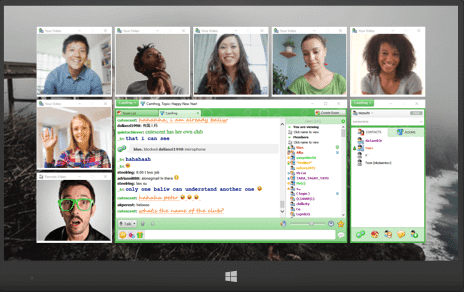
    Download The Latest Camfrog Pro APK Full Version – We have available many applications that we can use to make video calls with many people at once, one application that has always been popular until now is Camfrog Pro.

    Download The Latest Camfrog Pro APK Full Version
    Download The Latest Camfrog Pro APK Full Version

    How to Download The Latest Camfrog Pro APK Full Version

    Camfrog is a video chat application that can be used on various types of platforms and already has millions of active communities in the chat room.

    Read more:

    By using the Camfrog application, you can video chat with many users at the same time, both Windows, Android, and even IOS users.

    Camfrog Pro android application has several features that are more interesting than other platforms. For example, you can choose your photo to be used as a profile photo.

    In addition, there are tons of funny and unique stickers that can be used to make your conversation more exciting. Not only that, but you can also send gifts through this application.

    If you use Camfrog the free version won’t get that feature. All of these features can be obtained by using the Camfrog Pro APK application.

    Download Camfrog Pro APK Full Version for Free

    How to Download Camfrog Pro for Free
    How to Download Camfrog Pro for Free

    If you download Camfrog through Playstore, you will have to spend some money to convert Camfrog to the Pro version so that you get premium features.

    Those of you who don’t want to spend money can use the Camfrog Pro Apk application.

    But you have to download directly from this site to get Camfrog Pro free for Android

    Just click the download link below, so the download process will immediately run.

    Name Camfrog Pro APK
    Version 7.12.0.9
    Size 53MB
    Update August 2025
    Minimum OS 4.0.3 and up
    Developer Camshare Inc

    Latest Version

    Download Camfrog Pro

    Download Camfrog Pro Full Version APK

    Download Via Mediafire

    Download via Google Drive

    How to Install Camfrog Pro APK

    1. Make sure you download the Camfrog Pro APK file via the download link above
    2. Then activate the application installed from an unknown source by entering the settings menu >> Security >> checklist on the unknown source section. If you have previously activated it, you can skip this step
    3. Look for the Camfrog Pro APK file that was downloaded earlier, it will usually enter the download folder
    4. Open the Camfrog Pro APK file, then select Install
    5. Wait until the installation process is complete
    6. After completing the application is ready to use

    Camfrog Pro feature

    • Can do video chat with people all over the world
    • Join thousands of chat rooms that already exist and create your own
    • Can add new friends or old friends to the contact list on the Camfrog Pro application
    • Allows you to convert private videos with other friends both PC users and smartphones, all of which can support (cross-platform applications)
    • There is log help to get in and connect more quickly
    • Bug fixes

    In this application, there are 2 rooms that you can enter, namely a public room where everyone can enter and a second Room 18+ only adults can enter.

    Camfrog used to be very popular among PC users. However, due to the rapid development of the world of technology, especially on smartphones, the Developer finally released the Camfrog application specifically for smartphones both IOS and Android.

    As we know every day on Playstore there are only new applications, but only quality applications that will survive.

    Camfrog Android application is in principle the same as the one on the PC, and has all the same features that can both be used to make video calls for free.

    In addition, you are also free to interact with more than 1000 chat ROMs without any restrictions.

    With Camfrog Pro, of course, you are superior because it can accommodate thousands of users.

    Of course, this is much different if you use the free version of the Camfrog application.

    Camfrog is indeed different from other video chat applications, wherein other applications it is very difficult to find other people to be invited to video chat.

    How to use Camfrog Pro Android

    By using Camfrog Pro we can make video chat with all its users from all over the world.

    You can use the Camfrog Pro APK application to get a new chat room that is still active in the video chat menu.

    In addition, you can create your chat room and invite others to join.

    If you want to enter an active chat room, it’s very easy to just click on the person’s name, and then see what the rules apply in the chat room.

    The latest version of Camfrog Pro now has a server with a wider and unlimited range.

    So it will not experience server error complaints as is often the case with old versions of Camfrog.

    How to Start Video Chat

    To start a video chat, the first step to take is to send an instant message to the person you want to invite to a video chat.

    You can do this by right-clicking on the nickname and then selecting the Instant Messaging User option.

    If you don’t know someone to send a message to, you can access the user’s directory by clicking on the “Find Camfrog users” icon in the main window of the application.

    After sending a message to other users indicating that you have been invited to video chat, you must click the “Call” icon located in the instant message window.

    After other users accept your video chat invitation, you will see each other on the phone’s screen and hear the sound immediately.

    You can determine whether other users are male or female through their status.

    You can also confirm whether or not they have a webcam with their icon in their IM window or in the user directory.

    How to receive Camfrog pro-Video Chat

    How to receive Camfrog pro-Video Chat
    How to receive Camfrog pro-Video Chat

    When someone requests a video chat, they will send an instant message stating, “Nickname asks for a private call. Will you accept it? ”

    Then you will click on the “yes” hyperlink to accept and “no” if you don’t accept.

    You can find out other people’s profiles by clicking the “Profile” icon in the instant message window or right-clicking the nickname and selecting “View profile” to find out more about that user.

    If a user sends you a rude instant message, you can block it by clicking “Block” in the Instant Message window and then giving them a bad comment by clicking on a sad face next to the place that says “Give a Bad Review”.

    If this user receives three bad feedback from different users, he cannot trust someone for several minutes.

    Ending Video Chat

    To end the video chat, click the webcam icon “Close” at the top of the instant message window, close the instant message window, or close your local video or video window to other users.

    Disclaimer: All forms of download files on the Technadvice.com site are just for educational purposes only.

    DMCA: Technadvice.com complies with 17 U.S.C. * 512 and the Digital Millennium Copyright Act (DMCA). It is our policy to respond to any infringement notices and take appropriate action. If your copyrighted material has been posted on the site and you want this material removed, Contact us.

    Read more:

    Conclusion:

    So, friends, that’s above how to download the latest Camfrog pro-APK full version. I have given you all the necessary details about how to download and install Camfrog Mod APK’s Latest Version for Android. It is the best video chat apk available on Android.

  • What is ROM on Android Smartphones Device 2025

    What is ROM on Android Smartphones Device 2025

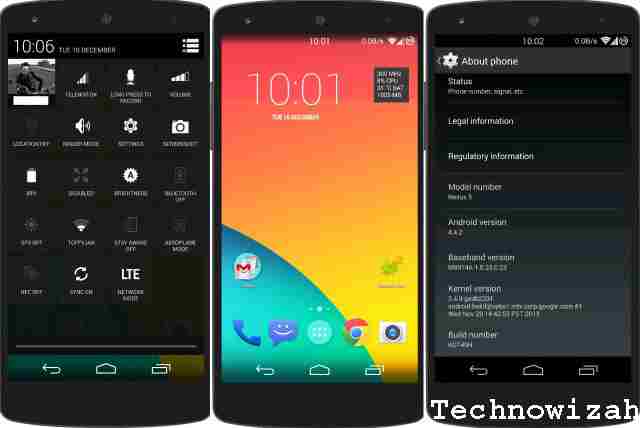
    What is ROM on an Android Smartphone? ROM stands for Read-Only Memory. In the case of Android Smartphones, this ROM refers to the internal storage media where the firmware and default applications are stored.

    What is ROM on Android Smartphone Complete

    What is ROM on Android Smartphones Complete History

    A ROM is a piece of hardware that functions as an internal storage medium. The data in it can only be read (read). However, through the flashing process, this ROM can be written to/filled with data.

    Read more:

    When you or someone else wants to install ROM on an Android Smartphone, this means they are installing new firmware on their smartphone. Especially for this case, you can think of ROM, Firmware, and Operating System as the same thing.

    Types of ROM in General

    Because Android is an operating system derived from Linux, it is also an Open-Source license. This causes ROM or Android firmware to come in several types, namely:

    • Stock ROM
    • Custom ROM
    • Branded Stock ROM

    #1. Stock ROM

    Stock ROM
    Stock ROM

    Stock ROM is the basic firmware on an Android smartphone that is made for an Android smartphone to work. Stock ROM usually has a basic design without any branding. In essence, Stock ROM is made only until the Android smartphone and the hardware in it can work.

    #2. Custom ROM

    Custom ROM
    Custom ROM

    A custom ROM is an Android smartphone firmware released unofficially by a developer that may have new display features, new features to increase performance. Custom ROMs are usually made when a particular smartphone manufacturer has a weakness in its performance so to cover these weaknesses, changes to the ROM or firmware are needed.

    #3. Branded Stock ROM

    Branded Stock ROM
    Branded Stock ROM

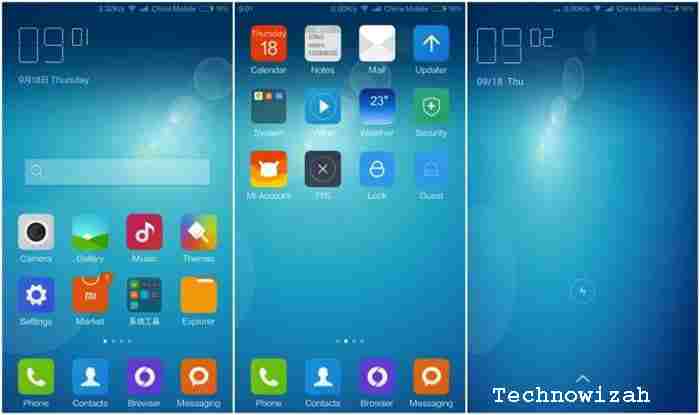
    A branded Stock ROM is a stock ROM that is customized and changed according to the wishes of the manufacturer or particular Android smartphone brand holder. Changes here usually include the design or appearance, certain applications, and changes made to increase the performance of an Android smartphone.

    Which is Better Stock ROM or Custom ROM?

    Each type of ROM has its advantages and disadvantages. For that, let’s learn one by one by comparing them based on common cases felt by Android users.

    #1. Pros and Cons of Stock ROM

    Stock ROMs are usually made by people who are very knowledgeable in the world of Android. By going through the long research and testing stages them, Stock ROM comes with the following advantages:

    • Most of the deficiencies have been resolved at the research and development stage.
    • High stability.
    • It is a universal Stock ROM that can be used on all official devices according to the specifications.
    • The update is very influential.

    Even though it has the above advantages, stock firmware also has the following disadvantages:

    • Updates are rare because development is carried out if there is cooperation with only certain manufacturers or brand holders.
    • If there is a weakness in the previous operating system, it will usually be fixed on the next smartphone because it is considered more profitable.
    • Despite the update, several countries did not receive it.

    #2. Pros And Cons of Custom ROM

    Although Custom ROMs are developed by people who don’t officially work for a particular Android smartphone manufacturer, they are highly knowledgeable and passionate. Here are some of the advantages of Custom ROM compared to Stock ROM:

    • A large selection of Custom ROMs for almost all types of Android smartphone devices, each ROM will provide optimizations that are not found on Stock ROM.
    • Frequently updated because it is developed by the community and its users directly.
    • Because there are many communities, we can easily provide feedback to developers directly without having to be complicated and costly.
    • Custom ROMs usually get rid of unnecessary applications.
    • Performance increases because Custom ROMs are made so that the hardware can work optimally.
    • Some Custom ROMs even come with more efficient battery consumption.
    • Custom ROM allows us to use microSD as an internal memory so that there is no more problem with full internal storage.

    Although there are many advantages of a Custom ROM, there are also some disadvantages the following:

    • Because it was released unofficially, we have to install it manually and there are often problems during installation.
    • Data loss risk during installation.
    • Android smartphones must be ROOT.
    • ROOT void warranty.
    • Risk of the bricked Android smartphone (won’t boot at all) if you do it wrong.

    Do I Need a Custom ROM?

    This is up to the Android smartphone user itself, if you have an Android smartphone with a Stock ROM that works optimally and suits your needs, then you don’t need to make any changes.

    Read more:

    Conclusion:

    However, if your Android smartphone feels that its performance is not optimal, such as the wasteful battery, loading takes a long time and a bug or weakness appears in the Stock ROM but has never been fixed by the developer, then the Custom ROM can be tried.

  • 15 Best File Manager Apps For Android Phone Device 2025

    15 Best File Manager Apps For Android Phone Device 2025

    15 Best File Manager Apps For Android Phone Devices – If you are an Android user, surely you need the best file manager app. Using these applications can help you browse files in the system, allocate and manage storage memory, and move and copy files and other things from one particular location to another. For this reason, this article will discuss some of the best file manager applications on Android that you can try.

    15 Best File Manager Apps For Android Phone Device
    15 Best File Manager Apps For Android Phone Device

    15 Best File Manager Apps For Android Phone Devices

    Several smartphone manufacturers have provided a built-in file manager application in each of their products. However, some users feel that the application has not met their needs in managing files. Therefore, they try to find the best file manager app to meet their expectations.

    Read more:

    In this review, you will get to know about the best file manager apps for the android platform and their internal specifications, user interface, quality, and ease of access. Here’s a list of the best file manager apps on Android for free.

    #1. AMAZE FILE MANAGER

    Developer: Team Amaze

    Price: Free +

    For people who want an open-source and lighter experience on file browsing, Amaze file manager will meet your expectations. The app is still relatively new, but Amaze has a nice user interface and file access.

    This file manager’s main attraction and uniqueness is the app design, built-in SMB file sharing feature, app management feature for all systems and the third-party installed apps, root explorer, cache, and junk file cleaning facility.

    #2. X-PLORE FILE MANAGER

    Developer: Lonely Cat Games

    Price: Free +

    The quite precise and professionally driven user interface which contains the best file manager app is X-plore file manager. It provides a multi-tasking facility in the form of a dual-pane file exploration feature so that you can access two individual windows at one time.

    This app is completely ad-free. As the name suggests, X-Plore has more additional features like a built-in PDF viewer, ZIP unpacker, hex viewer, and video player with subtitle attachments, and also has LAN connection, cloud storage as well as root support.

    #3. ASTRO FILE MANAGER

    Developer: App Annie Basics

    Price: Free

    The nostalgic app has its own reputation. Of course, this is Astro File Manager for Android. Anyone you can ask is a solid choice for organizing your files. The app developers keep updating this app and adding some additional features like SD card support, file compression, archive extraction support, and internal app management with cloud storage. This application has a unique and attractive high-user interface and ease of use.

    #4. ASUS FILE MANAGER

    Asus File Manager is made for the Zen user interface with Asus-made smartphones. Asus File Manager is a free application to access but contains ads. Attractive and awesome user interface with ease of use where multiple categories are displayed perfectly. Associated files are easy to retrieve and also have a recycle bin option so you can recover deleted files once again. This file manager app also contains LAN and SMB access, cloud storage, compression, and file extraction and has options to secure your confidential files.

    #5. FX FILE EXPLORER

    An ordinary file explorer with compromised quality features. FX File Manager’s varieties of functions include media and file allocation management, multi-window support, FTP transfer, and encrypted file management.

    Additional features like a built-in text editor and archive support for GZip, Bzip2, and 7zip. The best thing about this app is that it has no ads and it will be a better replacement for your old file manager.

    #6. ES FILE EXPLORER FILE MANAGER

    The most beautiful-looking and well-known file manager application for the android platform is ES File Explorer. This app has a different angle of features where it will cover all the needs of the user.

    Some important features for file managers are copy/paste options, a memory space analyzer, and trash to recover available space. Not only that, but ES File Manager also has built-in features for online/cloud storage and also access to the root system. Anyway, this application will really help you in managing files on an Android phone.

    #7. MI XPLORER SILVER

    This very new and simple file manager is called MiXplorer Silver. Has a lot of features for a file manager application. Features like EPub support, MobiPlacket, and PDF reader as well as file encryption and a bunch of plugins with more functionality like archive and file compression plugins.

    #8. TOTAL COMMANDER

    Developer: C. Ghisler

    Price: Free

    Looking for the most useful user-rated file manager application, Total Commander will meet your needs. Total Commander has all the necessary features like folder creation, file control, accessibility, theme change, and an easy-to-use user interface.

    Some special plugins like FTP and SFTP clients, WebDAV, and LAN access to share files and gain access to IP addresses. There is also a root explorer access option with multimode and options for managing file orders, bookmarks, etc.

    #9. MK FILE EXPLORER

    Developer: kormateusz

    Price: Free +

    Unlike other apps, MK Explorer is the best file manager app which has an interactive material design with compromise features like delete, hide, and copy/paste features with easy accessibility, Although this app will not support cloud storage offline features like a search tool, ZIP extractor and RAR, a built-in text editor, music and video player with support for different languages ​​is enough to make MK Explorer the right choice of file manager application for Android smartphones.

    #10. SOLID EXPLORER

    Developer: NeatBytes

    Price: Free +

    This popular application comes with important features to meet the needs of its users. Solid Explorer also has an attractive UI design, cloud support, root access, FTP, SFTP, and CIFS support.

    The choice of a dark theme with archive and compression support as well as chrome cast support makes the application more unique from the other applications mentioned above. This app is available for free, you can also try its full features after paying a low fee.

    Read more:

    Conclusion:

    We will also provide alternative file manager applications that you should try. Here’s a list of other applications:

    1. Root Explorer
    2. File Manager
    3. Xiaomi File manager
    4. Explorer++
    5. Cx File Explorer

    The above list is the best file manager apps on Android that you are ready to download and install. Please choose one and good luck exploring the application.

  • 15 Fun Android Apps To Download Now 2025

    15 Fun Android Apps To Download Now 2025

    15 Fun Android Apps To Download Now – Tired of scrolling through your social media apps? Don’t worry, there’s still entertainment left in this world! You probably still haven’t seen much, and have only explored the tip of the iceberg when it comes to knowing about the fun apps can bring.

    14 Fun Android Apps To Download Now
    14 Fun Android Apps To Download Now

    Best Fun Android Apps To Download Now

    Apps don’t always need to serve a practical function to be deemed worthy. Sometimes they just need to take up space in our phone’s memory for our enjoyment.

    Read more:

    So if you are looking to pass the time or just be giddily entertained by your devices, you might want to try these 14 apps that we listed.

    These Google Play applications are a mix of fun games, wacky and quirky tools, and even just seemingly senseless apps that you never thought you needed. This list even has a couple of fun editing/photo-enhancing tools to twist your captured images!

    Are you wild about your creativity? Why not use your Android phone to nurture your creative photo editing skills with these 10+ Best Photo Editing Applications for Android? Spoiler alert, most of them are free of use! The apps listed in this article are too! So keep reading, and be amused!

    #1. Bubble Wrap

    It’s quite expensive to always order a delivered parcel just to satisfy your bubble-popping itch. (Because you know, bubble wraps are there to protect the parcels and they’re free when you buy something!)  But did you know you can satisfy that desire without paying for any delivery? Download Bubble Wrap! It’s a bubble-popping game that can give you the same satisfying bubble-popping sound that you experience when doing it on the real thing.

    #2. Ugly Camera

    It is what it is – a camera that makes you look ugly. If Snapchat filters are meant to make you look more attractive than you are, then this is the antithesis of that. You can choose effects that actively distort your face or exaggerate your features to make you look “uglier.” You can capture your ugly selfie or even record a hilarious video that you can post on Instagram.

    Everyone tries to look good nowadays, so why not take the road less taken? Or should we say – the photos less taken? By the way, you can always do in-app purchases to remove ads and flawlessly enjoy the Ugly Camera experience.

    #3. Ownage Pranks

    This app boasts more than 100 hilarious prank calls that you can anonymously send to anyone you like. The pranks can range from an annoying neighbor who demands your victim’s wifi password to a furiously jealous woman who would accuse your victim of flirting with her boyfriend! These automatic pranks are performed by professional voice actors who can easily convince your victim that they’re talking to a real person right away.

    The calls are also made more believable because of their use of a funny online soundboard. If you are going to ask us, this is one (if not the most) innovative and funny app on this list. You can send one of their pranks to your friends and family.

    Send prank calls as much as you, please! There’s no way of them knowing that it’s you, anyway. They value your privacy best and won’t tell on you. Well, doesn’t that make them heaven of a pranking partner?

    #4. Dad Jokes

    We love our dads. But their jokes? Not so much. (Sorry, Dad!) But occasionally, they land just fine. If you are sick of memes on 9gag or shorts on TikTok, you might want to give this app a try to give yourself a good belly tickle.

    They might not be the funniest out there, but there is some unusual warmth to this kind of joke that gives out its appeal. You can surprise your dad by downloading this on his phone too to give him more inspiration for funnier jokes next time. He’ll love it!

    #5. Easy xkcd

    Easy xkcd is simply one of the coolest apps in the market. Why wouldn’t it be? It’s a one-stop app if your humor falls under romance, sarcasm, math, and language. The topics are extracted in a simple and hilarious series of webcomics.

    The comics are said to induce a few existential crises in their readers. This could be one of those hilarious comic strips you can see in newspapers back in the day. It even allows you to download the hilarious pieces offline! Sounds promising, doesn’t it?

    #6. Psychedelic Camera

    If you feel like taking a trip to the Kaleidoscope, then you should try Psychedelic Camera. Everything about this app is a trip! Unlike the Ugly Camera whose main objective is to, well – make you ugly; this camera can give an abstract and creative twist to your photos.

    You will realize that everything we see is just about perspective and that seeing the world through a psychedelic lens is so much fun! If you are going to ask us, it’s just the normal world – but on acid!

    #7. Daddy Long Legs

    If you’ve heard about Daddy Long Legs in Judy Abbott’s story, these Daddy Long Legs have nothing to do with that persona except, well – the long legs part. This game is so fun because it has a well-made interface, but the game is so absurd it sometimes feels surreal. Daddy’s long legs aren’t a person. Sometimes it resembles a bug or a horse.

    You can choose how it would look through a platter of options like adding a propeller hat, beard, and more traditionally masculine accessories. The main objective of this game is to let Daddy Long Legs walk without falling or stumbling. It may not sound as charismatic as it is, but you should try this one yourself and observe the charm that it will give you!

    #8. Pimple Popper

    When a round white-ish popping pimple comes up, no matter who you are, you can never escape the want to let it pop and explode. Both are disgusting yet deliciously satisfying! But if you know basic skincare, you probably know that this can be bad for your skin and may cause irreversible harm like scarring.

    Yikes! Satisfy this temptation by downloading this Pimple Popper app! This gives you the same amount of satisfaction as popping an actual zit, but without the ugly scars.

    #9. iFunny

    iFunny is about as typical of a funny app as we’ve seen. You open the app and scroll through thousands of random images, GIFs, videos, comics, etc. The app can also apparently generate memes. That’s it.

    It’s super simple, easy to use, and just delivers the goods when you want them. Some people complain about things like account problems and the occasional bug. However, we didn’t notice anything too wrong during our testing. The app is also free with no in-app purchases. It has ads, though.

    #10. Robbery Bob

    Some of us are fascinated with robbery stories portrayed on media and TV. But you know you’ll get in trouble for doing it, don’t you? Robbery Bob lets you live vicariously through this hilarious 2D game character.

    You’ll learn some ninja techniques like camouflaging yourself in places and stealing mundane things into luxury items. But, other than this absurd concept, you’ll love the script of this game that will leave you wanting to help Bob with his mission!

    #11. Goat Simulator GoatZ

    If you think about animals fighting the zombies, goats won’t easily come to mind. That’s what makes this game so alluring to its players. But, again, things don’t have to make sense, and you have to agree to disagree with a universe that doesn’t really make sense but is indeed kicking you out of your boredom! You’ll be training these goats to hide, kick, run, and make other survival moves. As fun as this app sounds, it’s no longer free. It’s still a bang for your buck!

    #12. Shake Me

    Shake Me is probably one of (if not the most) straightforward apps on this list. If you are in a kind of situation that needs some lightening up, simply shake your phone, and you will hear the Dark Knight (yup, THE Dark Knight) sing the Chacarron Macarron. Maybe the app is also called by its name because it shakes other people into laughter.

    #13. Granny

    If you are a fan of horror games, then Granny might appeal just right to you! The main challenge of the game is to escape Granny’s house without making a sound. If she catches you, she will knock you out with a baseball bat, and trust us, you wouldn’t like the look and the sound of that! However, we love how frightening this game is because it is enough to keep you entertained scarily!

    #14. Crossy Road

    Not everyone can feel so safe crossing the road – chickens and other animals included! A good game doesn’t need to make sense; it’s just meant to be enjoyable. Indeed, Crossy Road checks the boxes out for this! You will play to let these animals cross the road.

    Make sure to avoid collisions and stay away from the mighty eagle that may harm these animals. This fun game app comes with a reward system with gifts and prizes to motivate you to play even more. If you’re not satisfied enough by playing this on your device, you can try this game on a screen-mirroring Android TV. Cool, huh?

    Did you find anything on the list that makes you want to download it immediately on your Android phone? Great! They’re free anyway, so what’s stopping you? We can only say so much about these awesome apps, and it’s still a different experience to test and try them yourself.

    #15. Solitaire Bliss

    Solitaire Bliss offers dozens of classic card games for free, available online or offline. Try out beloved games such as Solitaire, Hearts, and FreeCell on their app as well as website. Solitaired features single and multiplayer options, difficulty settings, and a comprehensive guide featuring tips and history on each game.

    Read more:

    Conclusion:

    We suggest you download each of them, give the app a good fifteen minutes of exploration or more, and see what will work for you. Whatever sparks joy stays, and whatever feels “meh” gets deleted. For whatever decision you arrive with, we wish you a fun-filled time.