Category: Guide

Guide – Here you can find Reviews-related updates, How-to, Tips & Tricks, information, and more.

  • Three APN Settings – Step by Step configuration guide 2024

    Three APN Settings – Step by Step configuration guide 2024

    Three APN Settings – Step-by-Step Configuration Guide – Three is one of the most widely used cellular providers. Apart from being able to provide a fast and stable network connection, the price of Internet package 3 is also not too expensive when compared to other providers.

    Three APN Settings – Step by Step configuration guideList of Fastest and Stable Three APN Settings 2024

    Even so, there are times when the 3 internet networks that is presented become slow and unstable. Well, one way to overcome this is to set the APN used.

    Read more:

    For those of you 3 users who are looking for an APN for your internet connection to be more stable, then you can try some of the APN settings for operator 3 below.

    There are several settings that you can use. Of course, the APN settings can be adjusted according to the purpose of your internet use. Therefore, here are some recommendations for the best APN settings for the 3 best.

    #1. APN 3 4G Stable and Fast

    A stable and fast network connection is a desire for internet users. If you feel that the internet connection used 3 is less stable and still slow, try using the APN 3 settings as follows.

    • Name: Hutchison
    • APN: Hutchison
    • Proxy: No need to change
    • Port: No need to change
    • UserNama: 3gprs
    • Password: 3gprs
    • Server: No need to change
    • Mmsc: No need to change
    • Mms proxy: No need to change
    • Mms port: No need to change
    • Mcc: 510
    • Mnc: 89
    • Authentication type: Pap Or Chap
    • APN type: default,supl
    • APN protocol: Ipv4
    • APN roaming protocol: Ipv4
    • Bearer: unspecified
    • Mvno type: None

    #2. APN 3 4G LTE

    For those of you who are in an area with a full 4G LTE signal, you can increase the speed of the internet connection used. The trick is to use the APN 3 4G LTE settings as shown below.

    • Name: LTE
    • APN: LTE
    • Proxy: No need to change
    • Port: No need to change
    • UserNama: 3gprs
    • Password: 3gprs
    • Server: No need to change
    • Mmsc: No need to change
    • Mms proxy: No need to change
    • Mms port: No need to change
    • Mcc: 510
    • Mnc: 89
    • Authentication type: Pap Or Chap
    • APN type: default,supl
    • APN protocol: Ipv4
    • APN roaming protocol: Ipv4
    • Bearer: unspecified
    • Mvno type: None

    #3. APN 3 Internet Streaming

    Have you ever run out of an internet data package during an emergency? Don’t panic and rush to find a credit seller or data package first. You can try the following APN 3 settings, which might help resolve the issue.

    • Name: Free
    • APN: Free
    • Proxy: No need to change
    • Port: No need to change
    • UserNama: 3gprs
    • Password: 3gprs
    • Server: No need to change
    • Mmsc: No need to change
    • Mms proxy: No need to change
    • Mms port: No need to change
    • Mcc: 510
    • Mnc: 89
    • Authentication type: Pap Or Chap
    • APN type: default,supl
    • APN protocol: Ipv4
    • APN roaming protocol: Ipv4
    • Bearer: unspecified
    • Mvno type: None

    #4. APN 3 GPRS

    In a certain place, sometimes the only available internet network is GPRS. As is well known, the speed of the network is not very reliable. Well, to make it faster, try after APN 3 GPRS which is below.

    • Name: Tri GPRS
    • APN: 3gprs.net
    • Proxy: 82.145.208.20
    • Port: 80
    • UserNama: 3gprs
    • Password: 3gprs
    • Server: No need to change
    • Mmsc: No need to change
    • Mms proxy: No need to change
    • Mms port: No need to change
    • Mcc: 510
    • Mnc: 89
    • Authentication type: Pap Or Chap
    • APN type: default,supl
    • APN protocol: Ipv4
    • APN roaming protocol: Ipv4
    • Bearer: unspecified
    • Mvno type: None

    #5. APN 3 Unlimited Free Quota

    Many people choose to use the 3 Unlimited packages because there is no quota limit. However, it is not uncommon for the connection presented in the package to feel slow and less stable. If you use this Unlimited package, then you can try the following APN 3.

    • Nama: Unlimited
    • APN: Unlimited
    • Proxy: No need to change
    • Port: No need to change
    • UserNama: 3gprs
    • Password: 3gprs
    • Server: No need to change
    • Mmsc: No need to change
    • Mms proxy: No need to change
    • Mms port: No need to change
    • Mcc: 510
    • Mnc: 89
    • Authentication type: Pap Or Chap
    • APN type: default,supl
    • APN protocol: Ipv4
    • APN roaming protocol: Ipv4
    • Bearer: unspecified
    • Mvno type: None

    Note: Maybe some of the APN settings that we provide can no longer be used, because they are no longer supported.

    #6. Fastest APN 3

    Not only for special package 3 users, it turns out that there are also recommended APN settings for regular package 3 users. With this APN setting, it is guaranteed that the connection presented will feel faster than using the default or original APN.

    • Nama: APN Tri
    • APN: redir.tri.co.id
    • Proxy: No need to change
    • Port: No need to change
    • UserNama: 3gprs
    • Password: 3gprs
    • Server: No need to change
    • Mmsc: No need to change
    • Mms proxy: No need to change
    • Mms port: No need to change
    • Mcc: 510
    • Mnc: 89
    • Authentication type: Pap Or Chap
    • APN type: default,supl
    • APN protocol: Ipv4
    • APN roaming protocol: Ipv4
    • Bearer: unspecified
    • Mvno type: None

    #7. APN 3 YouTube

    When we are engrossed in watching videos on YouTube, sometimes we are annoyed by the buffering. Buffering is of course closely related to the network connectivity used. To handle it, then try to use the following APN.

    • Name: Tri
    • APN: tri.co.id
    • Proxy: No need to change
    • Port: No need to change
    • UserNama: 3gprs
    • Password: 3gprs
    • Server: No need to change
    • Mmsc: No need to change
    • Mms proxy: No need to change
    • Mms port: No need to change
    • Mcc: 510
    • Mnc: 89
    • Authentication type: Pap Or Chap
    • APN type: default,supl
    • APN protocol: Ipv4
    • APN roaming protocol: Ipv4
    • Bearer: unspecified
    • Mvno type: None

    #8. APN 3 Default

    If you have tried all of the above APN settings and failed or are no longer valid, then there is no other way but to restore the APN to its original state. Don’t be confused, below are the default APN 3 settings that you can copy.

    • Name: 3 data
    • APN: 3 data
    • Proxy: No need to change
    • Port: No need to change
    • Username: No need to change
    • Password: No need to change
    • Server: No need to change
    • Mmsc: No need to change
    • Mms proxy: No need to change
    • Mms port: No need to change
    • Mcc: 510
    • Mnc: 89
    • Authentication type: Pap Or Chap
    • APN type: default,supl
    • APN protocol: Ipv4
    • APN roaming protocol: Ipv4
    • Bearer: unspecified
    • Mvno type: None

    #9. APN 3 Default GPRS

    The default APN 3 mentioned earlier, is after the default APN for HP which already supports 4G network connectivity. But if the cellphone you are using does not support 4G, then return it after the APN as below.

    • Nama: GPRS
    • APN: 3gprs
    • Proxy: No need to change
    • Port: No need to change
    • UserNama: 3gprs
    • Password: 3gprs
    • Server: No need to change
    • Mmsc: No need to change
    • Mms proxy: No need to change
    • Mms port: No need to change
    • Mcc: 510
    • Mnc: 89
    • Authentication type: Pap Or Chap
    • APN type: default,supl
    • APN protocol: Ipv4
    • APN roaming protocol: Ipv4
    • Bearer: unspecified
    • Mvno type: None

    Conclusion:

    So, friends, This is the explanation of three APN settings – a step-by-step configuration guide, The internet speed you are using will be by the type of package or purpose of use. However, if the APN is no longer valid, it is highly recommended to return it to its original state (default).

  • Install TWRP 3.3.1+How to ROOT Samsung Galaxy A10 [2024]

    Install TWRP 3.3.1+How to ROOT Samsung Galaxy A10 [2024]

    Install TWRP 3.3.1+How to ROOT Samsung Galaxy A10 – Even though it is long and complicated, installing a custom recovery and rooting the Samsung A10 cellphone is not a difficult matter to implement. In this case, two options can be selected, the first Root via TWRP and the second without TWRP.

    Install TWRP 3.3.1+How to ROOT Samsung Galaxy A10
    Install TWRP 3.3.1+How to ROOT Samsung Galaxy A10

    Install TWRP 3.3.1+How to ROOT Samsung Galaxy A10 [2024]

    However, precision is needed in doing so, otherwise, the process will fail and can cause permanent damage to the device.

    Read more:

    Install TWRP and Root the Galaxy A10 itself apart from having many benefits, it also has many risks that must be borne. For that, before deciding you want to do it, you should first consider it.

    #1. Benefits & Risks of Installing TWRP / ROOT Samsung A10

    So, to make it easier for you to make a decision, here are some of the advantages (benefits) and disadvantages (risks) of installing TWRP / Root Samsung Galaxy A10 (SM-A105F, SM-A105FN, SM-A105G, SM-A105M) Android Q 10 / Pie 9.0.

    1.1. Benefits

    1. Install a custom ROM via TWRP
    2. Flash various mod zip files.
    3. Flashing the Xposed Module.
    4. Flash an image file.
    5. Root and Unroot.
    6. Backup & Restore ROM / System / Nandroid.
    7. Factory reset / hard reset.
    8. Wipe data, cache, and Dalvik.
    9. Access all files present in the root directory of the device.
    10. Improve performance through overclocking.
    11. Save battery power by underclocking.
    12. Remove built-in apps/bloatware.
    13. Can block ads that often appear.
    14. View, edit, or delete any system files in the root directory.
    15. Internal storage space is more relieved.

    1.2. Risk

    1. Weak security system so that it is easily attacked by viruses/malware.
    2. Store / official warranty is lost.
    3. Causes permanent damage to the device.
    4. It May result in a bootloop.

    #2. INSTALL TWRP & ROOT Samsung A10

    There are two methods you can take to root Samsung A10. First flash via TWRP custom recovery and second root without Recovery. The method via TWRP requires you to replace the default / parik recovery (CWM) with TWRP custom recovery so you can flash the root file.

    While root without TWRP can be applied via the ODIN flashtool application. So you just have to choose which method to use. Now to start the process, here are the steps.

    Warning!: Modifying and rooting the device can cause a loss of warranty, the KNOX security system is broken, bootlop can cause damage. For that, AndroLite.com is not responsible for things that occur due to the use of information and files on this site. Do With Your Own Risk.
    Urgent!: The root process can also result in deleting all data in the phone’s internal memory. For that, before doing so, please move (BACKUP) all data to other storage, such as memory cards (microSD), computers, clouds (cloud), and so on.

    2.1. Preparation

    1. To install TWRP and Root, you need a laptop or PC.
    2. A USB cable to connect your phone to a computer.
    3. OEM Unlock and USB Debugging are enabled.
    4. Download one of the following TWRP files and save it on your computer.
    5. SAMSUNG_USB_Driver.exe (install on the computer).
    6. ODIN3_v3.13.3.zip (extract on the computer).
    7. Magisk Manager.apk (install on mobile).
    8. Magisk_Root.zip (save on phone).
    9. DM / No-Verity.zip (save on phone).
    10. Multi-disabler-Samsung-v2.2.zip (save on phone).
    11. Additional files for ROOT WITHOUT TWRP option.

    2.2. Root via TWRP Recovery

    Before starting root, you need to install a custom recovery first to be able to flash root files such as Magisk Root, Super SU, and so on.

    2.2.1. Install TWRP

    1. Turn off the Galaxy A10 device until it is completely dead.
    2. Boot into Downloading mode. In this case, two options can be done:
      • Option # 1: Press and hold POWER + VOL UP + VOL DOWN.
      • Option # 2: Press and hold VOL UP + VOL DOWN then plug the USB cable that is already connected to the computer (while still pressing the Vol Up + Vol Down buttons).

      Release the buttons when the screen displays “Warning”.

    3. At the Warning screen, press the Volume Up button to continue to the Downloading Mode main menu.
    4. Open the computer then run the ODIN application by running as administrator.Root via TWRP Recovery
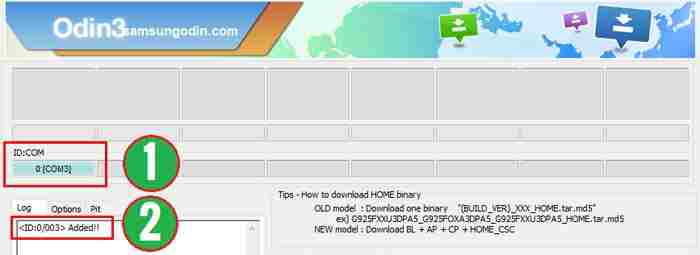
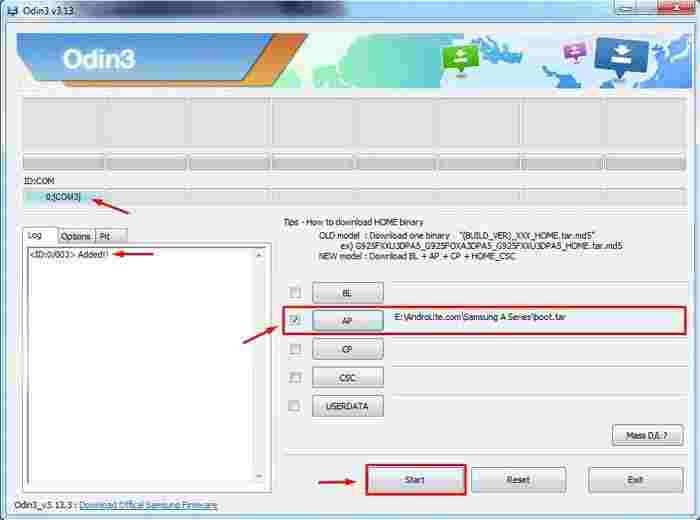
    5. Make sure Odin has detected your Galaxy A10 device by seeing the message ‘ Added !! ‘on the’ Log ‘tab or there is a port address under ID: COM.Root via TWRP Recovery
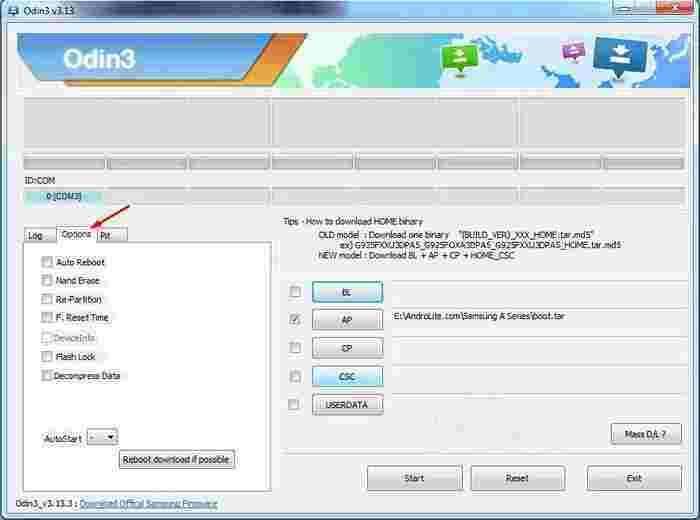
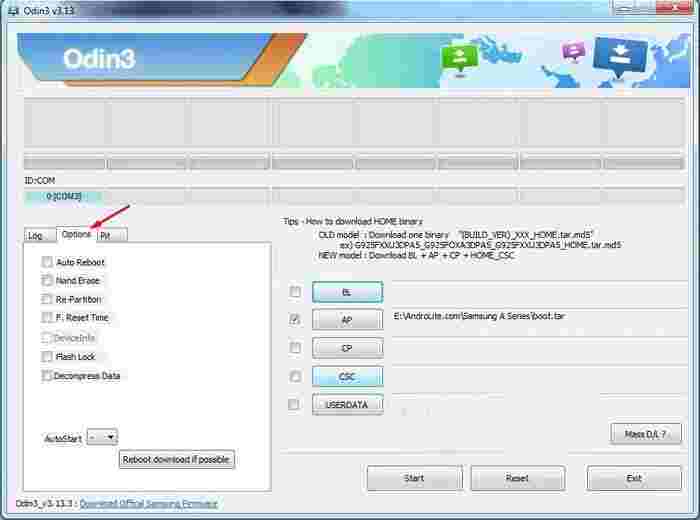
    6. Next, click the ‘ Options ‘ tab. Remove all ticks (  ) in the column.Root via TWRP Recovery
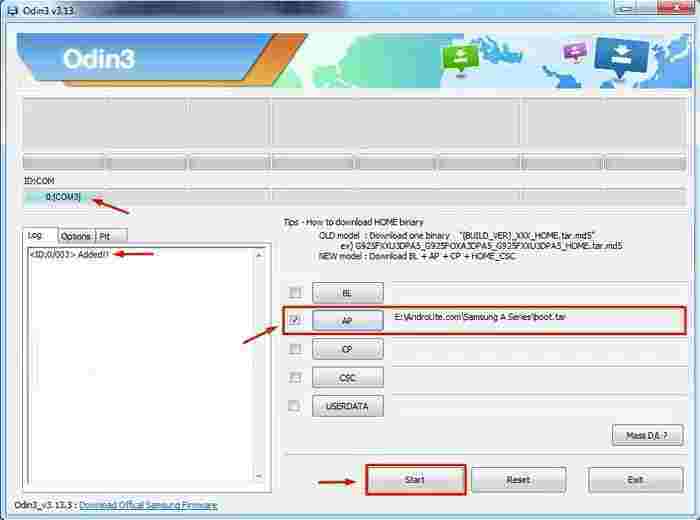
    7. Click the ” AP ” button then locate and select the TWRP-3.3.1-A10.img / TWRP-3.3.1-A10.tar file that is on the computer.Root via TWRP Recovery
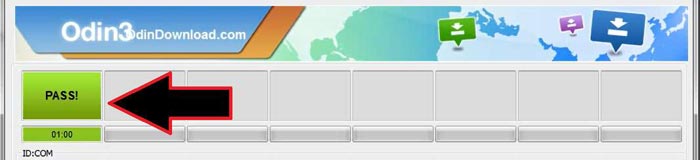
    8. To start the TWRP installation process, please click the ‘ Start ‘ button and wait for it to finish.Root via TWRP Recovery
    9. When finished, please unplug the USB cable that connects the phone to the computer.
    10. To exit Download Mode and boot into TWRP for the first time, please press and hold the ” POWER + VOL DOWN ” button. When the screen is blank/black, immediately release the Volume Down button then move your finger to the Volume Up button while keeping the Power button pressed.
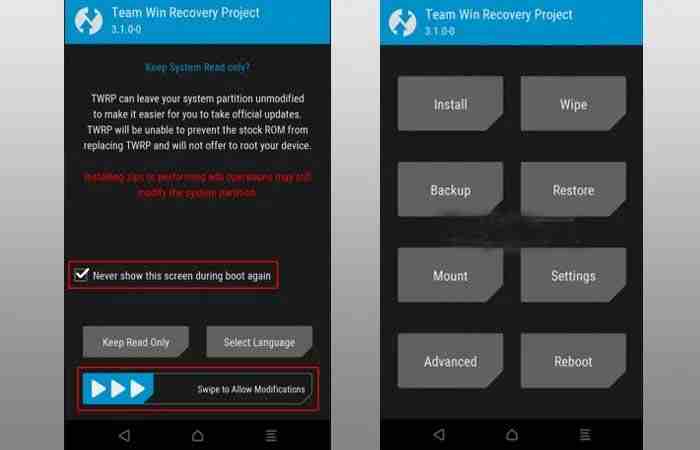
    11. When in the TWRP start menu, check “Never show this screen during boot again” then wipe to the right on “Swipe to allow Modification”.Root via TWRP Recovery
    12. Next, tap Wipe » Format Data » type ” Yes ” » OK, and wait for the process to finish.
    13. To prevent bootloop when the phone restarts, flash the Dm / No-verity.zip and Multi-disabler-Samsung-v2.2.zip files. The trick is to tap Install > Select Storage > then find the two files. After that, swipe right on ” Swipe to confirm flash ” to start flashing and wait for it to finish.
    14. At this point, you can reboot the system.
    15. Done.

    2.2.2. Root via TWRP

    1. Turn off the device until it is off.
    2. Next, please Boot the phone into TWRP Recovery mode:
      • Option # 1: Press and hold POWER + VOL UP.
      • Option # 2: With the phone turned on, press and hold the ” POWER + VOL DOWN ” button. When the Samsung boot logo appears, release the Volume Up button then move your finger to the Volume Up button while keeping the Power button pressed.
    3. If you are already on the TWRP menu, then tap Install.
    4. Flash the following three files (in order). To do this, tap Install » Select Storage » Find & Select Files :
      • Magisk_Root.zip
      • DM / No-Verity.zip
      • Multi-disabler-Samsung-v2.2.zip

      Swipe right on “Swipe to confirm flash” to start the flashing process.

    5. Next, please select Reboot » Reboot to System.
    6. To set up Magisk, please install Magisk_Manager.apk on your cellphone.
    7. To check the root status, please download the Root Checker application and then run it.
    8. Done.

    2.3. Root WITHOUT TWRP

    Slightly different from the method above, rooting without TWRP recovery is also one of the best options for rooting. How to? Here’s the complete tutorial.

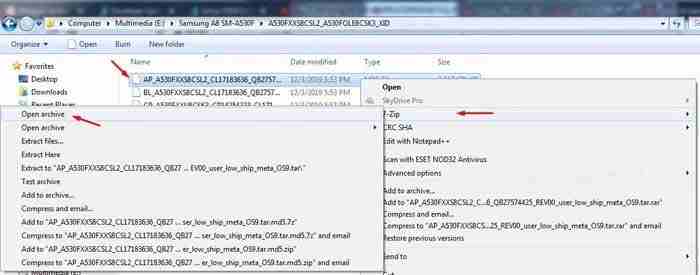
    1. Extract Firmware / ROM using the 7-Zip application. From the extract, right-click on the AP_A105FXX.tar.md5 file, select 7-Zip » Open Archive.Root WITHOUT TWRP Inside the 7-Zip application, right-click on the file boot.img.lz4 » Copy To. This file will be moved to the extracted firmware folder. Move (Copy) this file to the external memory of the phone.Root WITHOUT TWRP
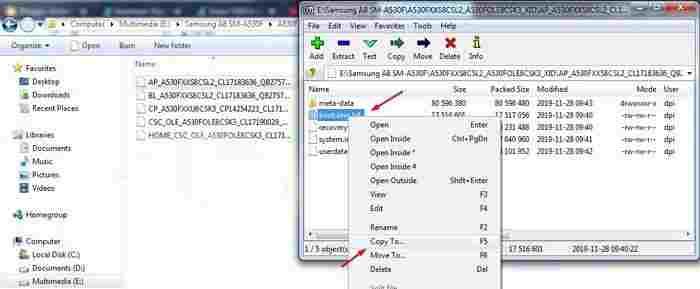
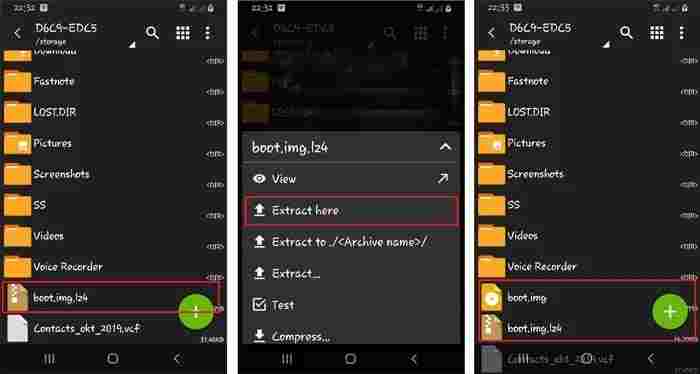
    2. Run the ZArchiver application. Tap on the boot.img.lz4 file then select Extract Here. Now in the same place, you will see 2 files with different extensions, first boot.img.lz4 and second boot.img. Please delete boot.img.lz4.Root WITHOUT TWRP
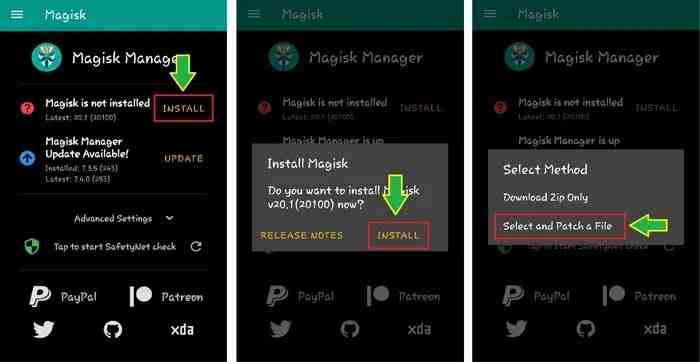
    3. Install magisk_manager.apk then run it. Tap Install which is beside Magisk is not installed. Tap again Install » Select and Patch a File » Find the boot.img file and wait for the flash process to complete.Root WITHOUT TWRP To see the patched boot.img file, please go to Internal Memory> Download> Magisk_patched.img.
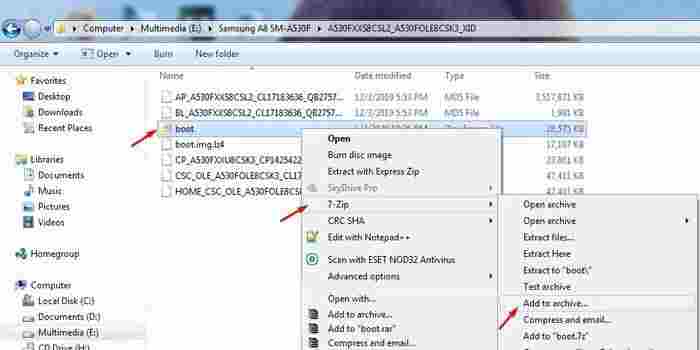
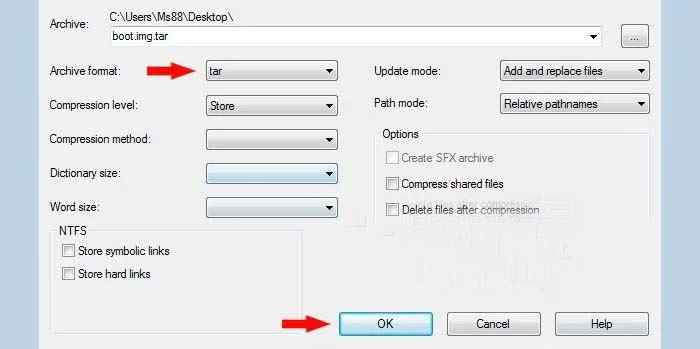
    4. Then copy back the Magisk_patched.img file to the computer then rename it to boot.img.Root WITHOUT TWRPAfter that, right-click on the file boot.img » 7-Zip » Add to archive. In the Archive Format column, select tar then clicks OK.Root WITHOUT TWRP
    5. Turn off the phone then Boot into Downloading Mode. In this case, two options can be done:
      • Option # 1: Press and hold POWER + VOL UP + VOL DOWN.
      • Option # 2: Press and hold VOL UP + VOL DOWN then plug in the USB cable (while still pressing the Vol Up + Vol Down buttons).
    6. In the Warning screen, press and hold the VOL UP button for approximately 10 seconds or until it enters the ” Unlock Bootloader? ” Continue by selecting the ” Yes ” option by pressing the ” VOLUME UP ” button.
    7. When the screen displays the message ” The phone’s bootloader is unlocked … “, please press the ” POWER ” button to continue. Wait for the phone to finish erasing data (Erasing).
    8. When finished, the screen will return to the message ” The phone’s bootloader is unlocked … “. Again press the ” POWER ” button to continue or wait for the phone to restart itself.
    9. When the cellphone is completely turned on, please do the initial configuration just like the new cellphone, but DO NOT “Sign in” or create a new Google and Samsung account (skip it if you get it).
    10. Turn off the device again then boot back into Downloading Mode. The method is the same as step # 2 above. At the Warning screen, press the Volume Up button to continue to the Downloading Mode main menu.
    11. Run the ODIN application run as administrator.
    12. Make sure ODIN has detected the device by seeing the ‘ Added !! ‘on the’ Log ‘tab or there is a port address under ID: COM. Remove all the checkmarks on the ‘ Options ‘ tab.Root WITHOUT TWRP
    13. Click the AP button then locate and select the boot.tar file. Click ‘ Start ‘ to start the rooting process and wait for it to finish.Root WITHOUT TWRP
    14. If successful, please unplug the USB cable that connects the cellphone to the PC and reboot the phone by pressing and holding the ” POWER + VOL DOWN ” button. Release both keys when the Samsung boot logo appears.

    #3. Samsung A10 Bootloop Solution

    If the device has a bootloop (stuck / stops only at the Samsung boot logo) when applying the tutorial above, several solutions can be done.

    1. Re-flash Firmware.
    2. Do a factory / hard reset via Recovery.
    3. Make sure to flash the Dm / no-verity and Multi-disabler-Samsung-v2.2.zip files as soon as the twrp installation is complete.

    The guidelines above can be applied to all series/models of the Samsung Galaxy A10, namely SM-A105F / DS, SM-A105FN / DS, SM-A105G / DS, SM-A105M / DS, whether it is still running the Android Pie v9.0 OS or the latest version is currently Android Q 10.0.

    Read more:

    Conclusion:

    Well, that’s the most complete tutorial on how to install TWRP and ROOT Samsung Galaxy A10 on this occasion. Hopefully, this tutorial is successful for you to apply. But if you have any questions, feel free to leave a comment.

  • 9 Ways To Fix IDM Fake Serial Number Error 2024

    9 Ways To Fix IDM Fake Serial Number Error 2024

    9 Ways To Fix IDM Fake Serial Number Error – Everyone might have installed Internet Download Manager (IDM) on their Laptop or computer, which is used to make it easier and easier to download documents, songs, videos, and other file types. But we are often faced with a registration message or fake serial number in IDM.

    9 Ways To Fix IDM Fake Serial Number Error
    9 Ways To Fix IDM Fake Serial Number Error

    How To Fix IDM Fake Serial Number Error 2024

    In this article, we will learn how to eliminate or fix the latest IDM Fake Serial Number in IDM. Also, read properly following the tutorial until it’s finished.

    Read more:

    By Rename File

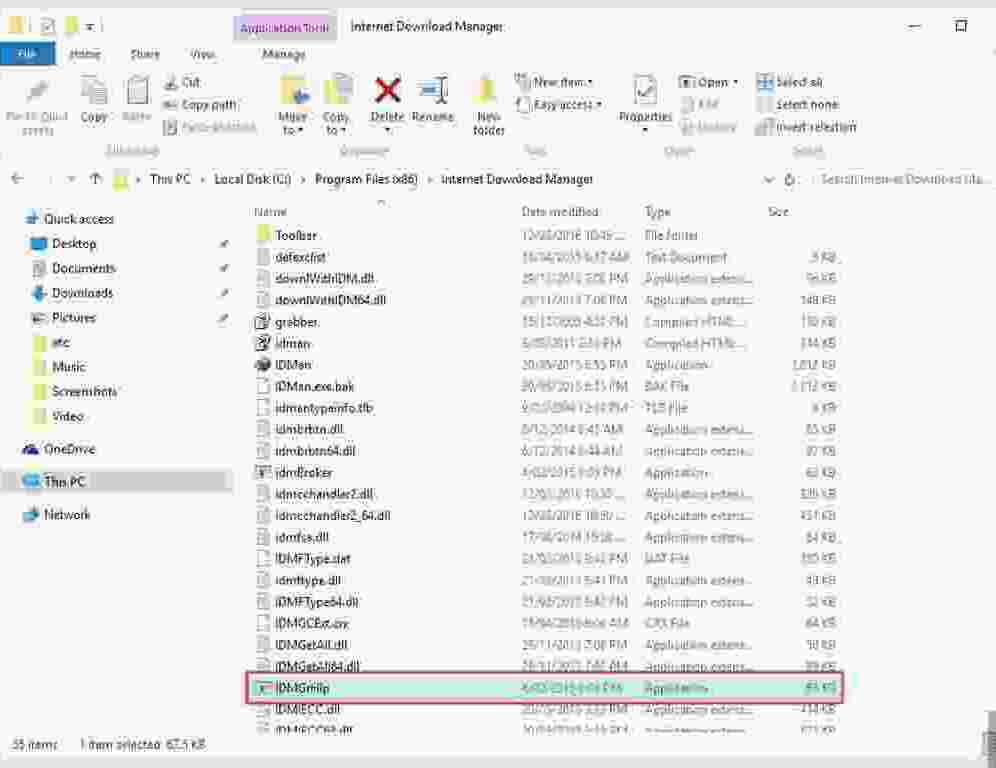
    The first way to deal with the Fix IDM Fake Serial Number is by renaming the idmhelp_old.exe file. following the steps below:

    • First, you can leave IDM or close IDM.
    • Close IDM in the Tray Icon.
    • Then you have to open the directory IDM software that normally resides in the Local Disk C.
    • Next, look for the IDMGrHIp.exe file and you can change the name and extension to idmhelp_old.exe.
    • Then you can press Enter or click ok when you have finished renaming the file.

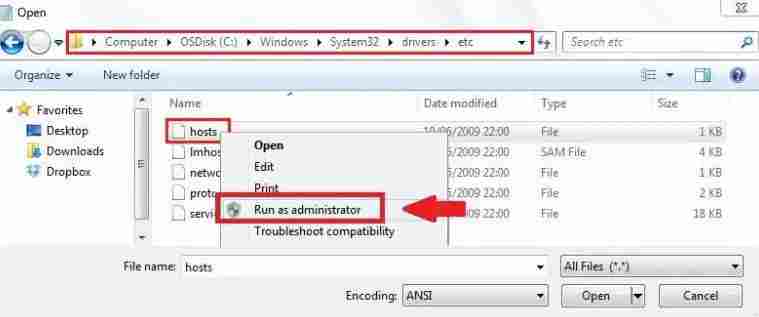
    By Editing the Hosts File

    Another way to deal with a fake serial number on your computer is to edit the host’s file, here are the steps:

    • First, you have to enter the C folder on your computer.
    • Then you can enter the WINDOWS folder.
    • If so, then you can enter the System32 folder again.
    • After that, you can enter the Drivers folder.
    • Click the folder named etc.
    • And in the etc folder, you will find the host file.
    • If you have found the host’s file, then you can right-click on it.
    • Select the Open with a menu in the options that are displayed.
    • Click Notepad.
    • Please type the text below, for example:

    127.0.0.1 secure.internetdownloadmanager.com
    127.0.0.1 mirror.internetdownloadmanager.com

    • Save this host’s file and change the properties of this file to Read-Only by right-clicking on the host’s file.
    • Then you can select properties.
    • Then you can check the read-only option.
    • And you can run IDM again.

    With How To Clean Regedit

    Another way to deal with fake serial numbers on Internet Download Manager is by cleaning Regedit. You can do this by following the steps below:

    • First, you can download the latest version of IDM or the old version. You can download it by searching the internet.
    • If IDM has finished downloading, try not to be connected to the internet. So you better turn off the Wifi first.
    • Then you can delete the IDM installation that is already on your laptop or computer.
    • Then you can enter the run menu, you can use the method to click the Windows key + R to run it.
    • After that, you can type Regedit in the column and then click Ok.
    • After that, you can search for HKEY_LOCAL_MACHINE and select the Software folder.
    • Then you can select Internet Download Manager and delete the selected Internet Download Manager. This is so that no more fake serial numbers are detected in the computer system.
    • Then you can reinstall the new IDM that you downloaded earlier.
    • Enter the serial number and patch according to the instructions or like your process.

    Eliminating Fake Serial Number Messages with Patches

    The following is how to use the IDM patch:

    1. The first step, please download the IDM 6.31 Patch file

    2. Then please extract the patch.exe file

    3. Copy the IDM 6.31 patch file and paste it into your IDM installation directory which is located at C: \ Program Files \ Internet Download Manager for Windows 32bit version. For Windows with a 64bit version it is: C: \ Program Files x86 \ Internet Download Manager

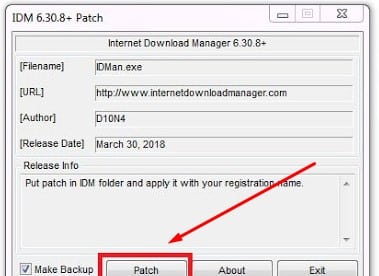
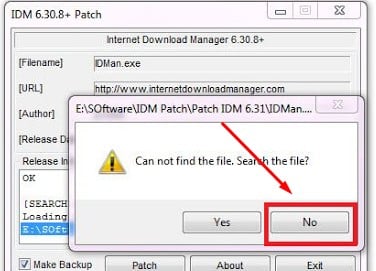
    4. Then right-click on the Patch file earlier and select Run as administrator then click Patch.

    Eliminating Fake Serial Number Messages with Patches

    5. In the new window that appears just select No.

    Eliminating Fake Serial Number Messages with Patches

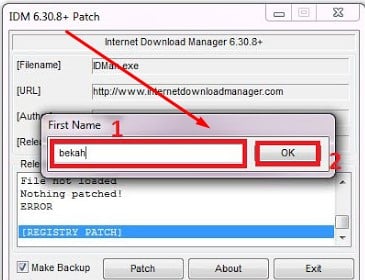
    6. Then we will be faced with a form to fill in our initial name. Just type anything but it contains a name then click Ok.

    Eliminating Fake Serial Number Messages with Patches

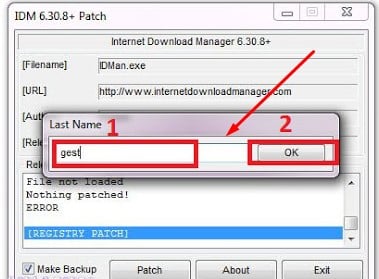
    7. In the next form that appears, type the last name again and then click Ok again.

    Eliminating Fake Serial Number Messages with Patches

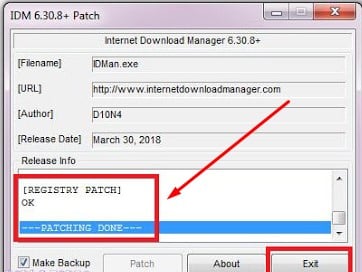
    8. Patch IDM 6.31 will patch automatically.

    Eliminating Fake Serial Number Messages with Patches

    9. The final step is to restart your PC / laptop.

    # 2. How to Get Rid of Fake Serial Number IDM

    1. Rename the file

    Rename the fileThe way to get rid of the first fake IDM serial Number is by renaming the file. The methods are:
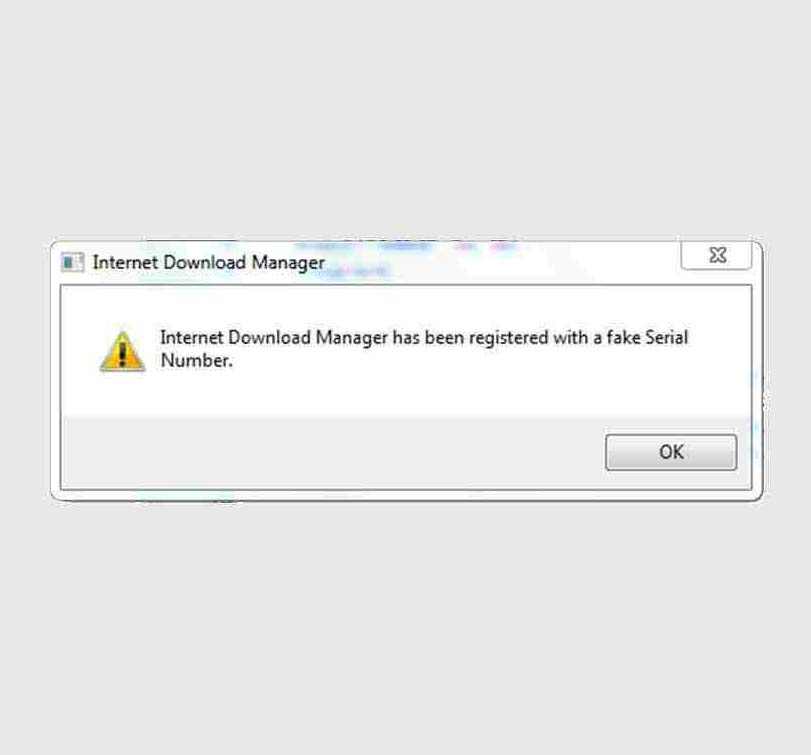
    • Close IDM first, and also close the one in the system tray (lower right corner).
    • Open the IDM installation folder, generally located in the C: > Program Files> Internet Download Manager folder.
    • Rename the file ” IDMGrHlp.exe ” to ” idmhelp-old.exe “.
    • Restart your computer.
    • Reopen the IDM installation folder.
    • Click the file named ” idmBroker.exe ” and rename it to ” IDMGrHlp.exe “.
    • Restart your computer again.
    • Done, IDM has been successfully changed to the Full Version.

    2. Reset Trial

    Reset TrialApart from the method above, you can use the method below:

    • Make sure you are using the latest version of IDM.
    • Download IDM Fake Serial Remover first.
    • Turn off the antivirus first so that the process runs smoothly.
    • Extract the files that you have downloaded. Later, the extract results in a folder in which there are several files.
    • Install a file called TrashReg.exe.
    • Open the application and delete the file called ” Visual Protect 3.5+ “.
    • Enter the task manager by pressing CTRL + ALT + DEL.
    • Select the Process section. Look for a file called ” IDMan.exe ” and end processes. If not, continue to the next stage.
    • Now run the application ” IDM Trial Reset.exe ” which is in the extracted folder.
    • Click the Trial reset tab and check ” Automatically “, and wait for the process to finish.
    • If so, copy the files named ” IDMGrHlp.exe “, ” Patch.exe “, and ” Registration.reg ” to the IDM installation folder and select replace/overwrite. (Generally, the folder is located at C: \ Program Files \ Internet Download Manager \.
    • Right-click Patch.exe> ​​Run Administrator> click Patch> fill in the first and last name (it’s up to you).
    • Close Patch, and click 2x on the file called ” Registration.reg“.
    • Done.

    3. Edit Host File

    Edit Host File

    The last way is to add a few IP lines in the Windows Hosts file, it takes care to apply this method.

    Host data:

    127.0.0.1 tonec.com
    127.0.0.1 www.tonec.com
    127.0.0.1 registeridm.com
    127.0.0.1 www.registeridm.com
    127.0.0.1 secure.registeridm.com
    127.0.0.1 secure.internetdownloadmanager.com
    127.0.0.1 mirror.internetdownloadmanager .com
    127.0.0.1 mirror2.internetdownloadmanager.com
    127.0.0.1 www.internetdownloadmanager.com

    How to edit the host’s file:

    • Open My Computer or Windows Explorer
    • Look for the host file at C: \ Windows \ System32 \ drivers \ etc
    • Right-click when found.
    • Select open with Notepad.
    • Under 127.0.0.1 localhost, add the host above.
    • Save this file in the read-only form (I right-click on the host and then select properties . Check Read-Only )
    • Done.

    Conclusion:

    This is the article on 9 ways to fix IDM fake serial number error, In this way, your IDM message will no longer appear fake serial number. Hope it is useful for you.

  • 3000+ Latest Unused Best Cool FF Nicknames 2024

    3000+ Latest Unused Best Cool FF Nicknames 2024

    3000+ Latest Unused Best Cool FF Nicknames – Nickname FF, Free Fire or we can call it by the slang name FF is a very popular Battle Royale game and many users. So it’s no wonder that this one game is widely known by all Indonesian people in every age group.

    3000+ Latest Unused Best Cool FF Nicknames3000+ Latest Unused Best Cool FF Nicknames 2024

    In the free fire game, there are many interesting features that you can enjoy and you get, many excellent features that you enjoy too. This free-fire game is one of the games that have sufficient specifications so that it can be played on all simple mobile devices.

    However, in this article, we will share. We have prepared an ff name or free-fire nickname that you can get for free. Surely not a few FF players are looking for that cool nickname. Therefore, we have prepared for all of you ff names that have not been used in the following full review.

    What is Free Fire Nickname?

    The Free Fire nickname is the name of the game that is on your FF game account, in the FF game account there is a nickname that you must fill in or create to find out or provide information on your game account name to other Free Fire players and users.

    Having a name or nickname in a very cool ff game is something that many ff users all over the world want, especially in Indonesia. Therefore, if you are one of the FF players who are looking for a cool ff name, you can read this review to the end.

    Because in this review we have provided cool ff names that you can get for free. Therefore, if you can’t wait to get the ff name that we share. You can immediately take and choose the completely cool ff name that we have shared in the following article.

    Here are the collections of FF Nicknames Unused

    There are several free-fire nicknames that we have prepared for all of you Indonesian ff friends if indeed you are looking for a completely cool ff name that has not been used. You can directly copy/copy the name of the ff that we have shared below.

    #1. FF Nickname (Unused Cool FF Name)

    • “Sʜʀᴋ” • ᴮᴬᴰʙᴏʏ
    • ꧁༺nickname༻꧂
    • ꧁༺₦Ї₦ℑ₳༻꧂
    • “TG” ཌ ĐʀᴀɢᴏƝ ད ° ᴵᴰᴹ ° tsu
    • ꧁ঔৣ☬✞𝓓𝖔𝖓✞☬ঔৣ꧂
    • ꧁ᶜ͢ᴿ͢ᴬ͢ᶻ͢ᵞ꧂
    • ꧁ঔৣ☠︎$℧℩ℭℹ︎ⅆ❦☠︎ঔৣ꧂
    • ꧁☆☬BM κɪɴɢ☬☆꧂
    • ᴷᴵᴺᴳ ° O0038 B͠a͠ r²
    • ꧁༺༒〖°ⓅⓇⓄ°〗༒༻꧂
    • 6ۣۜƤriͥcͣeͫss★
    • “Ѕʜʀ” • ℑℴƙℯℛᴾᴿᴼ
    • ঔৣ ۝ ÐâřҟŦ ﺂℜ ê ۝ ৣ
    • ⏤͟͟͞͞★ᴳᵒtͤeⷦtͣeꪝ࿐
    • 『ηя』丂°Ծscαг
    • °dhꍏ№ꍏ༻꧂
    • ꧁ ༺ HM•GAMING ༻ ꧂
    • ꧁༺ɴᵉᵛᵉʳ_ɢɪᴠᴇ ᴜᴘ༻꧂
    • ꧁༺ᏟᎡX༒ᎬᏃ•ᏚᎪNᏚ༒༻꧂
    • ꧁ ࿇ 〘Æ Ł € Ꮆ € ŇĐ〙 ࿇ ꧂
    • 「Fᴀᴋᴇ☂
    • ꧁ঔৣ☠︎$aπ$❦☠︎ঔৣ꧂
    • ɢᶲᵈᶻᶦᶩᵃji
    • ꧁༺༒ℛÄƵÏ༒༻꧂
    • ☬ᶜᴿᴬᶻᵞkíllєr☬
    • Ηя 』ཌ ĐʀᴀɢᴏƝ ད
    • ঔ•ᗪένι⎠° Vɪя͢ʊ͋S͚ •ঔ
    • O²κɪɴɢ࿐
    • ° ᴮᴸᴰ ° нυ sᴎιtsu
    • ꧁●✮CENDEK✮●꧂
    • ▄︻̷̿┻̿═━One ØV₵Ⱨ₳Ɽ₭₳⸕şťªİҝερ
    • sɪᴅ.『ᴺᴼᵀ꓄ꂦꊼꀤꉓ࿐⁩』
    • ◥꧁དℭ℟Åℤ¥༒₭ÏḼḼ℥℟ཌ꧂◤
    • 『ɴᴇғᴛ』ᴵᴰяıʟ☪
    • MC•꧁༺ᴮᴸᴬᶜᴷ༻꧂
    • ༺★BlackSteel★༻
    • NOB』вαℓα∂σяヅ™
    • ꧁ɴσσᴮ꧂
    • ༒༻ is the ruler o ズ 乇 knife ༺༒
    • ꧁༺DཛཌཇའaDo༻꧂
    • • ♛i • ๖ ۣۜ Ƥriͥ ภ cͣeͫss ツ
    • ᴬᴾᴷeĸo숬
    • NESC • Stroms
    • ✿✿
    • ꧁꧅๖ۣۣۜOᛗ𐌄ĞᎯ꧅꧂
    • ۝۩ •ZERO• ۩۝
    • ꧁༺J͓̽o͓̽s͓̽I͓̽༻꧂
    • ꧁༺AURA.FORCE༻꧂ IND
    • ☬ˢᴳᶜ°ᏚᵁᏞᎢᴬN☬
    • ꧁༺ᵅᵛᵑᏣᎡᎪᏃᎽ༻꧂
    • 〄•ST⚝ℛ°✔️
    • 」ᴾᴰᶻ」 Pℓαnktσn ツ
    • Ƀ͢͢Ƀ ㉺ Otsu no Chomu Ichizu
    • ꧁£Åβγ∞ÐθØŁ꧂
    • Mᴷ•KEMAZ
    • 『ηя』Larva•ᴵᵖ࿐
    • Ƥᘈ•꧁༒TYSON༒꧂
    • ✰ƑƑ✰
    • ꧁๖ۣۜßT๖ۣۜℜ*jͥerͣrͫץ*꧂
    • ᴮᴱᴳᴼ•ℳꉓ㋡ĽΘꋪᗪ
    • ᴮᴼˢˢ꧁Ɓσлʛʂʋ꧂ˢᴮ
    • ♛Phaňţøm♛
    • ☆GPB☬꧁ Rulerノ乇丂꧂☬
    • ƑƑ】 ๖ ۣۜ𝓞𝓶𝒶𝓡 ₧
    • ꧁࿇〘 Alays کtation〙 ࿇ ꧂
    • “APS” • Oscars
    • 『Guild』༒ⓝⓐⓜⓔ࿐ᴵᴰ
    • ꧁イє 4
    • ◥ὦɧ◤ᴾᴿᴼ ℤUℐX89 ༂
    • ° ᴮᴸᴰ ° Hυsᴎιtsu
    • ᴷᴺᶜ ° Ɗ͢ꋪꍏ_Gσղєtsu
    • ༺ NAD² • ๖ ۣۜ Ƥriͥ ภ cͣeͫss ツ
    • ꧁°ᴰའ°ᖫKaͥঠaͣyͫᖭツ꧂
    • ꧁༺FꍏnG༻꧂
    • ꧁ ࿇ 〘Æ Ł Ximulator〙 ࿇ ꧂
    • {Ns}βåçøť™
    • 『 JW 』•꧁Ivan꧂
    • 【YWS】 Ꮓϵɾzxᴬᶜ 戈心
    • ° ᴵᴰᴹ ° mbᎾᎥᏃtsu
    • ᴱᴰᴬᴺ ° Ðꀤღm ꌗ ࿐ ᵀᴳᴸ
    • [Knife uckѕ]•ᏚNᎾᎾᏢY★
    • ༒ ꎇ ࿆ ΐɀΐ☿ ₦ Ƶ ₭ ☿🇨🇦
    • ༄ ᶦᶰᵈ᭄✿ᴮᴬᴰʙᴏʏ
    • Ƒᴀᴙᴀᴎ ·
    • ᴮᴹ ° D͢R͢A͢ꁅ ꂦꈤ tsu
    • 〖₩Ā₩〗 ↬ℳѦδØŊ↫ 1 0
    • “Ηя” ᗩͷͼm 쾑
    • ᏚᏞᎢ ᏚᏞᎢ N 』尺 ı͓̽ Ꮯ Ҝ Ꮎ | ѧғя
    • ༺ SVL ༻ ᴸᴳˣ Feb Tsu
    • ║ᴺˢᵀᴿ║ℳꋪƵA ツ
    • ° ᴮᴹ ° D͢ra͢_ꁅꂦ ꈤ tsu
    • 【DyC】ℳatslapati࿐
    • 『NEOS』β!G°ᵃᴷᶻ
    • 『ᏊᖇᎦ』༺a̶n̶d̶r̶i̶༻
    • NEOS』β!G°ᵃᴷᶻ Need members
    • 『Ηя』 M͢A͢S͢_tϵr
    • 《+➅➁》•ƊђᎥlz࿐¹⁴
    • Copy my name ᴳᵒᵈŦı₥σσⁿᴳᵒᵈ
    • ᴅᴀʀᴋme ᴡᴀʀʀɪᴏʀ
    • ᴬᵁᴿᴬ°᭄ᴍɪʟʟʏ࿐
    • ꧁ঔৣ☬✞.MAR.✞☬ঔৣ꧂
    • “ˢᴹᴰ” v̸ᴇɴᴏᴍtsu
    • Kazuya✿
    • ᴿᴶˢ࿐ Ýѧ N feet ¡ Ķø࿐
    • ꧁ঔৣ☠︎putra❦☠︎ঔৣ꧂
    • ★ᴄ͢͢͢ʀɪᴍɪɴᴀʟ⁰⁰⁷★࿐
    • ᶠᵀ༆βσгɳᏃ¹࿐
    • Lᴬ•K a k a s h i🌸
    • OPܔ M A F I A★࿐F F
    • ×͜×ㅤ𝙰𝙻𝙾𝙽𝙴ㅤ𝙱𝙾𝚈
    • “° ᴰᴬᴮ °” • ᴮᴬᴰʙᴏʏ
    • i r i b i l a n g b o s☂
    • ♣Leͥgeͣnͫd♠v1⁄4
    • EXO•SHOOᵀᴱᴿ࿐
    • ꧁༺J꙰O꙰K꙰E꙰R꙰༻꧂
    • ꧁☆▄︻̷̿┻̿═━一☆☬mehayel☬꧂
    • ༄ᶦᶰᵈ᭄✿Gᴀᴍᴇʀ࿐
    • ⁇♨
    • ꧁༄KING°ⒹᖮⒿⓐⓝⒸⓄⓚ༄꧂
    • ᴅᴀʀᴋme ᴀssᴀsɪɴ

    #2. Nickname FF Simple ( Nama FF Kern Simple )

    • sɪᴍᴘʟᴇ ʙᴏʏ
    • ༺SiᴍƤle༻
    • Sɪᴍᴘʟᴇ ︎
    • ꧁ Simple ༄ Gᴀᴍᴇʀ ꧂
    • s1mple
    • dead ₇ ˢᶦᵐᵖˡᵉ
    • ᶰᶠ | tsu ◾S1MPLE♨
    • ༄๖ۣۜS̶̶i̶m̶p̶l̶e̶༭༄ ̶🤣
    • ***\/🅢🅘🅜🅟🅛🅔\/***
    • GᴏᴠᴛㅤNᴀᴛᴀʟɪᴀㅤ亗
    • ᴘʀᴇᴅᴀᴛᴏʀ
    • ˙·٠•● ●♦ Simple ♦● ●•٠·˙
    • ✩✧◕ᴗ◕✿Simple(◕ᴗ◕✿)✧✩
    • Sΐmקle ツ
    • ✩✧◕ᴗ◕✿Simple😊boy(◕ᴗ◕✿)✧✩
    • ꧁༺༒ℛÄƵÏ༒༻꧂
    • ⓋYASH
    • VAMP Me CYRUS ꔪ
    • ✖️RA☯️JA™️ ~✿࿐
    • ☬§ΐmͥþlͣeͫ_𝖌𝖍𝖔𝖘𝖙 ☬
    • S1️⃣mple
    • Rᴅㅤᴍᴀɴɪㅤ²¹ㅤ
    • Simple Boy mausam
    • LeaderⒶ
    • ᏚᎥᴍᴘʟᴇ
    • ᏚᎥᴍᴘʟᴇ☕︎
    • Winter Gw Rafael !! ❦
    • ✧◕ᴗ◕✿Simple(◕ᴗ◕✿)✧
    • simple god.
    • Snickers
    • Sɪᴍᴘʟᴇ
    • Simple boy Bikash🤪
    • •Vɪя͢ʊ͋S͚
    • KOG•
    • BRAND 𝟎𝟏BRAND 0 1
    • € I LOVE GAMING €
    • •Simple•
    • ꧁☆☬ᴄᴏʙʀᴀ☬☆꧂
    • `SIMPLE` ♡ )
    • ༺*Toxic*$*boy *༻
    • SIMPLE
    • 7 STAR GAMER €
    • $ ONE -TAP ¥
    • ◥▓▓GHOST▓▓◤
    • ★DIPANSHU FF.:*:
    • SᎥϻƤle
    • ṨᎥmթle
    • Berrypop•™
    • PSAS༺POJI3༻
    • € rAz ¥ (GMNG)
    • Simple🥰
    • iᴍթle
    • ❄️𝓢𝓲𝓶𝓹𝓵𝓮ᴳᵒᵈ☃️
    • р|ᵛ ṦᎥʍᎮム℮✦
    • Sɪᴍᴘʟᴇ.
    • imթ͢͢͢𝔩e
    • Simple 💔💔
    • 😔Sΐm ק le
    • 『simple』•
    • Aswini/Chiku.DL
    • RS•U M A I R A H ツ

    #3. Simbol Nickname FF ( Nama FF Simbol )

    • ꧁ঔৣ☬✞𝓓𝖔𝖓✞☬ঔৣ꧂
    • “ᎢᏟ” • ᴮᴬᴰʙᴏʏ tsu ࿐
    • ꧁༒₦Ї₦ℑ₳༒꧂
    • ꧁༒☬ᤂℌ4ℜৡ☬༒꧂
    • “ᴹᵛᴸ” • י More Otsu Ö࿐
    • ᴷˢツ• 𝔶𝔬𝔲𝔯 𝔫𝔞𝔪𝔢 | Node
    • ༺Leͥgeͣnͫd༻ᴳᵒᵈ
    • ᴺᵀᴮ™꧁༒Ṩstos༒꧂
    • 『ṨᎢᏩ』༒Ѵιཌཇའ༒
    • ꧁༒ ᤂ 4 ৡ ༒꧂
    • Simeta 亗 × ͜ × ❀
    • ⃝BᎥժαͦαᷟη࿐
    • ᴺᴱᵀ • ᏃᏋσ re ࿐ ᴬᴿ
    • ᴶᵂ ° ᭄kepen G tsu
    • ᝣ • ᴮᴬᴰGIRLS • Tsu ࿐
    • ꧁☆☬BM κɪɴɢ☬☆꧂
    • ⁇ ⚔_
    • ꧁ঔৣ☬₦Ї₦ℑ₳ᴾᴿᴼ☬ঔৣ꧂
    • ꧁༺J꙰O꙰K꙰E꙰R꙰༻꧂
    • “SR” кαмνяєт
    • тмS•ᴷ°ᴳᴬᴹᴺᴳ
    • ꧁༒☬Sa̶d̶B∆Y☬༒꧂
    • ℒ⃝Ꭵεℽαͦ࿐
    • “ᴹᵛᴸ” • י More Otsu Ø ࿐
    • 「Ɪx」 ৡ ۜ͜ ム Lo ₦ g ° Jr꧂
    • ᴸˣˢ➢☠ᏃєℜᏫ☠
    • ꧁𖤓𝕴𝕾𝕸𝕬𝕴𝕷𖤓꧂
    • ঔ BO ꙰ M ꙰ Bᴾᴿᴼ
    • ᴶᵂ°᭄•Boss ⃝࿐
    • ๖ۣۜ “Ӂ” י✠яєиø ☆ ঔৣ zu
    • 【PK】ωιк-ωιк☯
    • 『ᴹᴿ』•ɢᴀɴᴇsʜ࿐
    • ꧁⁣ ༺ ᴺᴵᴺᴬ ᴸᴼᵛᴱ ᴬˢᴿᴵᴱ ༻ ꧁⁣
    • FF√™꧁༒Destroyer༒√꧂
    • ꧁☠SA҉G҉A҉R҉☠꧂
    • ™ ٭ ཽ ᵃⁿᵈᶦʳᴼⁿˢ ヅ
    • 𝖓𝖔𝖔𝖇𝖎𝖊𝖘𝖙
    • ꧁ᴬⁿᵈˢ☬ Dan ndᎥs☬๖ۣۜƤeͥⱥcͣeͫ꧂
    • ꧁༺BM KING༻꧂
    • ꧁༺BTR • FakedGMLY༻꧂
    • ᶻᵖ꧁ঔৣ☬✞𝖋𝖆𝖍𝖎✞☬ঔৣ꧂
    • ✞ঔৣ۝❡ᴬᴺˢ۝ঔৣ✞
    • ︻ De 0057 ♡ ƤℜɆĐ₳₮Øℜ ♡
    • 【H】iяυηα鈥哼
    • “ཀའ” ᴾᴿᴬᵀᴬᴹᴬta
    • ༄ᶜᴋ᭄putra☆࿐
    • ᶦ Me | Ꮇ ᥲ η 丂 • Shi
    • ꧁༺Мёłїŋđǎ༻꧂
    • ✿ɠRαყ™✿ˢᶫᶰ
    • 『ˢᴹˢ』༺Ѧ¢ґ¥ℓї¢༻
    • 『+62』GAROXxx࿐
    • u⃟ғɪᴋ
    • ᳇•P E R D J A K A
    • ༒☬☆ℜᤂýýᤂňķᤂ☆☬༒
    • ℕᏳℤ♛࿐乇мㄖη™
    • 「№」ゔ〟ৣℜ¹ž₭ץ〟ゔৣªˢu
    • ꧁༺BTR • CoCoLi༻꧂
    • [DS] ㄙ rsha√ ↗in Mi
    • ꧁༺killer༻꧂
    • ●Key●Leͥgeͣnͫd●
    • 『inᴄ』ιѕmiє☆є࿐•
    • ༺༒ᴷᴱᵞ°Ѵιཌཇའ༒༻
    • ❀ຮ卄IΞ𐌁❀︻╦̵̵͇̿̿̿̿╤─
    • VXD • ㄈ ㄖ ㄥ ㄊ ㄚ
    • ꧁𓊈𒆜ROMAN𒆜𓊉꧂
    • • ssᴀsɪɴ
    • ꧁༒Rayyanka༒꧂
    • ₦Ї₦ℑ₳ ٭ ཽᶦʳᴼⁿˢ
    • ঔৣ۝ ÐâřҟŦﺂℜê۝ঔৣ✞,
    • • ᴿ ᴱ ᵀ • m a n t a n ༒
    • 『ˢᴹˢ』☬Ѧ¢ґ¥ℓї¢☬
    • FᎢ•Ⓓⓞⓡⓐᵃʰᵃʸ࿐
    • ქႽ | mossᴛʜᴇя 诶

    #4. Nickname FF Seram (Name FF Cool Seram)

    • Vanz Tzys
    • cry
    • Skyzo Tuo
    • Xylark︵
    • Lalaa Gz亗
    • “Ѕʜʀ” • ℑℴƙℯℛ
    • KD • Vicenzoo`
    • L u k z ㅤ亗 9
    • Why4Me?
    • ANS•ᴹᴿˢ S E L O W
    • Xzyy
    • Pshycopat
    • Xzy • ❁
    • ʙ ᴀ ʙ ʏ ʙ ᴏ ᴏ s亗
    • Tzy
    • ٭꧁яєʏ㍍᭄࿈
    • ONLY • 4 YOU
    • Zynnx
    • JAGOAN • sanz ✿ Gasz
    • Ganz Tzys
    • OPM ☯ᴳᶹʳᶹ᭄●⁴³
    • ŁØɌĐ•zᴇʀoᴺᴼᴵˢᴱ
    • MA TI YA) 999+
    • Ymate` Kudasai
    • I AM SIKOPAT
    • Xylark
    • 『FM』• L O R D
    • Demons
    • Aca • tzyda
    • Goodboy
    • Zxynn
    • ⁸ᴮᴵᵀㅤ • Dark¹²
    • Tranzz Tzys

    #5. Nickname FF Space (Name FF Cool Space)

    • ᴍㅤᴏㅤᴅㅤᴀㅤʀㅤsㅤɪㅤᴀㅤʜ
    • C i e b a l i k l o b y
    • 『ZX』RYz E N
    • “ᴴˢ” corona
    • ᴀ ɪ ɴ ɢ ʙ ᴏ ᴛ
    • E N A K B A L I K L O B B Y
    • ²sakit
    • Z X •Rz N
    • KokMOiCuk
    • ꧁༺DEFG༻꧂
    • HㅤEㅤRㅤOㅤSㅤHㅤIㅤMㅤA
    • Matiselesaikau
    • L A H K O K M A T I
    • “ᴀʟɢ” legend • id
    • Cie nonton
    • Eⲭⳏ F
    • ᴰrѕ• legend☂
    • +62•CIEENONTON ツ
    • 『ZX』RY iz EN
    • AM • CSmaxx
    • M o x z
    • BCD / Ambyarrr
    • Gangan Marahts
    • W O L F Yツ
    • K o k m a t i b a n g s a t
    • [ AR ] ʀɪᴏᴶᴿツ
    • ꧁ঔৣ☬Hendry☬ঔৣ꧂
    • B A N G S A T .
    • A W A S K N O C K
    • pulse pranaja
    • ᵀᴳᴸ • kakashihtsu
    • 『46』 ​​​​D o dy 﨎
    • ᴶᵃⁿᵍᵃⁿᴄᴇᴍʙᴜʀᴜᴮᵒˢtsu
    • And emotional 2nd D i Wik Wik
    • 『46』D of dy﨎
    • 『DM』• FireMax™
    • A K U S A Y A N G K A M U
    • A M P U N OM
    • Matiselesaikau☂️n
    • RاطaLoGblos
    • A K U K N O C K S A Y A N G
    • L i k e D u l u D o n k
    • ★ 彡 [nadi pranaja] 彡 ★
    • A K U B O C I L
    • NahkanKnock♤
    • E N A K J A D I B O N T IY
    • K  E  P  A  R  A  T
    • BOT • CIMOCI
    • PETAPAGENIT°ye
    • A W A S J A G A P A L A
    • 『MOKO』 Syarill • 﨎
    • K o q G i t u Y a a シ
    • M A N T A N T E R I N D A H
    • ★ 彡 [GM Dezz] 彡 ★
    • A D U H M A T I
    • MEGATRON
    • P A P T T D O N K S Y G
    • ┏BRT•zorGON┛™
    • M A M A M U D A
    • 『GM』★[Dezz ]★
    • I r i B i l a n g B o s
    • 『ᴴˢ』R ackhaツ
    • 『XTG』E-Sport
    • B o c a h B a r B a r
    • k o k m a t i s i h b a n g
    • J A N G A N P A N I K
    • J A M B I
    • K I T A T E M E N A J A
    • A N A K L O N T E H
    • M A T I L I K E A N D S H E R
    • A K U S A I A N G K A M U
    • J A D I A N K U Y
    • W h y a l w a y s m e
    • AㅤHㅤMㅤAㅤD
    • Ꮇ²Ꮶ・ᴹᴿ`APIN☂️
    • J U J U R A K U N U U B
    • Ganganmarahtsu
    • ﷽ ᭄ᴍㅤᴏㅤᴅㅤᴀㅤʀㅤ
    • AMS ✖️ CSmaxx
    • C I E E M A R A H Y A
    • ᴹᴿ メ RADEN ☂️9
    ALSO READ   Incubator 3 in 1 Free Fire Skin, here’s how to get it

    #6. FF Nicknames for Girls (Female FF Names, Girls)

    • 『きⁱʳˡ』✿ Nayツ
    • ꧁️ ☂️ˢᴬᴰɢɪʀʟ _
    • 『ᵍⁱʳˡ』 ✿ C haa ツ
    • ꧁༺✿ ᵈᵉᵛⁱˡ᭄𝒈𝒊𝒓𝒍࿐✿༻꧂
    • ᴍ᭄ꦿⁱˢˢQᵘᵉᵉⁿ
    • “What”・ᴛ ɪ ᴀ ʀ ᴀ☂
    • W ulan✿
    • 『Oᶻ』Baby•ᵍʳˡ
    • ༄ᶦᶰᵈ᭄✿Gᴀᴍᴇʀ࿐
    • ᴍ᭄ꦿⁱˢˢQᵘᵉᵉⁿ
    • Ayu • ࿐
    • ʙ ᴀ ʙ ʏ♡n i s a✿ᴳᴵᴿᴸ☂
    • Key『きⁱʳˡ』✿ Nayツ
    • ༄ ᶦᶰᵈ᭄Caa✿tsu “ᵍⁱʳˡ”
    • “ᵍⁱʳˡ” ✿PUTRI
    • ᴮᴬᴰɢɪ፝֟ʀʟ • Tsu
    • ꧁✿[ᕴÚĔĔŃ ᓎᖴ ᙘᗅᖇ²]✿꧂
    • ༄ᶦᶰᵈ᭄Girl✿࿐
    • • Nabilla✿
    • ɪᴹ᭄ɲɪsa✿ “ᵍⁱʳˡ”
    • 『ᵍⁱʳˡ』 ✿ R ev ツ❤
    • Deaa✿ᴳᴵᴿᴸ☂
    • 『ʙᴋ』•✿ᗷᴇᴇᵍⁱʳˡ࿐
    • ★ ʙ ᴀ ʙ ʏ ★ ᴛ ɪ ᴀ ʀ ᴀ Shi︎
    • 𝐂𝐚𝐧𝐬 • 𝐂𝐚𝐜𝐚 ᵍⁱʳˡ ☂︎
    • 『𝓠𝓾𝓮𝓮𝓷°𝓜𝓮𝓵』
    • ✿αliα ☂`⁴⁵✿ ᴳᴿᴸ
    • 『ʙᴋ』•✿ᵍⁱʳˡ࿐
    • 『ᵍⁱʳˡ』 ✿ N ia ツ
    • “ᵍⁱʳˡ” ✿Dila Tsu ⁴⁵
    • ᴳᴿᴸme ✿ * 𝙰𝚋𝚎𝚕 * ☂️`⁹⁹
    • Lz • “®αni ♡ • ᴮᴬᴰ Girl tsu
    • “BILAA” • ᴮᴬᴰɢɪʀʟtsu
    • ꧁༒☬☆•ᴅᴀᴙᴋ•☆☬༒꧂
    • ♡ ʙ ᴀ ʙ ʏ ♡ nisa tsu
    • V1•Queen☂⁴²
    • 𝚂 𝚊 𝚕 𝚜 𝚊
    • 『ᵍⁱʳˡ』✿ KYAツ
    • Women • ࿐
    • 『ᵍⁱʳˡ』 ✿ SAURA ツ
    • 『きⁱʳˡ』✿ z α z α ツ
    • ༄ᶦᶰᵈ᭄✿ccinta࿐
    • “ᵍⁱʳˡ” ✿GINA Tsu⁴⁵

    #7. FF Names for Boys ( FF Boys Nicknames )

    • Ps • ᴹᴿ Me Hybusa ✿
    • 『sᴛʀᴋ』ᴷᴺᴵᴳᴴᵀ༒࿐
    • ༄ᶦᶰᵈ᭄𝚋𝚘𝚛𝚞𝚝𝚘☂
    • Hᴛʀ`tsu • ᴛhɪɢᴇʀ☘
    • Sᴋ᭄ᶠᴬᴷᴱ𝐿𝑜𝓋𝑒
    • ༄ᶦᶰᵈ᭄•CR7✿βα¢oᵈ࿐
    • ☂Hybusatsu
    • “Sʜʀᴋ” • ᴮᴬᴰʙᴏʏ
    • Hᴛʀ`tsu • ᴛhɪɢᴇʀ ☘®
    • PS FOOD⁹⁹⁹
    • ᴹᴿ Me Hybusa ✿
    • 乂 RυƘα tsu Zˣᴿᶻ Zuga x
    • “ᴼᴾᵂ” ⓅⓇⒺⒹⒶⓉⓄⓇ︻┳de -100—
    • ꧁ ❤️♛ Nur ᴳ ᴬ ᴺ ᶻ tsu ♛ ❤️꧂
    • Ꭰ᭄ᴿᴷ ꧁༺༒V.I.N༒༻ ꧂
    • 『ᎠᏁ ッ • And love☂
    • “ᎠᏁ tsu • fatir☂
    • R™•Rizalmuk°
    • G Me L ㅤ Me DEMON ♡ ᭄ꦿ
    • Xrush×͜×
    • A D I T S A H A?ツ
    • “ENTER” WILDA︻┳de ق—
    • DETH •. QUDROA KILS
    • MRC•ERLANGGATZY√
    • AFIQ KACAK☂️
    • Adit D. Here
    • PBC • Remotsu
    • Evos mr05
    • ☯️MR ♋Bucin❤️
    • ⓈⒷⒽཌsɴɪᴘᴇʀད☂
    • Rvc Rian
    • Fxz idham
    • MR•Dikaa
    • BBY ALIFAH
    • Sicowokpolos
    • Ares JO WO
    • bkl•jagur45

    Conclusion:

    So, friends, This is the explanation of 3000+ latest unused best cool FF nicknames, That we have shared, hopefully, the nickname we share can be useful and can be an ff name on the free fire account that you all have.

  • 3 Ways To Know Wifi Password In Windows 10 PC 2024

    3 Ways To Know Wifi Password In Windows 10 PC 2024

    3 Ways To Know Wifi Password In Windows 10 PC – Have you forgotten your WiFi password? Do you want to access the internet but are blocked by entering the wrong Wi-Fi password? Don’t worry, you will be able to find out your Wi-Fi password right now.

    How To Know Wifi Password (Not Complicated)
    How To Know Wifi Password (Not Complicated)

    How To Know Wifi Password In Windows 10 Laptop PC 2024

    Using a command prompt (CMD), you can view a list of every wireless network that has been connected to your computer and its passwords.

    Read more:

    The condition of forgetting the Wifi password is as annoying as the situation when the Wifi often breaks because both of them make us unable to connect to the network, the result is that we cannot net.

    Fortunately, there is an uncomplicated, uncomplicated, easy and concise way to find out Wifi passwords. Well, the way is in this article.

    This article details how you can find out WiFi passwords or even change WiFi settings using CMD.

    WLAN profile

    There are times when a user likes you and forgets your own WiFi password. This is a common occurrence. With a WiFi router that runs non-stop and the WiFi connection automatically connects your cellphone or laptop when you are on your Wifi signal, therefore it makes us feel that we don’t need to remember our Wifi password, especially complicated Wifi.

    Maybe you are the type of user who wants to be safe, so using a complicated and random password, is good because it secures your WiFi connection, but passwords like this are easy to forget.

    Or there are users who use a random Wifi password that is given by the internet provider ( ISP ) by default.

    But don’t panic.

    Well, a WLAN Profile is created whenever the user enters WiFi credentials and creates a new connection. A WiFi profile includes important information such as network names, settings, and passwords.

    So here we will take advantage of this WLAN profile through the command prompt. This method will work regardless of whether you are currently connected to the WiFi network you are trying to gain access to or not. However, your computer must have been connected to a WiFi network at least once.

    #1. How to use CMD to Know the WiFi Password

    1. Here’s how to find out the WiFi password using Command:
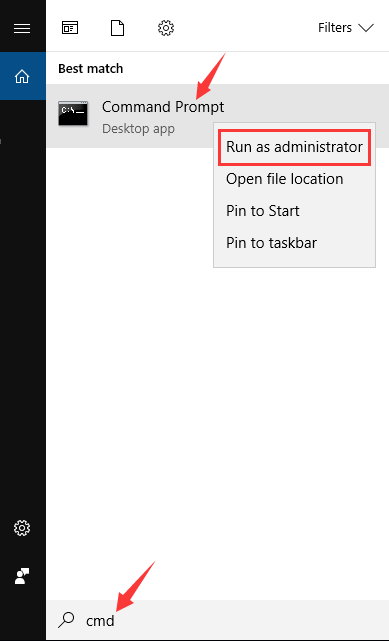
    2. Open a command prompt by opening Run (Windows + R) and typing CMD. Press Enter. Or type in CMD in Search.
    How to use CMD to Know WiFi Password
    How to use CMD to Know WiFi Password

    Note: Alternatively, you can use Find and type CMD. Right click on Command Prompt and select Run As Administrator.

    1. Type the following command line and press Enter:
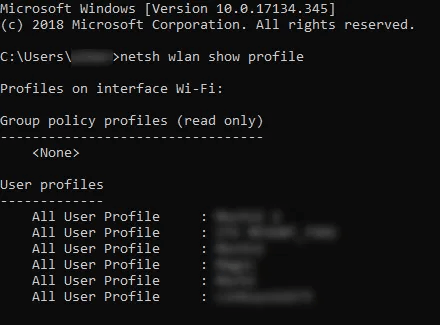
    netsh wlan show profile
    1. You will see a list of WLAN profiles stored on the PC. Pay attention to the name of the network you wish to browse.
    How to use CMD to Know WiFi Password
    How to use CMD to Know WiFi Password
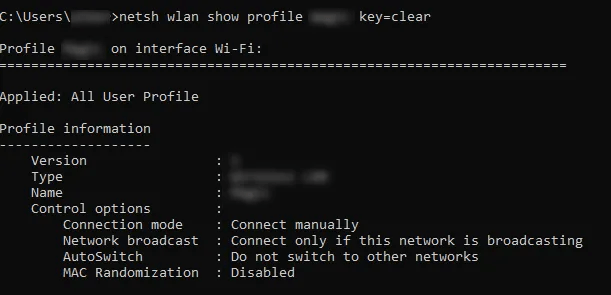
    1. Type the following command and replace “yourname” with the name of your WIFI network.
    netsh wlan show profile namawifianda key = clear

    netsh wlan show profile namawifianda key = clear
    netsh wlan show profile namawifianda key = clear
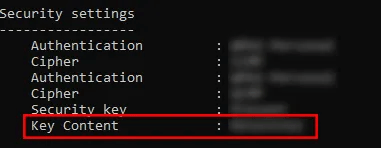
    1. Successfully completing these steps will bring up the WLAN profile of the network you wish to connect to. Scroll down and you will find the password under the Security Settings field and in Key Content: Wifi password name.
    Key Content Wifi password name
    Key Content Wifi password name

    #2. How to find out the Wifi password with Adapter Options / Settings

    The second way is will use the Network Adapter settings to see the Wifi password from the network to which our Windows computer device is usually connected. This is also the profile that our computer stores so that we can use it if needed.

    Step 1
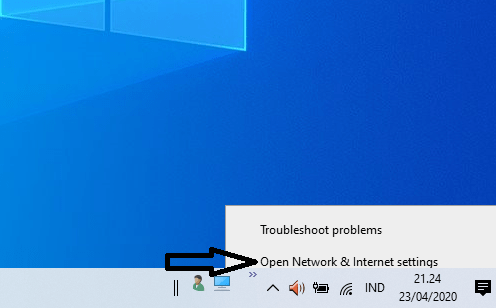
    Right-click the network icon on the toolbar and select “Open Network & Internet Settings”.

    How to find out the Wifi password with Adapter Options Settings
    How to find out the Wifi password with Adapter Options Settings

    Step 2
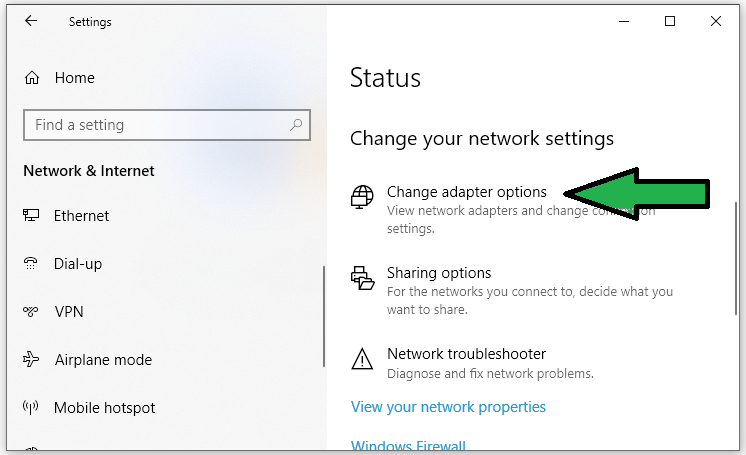
    Click “Change Adapter Options” or “Change Adapter Settings”.

    Change Adapter Options
    Change Adapter Options

    Step 3
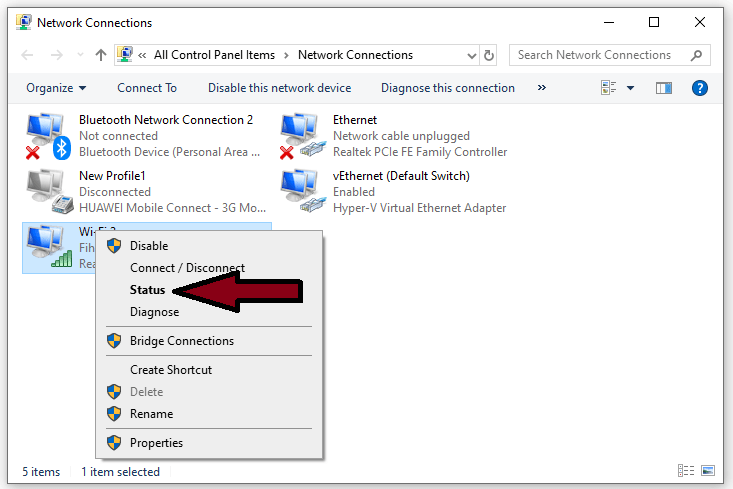
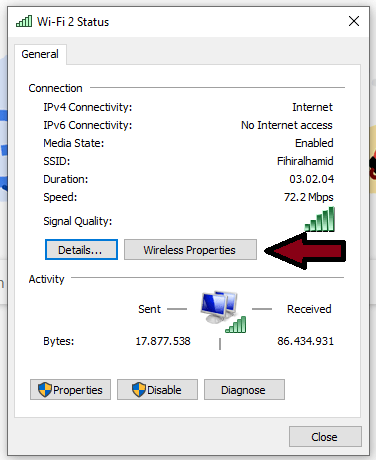
    Right-click on the Wi-Fi network and select “Status” on the drop-down menu.

    Right-click on the Wi-Fi network and select “Status”
    Right-click on the Wi-Fi network and select “Status”

    Step 4
    In the new pop-up window, select “Wireless Properties”

    Wireless Properties
    Wireless Properties

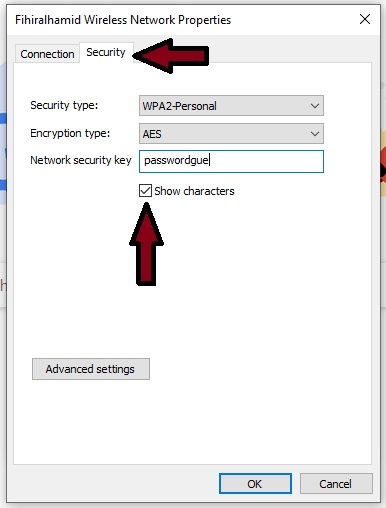
    Step 5
    Click on the Security tab.

    Click on the Security tab
    Click on the Security tab

    Step 6
    Check the box next to “Show Characters”, as in the example image above that “passwordgue” is my Wifi password. And you will find out the Wifi password by doing the method I reviewed here.

    #3. How to find out the Wifi password with software

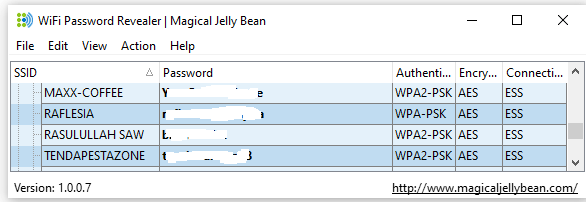
    If you are not comfortable using the Windows command line at the command prompt or tracing the path to the Network Options Adapter then you can use a third-party software called Wifi password revealer | Magical JellyBean which will retrieve all Wifi passwords stored in your Windows 10.

    You only need to download Wifi Password Revealer here, then install and run it. No configuration is required.

    How to find out the Wifi password with software
    How to find out the Wifi password with software

    You can select any Wifi connection and press Ctrl + Alt + C to copy the Wifi password on the clipboard.

    Please note that if you are using Windows Server 2003 or Windows XP the actual Wifi password will not be displayed but will be displayed as a HEX. The same HEX password can be used to activate Wifi on other devices.

    Congratulations, friends, because you already know the most accurate way to find out WiFi passwords on Windows computers, and so on. You can also follow methods that are still related to Wifi, namely how to change your Wifi Indihome password.

    Read more:

    Conclusion:

    So friends, these above how to know wifi password (not complicated) Just 3 ways, you don’t need a lot, but this method is the most effective way to find out the WiFi internet password where your computer device is connected.