Tag: PPSSPP

  • Best Settings For PPSSPP on Android (100% Working) 2025

    Best Settings For PPSSPP on Android (100% Working) 2025

    Best Settings For PPSSPP on Android (100% Working) – In this post, I will share the best PPSSPP settings so that when playing PSP games on Android it can run smoothly without the broken sound that usually occurs on low-spec cell phones.
    Best Settings For PPSSPP for Android Not Complicated
    Best Settings For PPSSPP for Android Not Complicated

    How to Best Settings For PPSSPP for Android

    When talking about the PPSSPP game, I remember when I first played racing games on PS1 which at that time I was playing Championship Motocross. It is a very pleasant thing where we can play with friends and duel in a motorcycle race.

    Read more:

    In contrast to the past, if we want to play the game PS1, ps2, or PSP now it can already be done with only Android phones, assisted by the PPSSPP and gold emulator application.

    However, many users complain that they experience lag when playing games, broken sound, cracked images, and others like that.

    Therefore here we will provide the best ppsspp settings that you can use to play PSP games smoothly and smoothly.

    Newest Anti-Lag PPSSPP Settings
    Newest Anti-Lag PPSSPP Settings
    Newest Anti-Lag PPSSPP Settings

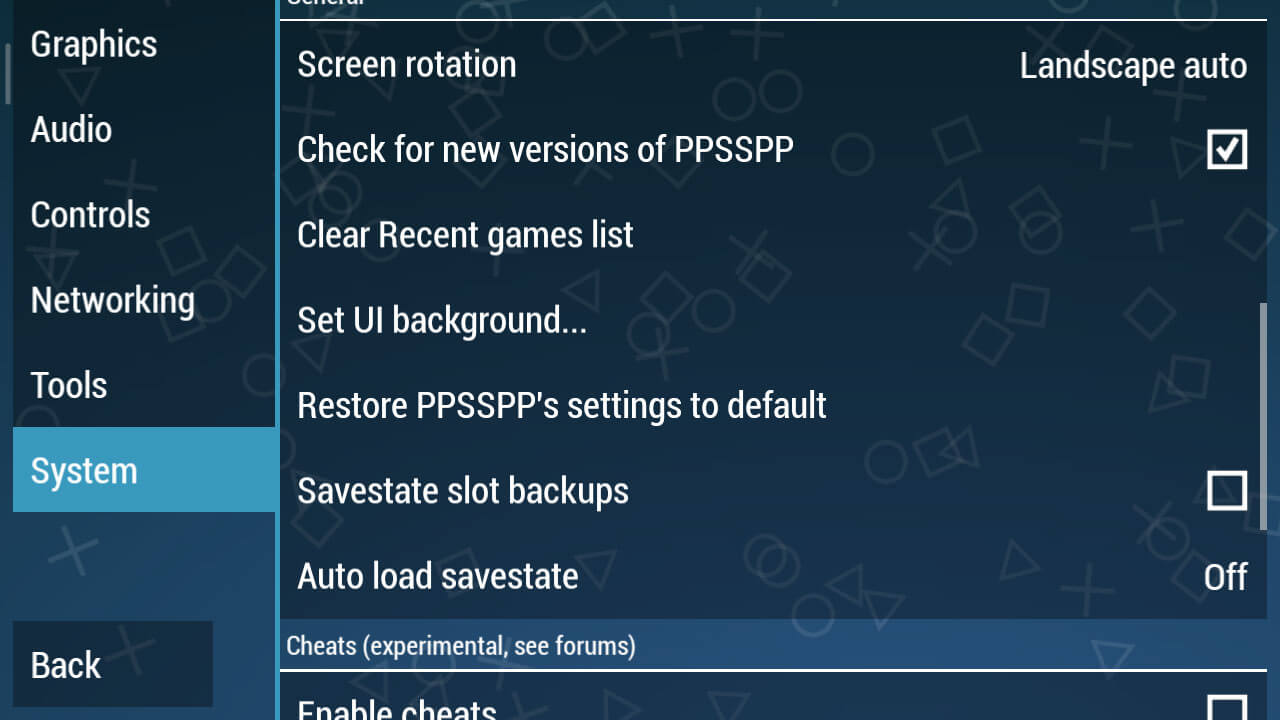
    If already installed, now enter PPSSPP then go to the Settings section or Settings. Choose System > General and select Restore PPSSPP’s settings to default so that we can make settings from the start.

    Graphic Settings
    Graphic Settings

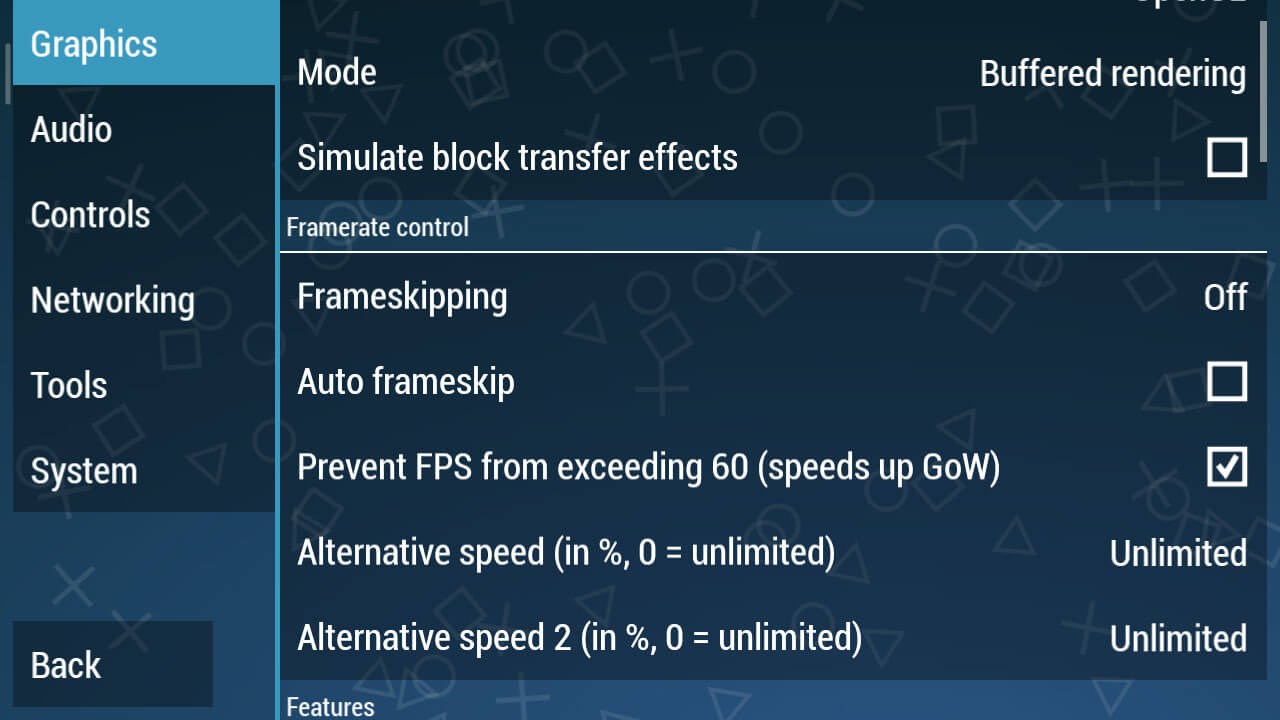
    Continue to the Graphics Settings option, this is the primary key so that a game can run smoothly and not lag. Moreover, problems often arise such as lag, broken, and black screen if you do the wrong graphic settings.

    • In Backend, select OpenGL
    • In Mode, select Buffered
    • Simulate block transfer effects, don’t check

    For more details, please see the screenshots above. As for the Buffered rendering, make sure you choose Buffered because it does match some skip-buffered games like the Naruto PPSSPP game, but other games will immediately black screen if you use that mode.
    Graphic Settings
    Graphic Settings
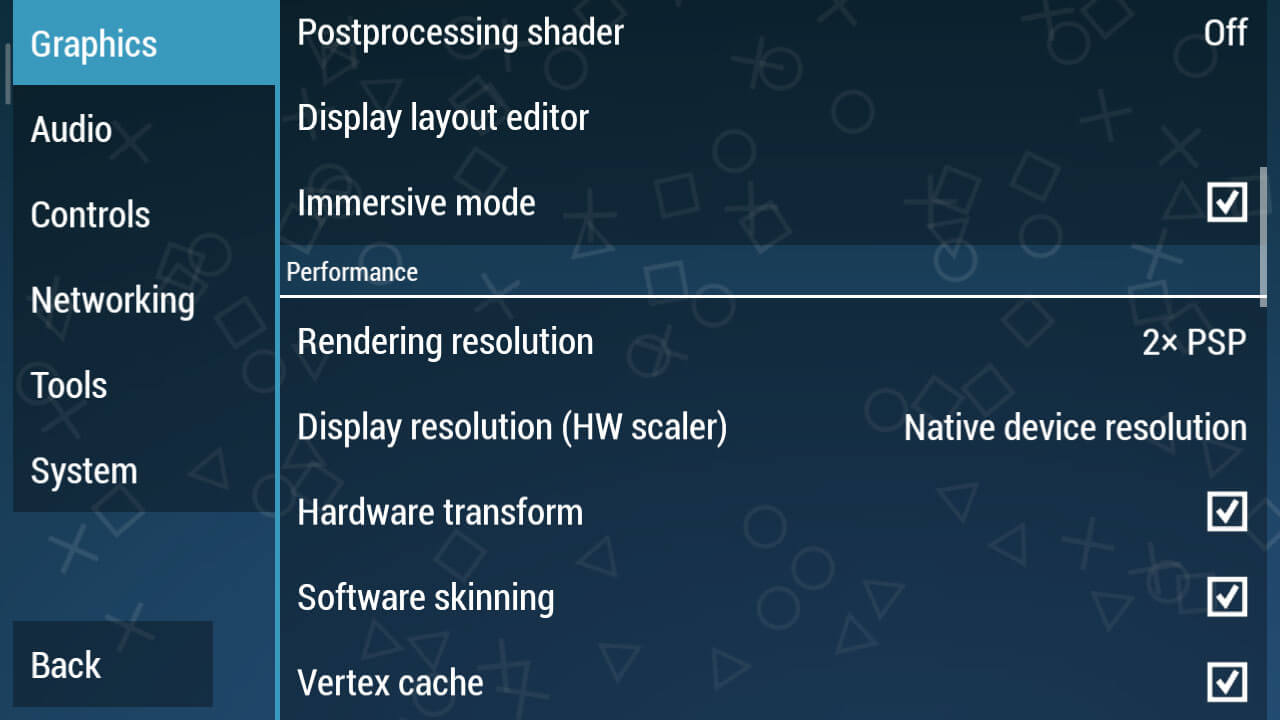
    • Immersive mode => Check
    • Hardware transform => Check
    • Software skinning => Check
    • Vertex Cache => Check
    Graphic Settings
    Graphic Settings
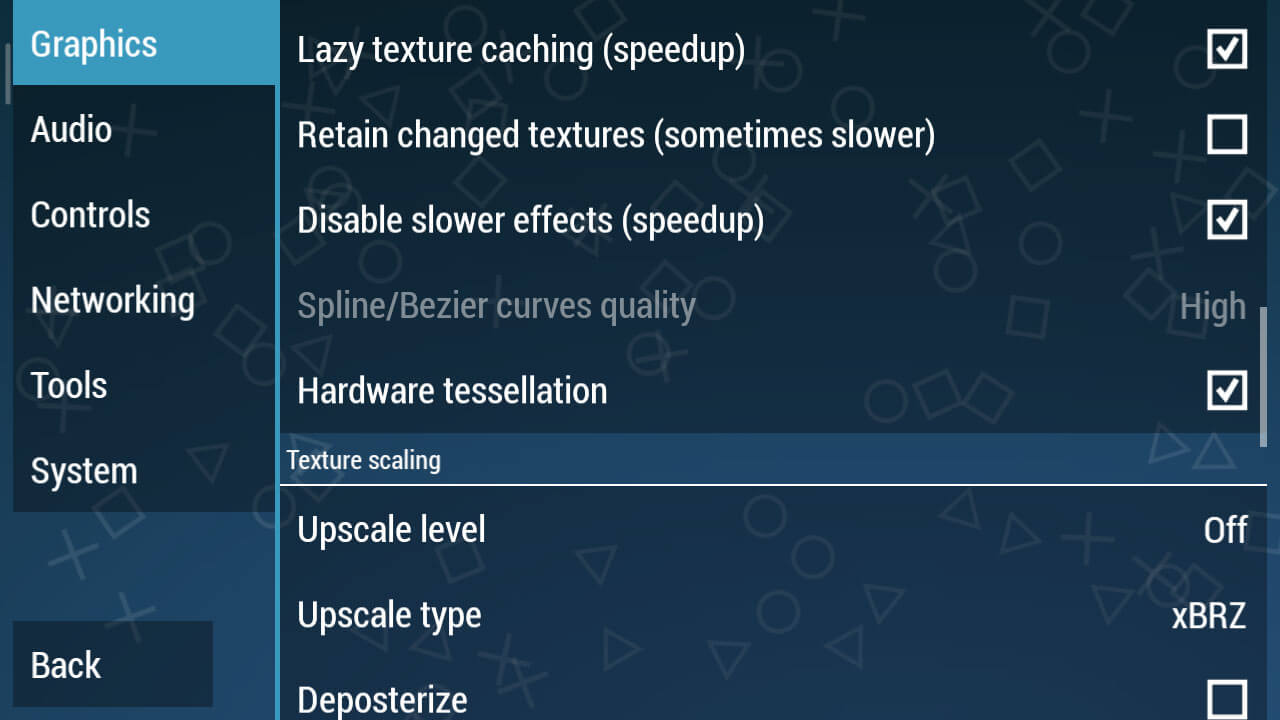
    • Lazy texture caching (speed up) => Check
    • Disable slower effects (speed up) => Check
    • Hardware tessellation => Check
    Graphic Settings
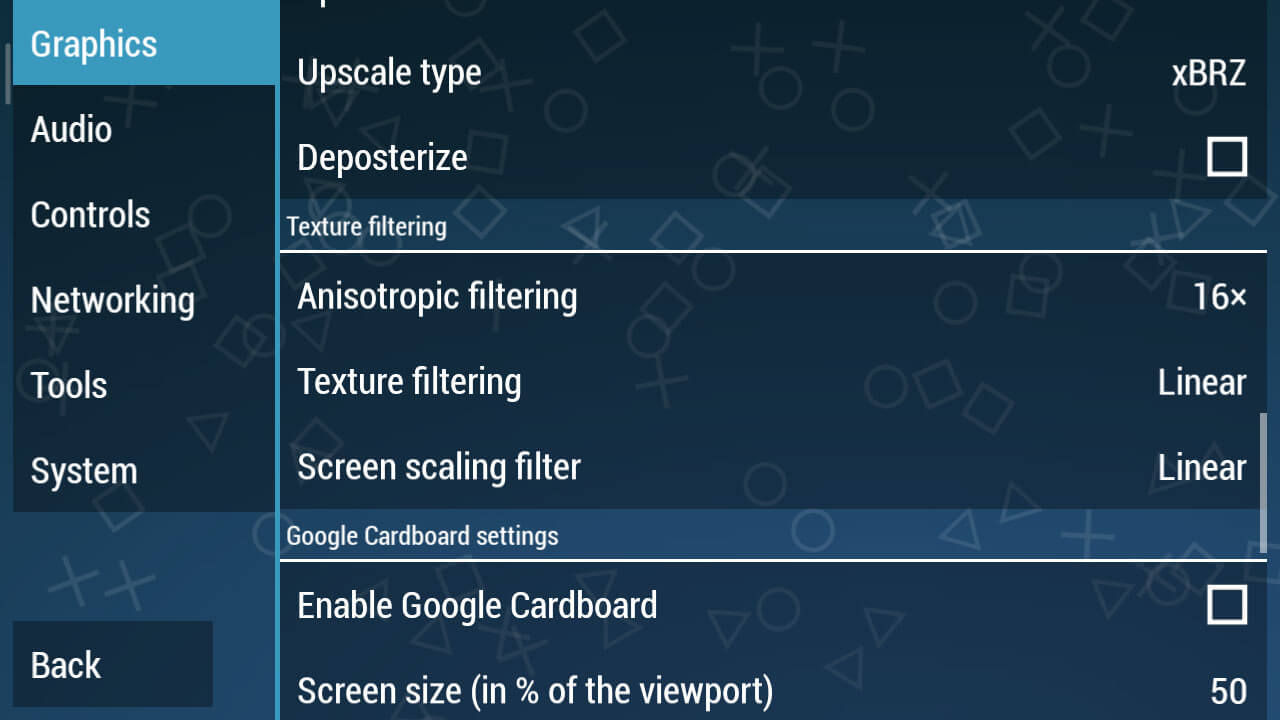
    • Change Texture Filtering to Linear
    • Screen Scaling Filter change to Linear
    Graphic Settings

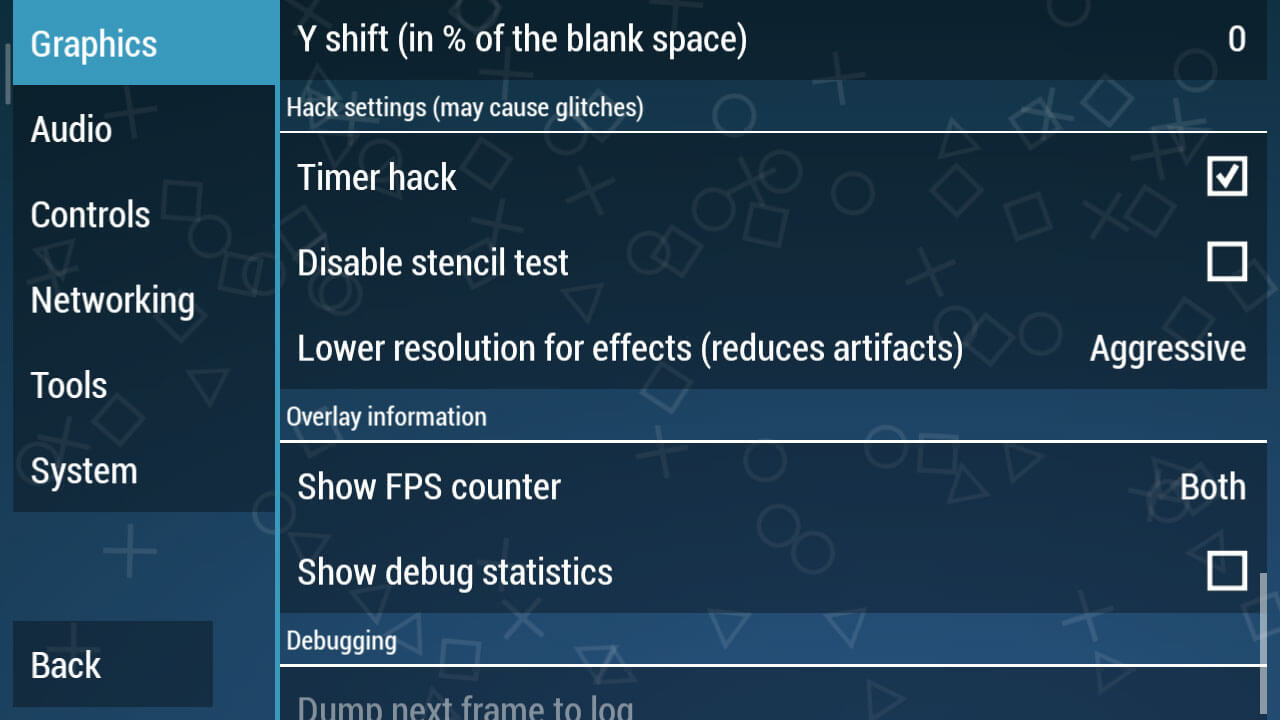
    This is the most crucial part, going into the Hack Settings Settings. Check the Hack Timer box, this is a must because this is only in PPSSPP version 1.7.5.

    Next, change the Lower resolution for effects (reduces artifacts).

    Audio Settings
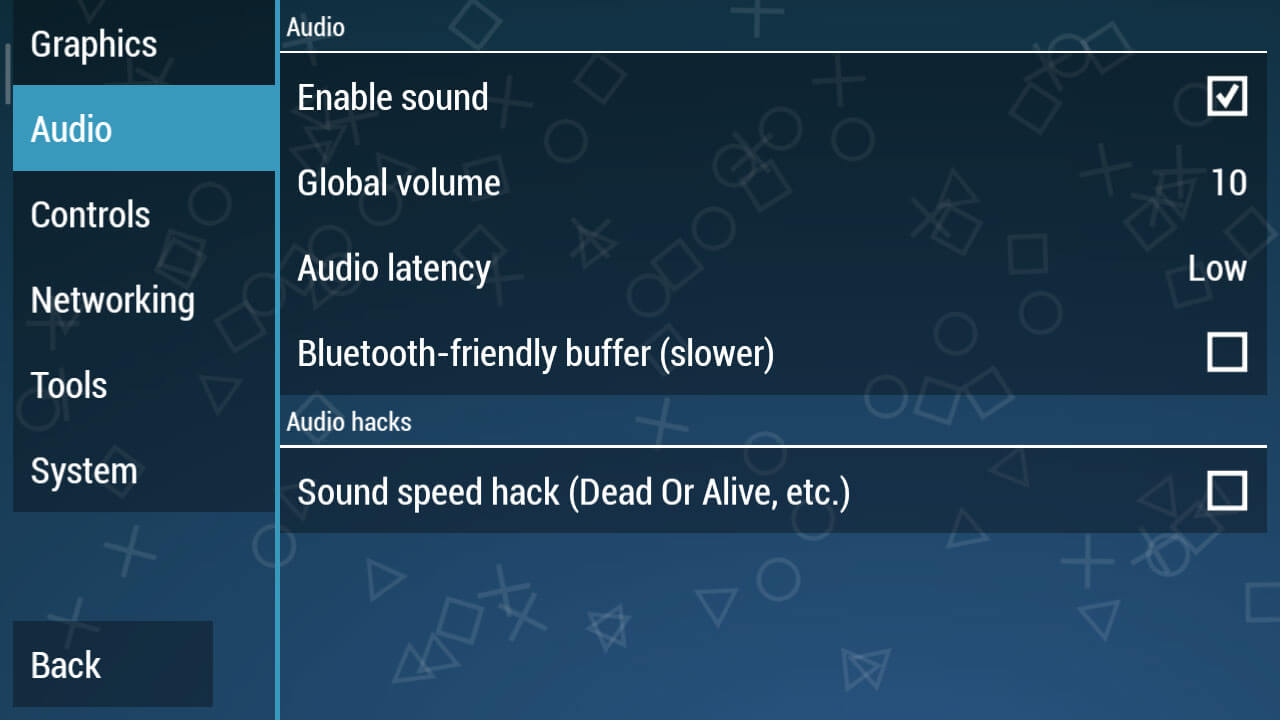
    Audio Settings

    You can just change the Audio Latency to Low. It looks simple, but if this setting has been applied it will clear up the sound of the game being played later.

    System Settings
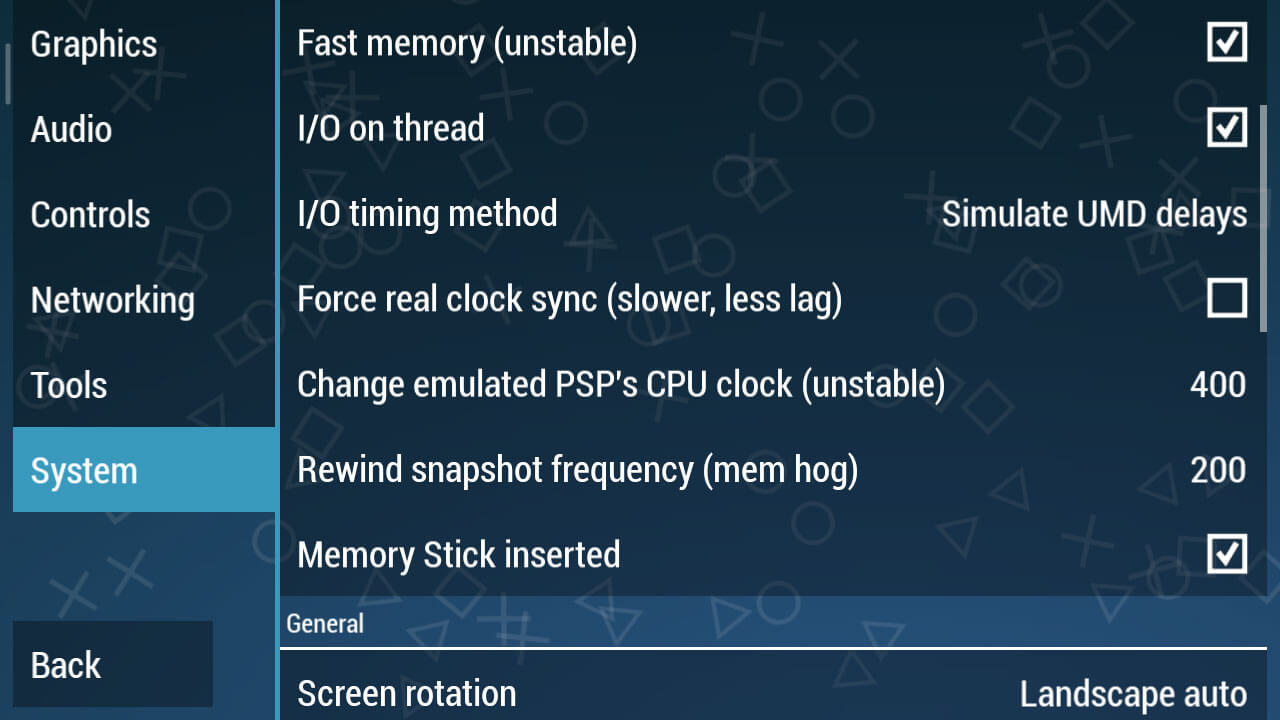
    System Settings
    • I / O timing method changes to Simulate UMD delays.
    • In the Change emulated PSP’s CPU clock (unstable) section, change it to 400.
    • Then in Rewind snapshot frequency (mem hog) change it to 200.

    As for you PPSSPP Gold users, for the settings, you can see below:

    Best PPSSPP Gold Settings To Play Smooth Games

    Here I prefer the Gold version of PPSSPP over the regular version because this is a premium application that we can buy at the Play Store, of course in terms of features it is also more complete than the usual version.

    For PPSSPP Gold, you can download it from the Play Store.

    # Step 1 – Graph Settings

    In the graphic settings, this is the most important part, because this will adjust to the device you are using.

    Here we will provide the best possible settings so that all types of mobile phones ranging from low to medium specs can run PSP games smoothly.

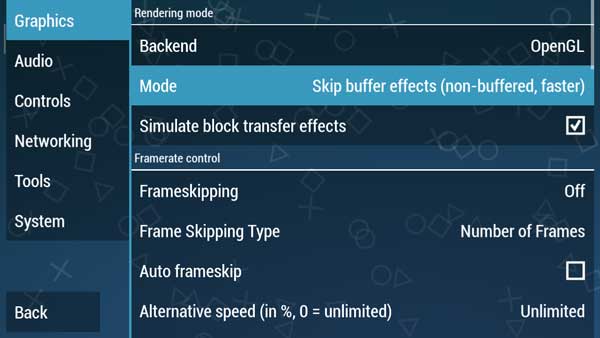
    In Rendering Mode, change the Mode to Skip buffer effects (non-buffed, faster)
    Step 1 - Graph Settings
    Step 1 – Graph Settings

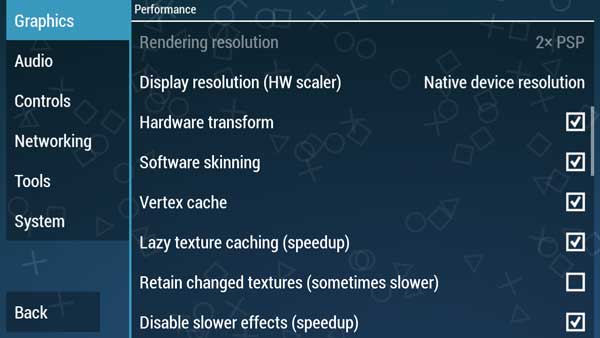
    We continue to the Performance section
    Step 1 - Graph Settings

    Check Lazy texture caching (speedup) and also Disable slower effects (speedup)

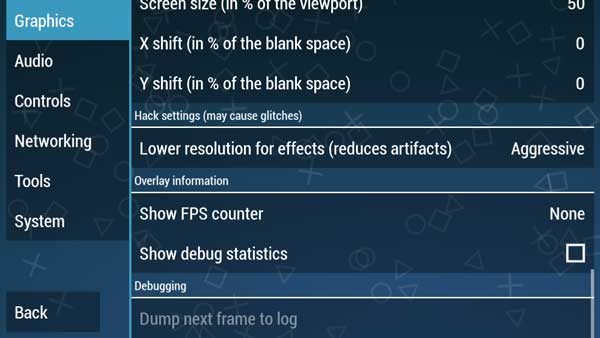
    And in the Hack settings (may cause glitches)
    Best PPSSPP Gold Settings To Play Smooth Games

    Lower resolution for effects (Reduces artifacts) we make Aggressive

    # Step 2 – Audio Settings

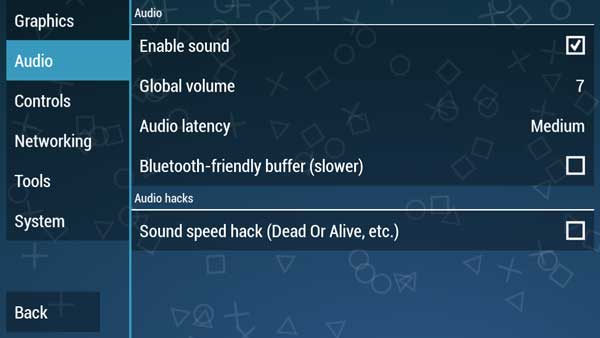
    In this audio section, we usually complain that we always experience broken sounds and also not smooth.

    This is not happening in the Audio settings but occurs in graphics or tools settings that cause game settings to be slow.

    For audio settings, we just need the settings below.
    Step 2 - Audio Settings
    Step 2 – Audio Settings

    # Step 3 – Setting Tools

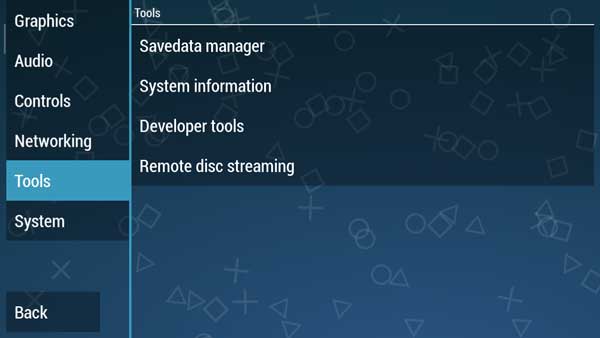
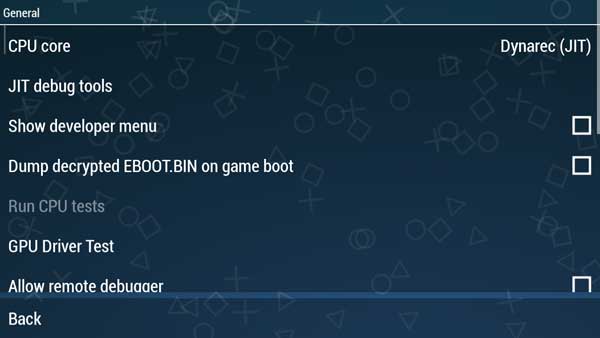
    For this part, you just need to make sure whether the CPU core is in Dynarec (JIT) mode or not, how do you please refer to the steps below.
    Step 3 - Setting Tools
    Step 3 - Setting Tools

    On the Tools menu, select Developer tools, and in the CPU core section make sure it’s Dynarec (JIT).

    # Step 4 – System Settings

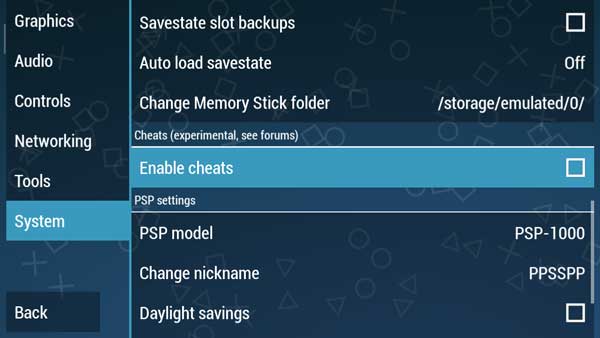
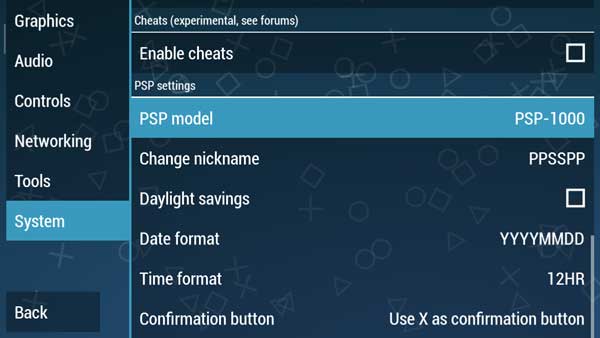
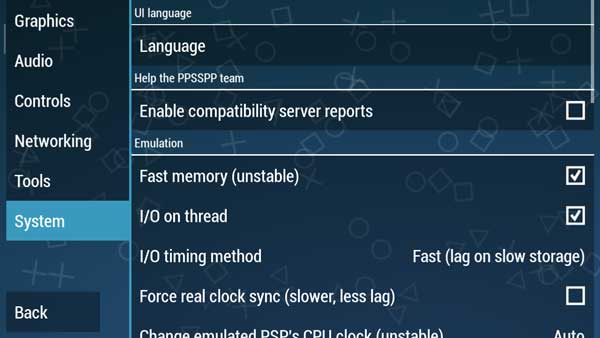
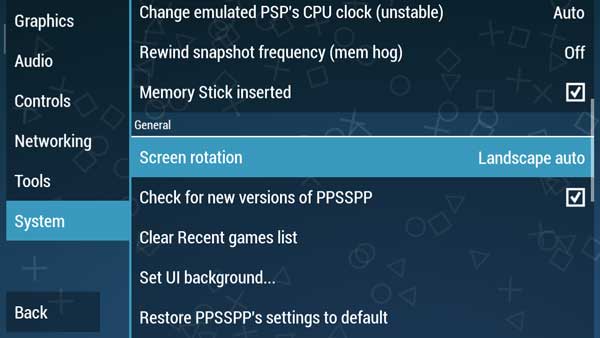
    And in the System section we don’t need to make any changes, just look at the pictures below to adjust your PPSSPP Gold settings.
    Step 4 - System Settings
    Step 4 - System Settings
    Step 4 - System Settings
    Step 4 - System Settings

    Please adjust the settings in your PPSSPP.

    PPSSPP Gold is a more optimal version than the usual PPSSPP version. So actually in this version, we don’t have to change a lot of settings.

    However, on certain devices, especially old-school phones with low specs, sometimes it requires optimal settings to stay smooth when playing PSP games.

    Read more:

    Conclusion:

    So, friends, these Above the best settings For PPSSPP for Android, which we recommend to play PSP iso games on Android so that it runs smoothly without lags. But sometimes there are still many who complain about slow games.
  • How To Download PPSSPP Games on Android and PC 2024

    How To Download PPSSPP Games on Android and PC 2024

    How To Download PPSSPP Games on Android and PC – The PPSSPP emulator which is often used to play PSP games on PC / Android does not provide a place to download games on the emulator. Therefore, users are certainly confused when using this emulator application to look for any exciting games that can be played at PPSSPP.

    Download PPSSPP Games on Android and PC
    Download PPSSPP Games on Android and PC

    How to Download PPSSPP Games on Android and PC

    About the PPSSPP Game Emulator

    PPSSPP is just an application that emulates PSP games so that it can run on a PC or Android. Similar to the original PSP device, in the PPSSPP emulator, there are no games. So you have to find the game yourself. Now, PPSSPP can play PSP games with ISO and CSO extensions.

    Read more:

    Then, What’s the Difference between ISO and CSO?

    Both are the same. CSO itself is only a compressed version of the ISO version. Both of them contain games that can be played in PPSSPP.

    Furthermore, if we download PPSSPP but don’t find the game in it, we no longer need to be confused.

    The format of the game PPSSPP is usually a CSO / ISO with different sizes. on Google itself, there are many links to download PPSSPP games that are lightweight or high compresses but when played the screen will blank. So the game can’t run smoothly.

    Therefore, we should download the PPSSPP game in ISO format and not CSO so that the size does not need to be compressed again. In addition, the game file format ISO on PPSSPP itself is very much like the games PES, Naruto, and FIFA until games else we can find.

    How to Play PSP Games on PPSSPP?

    It is very easy, you can follow how to download the game at PPSPP on the internet. You just need to put the game PSP device smartphone, run or PPSPP emulator application installation, and then select the ISO-shaped game earlier. Furthermore, the game can be played easily.

    To download the PPSSPP game on Android itself, we can choose a website that has provided a PPSSPP game emulator file. If you are curious, here’s how to download games on PPSSPP easily via an Android device!

    How to download games on PPSSPP on an Android Laptop PC

    How to download games on PPSSPP
    How to download games on PPSSPP

    Before you can play PSP games on Android, you must first download the ISO-shaped game files through the recommendation website to download PSP games.

    #1. Download PPSSPP Game via CoolROM.com

    The first recommended web that can be used to download PSP games is coolrom.com, how to download ISO game files via the CoolROM site? Check out the following steps.

    • Open the website www.coolrom.com.au using your favorite browser.
    • Search and select your favorite game, can use the search field, or by looking at the Top 25 Downloaded ROMs in the sidebar of the website.
    • For example, we will show you download the Tekken 3 PPSSPP game. Type the keyword “Tekken 3” in the search field then press Go.
    • Select one of the games that are displayed.
    • To download the game, you must press/click the Alternative download link at the bottom of the Download button.
    • Wait for the advertisement for 15 seconds.
    • Press/click Download Your File.
    • Save the game files in the form of .zip / .rar / .7z to a folder that is easy to find.

    #2. Download the PPSSPP game through RomsMania

    How:

    • Open and visit the website www. Romania. cc using your favorite browser.
    • Search and select the game you want.
    • For example, we download the game Resident Evil 3.
    • On the game posting page, press / click the More Options button at the bottom of the Download button.
    • Select and click Browser download (slowest).
    • PPSSPP ROM game files in the form of .zip / .rar / .7z will be downloaded automatically through the browser you are using.
    • Wait until the download is complete. Or, to speed up downloads you can use the latest IDM software.

    Now, after the PPSSPP game file (.zip / .7z / .rar format) is downloaded properly. Then we can extract to get the ISO file of the game. Just remove it using File Explorer or WinRAR. After the .zip / .7z file is successfully extracted and gets an ISO file, then pay attention to the next step.

    #3. Download and install the PPSSPP application

    The next stage is that we must have the PPSSPP application which can later be used to play PSP games on Android. How:

    • Open the Google Play Store application, then look for the PPSSPP application. To speed things up, you can download the PPSSPP application there.
    • After the PPSSPP APK file is downloaded successfully, just install the PPSSPP application on your Android.

    After the PPSSPP application is installed, it can play previously downloaded games. How to play the game? Check out the next step.

    #4. How to Play PPSSPP Games on Android

    Before you can play PSP games on Android, please note that we must have an ISO game PSP file that was downloaded to Android storage.

    For those who previously downloaded ISO game files via PC / Laptop, you can directly transfer them to your Android’s internal/external storage.

    Next, pay attention to the steps of playing the PPSSPP game on the following Android.

    • Make sure you have installed the PPSSPP application on your Android smartphone.
    • Open the PPSSPP application.
    • Search for the PSP game’s ISO file according to the folder where you put it in memory.
    • Tap/tap the game to start playing it.
    • You can also set the game Performance so that it doesn’t lag by tapping the Settings menu in the PPSSPP application.
    • Adjust Performance as you wish and the Android spec that you use.

    For PC / laptop users, can you also play this PSP game on your device? Of course, you can bang, the way is also quite simple. Consider the following methods and stages.

    How to Play PPSSPP Games on a PC / Laptop

    Before you can play PPSSPP games on a PC or laptop you must have game files that can be downloaded via the RomsMania or CoolROM website.

    Perform the steps on how to download the PPSSPP game above to download the game file. After getting the ISO game file, you can directly download the PPSSPP application on a PC / Laptop. How to do it?

    • Open your favorite browser, you can use Google Chrome or Firefox.
    • Open and visit the website www.ppsspp.org/downloads.html.
    • Scroll down and find PPSSPP for Windows.
    • Click the Download button that is already available. You can also choose .exe or .zip files.
    • Wait a while until the application/software PPSSPP for Windows has finished downloading.
    • Once downloaded, install the PPSSPP application for Windows to the PC / Laptop that you are using.
    • To be able to play PSP games on a PC, you can do the exact steps discussed in the previous paragraph.

    Recommended PPSSPP Best  Games for 2023

    In addition, we have also summarized a list of the best PPSSPP Game recommendations throughout 2021. This list is adapted from the website sources RoomsMania and CoolROM.

    The list of recommendations for the best and most popular PPSSPP 2021 games is as follows:

    1. God of War – Ghost of Sparta
    2. Naruto Shippuden – Ultimate Ninja Impact
    3. Tekken 6
    4. Grand Theft Auto – Vice City Stories
    5. Dragon Ball Z – Shin Budokai 2
    6. Dragon Ball Z – Shin Budokai
    7. Assassin’s Creed – Bloodlines
    8. God of War – Chains of Olympus
    9. Need For Speed ​​- Most Wanted 5-1-0
    10. Dragon Ball Z – Tenkaichi Tag Team
    11. Tekken 3
    12. Crash Bandicoot
    13. Jackie Chan Stuntmaster
    14. CTR – Crash Team Racing
    15. Digimon World 3
    16. WWF SmackDown! 2 – Know Your Role
    17. Final Fantasy VII (Disc 1)
    18. Bloody Roar II
    19. Yu-Gi-Oh! Forbidden Memories
    20. Digimon World
    21. Vigilante 8 – 2nd Offense
    22. Pepsiman (Japan)
    23. Final Fantasy VIII (Disc 1)
    24. Resident Evil 2 (Disc 1)
    25. FIFA Soccer 2005
    26. Twisted Metal 4
    27. Dino Crisis 2
    28. Marvel vs. Capcom – Clash of Super-Heroes
    29. Tenchu ​​2 – Birth of the Stealth Assassins
    30. Dragon Ball GT – Final Bout
    31. Suikoden II
    32. Spider-Man
    33. Super Shot Soccer
    34. NASCAR Rumble
    35. Brigandine – The Legend of Forsena

    Read more:

    Conclusion:

    So, friends, That’s the above complete How to download PPSSPP games on an Android PC, along with install methods and tutorials to play very easy games. Do not forget to share/share this article with your friends.