6 Ways to Fix Wireless Capability Is Turned off In Windows PC – You are having problems with Wireless Connection ( WiFi ) because there are no devices available to connect and when you try to troubleshoot the problem you get the following error: Wireless capability is turned off ( Radio is off).
How to Fix Wireless Capability Is Turned Off In Windows PC
How to Fix Wireless Capability Is Turned off In Windows 10 PC
The “Wireless Capabilities Is Turned Off” error usually occurs when the computer detects that the wireless adapter is disabled externally and cannot turn it on by itself.
This error is very common and may relate to many different situations. Appears when you run Windows Network Diagnostics when you are unable to connect to the internet.
The main problem is that the wireless device is disabled so let’s try to fix this error.
How to improve Wireless Capability is turned off
Please try any or all of the methods I recommend below to fix Wireless Capabilities Is Turned Off on all versions of Windows computers.
#1. Turn on WiFi
You may have accidentally pressed a physical button to turn off WiFi or some programs may have disabled it.
If so, you can easily fix the Wireless capability being turned off at the push of a button.
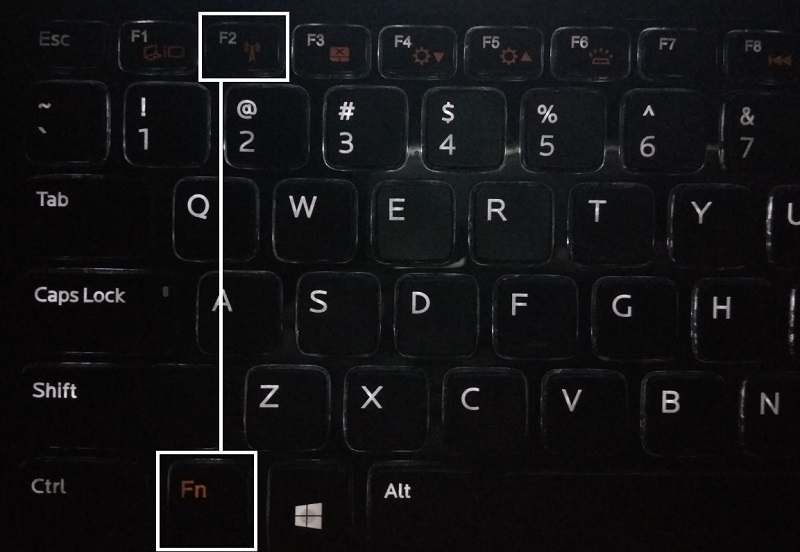
Locate your keyboard for WiFi and press to turn the WiFi back on. In most cases, you can use the Fn (function key) + F2 keys on the keyboard.
#2. Run the Network troubleshooter or Troubleshooter
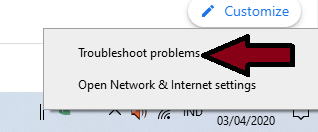
Right-click on the network icon in the notification area.
Select Troubleshoot Problems.
3. Follow the instructions on the screen to fix the problem.
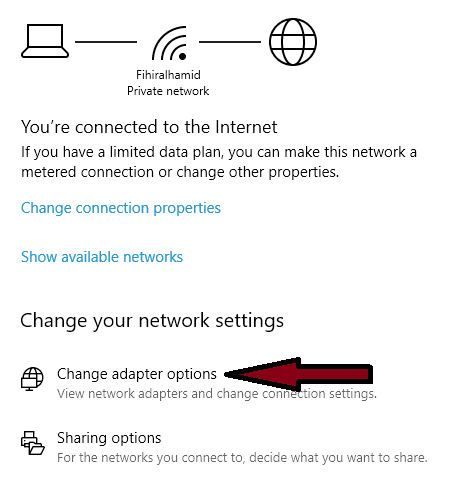
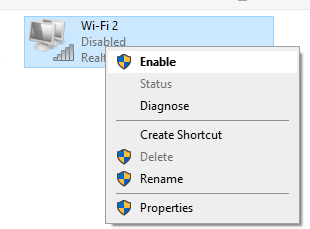
#3. Enable connection
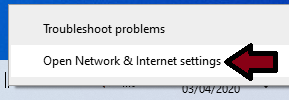
Right-click on the network icon in the notification area.
Right-click the WiFi connection and select Enable.
Restart to check if the problem was solved or not.
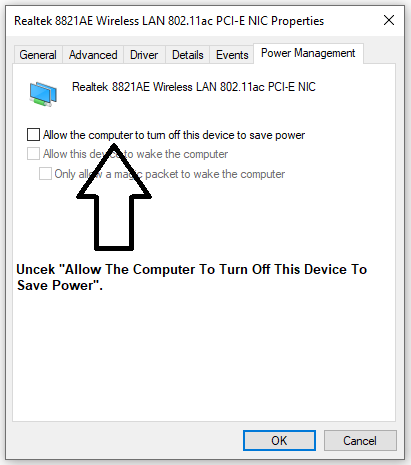
#4. Disable Allow the computer to turn off this device to save power
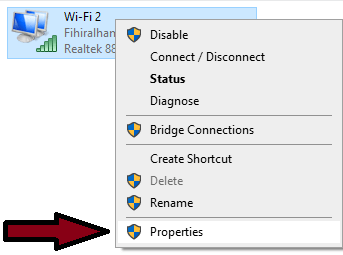
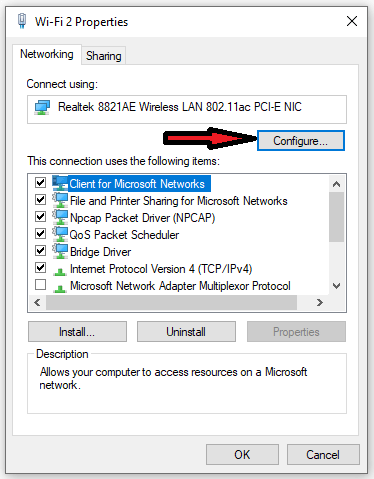
Perform steps 1 to 3 from method 3 above.
Then in step 4 select Properties.
Then select Configure.
Then check “Allow The Computer To Turn Off This Device To Save Power”.
Then click OK and restart your computer.
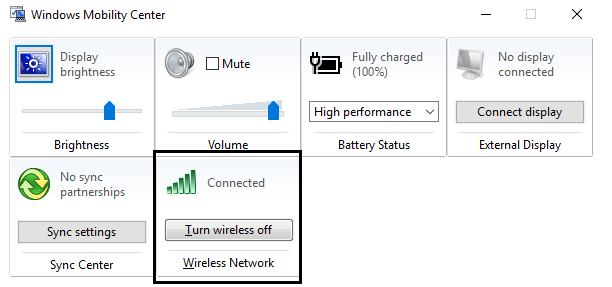
#5. Enable Wifi from the Windows Mobility Center
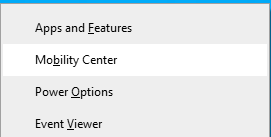
Press the Windows key + X and select Mobility Center.
In Windows Mobility Center, turn on or ON your WiFi connection.
Now restart your computer.
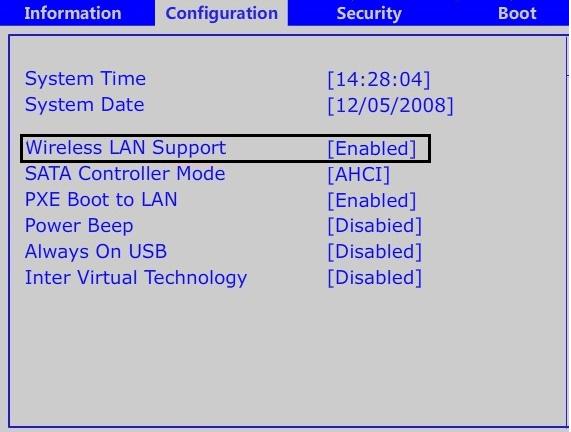
#6. Enable WiFi from BIOS
Sometimes none of the methods above work because the Wireless Adapter is not active from the BIOS, in this case, you have to enter the BIOS and set it as default, then enter again and enter “Windows Mobility Center” via the Control Panel and you can turn on / Turn off the Wireless Adapter.
This is the explanation where the above Wireless Capabilities Is Turned off (Radio Is off) error message should have been resolved by now, but if you still have any questions regarding the issue then feel free to ask me in the comments box.
How to Clone Hard Drive to SSD on Windows and Mac PC – Most computers today are equipped with a Hard disk drive (HDD), but you can enjoy better computer performance if you upgrade to a solid-state drive (SSD). But when you buy an SSD for a computer, you’ll need to copy all your data (or clone the drive) to get the operating system and all files on the new drive. Here’s how to clone a hard drive to SSD on Windows and Mac.
How to Clone Hard Drive to SSD on Windows and Mac
How to Clone Hard Drive to SSD on Windows and Mac PC
Before you take any of these steps, it’s important to back up all your important data. Problems might arise during the cloning process which can result in you losing all data. You also need to make sure that the SSD you are using has more capacity than the files you are cloning.
Download the free version of EaseUS Todo. You must enter your email address to download the application.
Follow the instructions on the screen to install the program on the computer.
Insert the SSD into your computer. Make sure the SDD is connected properly. If you only have space on your computer for a single drive, you may need to connect the SSD with a USB-to-SATA adapter or external dock for the cloning process. Then you can insert the SSD when the process is complete.
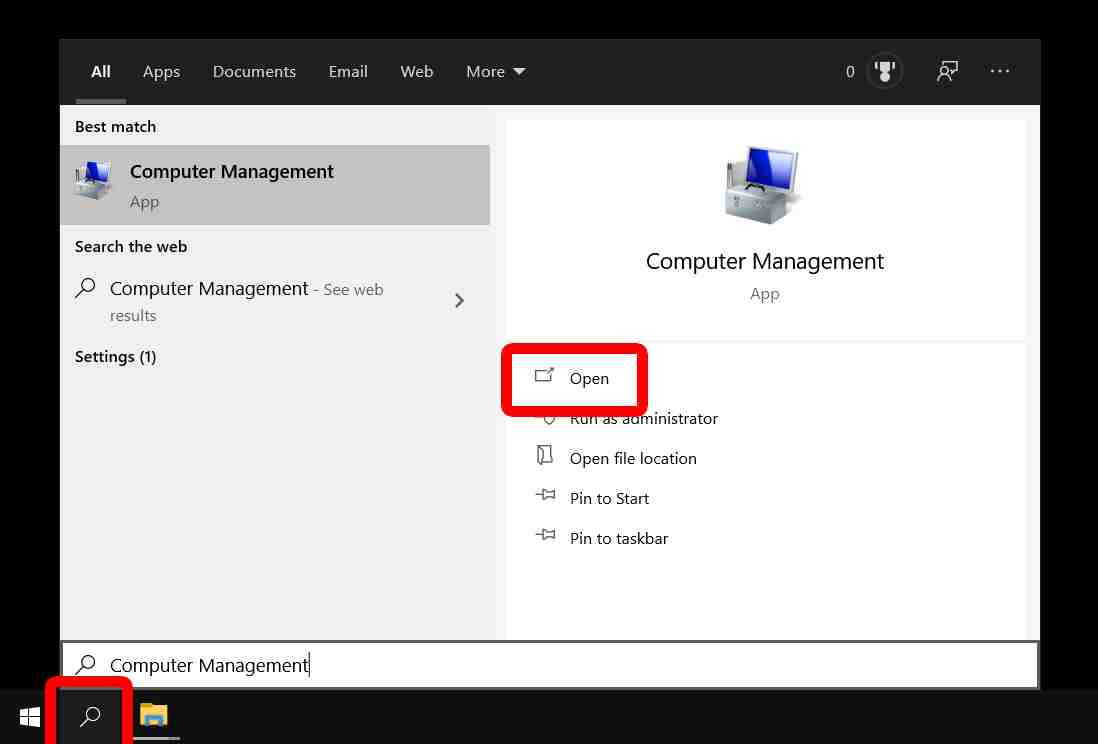
Click the magnifying glass icon in the lower-left corner of your screen and type “Computer Management” in the search box.
Then click Open.
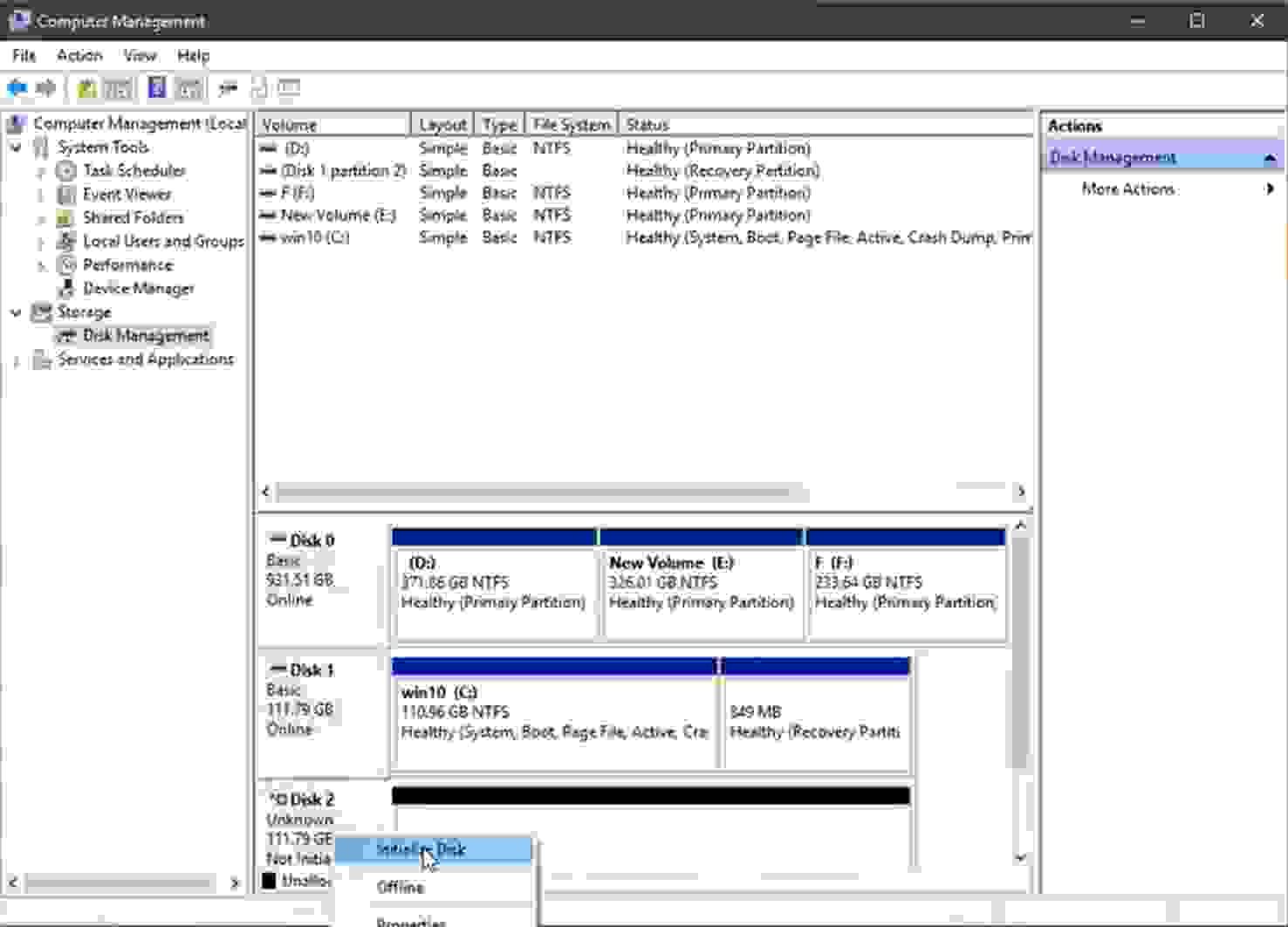
6. In the Computer Management window, initialize the SSD when prompted. If you are not prompted to initialize a disk, you can right-click on your disk and select Initialize Disk. If you don’t know which disk is the source and which is the new SSD, you can tell by looking at the size.
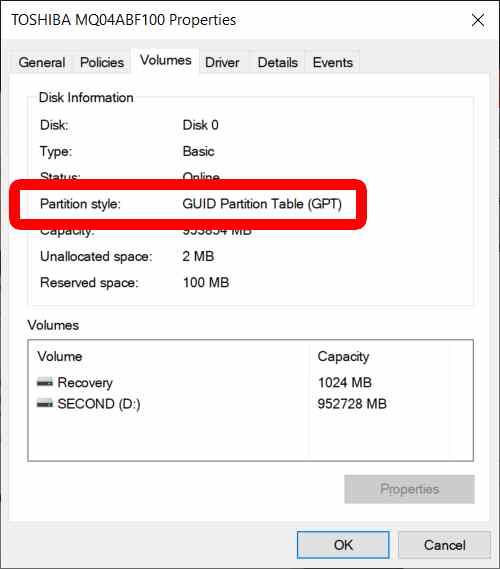
7. Select the same partition as your source drive. To find it, you can right-click on your source disk and click properties. Then select the Volume tab, where you will find the partition style, which should be GUID Partition Table (GPT) or Master Boot Record (MBR). Then select the same partition style for your SSD.
8. Click OK.
9. Open the EaseUS Todo application.
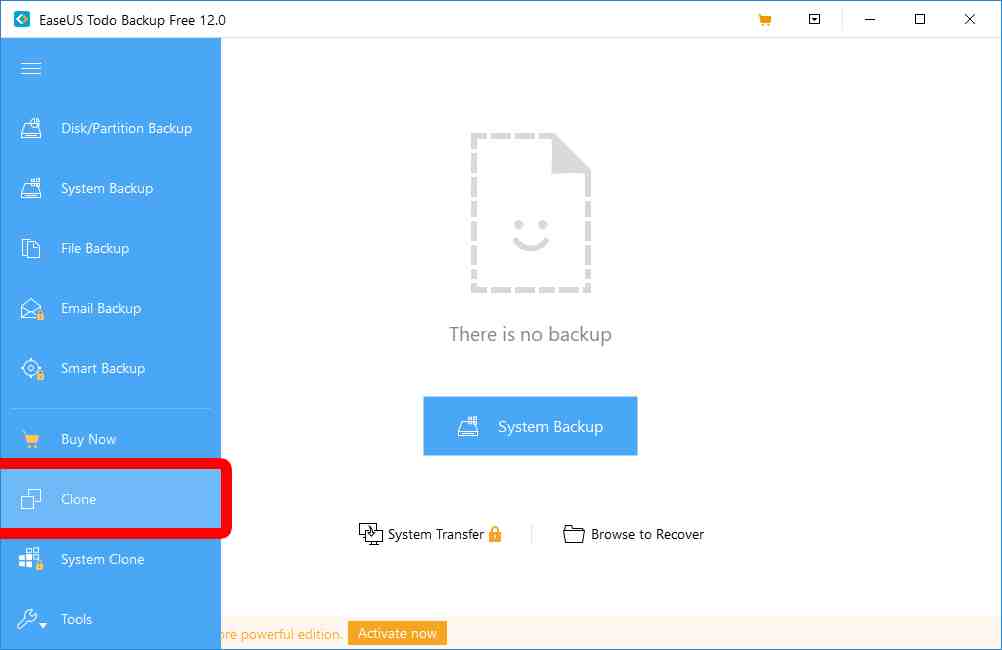
10. Click the “Clone” icon on the left sidebar. If you don’t see it, click the three horizontal lines in the top left corner of your window to expand the menu.
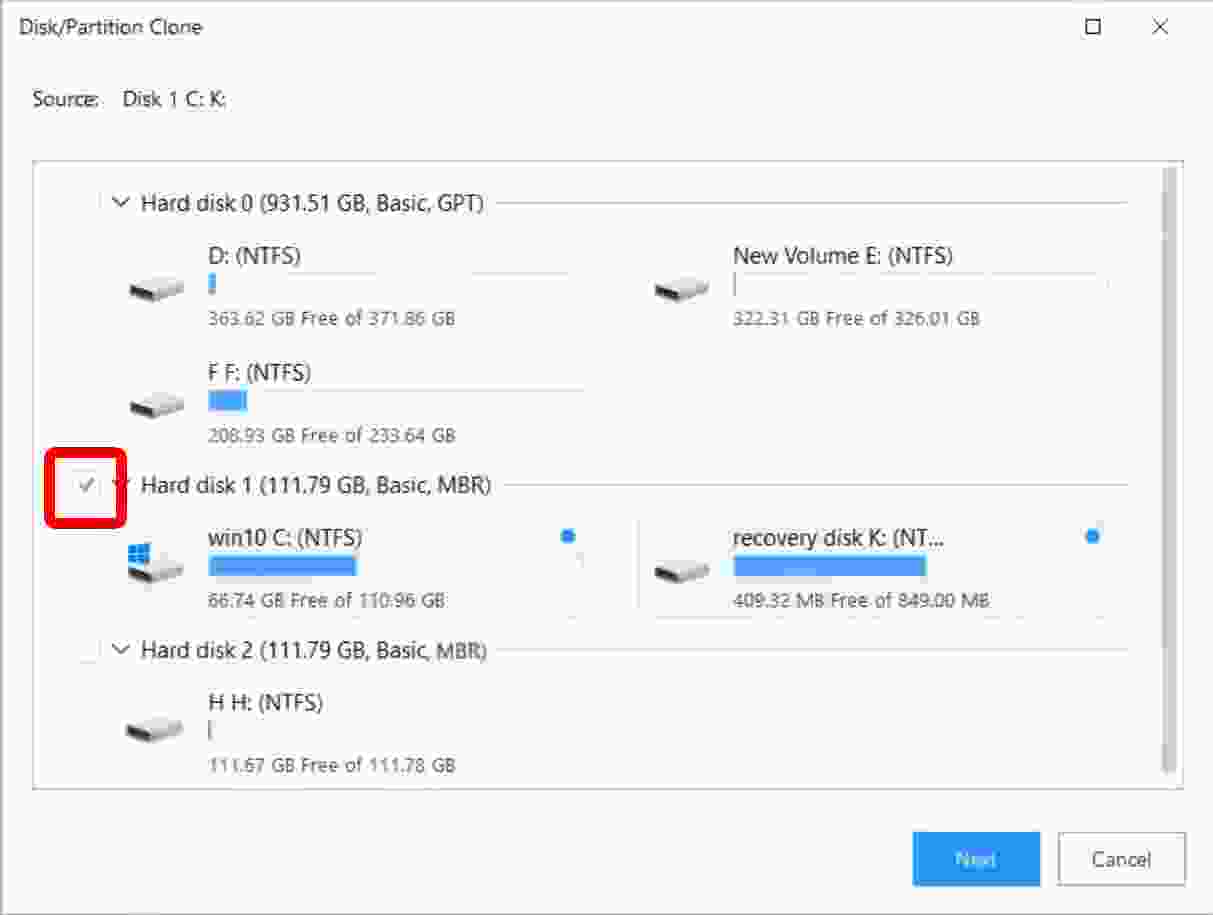
11. Select your source hard disk and click Next. This is your original drive, the drive where you clone your operating system and files.
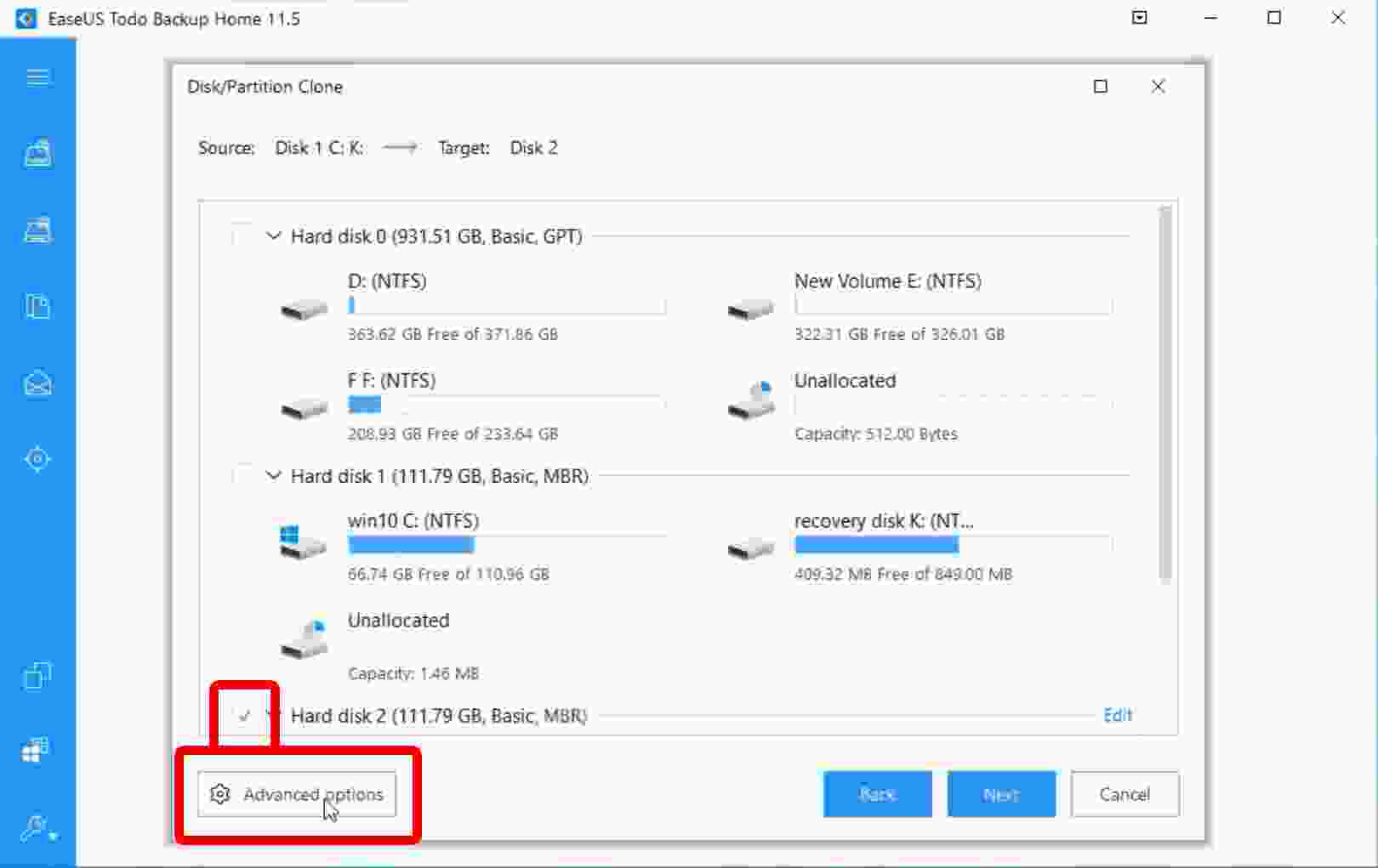
12. Then select the target disk or SSD, but don’t click Next.
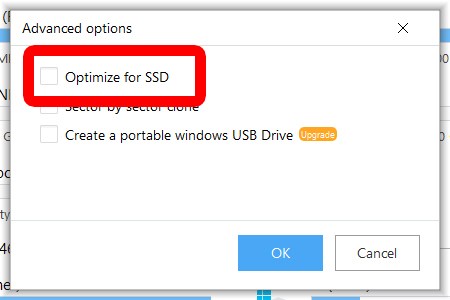
13. Next, click “Advanced Options”, then select “Optimize for SSD”. This will ensure that your partitions are aligned and that you get the most out of the SSD.
14. Click OK and then NEXT.
15. Click “Proceed” when prompted by the software.
16. Wait until the cloning process is complete. This may take a while, depending on how big your hard drive is.
17. Click “Finish” when the cloning process is complete.
How to Boot from SSD After Clone in Windows
Once you have cloned your hard drive, you can boot from the SSD to use the computer. Here are the steps on how to boot from SSD after you have cloned the hard drive.
1. Insert the SSD into the computer. If you are cloning with an external SDD, you will need to insert it into the computer before booting. If you can clone with the SSD already inserted in the computer, you can skip this step.
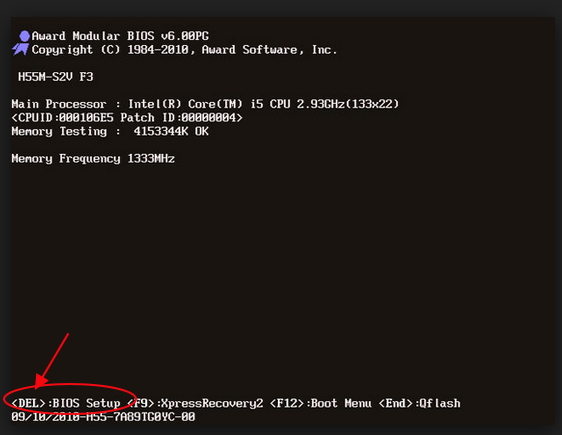
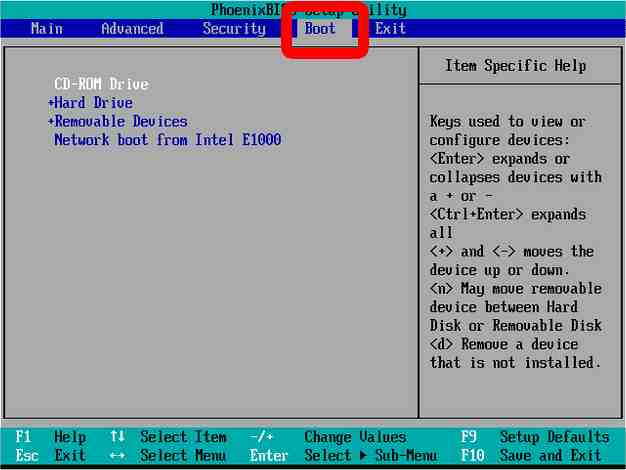
2. Restart the computer and enter the BIOS setup. Depending on your computer model, you will need to press ESC, F1, F2, F8, or F10 while the computer is restarted. You can search for the BIOS key online or check your startup screen.
3. Go to the Boot. You will see on-screen instructions on how to navigate the BIOS menu.
4. Move the SSD to the top of the list. You can use the keyboard to change the boot order from the computer drive. Putting your SSD at the top of the list tells your computer to boot from that drive first.
5. Exit the main BIOS menu.
6. Wait for your computer to reboot.
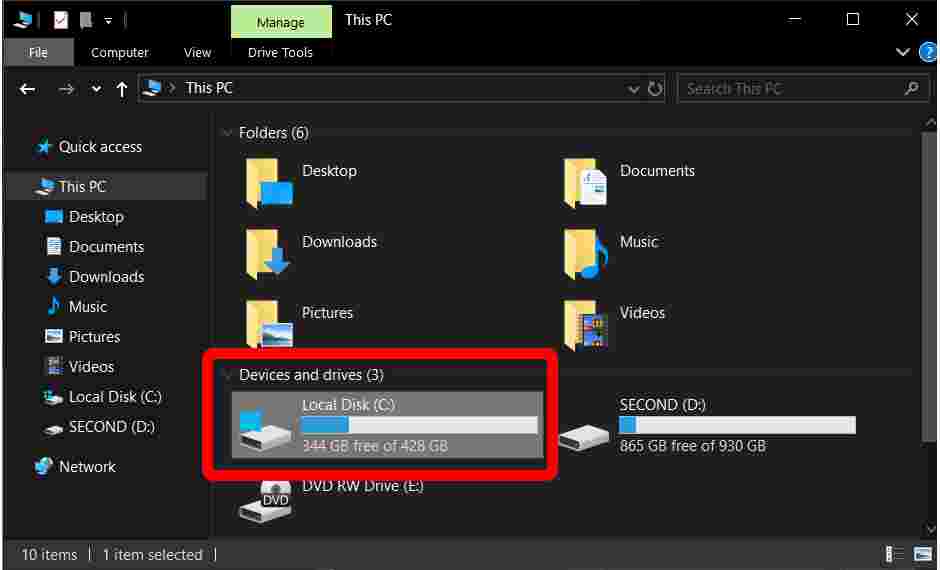
7. Open Windows Explorers and click This PC in the left sidebar to confirm that your SSD is C: drive. You can tell that an SSD is the new C drive by looking at its size.
How to Clone Hard Drive to SSD on Mac
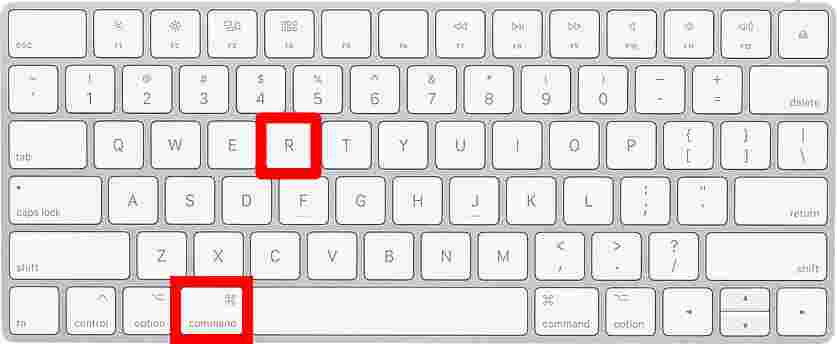
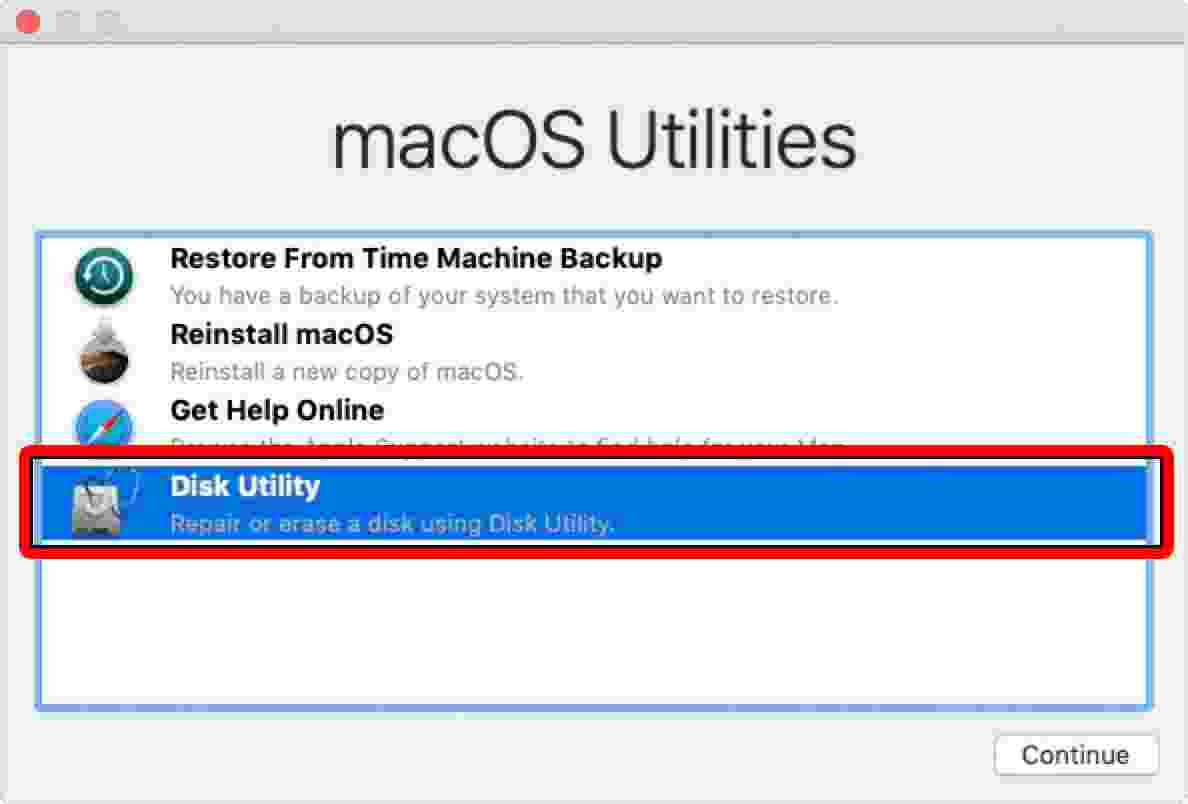
If you have a computer running macOS, you can perform the cloning process using Disk Utility. The system refers to the process as “Restore”, not cloning because you are restoring data from one source drive to another.
8 Ways to Check VGA on Windows 10 PC Laptop – There are many ways to check the type of VGA on your computer. As we know a computer consists of various hardware components. If one of the components is missing, you will not get any image on the monitor screen.
8 Ways to Check VGA on Windows 10 Laptop PC
How to Check VGA on Windows 10 PC Laptop
VGA also has an important role here, this component is responsible for processing the graphics displayed on your laptop or monitor screen.
Every laptop and PC is supported by a graphics processing unit (GPU). Some machines have a GPU built into the motherboard or processor, while others have a dedicated graphics card. If you don’t know what graphics card you have, it’s easier to find out with a different method. Here’s how to check the Laptop/PC VGA on Windows 10.
Checking the type of VGA card can be done in various ways, either by using additional applications or without using any application. Here are some ways to check laptop/PC VGA on Windows 10.
#1. Check VGA Through Settings
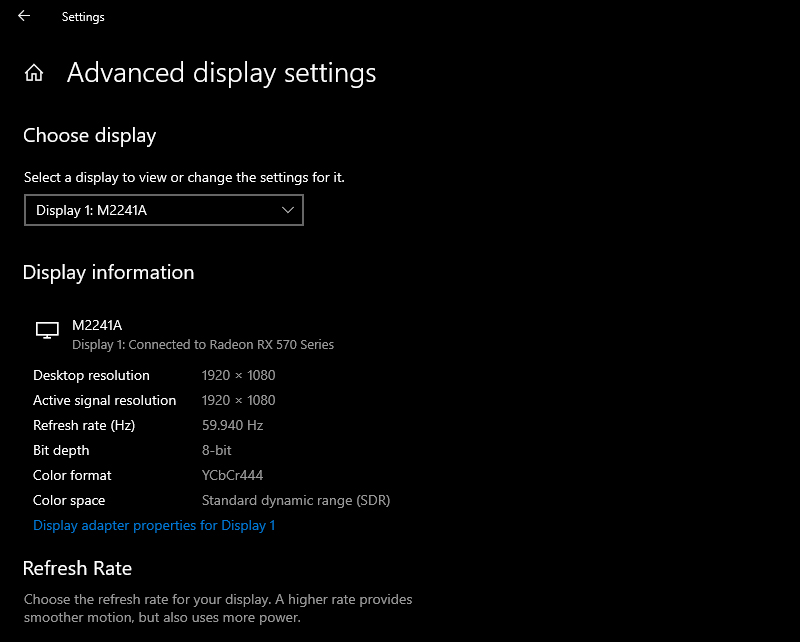
Press Windows Key + I to open Settings.
Click System. You will be in the Display section by default.
Under Multiple displays, click Advanced display settings.
It is possible to have different VGA cards connected to different monitors. If necessary, use the dropdown menu to select your primary monitor.
Under Display information, it will show which graphics card you have connected for that monitor.
You can also use this section to check the resolution, refresh rate, bit depth, and more.
#2. Check VGA Through Task Manager
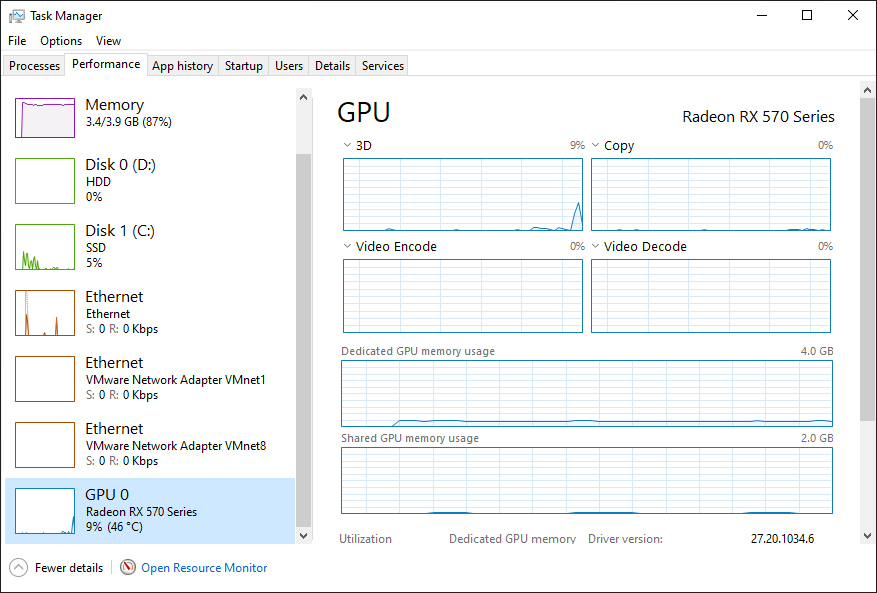
Right-click on your taskbar.
Click Task Manager.
If necessary, click More Details.
Switch to the Performance tab.
On the left, click GPU 0 (you’ll see GPU 1, GPU 2, and so on if you have multiple graphics cards).
At the top right, the name of your VGA card will be displayed.
You can also use this section to check your graphics card’s current load, temperature, driver version, and more.
#3. Check VGA Via DirectX Diagnostic Tool
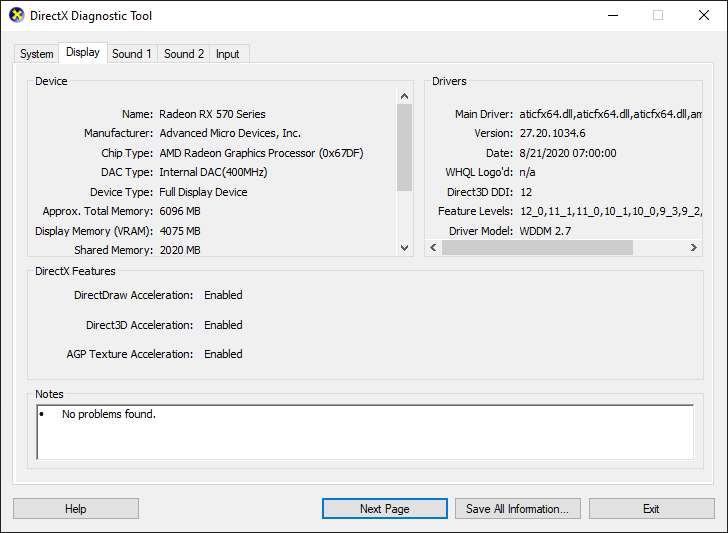
Press the Windows key + R to open the Run box.
Enter dxdiag and click OK. This opens the DirectX Diagnostic Tool.
Switch to the Display tab.
Under Device, under Name, your VGA card will be displayed.
You can also use this tool to view your graphics card memory, driver information, and monitor information.
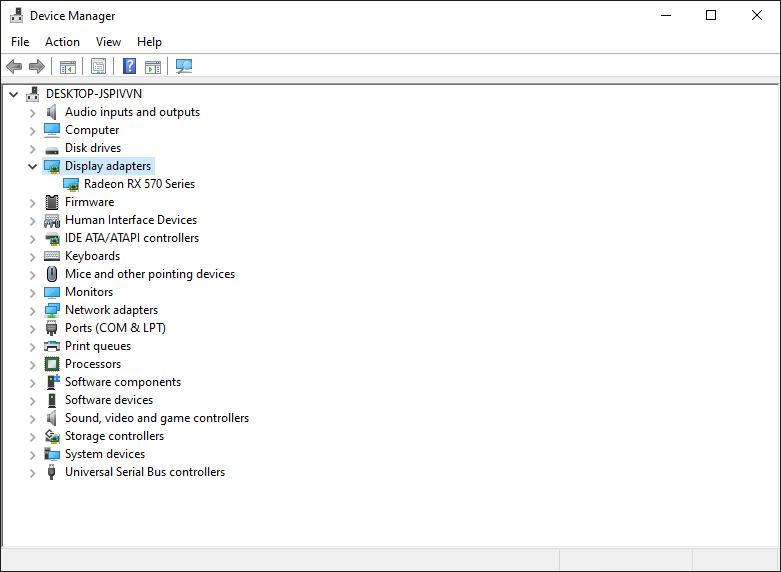
#4. Check VGA Via Device Manager
Press Windows Key + X.
Click Device Manager.
Double-click on Display adapters. This will list all your graphics cards.
If necessary, double-click the graphics card to open its properties to view additional driver information or view the event log. For example, you can switch to the Driver tab and click Update Driver to search for the latest drivers online.
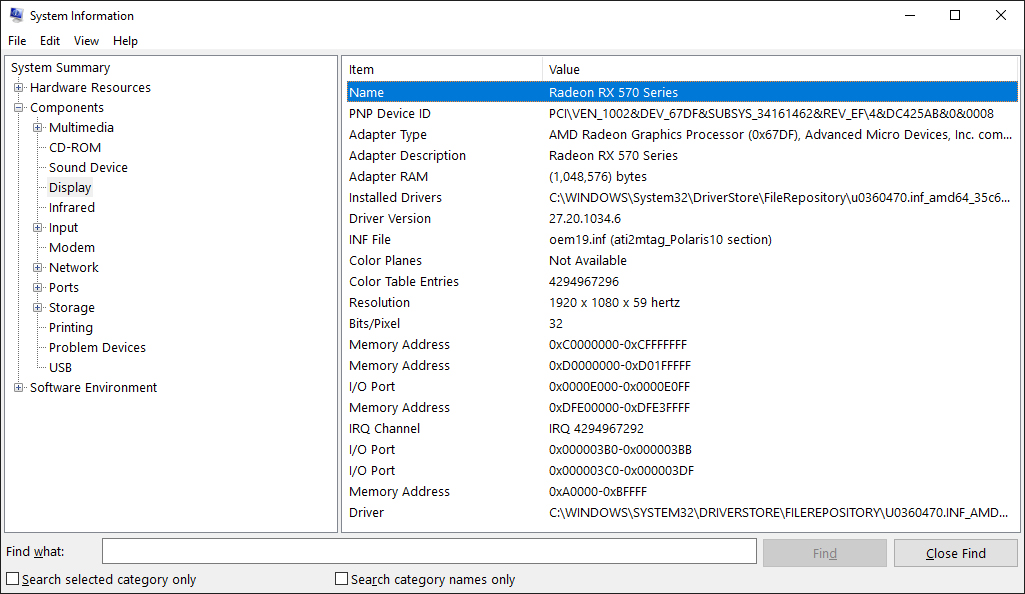
#5. Check VGA Through System Information
Type System Information in the Start Menu search bar, then select the best match.
In the left pane, double-clickon Components.
Click Displays.
In the right pane, under Name, your graphics card will be displayed.
You can also use System Information to find out about your other components, like sound devices or storage drives, or check the Software Environment for things like running services or print jobs.
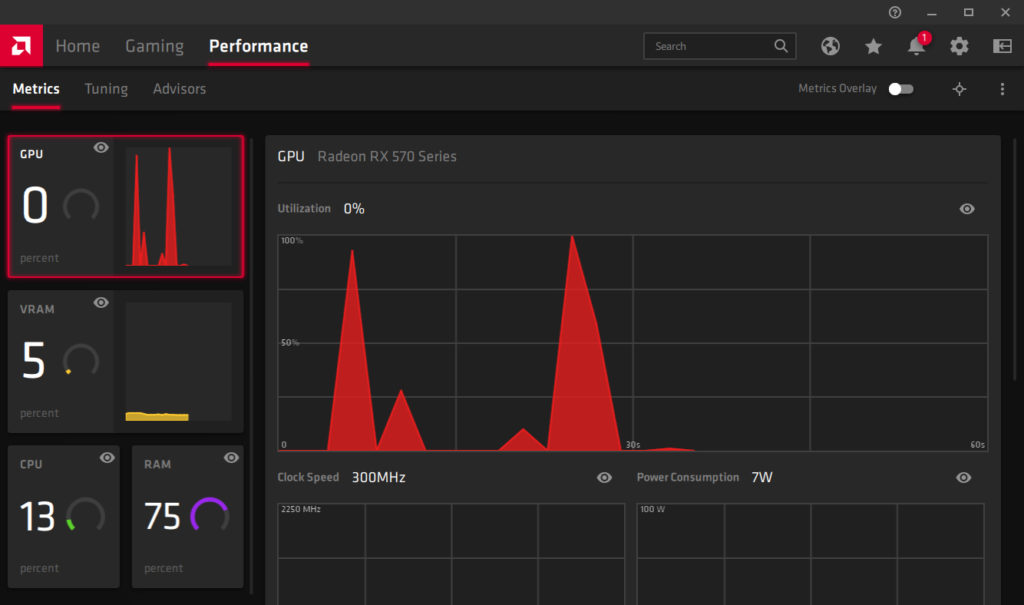
#6. Check VGA Via Manufacturer Control Panel
If you have an integrated graphics card, chances are it was manufactured by Intel or AMD. If your graphics card is dedicated, it’s most likely from AMD or Nvidia.
Therefore, you should do a system search for the brand name to see if you have the control panel program installed. For example, AMD has Radeon Software, and Nvidia has GeForce Experience.
This program will give you detailed information about your graphics card, just go to the settings page. You’ll also find lots of customization options in the program, such as enabling features like FreeSync or G-Sync.
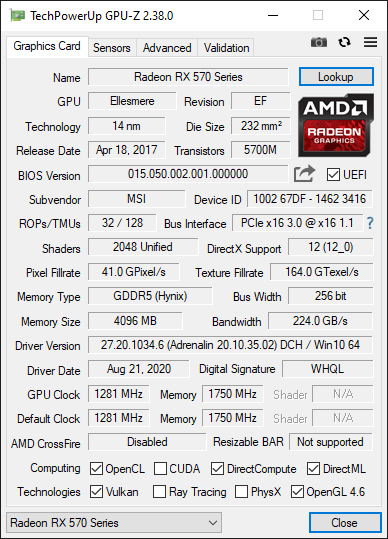
#7. Check VGA Via GPU-Z
In addition to the method above, another way to check the laptop’s VGA is to use the GPU-Z application. This application was developed by TechPowerUp and you can download it for free on the official website. GPU-Z is claimed to be very reliable in checking VGA cards on laptops and PCs. Even the information it provides is very accurate. There you can check the GPU name, memory type, memory type, chipset size, graphics card name, and much more.
You no longer need to doubt the ability of this one application. This application also supports various types of graphics cards, from Intel, NVIDIA, AMD, and also ATI.
#8. Check VGA Via Speccy
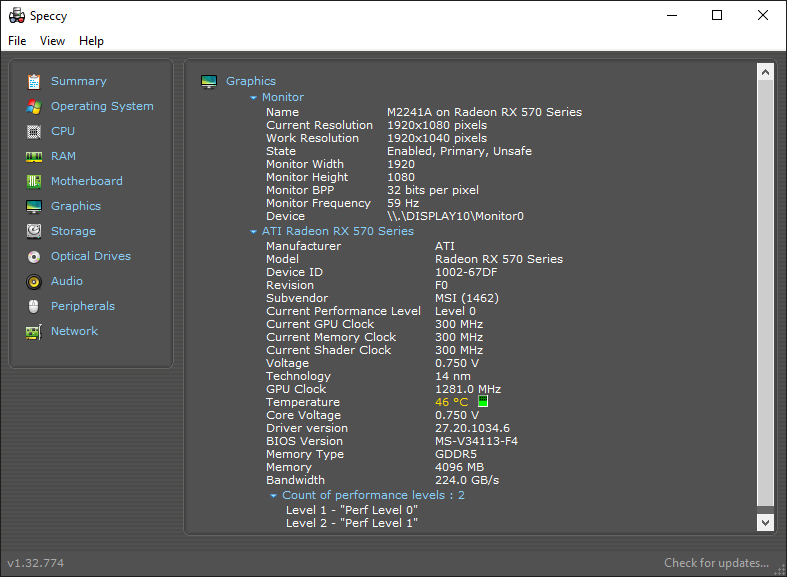
Another application to check VGA on a Laptop/PC is Speccy. Speccy is an application developed by Piriform to view computer specifications. The detailed hardware data displayed by Speccy can be said to be more complete than using the control panel or the Diagnostic Tool.
This application provides detailed data on all hardware on the computer. Including CPU, Motherboard, RAM, Graphics Cards, Hard Disks, Optical Drives, and more. Speccy also adds temperature data on several components, this is very useful to know the condition of the hardware.
Now that you know how to check your laptop or PC’s VGA on Windows 10, you might start thinking it’s time to upgrade, especially if your computer can’t handle intensive tasks like editing videos or playing games.
That’s where the benefits of a dedicated graphics card are. They cost more but are much more powerful than the integrated ones because they have their chip, memory, and fan to keep them cool.
Top 32 Free Sites To Receive SMS Online Verification – When you register for an online service that requires a member login, you will be asked to enter a phone number. Unfortunately, at this time the misuse of this telephone number is increasingly prevalent and sometimes even detrimental to the owner.
Top 10 Free Sites To Receive SMS Online Verification
Top 32 Free Sites To Receive SMS Online Verification
To avoid this, now you don’t need to worry because there are free sites that provide special numbers to receive verification.
From free sites to get this number, you will get a one-time number so you don’t have to buy a new SIM card and register a sim card with your identity number. What are the sites? Here’s the list.
List of Top 32 Free Sites To Receive SMS Online Verifications Facebook Instagram Email ETC
#1. Pinger Textfree Web
Pinger Textfree Web
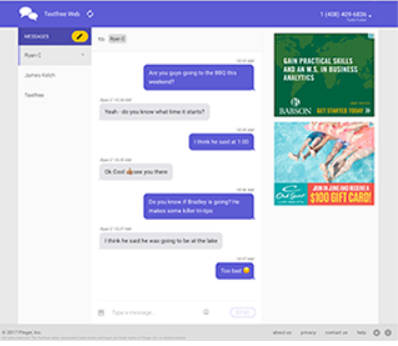
Pinger Textfree Web is a pretty good number of find-free sites, especially for receiving SMS online.
One of the advantages of this site is that it offers a pretty good alternative if you’re having trouble registering with TextNow.
On this site, anyone can register, use, and access it for free.
The condition is you only need to prepare a valid US zip code when registering.
You can also search this zip code through the Google search engine. When registering there will be a large selection of US phone numbers to choose from. To enjoy the service.
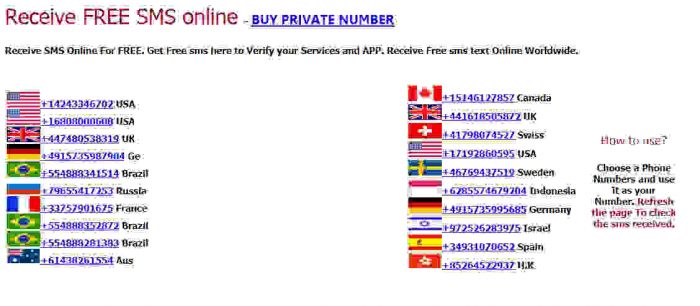
Then you can visit the site http://receive-sms-online.com as a free site to get the next number.
This site will be very helpful for receiving messages online if you want to keep your phone number hidden.
Access to this site is even easier as you are only required to select a number from the huge list of numbers provided.
This server can be accessed for free, but what you have to be aware of is that there is a secondary server domain that can prevent your access to this site.
This site is also included as the best site that you can choose specifically for receiving online technology.
This site provides boasts more than 228 countries with global coverage. Customer service can also be accessed 24/7.
The best part is that you can choose whatever number you need to receive a verification SMS yourself. However, this site also has a weakness where sometimes the number given doesn’t work.
You don’t need to worry because this problem will be resolved immediately. To access it you can visit the page http://www.freeonlinephone.org/
If you access this site, you will see the similarities between this site and the freeonlinephone.org site.
This is natural because they are both made by the same company. This site will offer 5 numbers from the US and 3 numbers from the UK that you can use.
The weakness of this site is that when receiving an SMS there is usually a delay. To enjoy its services you can access it at https://www.receivesmsonline.info/
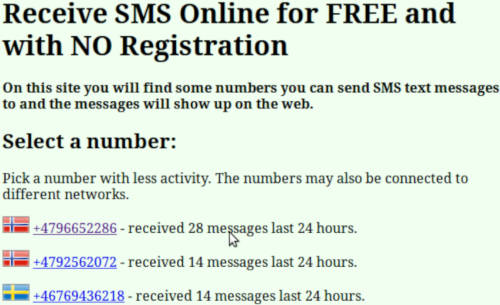
This next site offers a total of 10 numbers from 8 countries namely the United States, Australia, Spain, Lithuania, Norway, Hungary, and Sweden to receive your SMS online.
However, this site has a weakness, where out of every 10 numbers provided on this site, usually only 3 SMS can be received.
However, you can still enjoy the services provided by accessing the http://receivefreesms.com/ page.
Furthermore, there is Sellaite SMS Receive, a site offering online SMS-receiving services. This site has one host, which is Estonia.
This site has the advantage of responding quickly when a number cannot be used.
However, there is a downside to this site that is when the gateway can’t send messages to Estonia at a certain time, there is nothing you can do about it.
The way this site works is to provide a free phone number to try out.
Previously you had to provide your phone number so that you could receive a verification code.
The advantage of this site is that you can use a number on the site to get a verification code.
While the weakness is that this trial will not be able to send messages to unverified numbers. You can access the link https://www.twilio.com/try-twilio to try it.
(TextNow App Link) This site allows you to receive SMS online only. When you access the sign-up on their site you will immediately get a unique phone number which is free.
The weakness of this site is that usually, users will often have difficulty registering and often receive messages saying “Something went wrong during the signup process, try again”. To try it, you can access it at https: //www.textnow.con/
Among the list of sites to get free numbers, this site is probably the best. This site will provide 6 free telephone numbers from Sweden and the UK for you to verify.
If you use this service, your verification SMS will be publicly displayed on its web page, unless you register for a premium service.
There are no significant drawbacks to this site in general. Direct access at http://receive-sms.com/ to enjoy the service.
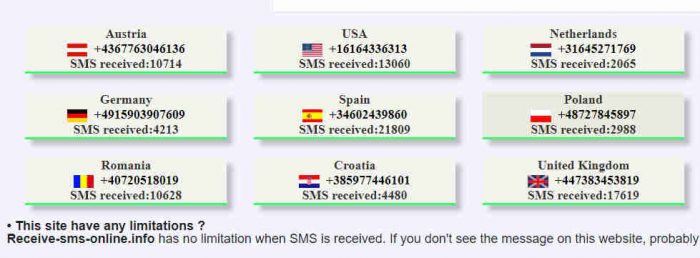
https://receive-sms-online.info/ is a free service for receiving real online SMS messages as they are received on dynamic modem usage. On this site, you can check whether you received an incoming SMS or not by selecting a virtual number and reloading the incoming message
Choose one of the numbers listed from various countries and you can see the SMS through that number in seconds. All messages are shown, and nothing is blocked.
You can take advantage of the online receive SMS service to verify your Google account, Facebook, eBay, Paypal.. etc. several overseas numbers are supported including the US, Spain, Romania, the UK, Germany, France, Russia, and many more
The number list on this site is updated every few weeks and once a month. No paid membership, completely free.
https://receive-smss.com/ is a free online service for receiving SMS text messages and MMS voice messages. You don’t need to register to use it, just select the list of available numbers and you can immediately use it to receive messages from Facebook, telegram, WeChat, VK, PayPal, Alipay, and others
Receive SMSS has a high-speed server, accesses incoming messages in real-time in a few seconds, and guarantees no delay in incoming messages. Reload the page periodically to see the latest messages. No need to pay, no limit on the number of messages received, no hidden messages, and replacement of new virtual numbers every month.
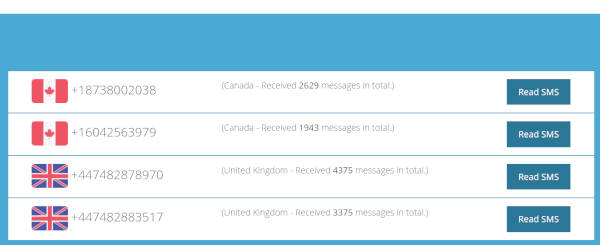
https://smsreceivefree.com/country/usa provides free virtual numbers that have been sorted based on the list of the latest number additions. Also available is a description of the total number of messages that have been received (indicating how often this virtual number is used to receive verification codes)
The online number here is temporary and will be deleted every month. This online SMS-receiving service has been free since 2014.
http://smsget.net/free/en/ provides 2-3 virtual numbers to be shared, all you have to do is press the reload button on the side to see the latest incoming SMS messages
Even if these numbers are shared, you can choose the delete message history option after using the security code to verify the account so that others don’t know about it.
The SMSget service as a virtual number for online SMS recipients has limitations, namely blocking incoming messages with certain bad words including credit, wallets, banks, and cards, to prevent criminal hacking activities that lead to criminal acts.
https://getfreesmsnumber.com/ also includes a free service for receiving online SMS messages and voice calls, users do not need to register and can directly choose an available virtual number to receive messages.
https://www.receivesmsonline.net/ provides virtual numbers from the United States, England, Sweden, Canada, and others to receive incoming SMS messages.
Each virtual number contains a description of the total number of messages, try selecting a number with less than 500 incoming messages.
https://sms-receive.net/ is a website that contains virtual phone numbers and real phone numbers stored on the SIM card. This website provides a free service to users with public telephone numbers where you can receive SMS online on various websites or social forums such as NAVERLINE, Yahoo, Microsoft, serverloft, CloudSigma, Facebook, Amazon, VK, OKru, Instagram, RealStatus, etc. Remember that all messages received on this website will be visible to everyone and cannot be deleted.
https://sms-online.co/receive-free-sms is a free service for receiving sms messages online, users don’t need to register and even have a phone. Please select an available virtual number and use it directly to receive messages/verification codes from Facebook, telegram, WeChat, vk, Paypal, Alipay, etc.
Overseas virtual numbers from the USA, Germany, Spain, Romania, UK, France, Russia, Italy, China, and Japan, and we will keep adding more. You can verify any service you want like: Facebook, Yandex, Ebay, Voxox, Uber, Sunny.co.uk, www.atmloansuk.com, atm-loans-uk, liqpay, Increment Verification, LINE account Verification, WeChat Verification, Rebtel Account Verification, Badoo, yuilop confirmation code, Instagram verification, RECEIVE LOAN FAST, www.2dayloan.com, Odnoklassniki code, OKru, NAVERLINE, Your one-time use eBay PIN, www.PaydayPhone.co.uk, smsmail.com, Winner .com codes, Uw codes, Bedankt, CheShopping, tabor.ru, Freischaltcode, IS24, serverloft, RealStatus, LeoVegas, VISIT-X, upload.net Premium, Easyusenet, google verification codes, free mcent confirmation, Chatroulette, Yandex verification.
https://mytempsms.com/ FREE SERVICE TO RECEIVE ONLINE SMS AND VOICE MESSAGES. NO NEED TO REGISTER. JUST SELECT YOUR PHONE NUMBER FROM THE LIST BELOW. YOU CAN USE IT TO RECEIVE MESSAGES FROM FACEBOOK, TELEGRAM, WECHAT, VK, PAYPAL, ALIPAY AND OTHERS.
https://smska.us/ uses the Russian language, at first you might look confused when you open this service in the typical Russian language, but it doesn’t matter because what you need to do is still the same, namely choosing a cellphone number and use it to receive incoming SMS messages
Every month the number is renewed, the old number will be permanently deleted and cannot be used again forever.
http://receive-sms-now.com/ is a website that provides online numbers to receive sms from various sources and protect its users from spam targets or sms bombs. Virtual numbers are updated all the time and receive unlimited SMS.
You can use it to verify accounts FACEBOOK, YANDEX, EBAY, VOXOX, UBER, SUNNY.CO.UK, WWW.ATMLOANSUK.COM, ATM-LOANS-UK, LIQPAY, HIKE VERIFICATION, LINE ACCOUNT VERIFICATION, WECHAT VERIFICATION, REBTEL ACCOUNT VERIFICATION, BADOO, INSTAGRAM VERIFICATION ACCOUNT CONFIRMATION, QUICK ACCEPT LOANS, WWW.2DAYLOAN.COM, ODNOKLASSNIKI CODE, OKRU, NAVERLINE, YOUR SINGLE-USE EBAY PIN, WWW.PAYDAYPHONE.CO.UK, SMSMAIL.COM, WINNER.COM CODE, UW CODE, BEDANKT, CHESHOPANKT, TABOR.RU, FREISCHALTCODE, IS24, SERVERLOFT, REALSTATUS, LEEOVEGAS, VISIT-X, UPLOADED.NET PREMIUM, EASYUSENET, GOOGLE VERIFICATION CODE, MCENT FREE CONFIRMATION, CHATROULETTE, YANDEX VERIFICATION, WAHOOTI VERIFICATION, YAHOOTIVERIFOTIKA, COINSUP, CLOUDSIGMA, MAIL.RU, GUMTREE, VISA QIWI WALLET, WEEBLY, BEETALK, GLOBAL CALL, CHIKKA, LocalBitcoins, PCGAMESUPPLY, PREMIUMIZE.ME, VOXOX, VK.COM, VICHATTER.
https://www.majorphones.com/ Verify your account on your favorite platform with a real phone number. Get Non-VoIP phone numbers from the best US and UK phone carriers. The service here is fully paid… there are numbers from Vodafone, Sprint, Tmobile, and Verizon operators available.
https://verifywithsms.com/ This virtual number service is also paid but very cheap, starting from $ 1.14, Simple. Fast. Reliable. Verify all your accounts with a US-based number
Not bad if 1 number can be used for yourself and we can use it for various accounts.
https://www.textverified.com/ This online SMS verification service is also paid with a number rental system, you can verify your account with a United States number to receive voice messages and SMS.
Because it is delivered, it is clear that the features range from encrypting incoming messages to supporting illegal cryptocurrencies, and API integration so that incoming messages are received faster, without delays and discounts.
https://pvadeals.com/ Users must register to get a virtual number, it’s cheap starting from $ 5/number. Every number a customer gets is unique and never used by anyone else.
https://quackr.io/ This one is FREE you know, quackr allows you to use a secure temporary phone number instead of your real phone number on the internet. Phone numbers are renewed every month, users don’t need to register and just choose an available number
A temporary (or one-time use) phone number is a number that is not owned by you but can be used to receive SMS/text messages. Some providers will allow you to send messages but this usually comes at a cost but quack provides temporary phone numbers for free, there are a total of 51 active numbers for public use.
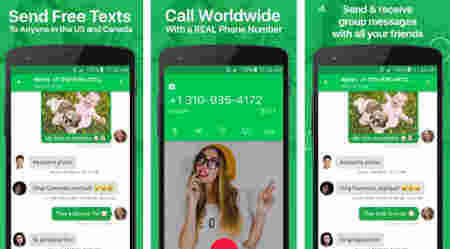
https://www.textnow.com/ Get a real phone number and start calling & texting – it’s free! No credit card needed
Textnow is based on an Android application and website, usually used by friends for personal numbers for WhatsApp, Telegram, etc. Users get an American number for free.
https://freephonenum.com/ The site provides temporary/one-time-use numbers to users and does not charge users for using the service, and users do not need to wait to receive SMS. You can freely use these numbers to test SMS reception only. These numbers give developers easy access to SMS to test and develop SMS-related products.
https://www.freeonlinephone.org/ Free! Just use one of the numbers listed below, then select a number and you can see the SMS that reached that number.
https://sms-man.com/ – SMS activation service, where you can buy a virtual number to register on popular sites starting from $0.10. The site contains numbers for more than 500 of the most famous places and online messengers: Facebook, VK, Google, Instagram, Twitter, Viber, Telegram, and many others. Account activation via SMS is carried out via mobile numbers from more than 350 countries around the world.
https://valar-sms.com/ – is a temporary number provider service to receive SMS text messages from anywhere. Many sites require account activation via a verification code and you cannot install multiple SIM cards at the same time.
This is the explanation of the top 32 free sites to receive SMS online verification, By using these sites you no longer need to fear that your phone number is misused by irresponsible people.
9051+ Unused Cool FF Names (Bucin, 4 Letters, Umbrella) – Every player wants to use a nickname that looks cool and aesthetic to other players. Well, therefore here we will provide cool ff names and their meanings that have not been used the best in 2024.
Free Fire, is a game from Garena that dominates Indonesia in the mobile or smartphone sector. By using a smartphone based on Android or iOS, players can enjoy the fun of shooting between players to fight for first place by surviving to the end. Booyah!
This game is a place to show off skills and skins, namely the abilities and costumes of the player’s character. Great players certainly don’t need cool costumes to be number one in every match, but there’s nothing wrong with wearing good skins.
One thing is for sure, a cool name must be owned by Free Fire or FF players so that other players will remember the name for a long time.
The name of an FF account will be very remembered by opponents and friends if our name is unique and our game is very good. Being number one, everyone can do it. But being number one in a row from a Ranked match and a major competition? Certainly an achievement. Let’s discuss the name FF in more detail.
Free Fire Name, Professional Player Identity
Any online game must have some very famous names in the game. Let’s take, for example, Valorant, a game that is on the rise. Names like TenZ, Hiko, and Skadoodle are never foreign to Valorant players. Their great game is reflected in their unique and cool name that other players can remember very clearly.
What about Free Fire itself? Of course, there are many names of professional FF players who are also known by many people, and their names are always remembered in the minds of FF players. If you are a true FF player, you must remember and be familiar with some of the names below:
Letda Hyper (BTR Letda)
Dyland Pros
Jess No Limit
Onic.Amek
Evos MR05
RRQ Legaeloth
Imba JR (NESC Aura)
BUDI01 Gaming
RRQ Lord
Wawan MKS
Frontal Gaming
Onic JARS
These names are the names of professional players in the Garena Free Fire game. Not foreign right? Of course, their names soar above millions of others because their games are impressive and their names are cool and easy to remember.
Want to have a cool FF name like them? Stay cool. You can use a cool name for your FF account and with this name, you can advance toward professional gamers with even more focus.
List of Unused Free Fire Cool Names
EU leaked pharma strategy pushes innovation for a resilient Europe anavar purchase online taking anabolic steroids with bipolar, anabolic steroids and drinking alcohol
Garena Free Fire gives players the freedom to enter unique symbols, logos, and fonts in the account naming system so that they can easily find a name that matches their identity. However, not all Android and iOS keyboards have this feature.
Therefore, below we have provided unique and cool names that you can just copy and paste to use in your Garena Free Fire account name. Please check the following names:
#1. Cool FF Names Special Symbols And Fonts, or S҉a҉i҉k҉o҉
#12. Cool FF Names Based on Favorite Cartoon Characters
Garfield
Daffy Duck
Betty Boop
Bugs Bunny
Donald Duck
Dennis the Menace
Snoopy
Road Runner
Scooby-Doo
Buttercup
Tom & Jerry
Pisces Graiver
How to Change the Latest FF Names
If you want to change the name after having your own FF name on your account, you can of course change the name. Once you find the right name, follow these steps:
Copy the name you want to use (if using special symbols and fonts)
Enter the Free Fire game
Open your Profile by clicking or pressing your profile photo
Click the pencil icon to change your Free Fire account name
Enter new name
Click the Diamond icon with the number 390 to save the new name
To change the name of the Garena Free Fire game, it takes 390 Diamonds to save it. Make sure the Diamond in your account is sufficient or if it is not enough, you can Top Up Diamond Free Fire at the nearest outlet that provides it. You can also Top Up using applications such as Shopee, Tokopedia, and Itemku.
How to Change FF Nickname for Free
To change the free nickname or FF name of your Garena Free Fire account for free, there is a certain way, namely by using the Name Change Card. The Name Change Card itself is obtained through a special event that Garena often holds. After getting this card, players can use it to change their account name.
If you already have a Name Change Card, how to use it is quite easy. Follow these steps:
Copy the name you want to use (if using special symbols and fonts)
Enter the Free Fire game
Open your Profile by clicking or pressing your profile photo
Click the pencil icon to change your Free Fire account name
Enter new name
Click the icon with the Name Change Card logo
Suggestions When Determining Free Fire Account Names
When you want to give a name to a new account or change the name of your old account, you should pay attention to the following things:
Use a simple but elegant name. Names like this are synonymous with names that are not funny. That way, your playmates won’t think of you as a kid and you won’t be taken for granted.
Prioritize skills. What’s a good, unique, and cool name if every round you guys become a burden to your teammates? No matter what name you have, in the Free Fire game, victory is still determined by skill.
Don’t use an obscene name. Lots of players use names with negative connotations, or even negative words outright. This is uncomfortable and can damage the morale of our nation’s youth. Always be polite in communicating with friends and foes and don’t spoil this game with inappropriate words.
Conclusion:
So, friends, This is the explanation of 9051+ Unused Cool FF Names (Bucin, 4 Letters, Umbrella), With the best and coolest names, of course, you can jump into battle with more confidence. However, don’t forget to continue to improve your shooting skills and strategies so that victory after victory can be achieved.



 ESCANOR07
 ₭ɆⱤ︎☬༒ ️
 ꧁
꧁ AWESOME ™ ️
 it? It’s forbidden
 inミ
inミ ⓐ
ⓐ  dw ️⁴⁵
 Im sorryッ
 ⁴³
⁴³ B2K©HeNNeL
 ️
️